
A book reader for Rokid AI Glasses that shows only floating words — no glowing background block.
I'm not from an IT background — I'm a property agent and I don't understand a single line of code. This entire app was built by Claude Code (Anthropic's AI coding assistant). I just described what I wanted in plain English, tested it on my glasses, and told it what to fix.
Real captures from the glasses, reading in a dark room — the background is genuinely invisible, only the words float:
| Floating text (page mode) | One word at a time (RSVP) | Sentence mode |
|---|---|---|
 |
 |
 |
| The library at night | Paragraph mode | Status line (wpm always visible) |
|---|---|---|
 |
 |
 |
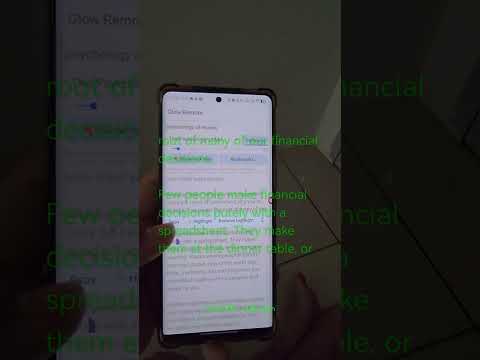
And the companion phone app — remote control, live settings, and the AI book summary (this one just finished summarizing The Psychology of Money):
| Main screen + AI summary | Remote & live settings |
|---|---|
 |
 |
(A demo video is attached to the latest release.)
Reader apps sideloaded onto the glasses show up as a big glowing green block at night — the app background lights up the whole see-through display. Glow Reader's background is truly invisible: all you see are floating words.
The technical fix, for the curious: on the glasses' waveguide display every non-black pixel glows green. A pure black app window should be invisible — but Android draws a translucent "focus highlight" over keyboard-navigated apps, which becomes a solid green slab. Glow Reader disables that (
android:defaultFocusHighlightEnabled=false), along with every other system decoration that would light up.
- Reads EPUB, PDF, TXT and Markdown (PDFs are reflowed into clean, resizable text)
- 5 reading modes (press
Mto cycle): page flip · word-by-word speed reading (RSVP) · teleprompter auto-scroll · sentence-by-sentence · paragraph-by-paragraph - "Close the book" gesture — double-tap the temple and the display powers down to fully invisible (you stay in the book, position kept) so you can look someone in the eye; double-tap to keep reading. A faint veil fades out over ~5 seconds as the panel goes to sleep — after that it's true native transparency. If the display has fully slept, double-tap twice to reopen (first wakes the screen, second reopens the book).
- Low Light mode (
L) + 5 text brightness levels (T) for night reading - Adjustable display area — move/resize where the text floats (
U/N/O/P) - Full-lines-only rendering — no half-cut words at the scroll edges (
X) - Words-per-minute and progress always visible in a status line that never overlaps the text
- Remembers position, mode and settings per book; save/restore preferred settings (
V/R) - Books auto-appear from the glasses' Download folder (use the built-in browser), or push them from your phone
- AI summary (phone app): summarizes any book chapter by chapter with YOUR OWN API key (DeepSeek / OpenAI / Claude) in Short / Medium / Long versions — the summary lands in the glasses library as a readable book
- Delete books, update safely: updating the app never loses books, positions or highlights
| APK | Installs on | What it does |
|---|---|---|
| GlowReader.apk | the glasses | the reader itself |
| GlowRemote.apk | your Android phone | remote control + live settings + send books over WiFi |
Download both from Releases.
Glasses temple touchpad: single tap = play/pause · swipe = turn page · double-tap = close/reopen the book (display powers off — truly invisible). While the book is closed, taps and swipes are ignored so you can't light the display by accident; if it has fully gone to sleep, double-tap twice to resume (wake, then reopen).
Without the phone app: any Bluetooth keyboard/mouse works (e.g. a free "Bluetooth Keyboard & Mouse" phone app). Arrows or W/A/S/D navigate, SPACE turns pages / plays / pauses, ENTER opens a book, B returns to the library, H shows the full key list on screen.
With Glow Remote (phone app): big buttons for everything — pages, font size, speed, brightness, display area — applied instantly on the glasses, plus one-tap "send a book to the glasses." Requirements: Rokid Manager installed, glasses' WiFi turned on and connected to the same WiFi network as your phone. Open Glow Remote → tap Find glasses → it connects by itself.
- Sideload
GlowReader.apkonto the glasses the usual way (e.g. the install-APK option in the phone companion app). - On first launch the glasses will ask for "all files access" — that's so the app can see books in the Download folder.
- Install
GlowRemote.apkon your phone like any normal APK.
Both apps are plain Android/Kotlin projects with the Gradle wrapper:
cd GlowReader   # glasses app source
gradlew.bat assembleDebug
cd ../GlowRemote  # phone app source
gradlew.bat assembleDebug
Requires JDK 17 and the Android SDK (API 34).
- All programming: Claude Code — including researching how other community apps solved the green-glow problem
- Inspired by the excellent open-source Rokid community apps in awesome-rokid, especially Lume, whose source revealed the focus-highlight fix
- Not affiliated with Rokid — "works with Rokid Glasses" is a compatibility statement only
It's a hobby project made for my own night reading, so it's not perfect — but it works great for me and it's free. Feedback and ideas welcome! 🙂