
A fully automatic video editor, in development. The goal: drop in your footage, choose a length and an aspect ratio, and get back a finished video, cut, captioned, framed, graded and animated, with no manual steps. It is built for Mandarin, English and speech that switches between them. Captions come out in Taiwan Traditional Chinese.


Status: the analysis worker, the planner, the renderer with its captions and effect templates, the
pnpm editcommand that runs them from footage to a finished video, the web page in front of it, the desktop app for Apple silicon Macs, Windows and Linux that runs the page with nothing else to install, the agent skill that changes a finished edit by conversation, and the benchmark work today.
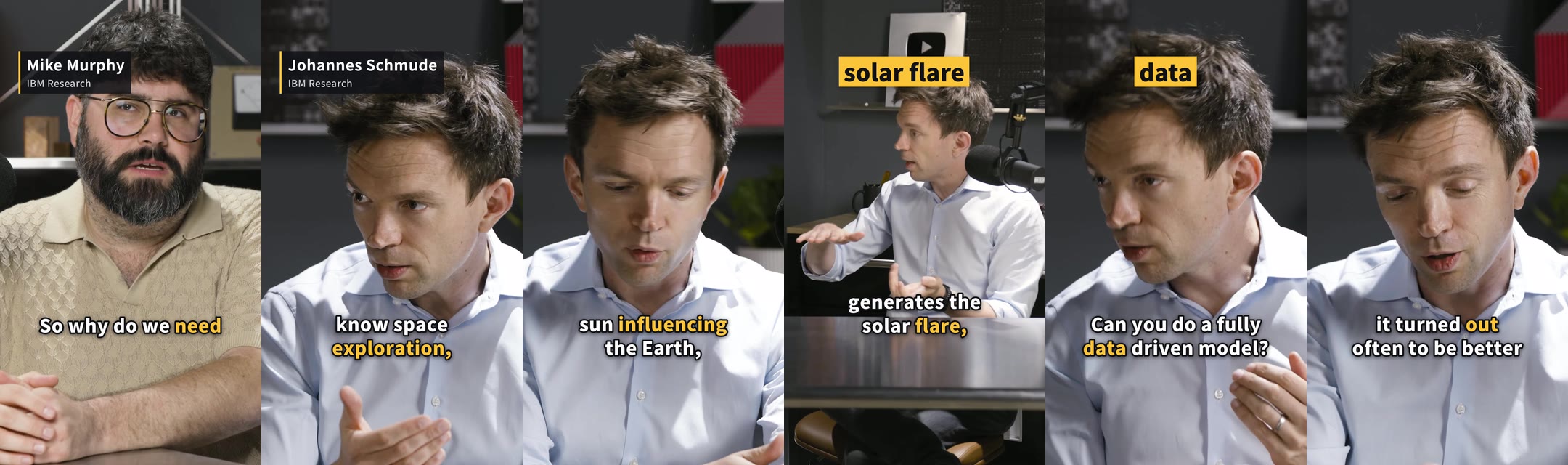
A 60-second 9:16 edit made by pnpm edit with no manual steps from IBM Research's 19-minute interview "Why NASA and IBM made a new AI model that predicts the Sun's damaging flares" (CC BY 3.0), cut, reframed, captioned and named on screen (watch it, 16:9 version, credits).
The desktop app needs nothing else installed: no Node, no Python, no command line. Download the installer for your computer from the download page, or straight from downloads.fineframe.app:
| Computer | Installer |
|---|---|
| Mac with Apple silicon (M1 or later) | Fineframe-mac-arm64.dmg |
| Windows 10 or 11 (x64) | Fineframe-win-x64.exe |
| Linux (x86-64) | Fineframe-linux-x86_64.AppImage |
These are always the latest version; each version is also there as Fineframe-<version>-<computer>, such as Fineframe-0.5.0-mac-arm64.dmg.
Macs with an Intel processor are not supported: PyTorch and ONNX Runtime, which the analysis runs on, no longer publish builds for them.
macOS. Open the DMG and drag Fineframe into Applications. The app is not yet signed with an Apple Developer ID, so the first time you open it, macOS says it cannot check the app for malicious software and offers only Done or Move to Trash. Choose Done, then open System Settings → Privacy & Security, scroll to Security, and choose Open Anyway next to the message about Fineframe; confirm with your password. macOS remembers the choice, and later launches open normally. SHA256SUMS lets you check the file you downloaded, and gh attestation verify <file> --repo zcxy-dev/fineframe checks that GitHub Actions built it from this repository.
Windows. Open the installer: it installs Fineframe for your user alone, with no administrator needed, and opens it. The installer is not yet signed with a code-signing certificate, so Microsoft Defender SmartScreen may show "Windows protected your PC". Choose More info, check that the app is Fineframe, then choose Run anyway.
Linux. Make the AppImage executable (chmod +x Fineframe-*.AppImage) and run it. AppImages need FUSE 2: on Ubuntu 24.04, sudo apt install libfuse2t64.
The first time it opens, the app asks you to sign in to your Fineframe account, in your browser on fineframe.app; making an edit or planning one again needs that account, free during the public beta and with a subscription once paid plans open, while rendering, opening earlier projects and downloads work without one. The app checks the account before each edit and keeps working offline for 7 days after its last check. It then asks for your Anthropic API key and checks it; Claude plans each edit, writes its motion graphics and checks its cuts, about US$0.20 to 0.60 for an edit of a minute or less and US$1 to 1.20 for one of five minutes (measured). Meanwhile it installs the analysis once, about 2 GB of Python and PyTorch, with its progress in the window. The first edit then downloads what it needs on first use, each with its own bar: the speech model (sizes), FFmpeg and the effects renderer, and yt-dlp for the first link imported. On a computer with less than 12 GB of memory, too little for the speech model, speech is heard on OpenRouter instead, with your OpenRouter API key, for about US$0.03 an hour of footage; the app says so, and either can be chosen.
The keys and the sign-in stay on your computer, in files only your user can read, in the app's folder (~/Library/Application Support/Fineframe on macOS, %APPDATA%\Fineframe on Windows, ~/.config/Fineframe on Linux), with the Python it installed and your brand kits. The models and edits are in .cache\video-editor and .cache\huggingface in your user folder (~/.cache/… on macOS and Linux). To remove the app entirely, uninstall or delete it and delete those folders. On Windows and Linux the app updates itself: it downloads a new version in the background and installs it when you restart it ("Restart to update" in the window) or quit it. On a Mac, which cannot install an update of an app not signed with a Developer ID, the window says when a new version is out, with its download: install it over the old one. Either way the keys and downloads stay. Releases up to 0.3.0 were called Video Editor: Fineframe does not replace it and asks for the key again, since that app's folder is Video Editor; uninstall it and delete that folder. How the app is built: apps/desktop.
footage/ (any number of clips)  +  length (15 s … 1 h)  +  aspect (9:16 · 1:1 · 16:9)
        │
        ▼
analyze     shots · speech and pauses · transcript with word timings · faces · audio events
plan        pick the best takes, remove fillers and dead air, fit the requested length
render      cuts · framing · colour · voice · music · animated captions · effects · loudness
check       review every cut, fix what is wrong, at most three passes
        │
        ▼
finished.mp4  +  captions.srt
A single web page drives it: drop the files or paste a video's link, pick the length and aspect ratio, press start, and download the result.
- Probe: rotated phone footage, non-square pixels, HDR and every audio track, read as they play (sources).
- Shot detection: TransNetV2 finds hard cuts and dissolves.
- Speech and pauses: Silero VAD finds where someone speaks.
- Loudness and audio events: EBU R128 loudness, and laughter, applause and music from the CED tagger (details).
- Faces and who speaks: YuNet faces tracked through each shot, and who speaks when (details).
- Long sources: frames and speech stream through the analysis, so a source's length barely changes its memory; the speech model sets the peak (sizes, shots, voice).
- Transcript: Qwen3-ASR keeps mixed Mandarin and English mixed, in Taiwan Traditional Chinese with OpenCC, timed word by word, locally or on OpenRouter (details).
- Transcript correction (opt-in): Claude fixes misheard names, terms and homophones, and only edits that keep every spoken word apply (details).
- Plan: Claude plans the edit and checks every cut; code cuts between words to the length asked (measurements).
- Framing: a virtual camera frames every clip in the edit's shape and follows whoever speaks.
- Render:
project.jsonto MP4 with frame- and sample-exact cuts, transitions, B-roll, grading and loudness (measurements). - Music: tracks you supply, fitted to the edit and ducked under speech (details, measurements).
- Links: a public video's link, from YouTube or another site yt-dlp reads, imported as footage at up to 1080p, in the page and in
pnpm edit(details). - One command:
pnpm editturns a folder of footage into the finished video at the length and aspect asked (measurements). - Several shorts:
pnpm edit --shortsand the page make up to 10 shorts from one long video, each from one stretch of it, with a title, a description and hashtags. - Desktop app: installers for Apple silicon Macs, Windows and Linux run the web page with nothing else to install (details).
- Web page: one page runs
pnpm editon dropped footage, with live progress, cost estimates and downloads. - Changing an edit:
pnpm renderrenders a changedproject.jsonagain, and the agent skill changes an edit by conversation. - Editing apps:
pnpm render --exportand the page's "Export to an editing app" turn a finished edit into timelines for Final Cut Pro, DaVinci Resolve and Premiere Pro, with its B-roll, music, captions and graphics. - Effects: five animated templates for titles, names, chapters, callouts and wipes, rendered with HyperFrames (placement).
- B-roll: a rich edit, the default, cuts away to stock footage and captures of the pages the speaker names, from free sources (details).
- Motion graphics: Claude writes each edit's graphics as HTML and CSS once its cut is known: corner labels and lower thirds over the speaker, a panel over the speaker at 9:16, and full-frame graphics, each checked as drawn and against the speech.
- Captions: burned in word by word, with a SubRip file that matches the picture.
- Brand kits: a logo watermark, up to three colours, fonts and custom captions, kept as named kits on the page or passed as
pnpm edit --brand, and changed on a finished edit with a render alone. - Studio voice: each source's speech denoised and processed by a chain chosen from its measurements (measurements).
- Benchmark:
vebenchscores transcripts, shots, speakers, renders, music and edits across a corpus. - File formats: JSON Schemas for the media index,
project.jsonand progress lines, with generated types and validators. - Ground truth drafts:
vework draft-truthdrafts a corpus clip's transcript for a person to correct (workflow). - Platforms: macOS on Apple silicon, Windows x64 and Linux x64, tested by CI on every change. Intel Macs are not supported.
- Synthetic corpus:
vebench synthgenerates talks, conversations, a phone walk, screen recordings and music with exact truth.
Analysis and rendering run locally; SECURITY.md says what planning, the cut review, transcript correction, cloud speech, a rich edit's B-roll and link import send or fetch.
From the source, for development and the command line; to only use the editor, install the app.
Requirements:
- macOS on Apple silicon, Windows 10 or 11 on x64, or Linux.
- mise, which installs the pinned Node, Python and
uv; Node's corepack then provides the pinned pnpm. On Windows, install it withwinget install jdx.miseand run the commands below in PowerShell, with Git installed. - Disk space for the Python environment (size) and the model weights downloaded on first use (sizes).
- An Anthropic API key: Claude plans the edit and checks its cuts (cost).
git clone https://github.com/zcxy-dev/fineframe.git
cd fineframe
mise run start
mise run start installs the tools, the packages and the Python environment, builds the web page, starts it on 127.0.0.1 and opens it in the browser. mise asks once to trust the repository's mise.toml. The first time, the page asks for the API key, checks it with Anthropic and keeps it in the git-ignored .env. Run it again the same way; with mise activated in your shell, pnpm start does the same.
From the command line, once mise run start has set things up (or after mise install, pnpm install and uv sync in worker/), with the key in .env (copy .env.example; copy .env.example .env on Windows):
pnpm edit footage/ --length 60s --aspect 9:16 -o out/edit.mp4pnpm edit --help lists the options; packages/engine says what the command writes and how it reports progress. The analysis on its own writes one file's media index:
cd worker
# Shots, speech, a transcript with word timings, loudness, audio events, faces and who speaks,
# and voice measurements, with the denoised speech beside the index (talk.voice.wav).
uv run vework analyze talk.mp4 -o talk.index.json
The media index format is defined with the other file formats in packages/schema.
| Model | Weights to download | Speed on the reference machine | Peak memory |
|---|---|---|---|
| Qwen3-ASR-0.6B | 3.4 GB | ~1.3× the clip's length | ~9 GB |
| Qwen3-ASR-1.7B | 5.9 GB | ~14× the clip's length | ~14 GB |
--asr cloud |
1.8 GB (the aligner) | ~0.5× the clip's length, with OpenRouter responding quickly | ~3.3 GB |
Weight sizes include the aligner. vework uses 1.7B with a CUDA GPU and 0.6B otherwise; --asr-model overrides that. With --asr cloud (pnpm edit --asr cloud), OpenRouter hears the speech and only the aligner runs here. The key goes in .env as OPENROUTER_API_KEY (cloud speech). On Linux and Windows, the lockfile installs a CPU-only PyTorch, so the models run on the CPU there. On a Mac with Apple silicon the speech model runs on its GPU, falling back to the CPU by itself, and the aligner on the CPU (Apple silicon).
To plan or render on its own, see packages/engine. To score outputs against ground truth, see bench/.
The video-editor skill teaches Claude Code, Codex and other agents that read Agent Skills to run the editor: check the setup, make an edit, and then change the finished edit as you ask for it, such as "cut the part about pricing", "the caption says 阿者, it should be 阿哲", "call it 剪輯師的一天" or "turn the music down". Each change edits the edit's project.json and renders it again, without analysing or planning again, into a new version beside the last.
With the desktop app: choose "Install Command Line Tool…" and "Install Agent Skill…" in its menu (the Fineframe menu on macOS, File on Windows and Linux). The first puts a fineframe command on your PATH: fineframe edit and fineframe render take the same options as pnpm edit and pnpm render, and run with the app's own runtime and the keys saved in it, with no Node or clone; fineframe edit needs the account signed in in the app. The second copies the skill into ~/.claude/skills/video-editor for Claude Code and ~/.agents/skills/video-editor for Codex. Each dialog says where it installed and how to remove it. The app updates the command and the skill it installed when it updates itself.
From a clone, for working on the editor: set it up as in the quick start. The skill is the folder skills/video-editor; link it into the clone's own skills folder, so nothing outside the clone changes:
# Claude Code
mkdir -p .claude/skills && ln -s ../../skills/video-editor .claude/skills/video-editor
# Codex and other agents that read .agents/skills
mkdir -p .agents/skills && ln -s ../../skills/video-editor .agents/skills/video-editor
Start a new session in the clone and ask it to edit a folder of footage, or to change an edit you made. A git pull updates the skill with the editor.
Setup, checks and the rules every change follows are in CONTRIBUTING.md. Report security issues as described in SECURITY.md.
The editor is built on these models and libraries: Qwen3-ASR and Qwen3-ForcedAligner for the transcript, TransNetV2 for shots, Silero VAD for speech, CED for audio events, YuNet for faces, Beat This! for beats, DeepFilterNet for the voice, OpenCC for Traditional Chinese, FFmpeg and libass for rendering, HyperFrames for the effects, Next.js for the web page, Noto CJK and Inter for type, and Kokoro for the synthetic corpus's voices.
The project's code is proprietary, all rights reserved (LICENSE). THIRD_PARTY_NOTICES.md lists every model, font and program it uses and every package it depends on directly, with its licence and how it reaches you, and keeps the notices of code adapted from other projects. Three of them need attention before commercial use or redistribution:
- FFmpeg: the builds the renderer downloads and the PyAV wheels the worker installs are GPL. Redistributing FFmpeg means meeting the GPL or shipping an LGPL build (details); the desktop app's installers carry no FFmpeg, which downloads on first use (details).
- Optional extras install a few GPL packages: espeak-ng and phonemizer in the benchmark's
synthextra (details).