Demonstrates how to use cookies in Ionic hybrid apps (Ionic1 / Ionic2) and how to capture WebView HTTP logs. The backend is built with Node + Express.
Many people have encountered problems with cookie-based authentication and therefore recommend using custom request headers instead. In my tests, WebView on both iOS and Android accepts cookies — the real challenge is capturing and inspecting the cookie-related request/response data.
This project aims to:
- provide an example Node + Express service to set and read cookies;
- provide an Ionic (Ionic1) hybrid app that interacts with the service via AJAX;
- demonstrate how to capture and verify
Set-Cookie/Cookieexchanges at the WebView/network layer (Wireshark and screenshots included).
nodeServer/: Express service with/setCookiesand/getCookiesendpoints.ionicApp/: Ionic example application (Ionic1).ionicV8ReactApp/: Ionic example application (Ionic React / Capacitor v8).logImg/: capture screenshots and Wireshark logs proving cookie exchanges.
NOTE — The Environment and the following sections describe the Ionic1 example (ionicApp).
- macOS Sierra 10.12.5
- Xcode 8.3.3
- Node v4.4.3
- Ionic 2.1.18
- Cordova 7.0.1
Adjust versions to match your development environment.
- Start the Node server
git clone https://github.com/wangjinyang/ionic-angular-cookies.git
cd ionic-angular-cookies/nodeServer

npm install
node ./bin/www
The service listens on http://localhost:3000 by default. Visit the root URL to see a basic response.
- Run the Ionic app
cd ../ionicApp
npm install
# Set the `server` variable in `ionicApp/www/app.js` to your machine IP, e.g. http://192.168.x.x:3000
ionic state restore
ionic build- iOS: open
ionicApp/platforms/ios/cookies.xcodeprojin Xcode and run on simulator/device. - Android: run
ionic run androidto deploy to a device.
The app provides two buttons:
- Set Cookie: calls
/setCookies. The server responds withSet-Cookie, which the WebView should accept and store. - Get Cookie: calls
/getCookies. The server reads cookies from the incoming request and returns them as JSON.
Debug and verification methods:
- Use Wireshark to capture request/response packets and inspect
Set-CookieandCookieheaders. - Inspect WebView console logs on iOS to see
Set-Cookiedetails (see images underlogImg/ios). - Compare with Android logs/screenshots under
logImg/android(Crosswalk and non-Crosswalk tested).
Conclusion based on the examples:
- WebView on both iOS and Android can accept
Set-Cookiefrom the server and includeCookiein subsequent requests, provided CORS and cookie attributes are configured correctly.
- CORS and credentials
When your app and server are on different origins, configure CORS properly. Example:
res.header('Access-Control-Allow-Origin', '*');
res.header('Access-Control-Allow-Headers', 'Origin, X-Requested-With, Content-Type, Accept');
res.header('Access-Control-Allow-Methods', 'PUT,POST,GET,DELETE,OPTIONS');
res.header('Access-Control-Allow-Credentials', true);
Note: if you use Access-Control-Allow-Credentials: true, Access-Control-Allow-Origin must not be *; set it to the specific origin.
- Cookie attributes
Ensure the server sets appropriate Path, Domain, and Expires/Max-Age. Cross-origin cookies may be restricted by the WebView or platform policies.
- Packet capture
Wireshark is a reliable way to confirm whether Set-Cookie and Cookie headers were actually transmitted on the network.
Modify the example cookie or behavior in nodeServer/routes/index.js.
See the project LICENSE file at the repository root.
If you want, I can also:
- translate this back to Chinese;
- split the documentation into
docs/with separate pages (Quick Start, Troubleshooting, Screenshots); - prepare a cleaned README.md suitable for GitHub project homepage.
Tell me which one you prefer.
macOS Sierra 10.12.5
Xcode 8.3.3
node v4.4.3
ionic 2.1.18
cordova 7.0.1
Requirements check results for android:
Java JDK: installed 1.8.0
Android SDK: installed true
Android target: installed Google Inc.:Google APIs:18,android-25,android-24,android-N,android-23,android-19,android-18
Gradle: installed /Applications/Android Studio.app/Contents/gradle/gradle-2.10/bin/gradle

Requirements check results for ios:
Apple OS X: installed darwin
Xcode: installed 8.3.3
ios-deploy: installed 1.9.0
CocoaPods: installed
run command below start up node server
git clone https://github.com/wangjinyang/ionic-angular-cookies.git

cd nodeServer/

npm i

node ./bin/www
then,the server is start up depend on localhost:3000,open your brower and visit localhost:3000,you can see Express String!
there's two rest api /setCookies--------set cookies to webview
there's two rest api /getCookies--------get cookies value
you can change cookies value in this file 'nodeServer/routes/index.js'
run command below build and run ionic hybrid app on device or simulator
cd ionicApp/

npm i
run command below to get your computer ip
ifconfig
find file 'ionicApp/www/app.js' line 28 (var server='http://[YOUR IP HERE ]:3000'),for example (var server='http://192.168.33.44:3000')
ionic state restore

ionic build
then,ios and android app is ready
use Xcode open 'ionicApp/platforms/ios/cookies.xcodeproj',run app on simulator
run command below
ionic run android
run the app on android device
app has two buttons one is 'set cookies' which is send a ajax request to server +/setCookies,the response is String data('SET COOKIES SUCCESS') and let webview set cookies('cookiesTest', 'set cookies success,your cookies can be set by server');
another is 'get cookies' which is send a ajax request to server +/getCookies,the response is JSON data({'cookiesTest', 'set cookies success,your cookies can be set by server'});
if images can't see clearly,just click it,brower will open a new tag to show raw image

by String 'SET COOKIES SUCCESS',make sure ajax request to server +/setCookies is work very well,next we check webview log

on image,we can find Set-Cookie key,it has cookies value,path,Expires,so webview get set cookies command.
check the wireshark there is two step. first app send request,second server reponse command Set-Cookie to webview,i take screen shot as show below


by String {'cookiesTest', 'set cookies success,your cookies can be set by server'},make sure ajax request to server +/getCookies is work very well,next we check webview log
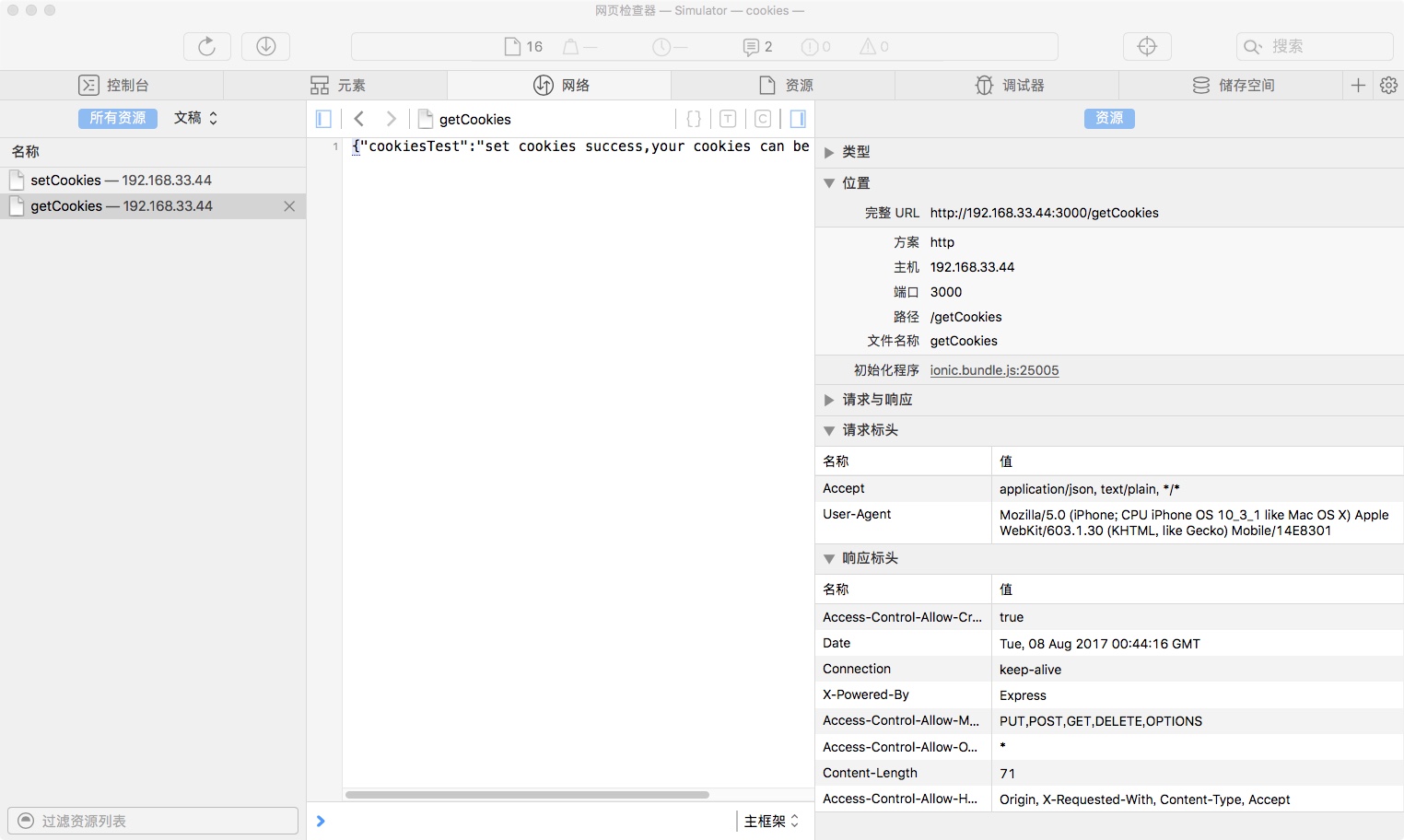
check request message on image,there is only two key 'Accept' and 'User-Agent',no things about cookie.we don't know is't cookies was send,but we know the server response correct Json data that is requset.cookies which is handled by server logic.
the question is two, one is that is't webview send cookies but webview log do not show, other is how server identify and Analysis the ajax request.
we can catch http log by wireshark that show the resault,below images show ajax request to server +/getCookies what webview send

checked log,we can sure webview send cookies,and we can see the cookies value.next image show server response

this is node server log


by String 'SET COOKIES SUCCESS',make sure ajax request to server +/setCookies is work very well,next we check webview log

on image,compare ios webview,wo can not see Set-Cookie key,check the wireshark log there is two step. first app send request,second server reponse command Set-Cookie to webview(obviously server send set_cookies command),i take screen shot as show below
the question is that is't webview run the set cookies command which is send by server,we have no ideas about it ?


by String {'cookiesTest', 'set cookies success,your cookies can be set by server'},make sure ajax request to server +/getCookies is work very well,next we check webview log

check request message on image,there is only two key 'Accept' and 'User-Agent',no things about cookie.we don't know is't cookies was send,but we know the server response correct Json data that is requset.cookies which is handled by server logic.
we can catch http log by wireshark that show the resault,below images show ajax request to server +/getCookies what webview send

checked log,we can sure webview send cookies and webview run server command 'Set-Cookie' success,and we can see the cookies value.next image show server response

this is node server log

both ios and android(cross-walk or not) support cookies very vell
wiresharp is a way show very step the data exchange
i have build ios and android hybrid app work very well base on cookies authentication,ios and android webview can accept gateway and server 'Set-Cookie' command and then run it very well, if cookie not work very well,you should check
1.server or gateway set Cross-Origin allow all and when cross origin force with cookies on headers,in my case
  res.header("Access-Control-Allow-Origin", '*');
  res.header("Access-Control-Allow-Headers", "Origin, X-Requested-With, Content-Type, Accept");
  res.header("Access-Control-Allow-Methods","PUT,POST,GET,DELETE,OPTIONS");
  res.header("Access-Control-Allow-Credentials",true);
2.the cookies style,check my wireshark image set cookies key,make sure your cookie value match mine.
if question leave me issue
I also created an Ionic React / Capacitor v8 version of the example, located in the ionicV8ReactApp/ folder. The setup and functionality are similar to the Ionic1 version, but with modern React and Capacitor APIs.
