📚 This documentation is also available in Persian (Farsi).
You can use this script to bypass the bans on Telegram API by different hosts. Simply send the request to this script instead of the Telegram Bot API after deploying it as a web app and allowing anonymous access.
It accepts both GET and POST requests with the following parameters:
| Name | Type | Description |
|---|---|---|
bot_token |
String | The Telegram Bot Token |
method |
String | Telegram Bot API method name, e.g., sendMessage |
args |
JSON Object | The arguments/parameters for the API method, e.g., {"chat_id":"123","text":"HelloWorld"} |
See the screenshots below 👇
- Go to script.google.com and sign in if required.
- Create a new project and give it a name you love :)
- It should open a file (Code.gs by default). Remove the contents of this file.
- Copy the contents of wptelegram-google-script.gs and paste them into your project file (Code.gs).
- Click on Save (💾) or press
Ctrl+S. - Click "Deploy" at the top and select "New deployment" to open a popup.
- Inside the popup, click on "Select type" ⚙️ and choose "Web app".
- In "Web app", for Execute as, select "Me ()" [IMPORTANT].
- In "Who has access", select "Anyone" [IMPORTANT].
- Click on "Deploy" to open the Authorization box.
- Click on "Authorize access" to authorize the script.
- In the popup window, select your Google Account.
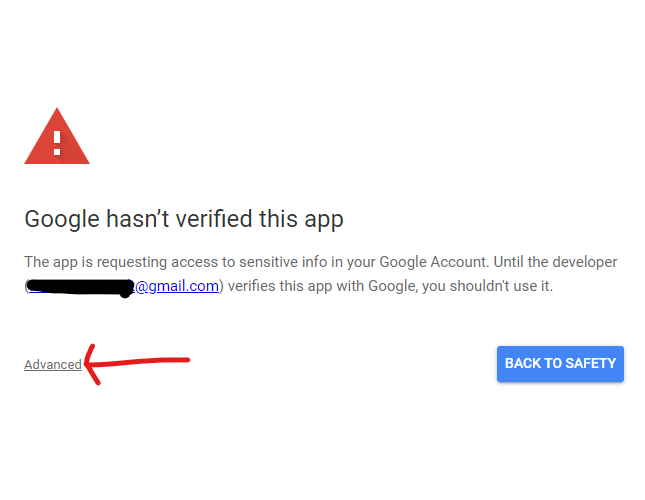
- If you see a warning "Google hasn't verified this app", it’s fine to click "Advanced" and choose "Go to (unsafe)".
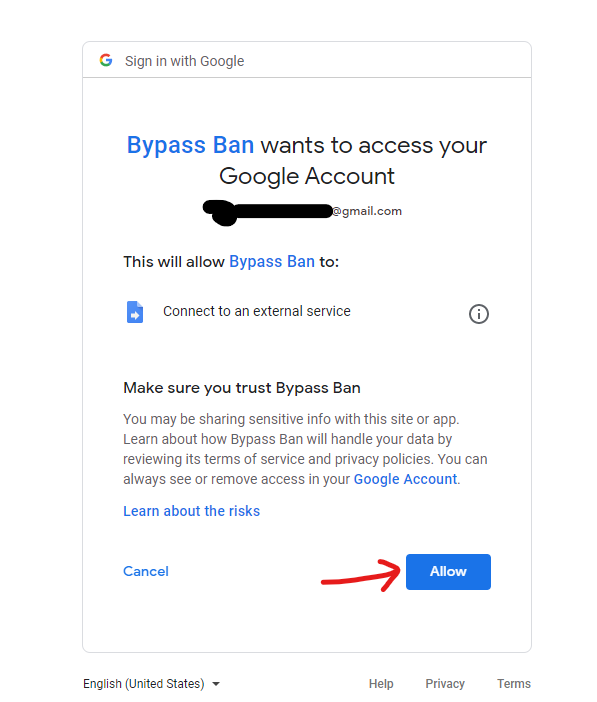
- On the next screen, click "Allow".
- After redirect, you should see "Deployment successfully updated".
- Copy the "Web app URL" and paste it into your app or plugin.