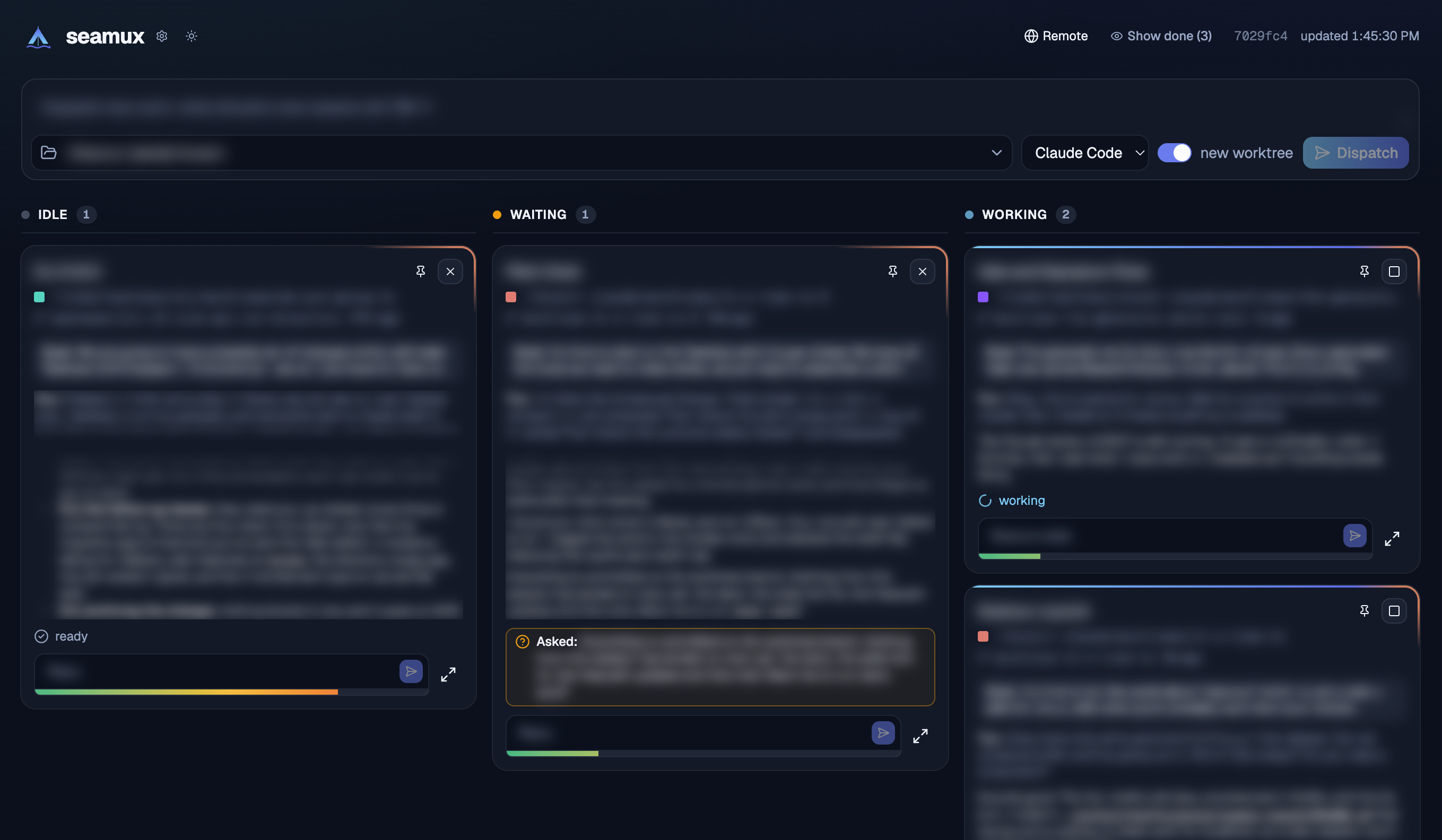
A board over every Claude Code and Codex session on your Mac, and the tools to drive and dispatch them. Each card is a live chat you can read and reply to. The columns show what each chat needs from you, and one bar starts new work as its own session.
Running a dozen agent sessions at once means a dozen terminals to check: which one is waiting on a permission prompt, which finished an hour ago, which is still working. seamux puts them all on one board in your browser, where you can answer a question, approve a tool call, queue the next prompt or start new work without finding the right tab. It works from your phone too.
You need:
- macOS. seamux reads cmux and the agents' own files on this Mac.
- cmux, the terminal your sessions run in. seamux drives a session by typing into its cmux terminal, so a session outside cmux shows on the board but can't be driven from it.
- Claude Code, and optionally Codex.
- Node 24 or later.
Then:
npx seamux # run the board on http://127.0.0.1:54321 and keep it runningThe first run installs the subagent hooks and the dispatch skill Claude Code needs for the board, and says what it changed; npx seamux uninstall removes them. Or, from a clone of this repo, npm install and then npm run seamux, which runs the dev server so a change goes live as soon as it's saved.
- Getting started: requirements, installing from npm or a clone, what
setupchanges outside seamux, setting a password, and every setting and environment variable. - Remote connections: reaching the board from your phone or another computer, over your own network with mDNS, or from anywhere through a Cloudflare tunnel behind Cloudflare Access.
The board is rebuilt every 3 seconds while the tab is visible, from:
claude agents --json --all, for which Claude Code sessions exist and what state each is in.cmux sessions list, which finds each session's terminal (its cmux surface) so seamux can type into it. It is also the only list of live Codex sessions, which is why seamux sees a Codex session only if it runs in cmux.- The transcripts in
~/.claude/projects/and~/.codex/sessions/, which hold each conversation, whether a turn is still running, open questions, subagents, and how full the context window is. cmux's own idle/running state for Codex goes stale, so a Codex card takes it from the transcript, and reads an approval off the terminal.
The store at data/seamux.db, in ~/.seamux or a clone, holds only what those don't record: subagent lifecycle from the hooks, what each dispatched session was started for, pins and their order, queued messages, settings, and fan-out records. Deleting data/ loses those and never a session.
| Column | Means |
|---|---|
| ATTENTION | A service, not a chat, that needs you: Claude Code or Codex signed out, or chats stopped on an expired login. Left of everything, and only there while something is wrong. It can't be pinned |
| PINNED | Sessions you've pinned as long-running. It keeps your order, which you change by dragging a card's name (with a mouse, not on a touch screen), and only appears while something is pinned. Closing a pinned session unpins it. /clear carries a chat on under a new session, so the pin moves to that one, in its place, and if you had the old chat open in full view the new one opens there |
| IDLE | Alive, nothing to do |
| WAITING | Stopped until you answer: a permission prompt, a question, any other dialog, or a turn that ended on a question, or that a background session reports left it blocked on you |
| WORKING | A turn is running, or one of its subagents is |
| DONE | Closed by you. Hidden until you click Show done. A card stays for 30 minutes with a resume button, then drops off the board |
Each column lists cards by when you last sent them a prompt, oldest first, so the chat you've left longest is at the top. A working chat keeps its place while its turn runs instead of jumping to the bottom each time it writes.
A card moves the moment you act on it, without waiting for the next rebuild. A message you send, a question you answer, or a tool you approve puts it in WORKING. Stop and resume put it in IDLE, and close puts it in DONE. A dispatch or a fork shows as a starting card in WORKING until its chat is listed. The board keeps the card where you put it until a rebuild agrees, or for 12 seconds, after which the rebuild's state wins. A card that finished its turn before any rebuild saw it working goes back to where it was. A close holds for as long as the close-session macro runs. If an action fails, the card goes back at once.
ATTENTION has one card per service, bordered in the service's color (Anthropic's clay, Codex's teal). seamux reads whether each is signed in from claude auth status and codex login status, and reads expired logins from the transcripts, where Claude Code writes them in place of a reply. No status page is scraped. Sign in runs the tool's own sign-in with no terminal, so it can be finished from any device. It opens no browser tab by itself. For Claude Code, open the card's link: on the Mac the sign-in finishes by itself, and anywhere else you paste back the code the page shows. For Codex, open the link and enter the code on the card. Sending /login to a chat from the board, typed or queued, starts this same sign-in for the chat's service instead of typing it into the chat. Once the sign-in completes, its card leaves Attention and a toast says so, unless chats stopped on the expired login are still on it: Resume sends continue to each chat that stopped on the expired login. A failed request needs nothing from you. When a chat's turn ends on one, such as "API Error: Can't reach the API server", "529 Overloaded" or "Your computer went to sleep mid-response", its card shows the error muted in place of a reply, and the board picks the chat back up by itself. Every 10 seconds it sends a HEAD request to the API, or to ANTHROPIC_BASE_URL if the board's environment sets it, and once anything answers after the error it sends the chat continue. It tries 30 seconds after the error, then 60 and 120 seconds after each one that follows, and then leaves the chat to you. It doesn't resume a chat with a queued message, which goes instead, or an error from before the board started.
On a narrow screen, such as a phone, the columns become a carousel with one column per screen. Swipe between them, or tap a column's tab in the strip above. The strip shows each column's count, with Waiting's in amber while anything waits and Attention's in red while a service needs you. DONE is always there, as the last column. The board opens on ATTENTION while a service needs you, or else on the column you last viewed in that tab, or otherwise on WAITING if anything waits, else on WORKING. A card there has an Open chat button in place of its reply box. The dispatch bar moves behind the header's New button. The ⋯ menu holds the LAN and Remote links, the background sessions, and the version.
While anything waits, the tab's title counts it: (2) seamux, services that need you included. Desktop notifications, a switch in the config dialog's General tab, fire when a chat starts waiting, or a service needs you to sign in, while the board isn't the focused window. Browsers only allow them on a secure origin, so they work on localhost and through the tunnel, but not on the plain-HTTP .local address. On a phone they go through the board's service worker, since phones allow notifications no other way. On an iPhone they also need the board added to the Home Screen, from Safari's share menu. They arrive only while the board is running, since the board sends them itself and there is no push server.
Background sessions (claude --bg) belong to the chat that started them. They show as a marker on that chat's card, not as cards of their own. Any that no open chat accounts for are listed below the board, or under ⋯ on a phone, where you can resume one, or ask for it to be deleted.
A card shows the last prompt and the end of the latest reply, with a reply box beneath. Clicking it opens the whole conversation.
- Replying empties the session's prompt box first, so a draft left there is neither sent along nor run as shell commands (Claude Code keeps it for Ctrl+Y), then types your text into the session's terminal and presses Enter, again if the text is still sitting in the prompt box. It is pasted only into Codex, or when it holds a tab. If the chat is working, the message waits in seamux's queue, and the card shows
working +N. The server sends queued messages one per turn once the chat is idle, even with no board open. - Slash commands autocomplete in a Claude Code chat's reply box and full view. Typing
/lists the commands that chat's folder has: built-ins, user, project and plugin skills, and MCP prompts, with their arguments and descriptions. Arrows move, Tab or Enter completes, Esc dismisses. The server gets the list from a headless Claude Code that exits before any prompt, and keeps it for ten minutes per folder. Sending/reload-skillsfrom the board drops the list, and so does the config dialog's Debug tab. The terminal-only commands, such as/add-dir, aren't in it. - Attachments go in from the full view: paste a file or image, drop one on the input, or pick some with Attach beside Send, and each goes in as
[Image #1]or[File #2]where the cursor is, with a thumbnail above the input. Deleting the label or pressing its × takes it out. Files stay in the browser until the message is sent or queued. Then the server writes each one to/tmp/seamux/<session>/under a random name, in directories only your account can read, and puts the file's path, with its original name, in place of its label, so the agent opens it itself, and can open it again later. Claude Code asks before reading outside the chat's folder, so the first attachment in a chat stops on an approval; aRead(//tmp/seamux/**)allow rule in~/.claude/settings.jsonskips it. The conversation shows each sent attachment under its message by its original name, opening in the file viewer. Nothing deletes the files; macOS clears/tmpof files left unopened for a few days. Attachments don't survive a reload, which leaves their labels as plain text, and Fork doesn't take them. - A multiline draft can't be edited in the card's one-line reply box without losing its line breaks, so the box shows its first line and line count across the full width. The box, the line count and its button all open the full view instead of sending.
- Dialogs are answered from the card. An approval gets Approve and Deny. An AskUserQuestion gets its options, with each option's preview and a note to go with the pick when the question has previews, and, as in the terminal, a row after them to type an answer of your own; the reply box is hidden until the question is answered. Any other dialog gets one button per option, in the terminal's order, and so does a tool's own confirmation, such as the Artifact tool's "Permanently delete …?", which shows No and Yes in place of Approve and Deny. seamux presses the same keys you would.
- Stop presses Esc in the session's terminal. Fork starts a new session with a copy of this chat's context. Pin moves a card into or out of PINNED. Minimize folds a card down to its name and buttons, for a chat you want on the board but not in the way, and Restore opens it back up; this browser remembers which cards are minimized.
- Rename by double-clicking a card's name, or with the pencil beside it in the full view. A chat that is open in cmux is sent
/rename, which takes effect even mid-turn and retitles its tab, but not while a dialog is open in it. Its cmux workspace is renamed too when the chat is the workspace's only tab. A closed chat gets the lines/renamewould have written appended to its transcript, and keeps the name when resumed. - Close sends the close-session macro, waits for that turn, then sends
/exitand closes the cmux tab. If the turn ends on a question or leaves work behind, the chat stays open with a note. Closing it again exits without sending the macro. Once you prompt it again, the note goes, and closing starts over with the macro. The conversation is kept, so resume reopens it in a new cmux workspace. - The context bar under each input fills from green to red as the context window fills, so you can wrap up or fork a chat before Claude Code compacts it.
- Codex cards are marked Codex. They reply, stop, approve and deny, rename, close and resume like the rest. They have no subagents, background sessions or Fork, and a Codex dialog other than a command approval has to be answered in its terminal. A Codex chat renamed while closed gets a line in
~/.codex/session_index.jsonl, where Codex's own/renamewrites. - Links to files in a reply, and paths written bare like
./content/post.mdorapp/root.tsx:12, open in seamux's own viewer, highlighted, with rendered markdown and HTML, and it reloads while the file changes. The header's list button numbers the lines of a raw file, and the choice is remembered. A link toapp/root.tsx:12opens the file raw, scrolled to line 12 and marked. A path into a worktree that has since been removed opens the same file in the checkout it was made from.
The dispatch bar at the top starts a new top-level session in a chosen directory, with the chosen agent, optionally in a new worktree, with your prompt wrapped in the new-session macro. seamux makes that worktree itself, branched from what the directory has checked out, and puts it in the repo's main checkout even when the directory is itself a worktree, so worktrees never nest: under .claude/worktrees/ if the repo has one, otherwise under worktrees/. A new session and its worktree are named after the prompt's first words. When a session or cmux workspace already goes by that name, or its worktree or branch already exists, the name gets the next free number on the end (fix-the-login-2, fix-the-login-3). One number frees every layer at once, so the session, its workspace, its worktree and its branch all match. A tangent split out of a chat is numbered the same way. A session in a new worktree also gets the How to worktree macro, which has it follow the repo's worktree convention, or propose one and record it in the repo's agent instructions when there is none. Starting new work in its own session is the point: that's cheaper than piling another goal into a chat that's already running.
A session can split a task into several at once with the seamux-dispatch skill, which calls bin/seamux:
seamux fanout <manifest.json | ->   declare the workers, then start each as its own session
seamux wait <dispatch-id>           wait until every worker has reported or ended, then print every handback
seamux done <dispatch-id> <worker> --summary "…" [--result <path>] [--status ok|failed]
seamux status <dispatch-id>         where a dispatch stands, without waiting
seamux list                         every dispatch
A worker counts as finished only when it writes its done marker, not when its output file appears. The parent waits for all of them at once instead of reacting to each as it arrives. A worker whose session closes without reporting counts as gone, never within a few minutes of fanout starting it, so the wait ends rather than running to its timeout, and lists it under gone. On the board, the card of the chat that ran fanout says how many workers it has, as (3 workers) after its state; clicking that opens the chat, whose side rail lists each worker beside its subagents. A worker still out shows in full; one that has reported, failed or gone folds to a line that opens to what it said. The workers stay listed until 10 minutes after the last one reported or closed, as a finished subagent stays 10 minutes.
- It never destroys. seamux has no command that deletes a session, a worktree or a transcript. When something should go, seamux sends a prompt asking the session that owns it to remove it.
- Localhost, unless you open it. The server binds
127.0.0.1, and every write checks that the request came from the board itself, so no other website can type into your sessions. The one exception is setting the theme from a script, off unless you turn it on in the Themes tab, which can only pick a saved theme. The only other ways in are the ones the Remote tab switches on: mDNS, only with the board's password, and the Cloudflare tunnel, only with a valid Access token.
Whoever can reach the board can type into every session on your Mac, and those sessions can run commands. Treat access to it like access to your terminal. SECURITY.md says how to report a vulnerability.
Issues and pull requests are welcome. CONTRIBUTING.md covers setting up, checking a change, and how the board you run picks it up. knowledge/ records what Claude Code, Codex, cmux and the rest actually do, measured, where it differs from their docs; read the domain you're touching before relying on any tool's documentation.