A local-first maintenance toolkit for Markdown and Obsidian vaults.
Find link rot, rename and move notes safely, keep Git backups, and explore your knowledge graph—without handing your notes to a cloud service.




Quick start · Live walkthrough · Demo vault · Documentation · 简体中文
Your notes are already portable, readable files. Keeping them healthy should be just as simple.
2ndBrain CLI adds a careful maintenance layer around ordinary Markdown: it inspects before it changes, previews risky refactors, and keeps note operations inside the vault you choose.
No cloud account · No database migration · No editor lock-in
| Capability | What you get | |
|---|---|---|
| 🔎 | Diagnose | Broken links, missing headings or blocks, missing embeds, ambiguous WikiLinks, backlinks, and orphan notes |
| 🛠️ | Refactor | Safe rename and move operations with dry-run previews and automatic link rewriting |
| 🕸️ | Explore | A local dashboard, note browser, reviews, link-health view, and interactive knowledge graph |
| 🛡️ | Protect | Notes-only Git commits, optional pushes, and a background watcher with strict repository boundaries |
| ✍️ | Capture & review | Fast note capture with frontmatter plus weekly, monthly, tag-based, and random reviews |
It works with the Markdown vault you already have—including Obsidian aliases, note embeds, image embeds, headings, and block references.
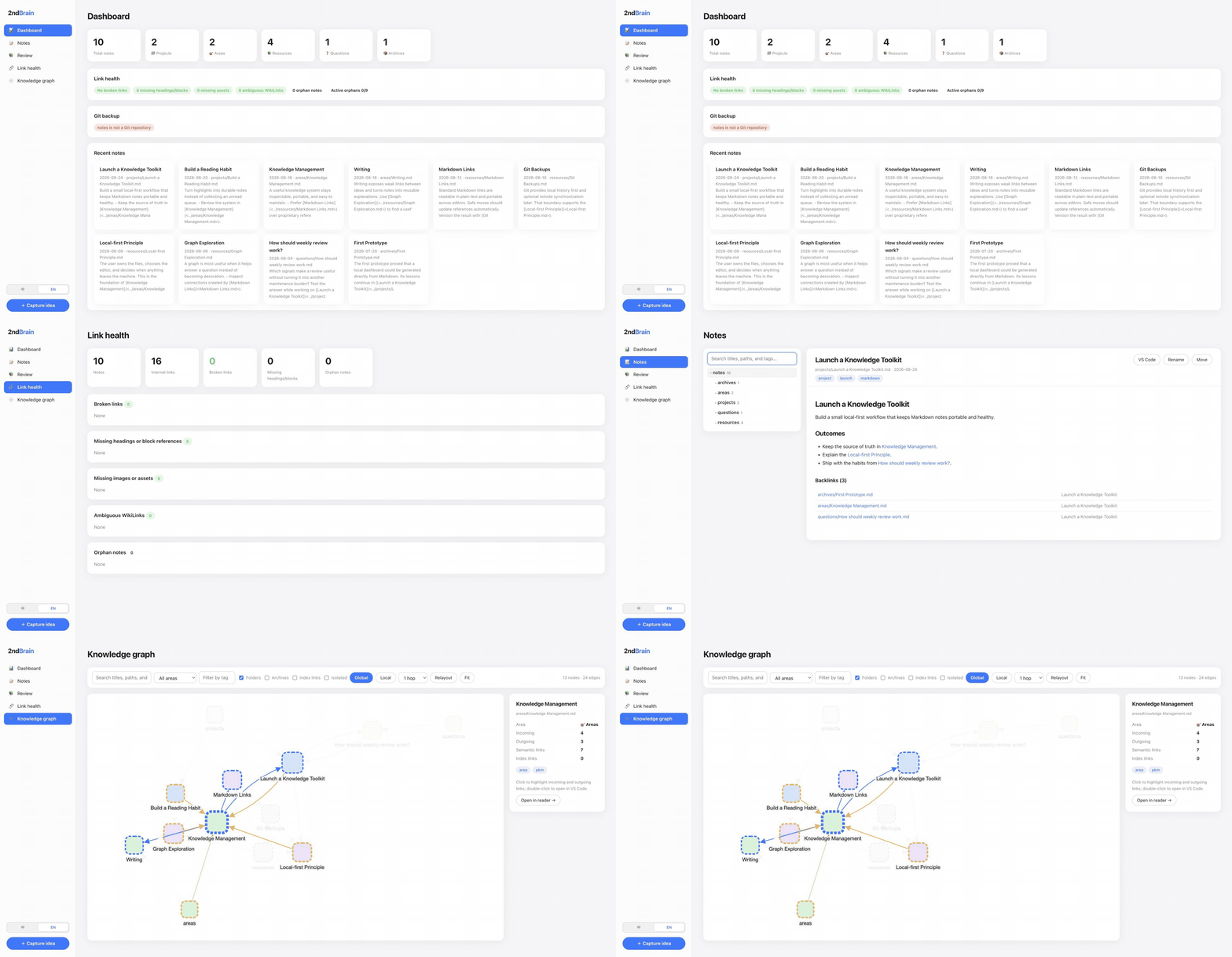
Inspect link health → preview a safe rename → browse the local dashboard and knowledge graph.
Requires Node.js 20 or newer.
npm install -g @qwtang/brain-cli

mkdir my-brain && cd my-brain
brain init
brain web --open
That creates a local workspace and opens the WebUI at 127.0.0.1. Your notes remain ordinary Markdown files on disk.
Point 2ndBrain CLI at it directly—no initialization, import, or migration required:
# Read-only health check
brain doctor /absolute/path/to/your/notes

# Read-only link and orphan scan
brain --vault /absolute/path/to/your/notes links --stats --orphans

# Open the local WebUI
brain --vault /absolute/path/to/your/notes web --open
A safe first step:
doctorand link scans are read-only. Use--dry-runbefore renaming or moving notes.
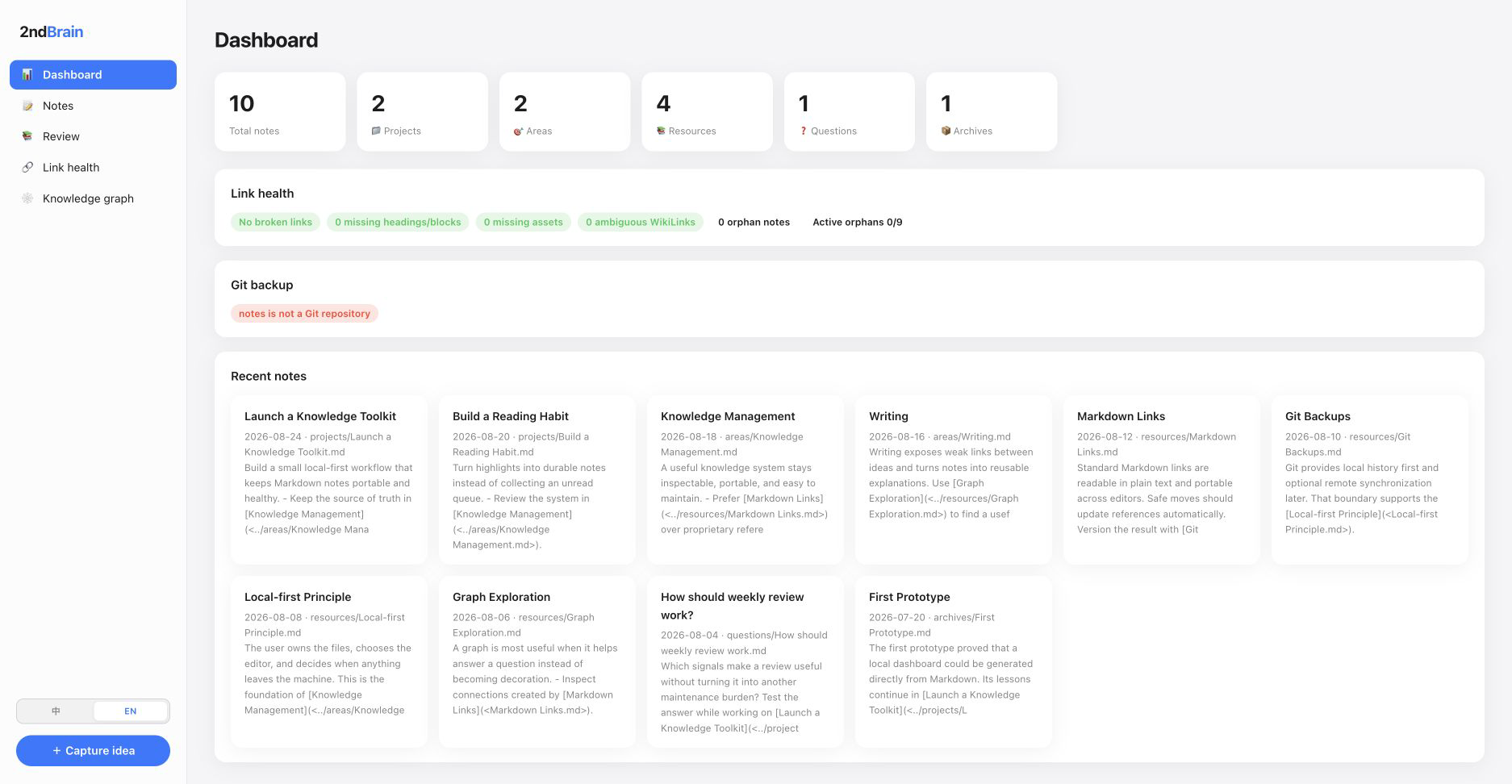
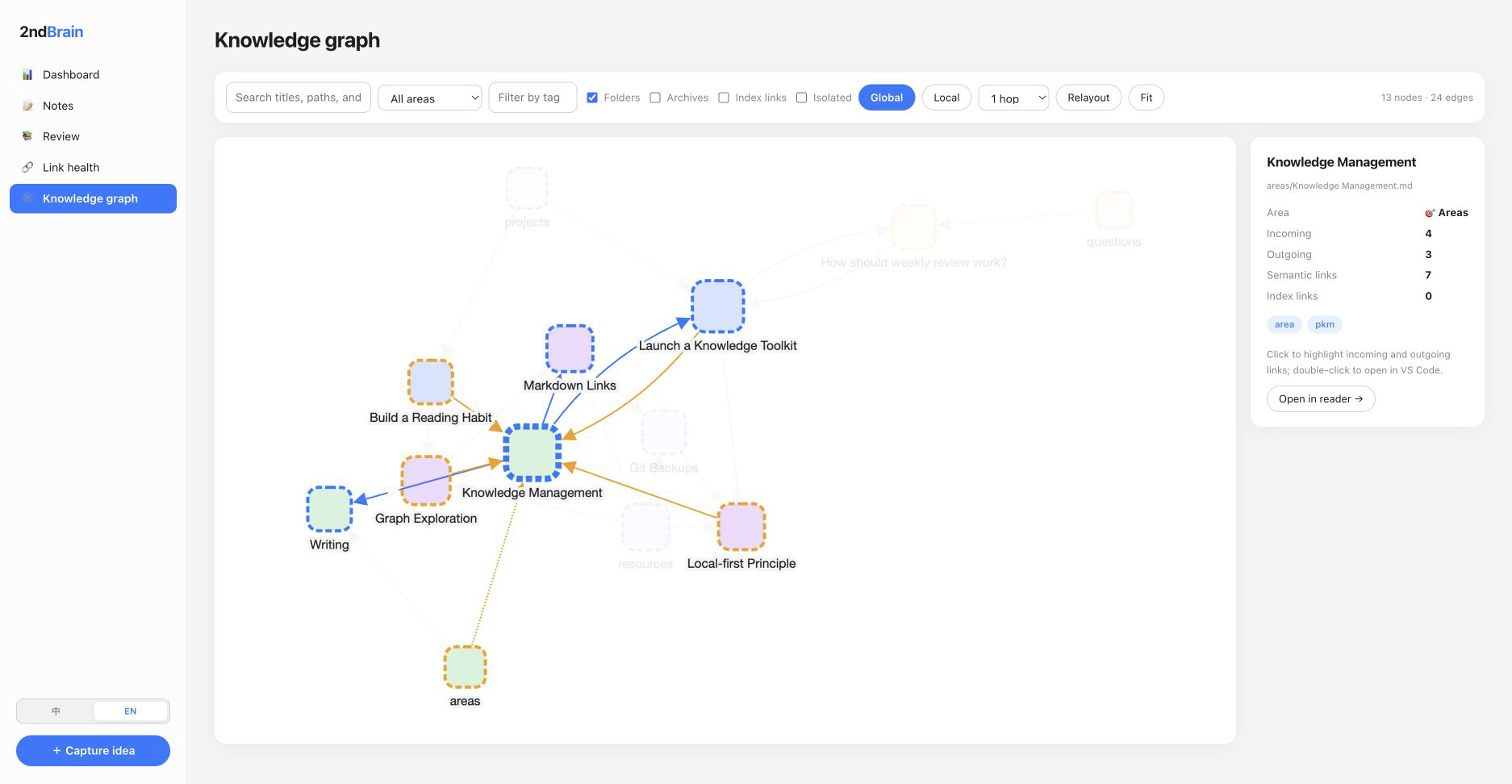
The WebUI turns your local files into a focused maintenance workspace while keeping the filesystem as the source of truth.
 |
 |
| One-glance vault health Notes, PARA areas, link health, Git status, and recent activity. |
Interactive knowledge graph Explore relationships without uploading your notes. |
-
Inspect before making changes.
brain status
brain links --check --stats --orphans
-
Preview refactors, then apply them with confidence.
brain rename "areas/Old name.md" "New name" --dry-run
brain rename "areas/Old name.md" "New name"
-
Preserve the result in the notes repository.
brain backup
brain backup --push
| Tool | Primary responsibility |
|---|---|
| Obsidian | Write and browse Markdown with an editor-first experience |
| VS Code | Edit files, scripts, templates, and Git changes |
| Git | Store version history and synchronize a repository |
| 2ndBrain CLI | Diagnose, safely refactor, review, back up, and visualize a Markdown vault |
2ndBrain CLI does not replace your editor or Git client. It handles the maintenance work that becomes risky and repetitive as a vault grows.
| Command | What it does | Writes files? |
|---|---|---|
brain doctor <path> |
Inspect an existing vault without initialization | No |
brain status |
Show vault and Git status | No |
brain init |
Create the default workspace and PARA directories | Yes |
brain capture <title> |
Create a Markdown note with frontmatter | Yes |
brain links --stats --orphans |
Inspect links and orphan notes | No |
brain backlinks <note> |
List notes linking to a note | No |
brain rename <old> <new> --dry-run |
Preview a safe rename and link updates | No |
brain move <old> <new> --dry-run |
Preview a move and relative-link updates | No |
brain backup [--push] |
Commit, and optionally push, the notes repository | Git only |
brain review week |
Review notes using local metadata | No |
brain web --open |
Start the local dashboard, note browser, checks, and graph | Only for editing actions |
brain watch start |
Start background notes maintenance | Yes |
Run brain <command> --help for every option.
- Local by default.
brain weblistens only on127.0.0.1. - Read-only inspection. Doctor, links, backlinks, status, reviews, and dry-run previews do not modify notes.
- Scoped Git operations. Backup and watcher commands operate only on the Git repository at
NOTES_DIR. - Path protection. Refactors reject paths outside the configured vault.
- Recoverable changes. Preview large moves and keep Git history before applying them.
When duplicate short note names make a WikiLink ambiguous, the CLI reports it instead of guessing. Use a vault-relative WikiLink path to disambiguate.
The repository includes a small fictional vault with no personal content, so you can evaluate the scanner and WebUI safely.
git clone https://github.com/tangquanwei/brain-cli.git
cd brain-cli
npm install
npm run build

node dist/cli.js doctor "$PWD/examples/demo-vault/notes"
node dist/cli.js --vault "$PWD/examples/demo-vault/notes" web --open
The demo is verified with 10 notes, 16 internal links, and no broken links, missing references, ambiguous WikiLinks, or orphan notes. See its structure, whiteboard edges, and expected relationships (also available in 中文).
Use --vault <path> for one-off vault selection. For a persistent default, create a workspace-level .env from .env.example. Resolution order is --vault, then NOTES_DIR, then notes.
| Variable | Default | Meaning |
|---|---|---|
NOTES_DIR |
notes |
Markdown vault path, relative to the workspace or absolute |
GIT_AUTO_COMMIT |
true |
Automatically commit after supported write operations |
COMMIT_INTERVAL |
30 |
Watcher commit interval in seconds |
PUSH_INTERVAL |
900 |
Watcher push interval in seconds |
WATCH_ENABLED |
true |
Enable watcher behavior |
Install the repository's skills globally for Codex and OpenClaw:
npx --yes skills add tangquanwei/brain-cli --skill '*' --global --agent codex openclaw --yesThis adds operate-brain-vault for safe vault operations and maintain-brain-cli for repository development. Restart the agent if the skills do not appear immediately. To target another supported agent, add or replace an --agent value.
- Quick start · CLI reference · Configuration
- Link-scan benchmark · Watcher · Daily workflow
- Roadmap · Changelog · Contributing · Security
npm install
npm test
npm run typecheck
npm run build
Issues and focused pull requests are welcome. When reporting feedback from a real vault, please include the editor, operating system, note count, and first point of friction—without sharing private note content.
Built for people who want the convenience of a knowledge tool and the durability of plain files.