



A QR & Barcode Library & CLI for Node.js/Bun/Browser.
- 🤖 QR Code: Customizable Generation & Reading
- 📊 Barcode:
CODE128,EAN,EAN-13,EAN-8,EAN-5,EAN-2,UPC (A),CODE39,ITF-14,MSI,Pharmacode,Codabar—Generation & Reading - 📦 Lightweight: Zero dependencies
- 🚀 Fast: Built with performance in mind
- 📜 TypeScript: Strongly typed
- 📚 Simple: Easy to use
- 📖 Documentation: Well-documented
- 🛠 Library & CLI: Interact in different ways
It's simple to install the library and CLI:
npm install qrx
bun add qrx
yarn add qrx
pnpm add qrx
Check out the package.json scripts for more commands.
<div id="qr-code"></div>

<script type="text/javascript">
new QRCode(document.getElementById("qr-code"), "https://stacksjs.org");
</script>
If you want to customize the QR code, you can pass in an options object:
<div id="qr-code"></div>

<script type="text/javascript">
const options = {
  width: 2,
  height: 100,
  format: 'auto',
  displayValue: true,
  fontOptions: '',
  font: 'monospace',
  text: undefined,
  textAlign: 'center',
  textPosition: 'bottom',
  textMargin: 2,
  fontSize: 20,
  background: '#ffffff',
  lineColor: '#000000',
  margin: 10,
  marginTop: undefined,
  marginBottom: undefined,
  marginLeft: undefined,
  marginRight: undefined,
  valid() { },
}

var qrCode = new QRCode(document.getElementById("qr-code"), options);
</script>
You can also use methods to interact with the QR code:
qrCode.clear() // clear the code
qrCode.makeCode('https://docs.stacksjs.org') // create another codeQRCode draws into an element. On a server — rendering a membership card, an
email, a PDF, a page — there is no element, so the encoder is exposed directly:
import { toMatrix, toSvg, toTerminal } from 'ts-qr-codes'

// An SVG string, ready to inline or to base64 into a data URL.
toSvg('https://stacksjs.org', { size: 360 })

// Named for a screen reader; without a title the code is hidden from
// assistive technology, which is right when the value is also on the page.
toSvg('https://stacksjs.org', { title: 'Membership card' })

// Transparent, in your own colours.
toSvg('https://stacksjs.org', { background: null, color: '#1649ff' })

// The raw modules, if you would rather draw them yourself. `true` is dark.
toMatrix('https://stacksjs.org')

// Or print it where you are.
console.log(toTerminal('https://stacksjs.org'))
toSvg emits the dark modules as a single path of horizontal runs on a
module-unit viewBox, so the output is crisp at any size and a few hundred bytes
rather than the tens of kilobytes a rect-per-module renderer produces.
| Option | Default | |
|---|---|---|
size |
— | Rendered width/height in pixels. Omit to size by scale. |
scale |
4 |
Pixels per module, used when size is not given. |
margin |
4 |
Modules of quiet zone. Four is the specification's minimum. |
color |
#000000 |
Dark module colour. |
background |
#ffffff |
Light colour, drawn as one rect. null omits it. |
title |
— | Accessible name. Without one the SVG is aria-hidden. |
correctLevel |
M |
Error correction level. |
A lightweight Barcode library with zero dependencies. It supports multiple barcode formats and works in browsers and with Node.js & Bun.
- CODE128
- CODE128 (automatic mode switching)
- CODE128 A/B/C (force mode)
- EAN
- EAN-13
- EAN-8
- EAN-5
- EAN-2
- UPC (A)
- UPC (E)
- CODE39
- ITF
- ITF
- ITF-14
- MSI
- MSI10
- MSI11
- MSI1010
- MSI1110
- Pharmacode
- Codabar
<svg id="barcode"></svg>
<!-- or -->
<canvas id="barcode"></canvas>
<!-- or -->
<img id="barcode"/>barcode('#barcode', 'Hi!')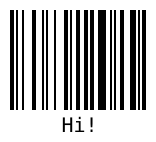
import { barcode } from 'ts-qr-codes'

barcode('#barcode', '1234', {
  format: 'pharmacode',
  lineColor: '#0aa',
  width: 4,
  height: 40,
  displayValue: false
})
import { barcode } from 'ts-qr-codes'

barcode('#barcode')
  .options({ font: 'OCR-B' }) // Will affect all barcodes
  .EAN13('1234567890128', { fontSize: 18, textMargin: 0 })
  .blank(20) // Create space between the barcodes
  .EAN5('12345', { height: 85, textPosition: 'top', fontSize: 16, marginTop: 15 })
.render()Use any barcode-* or data-* as attributes where * is any option.
<svg
  class="barcode"
  barcode-format="upc"
  barcode-value="123456789012"
  barcode-text-margin="0"
  barcode-font-options="bold"
></svg>
And then initialize it with:
barcode('.barcode').init()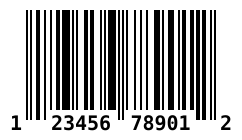
Pass in an object which will be filled with data.
const data = {}
barcode(data, 'text', { ...options })
data will be filled with a encodings property which has all the needed values. See docs for examples of what data looks like.
import { barcode } from 'ts-qr-codes'
import { createCanvas } from 'canvas'

const canvas = createCanvas()

barcode(canvas, 'Hello')

// As this is a node-canvas, you can configure it as you like:
// see https://github.com/Automattic/node-canvas for more informationimport { DOMImplementation, XMLSerializer } from 'xmldom'
const xmlSerializer = new XMLSerializer()
const document = new DOMImplementation().createDocument('http://www.w3.org/1999/xhtml', 'html', null)
const svgNode = document.createElementNS('http://www.w3.org/2000/svg', 'svg')
Barcode(svgNode, 'test', {
xmlDocument: document,
})
const svgText = xmlSerializer.serializeToString(svgNode)For information about how to use the options, see the docs.
| Option | Default value | Type |
|---|---|---|
format |
"auto" (CODE128) |
String |
width |
2 |
Number |
height |
100 |
Number |
displayValue |
true |
Boolean |
text |
undefined |
String |
fontOptions |
"" |
String |
font |
"monospace" |
String |
textAlign |
"center" |
String |
textPosition |
"bottom" |
String |
textMargin |
2 |
Number |
fontSize |
20 |
Number |
background |
"#ffffff" |
String (CSS color) |
lineColor |
"#000000" |
String (CSS color) |
margin |
10 |
Number |
marginTop |
undefined |
Number |
marginBottom |
undefined |
Number |
marginLeft |
undefined |
Number |
marginRight |
undefined |
Number |
valid |
function(valid){} |
Function |
bun testPlease see our releases page for more information on what has changed recently.
Please see CONTRIBUTING for details.
For help, discussion about best practices, or any other conversation that would benefit from being searchable:
For casual chit-chat with others using this package:
Join the Stacks Discord Server
“Software that is free, but hopes for a postcard.” We love receiving postcards from around the world showing where qrx is being used! We showcase them on our website too.
Our address: Stacks.js, 12665 Village Ln #2306, Playa Vista, CA 90094, United States 🌎
We would like to extend our thanks to the following sponsors for funding Stacks development. If you are interested in becoming a sponsor, please reach out to us.
Many thanks for the libraries that laid the groundwork:
- JsBarcode: https://github.com/lindell/JsBarcode
- Quagga: https://github.com/ericblade/quagga2
- QRCode.js: https://github.com/davidshimjs/qrcodejs
The MIT License (MIT). Please see LICENSE for more information.
Made with 💙