This is basic demo application, to combining react.js with JointJS.
- Reactjs
- JSX
- ES2015
- React-router
- Redux
- jQuery
- JointJS
$ git clone https://github.com/santoshshinde2012/reactjs-jointjs-example.gitThis project was bootstrapped with Create React App.
Below you will find some information on how to perform common tasks.
You can find the most recent version of this guide here.
Once you've downloaded the demo and installed all the prerequisites, you're just a few steps away from starting to develop your demo application.
The demo comes pre-bundled with a package.json file that contain the list of modules you need to start your application.
To install the dependencies, run this in the application folder from the command-line:
$ npm installThis command does a few things:
- First it will install the dependencies needed for the application to run.
- If you're running in a development environment, it will then also install development dependencies needed for testing and running your application.
- When the npm packages install process is over, npm will initiate a bower install command to install all the front-end modules needed for the application
- To update these packages later on, just run
npm update
Run your application using npm:
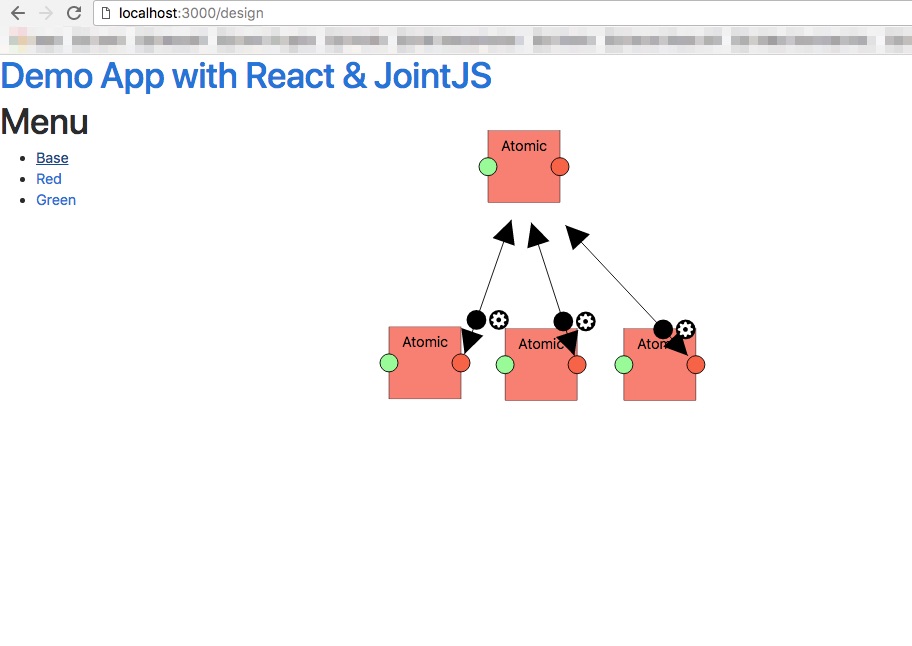
$ npm startYour application should run on port 3000 with the development environment configuration, so in your browser just go to http://localhost:3000
- My website (santoshshinde.com)
- Github (@santoshshinde2012)
- Twitter (@shindesan2012)
- Stackoverflow (@user:4319438)
- Medium (@shindesan2012)