
An Anthropic-compatible local proxy for Claude Code, Codex, Pi, and their IDE extensions — backed by 28 model providers, with multi-key rotation everywhere, built-in web search providers, and full request analytics.







Run your coding agents with free, paid, or local models. Choose and validate providers from one local Admin UI.
Features · Quick Start · Model Providers · Web Search · Admin Dashboard · Clients · Integrations · Manage

Claude Code running through the Free Claude Code proxy.

Codex CLI using the local FCC Responses provider.

Claude Code native /model picker with FCC gateway models.

Codex native /model picker with the generated FCC catalog.
| Area | What you get |
|---|---|
| Coding agents | Launch Claude Code with fcc-claude, Codex with fcc-codex, or Pi with fcc-pi; each agent's native model picker works against the FCC catalog. |
| Model providers | 28 cloud and local providers, including Kimi For Coding, Amazon Bedrock, and Google Vertex AI. Switch and validate providers from the Admin UI. |
| Model-tier routing | Route Fable, Opus, Sonnet, Haiku, and fallback traffic to different models. |
| Protocol fidelity | Streaming, tool use, reasoning, and image input preserved across compatible models, with configurable reasoning control. |
| Key rotation | Multi-key credential rotation for both model and web search providers: comma-separated keys, four rotation policies, health tracking with cooldowns/circuit breaking/lockout, and per-key admin management. |
| Web search | Claude Code's official web_search server tool fulfilled at the proxy level by 14 search providers, with 50+ advanced per-provider options, rich result digests, and zero-config keyless fallback. |
| Request analytics | Persistent SQLite log of every request, plus Requests and Web Search tabs in the Admin UI with filters, stats, and weekly/monthly rollups. |
| Editor integrations | Claude Code and Codex in VS Code, or Claude Code through JetBrains ACP. |
| Messaging | Optionally run Claude Code sessions through Discord or Telegram with voice-note transcription. |
| Security | Optional token authentication for the local proxy. |
Everything is configured through the same .env file (see .env.example) and the Admin UI.
macOS/Linux:
curl -fsSL "https://raw.githubusercontent.com/quevedoSteven/free-claude-code/main/scripts/install.sh" | shWindows PowerShell:
& ([scriptblock]::Create((irm "https://raw.githubusercontent.com/quevedoSteven/free-claude-code/main/scripts/install.ps1")))Re-run the same command whenever you want to update. You can review the installers before running them: install.sh and install.ps1.
fcc-serverTo print the installed Free Claude Code version without starting the server,
run fcc-server --version.
Keep this process running. By default, the Admin UI opens in your browser once the server is healthy. Its address is always shown in the startup log:
INFO: Admin UI: http://127.0.0.1:8082/admin (local-only)
Use the port shown in your terminal if it differs from 8082.
- Create an API key at build.nvidia.com/settings/api-keys.
- Open the Admin UI URL from the server log.
- Paste the key into
NVIDIA_NIM_API_KEY. - Leave
MODELon the defaultnvidia_nim/nvidia/nemotron-3-super-120b-a12b, or search the model dropdown and select another model. - Click Validate, then Apply.

Claude Code:
fcc-claudeCodex:
fcc-codexPi:
fcc-piAll three launchers use the current Admin UI settings. Use the agent's model picker to choose from the models FCC exposes. Normal CLI arguments still work, for example:
fcc-codex exec "hello"fcc-pi registers FCC only for that Pi process; your existing Pi settings, sessions, credentials, and extensions remain unchanged.
Two ways to point Claude Code at your local FCC server (http://127.0.0.1:8082, auth token freecc — match these to the Admin UI if you changed them). No custom model overrides are needed in either case: FCC exposes native Fable / Opus / Sonnet / Haiku tier models, so Claude Code's built-in model picker works as-is.
Edit ~/.claude/settings.json (%USERPROFILE%\.claude\settings.json on Windows) and add the env block — or replace these two values if they already exist:
{
  "env": {
    "ANTHROPIC_AUTH_TOKEN": "freecc",
    "ANTHROPIC_BASE_URL": "http://127.0.0.1:8082"
  }
}
Notes:
- Keep any other keys you already have in the file — just merge the
enventries. ANTHROPIC_AUTH_TOKENsends the key as a bearer token (what FCC expects). The settings file wins over shell exports.- Restart Claude Code after editing, then verify with
/status— it should showAnthropic base URL: http://127.0.0.1:8082and your auth token. - Official reference: Claude Code LLM gateway docs · settings.json reference.
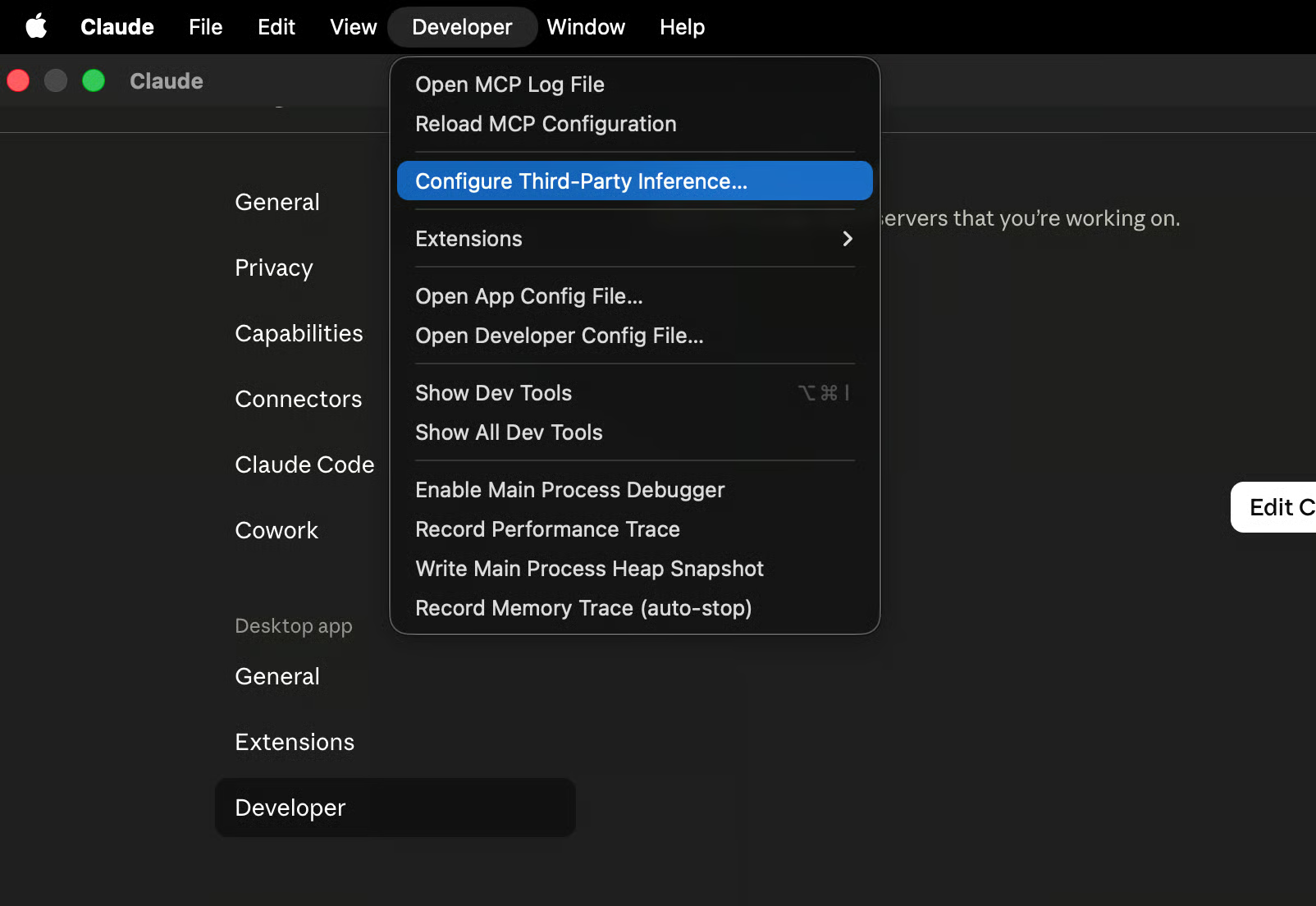
The desktop app routes its Code tab through the same ~/.claude/settings.json above, but it also has a native gateway setting (no file editing). Menu labels vary slightly by app version — the current documented path is:
- Enable Developer Mode: open Help → Troubleshooting → Enable Developer Mode. The app restarts with a new Developer menu/tab. (On older builds: Settings → enable Developer mode, which exposes Settings → Developer instead.)
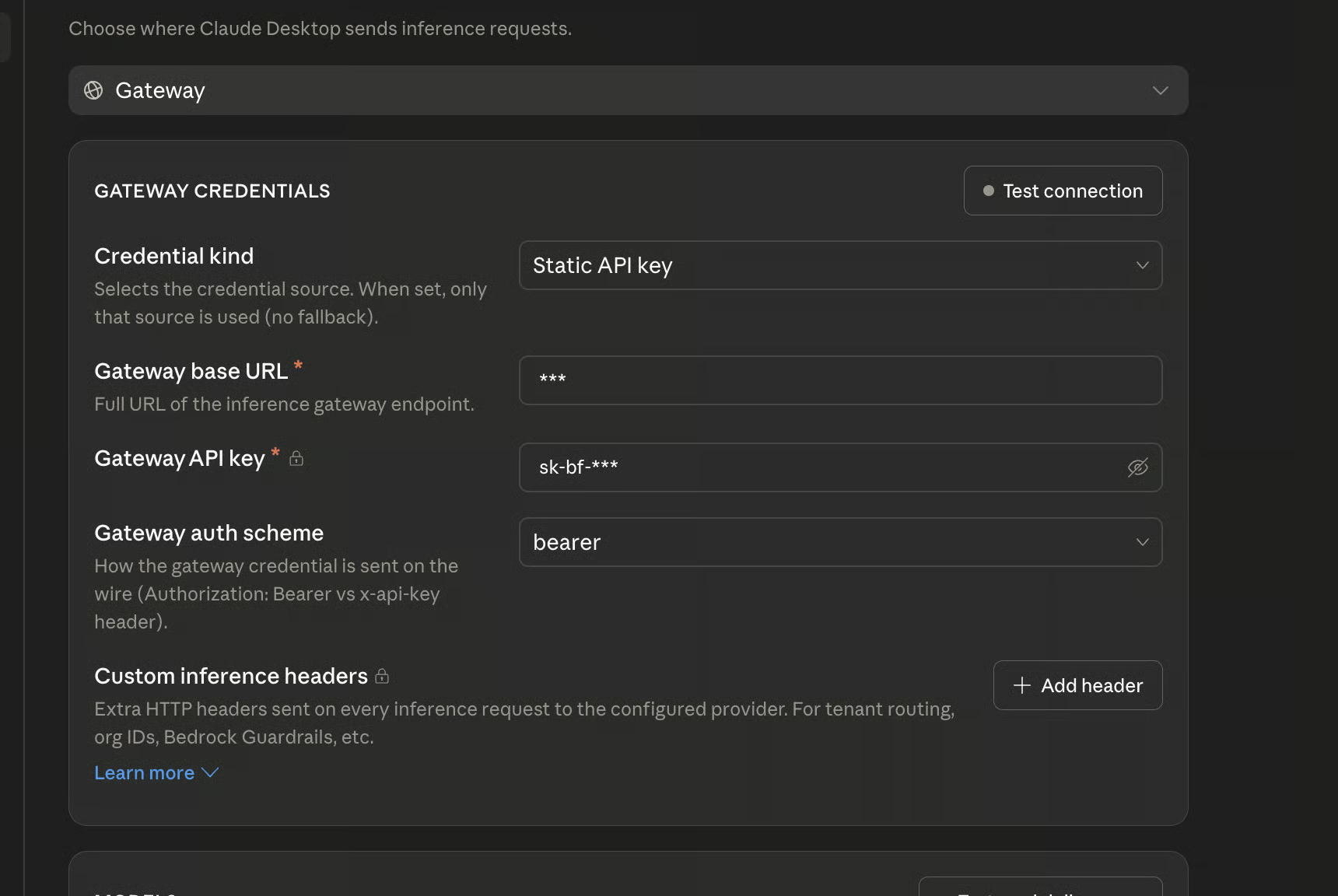
- Open Developer → Configure Third-Party Inference and set:
- Inference provider:
Gateway - Gateway base URL:
http://127.0.0.1:8082 - Auth scheme:
bearer - Gateway API key:
freecc
- Inference provider:
- Press OK / save, then restart the app.
After connecting, the app auto-discovers models from FCC's /v1/models — the initial warning dialog can be safely ignored; the model picker fills in once discovery completes. One limitation: with a gateway active, the desktop app runs local sessions only (no Anthropic-hosted cloud environments).
Visual walkthroughs from other gateway tutorials (same dialogs, different URLs):
- Bifrost docs — Claude Desktop: Developer tab → Inference provider = Gateway · Gateway fields (base URL / auth scheme / key)
- Merge docs — Claude Code via Gateway (Developer mode → add endpoint → add API key)
- CodeGateway — Claude Desktop Developer Mode custom endpoint (older-build flow via
claude_desktop_config.json)
Enter the listed setting in the Admin UI, open Model Config, then search the MODEL dropdown and select a model. FCC constructs each slug as <provider-id>/<exact-provider-model-id>; free-text entry remains available when a provider cannot list a model. Click Validate and Apply. Provider names link to their key, model, or setup pages.
| Provider | Admin UI setting | Example MODEL |
|---|---|---|
| NVIDIA NIM | NVIDIA_NIM_API_KEY |
nvidia_nim/nvidia/nemotron-3-super-120b-a12b |
| OpenRouter | OPENROUTER_API_KEY |
open_router/openrouter/free |
| Google AI Studio (Gemini) | GEMINI_API_KEY |
gemini/models/gemini-3.1-flash-lite |
| Google Vertex AI | VERTEX_PROJECT_ID + ADC |
vertex/google/gemini-3.5-flash |
| Amazon Bedrock | AWS_BEARER_TOKEN_BEDROCK |
bedrock/openai.gpt-oss-120b |
| DeepSeek | DEEPSEEK_API_KEY |
deepseek/deepseek-chat |
| Mistral La Plateforme | MISTRAL_API_KEY |
mistral/devstral-small-latest |
| Mistral Codestral | CODESTRAL_API_KEY |
mistral_codestral/codestral-latest |
| OpenCode Zen | OPENCODE_API_KEY |
opencode/gpt-5.3-codex |
| OpenCode Go | OPENCODE_API_KEY |
opencode_go/minimax-m2.7 |
| Vercel AI Gateway | AI_GATEWAY_API_KEY |
vercel/openai/gpt-5.5 |
| Hugging Face Inference Providers | HUGGINGFACE_API_KEY |
huggingface/Qwen/Qwen3-Coder-480B-A35B-Instruct:fastest |
| Cohere | COHERE_API_KEY |
cohere/command-a-plus-05-2026 |
| GitHub Models | GITHUB_MODELS_TOKEN |
github_models/openai/gpt-4.1 |
| Wafer | WAFER_API_KEY |
wafer/DeepSeek-V4-Pro |
| Kimi | KIMI_API_KEY |
kimi/kimi-k2.5 |
| Kimi Coding | KIMI_CODING_API_KEY |
kimi_code/kimi-k2.5 |
| MiniMax | MINIMAX_API_KEY |
minimax/MiniMax-M3 |
| Cerebras Inference | CEREBRAS_API_KEY |
cerebras/gpt-oss-120b |
| Groq | GROQ_API_KEY |
groq/llama-3.3-70b-versatile |
| SambaNova | SAMBANOVA_API_KEY |
sambanova/Meta-Llama-3.3-70B-Instruct |
| Fireworks AI | FIREWORKS_API_KEY |
fireworks/accounts/fireworks/models/llama-v3p3-70b-instruct |
| Cloudflare Workers AI | CLOUDFLARE_API_TOKEN and CLOUDFLARE_ACCOUNT_ID |
cloudflare/@cf/moonshotai/kimi-k2.6 |
| Z.ai | ZAI_API_KEY |
zai/glm-5.2 |
| Ollama Cloud | OLLAMA_API_KEY |
ollama_cloud/qwen3-coder:480b |
| LM Studio | LM_STUDIO_BASE_URL |
lmstudio/<model-id> |
| llama.cpp | LLAMACPP_BASE_URL |
llamacpp/<model-id> |
| Ollama | OLLAMA_BASE_URL |
ollama/<model-tag> |
Important provider notes:
- Mistral Codestral uses a separate key from Mistral La Plateforme.
- OpenCode Zen and OpenCode Go share
OPENCODE_API_KEYbut use different model prefixes. - Cloudflare requires both its API token and account ID.
- Ollama Cloud connects directly to
ollama.com; use the exact model IDs shown by FCC's model picker. Local Ollama remains available through the separateollama/prefix. - Prefer tool-capable models for coding agents. Local models also need enough context for the agent's system prompt and tool definitions.
Local provider setup
Start LM Studio's local server, load a tool-capable model, and use the model identifier shown by LM Studio with the lmstudio/ prefix. The default URL is http://localhost:1234/v1.
Start llama-server with its OpenAI-compatible Chat Completions API and enough context for the model. Use the local model ID with the llamacpp/ prefix. LLAMACPP_BASE_URL defaults to http://localhost:8080/v1; FCC accepts either the server root or an explicit /v1 suffix.
ollama pull llama3.1
ollama serve
Use the tag shown by ollama list with the ollama/ prefix. OLLAMA_BASE_URL defaults to http://localhost:11434; FCC accepts either the root URL or an explicit /v1 suffix.
Put multiple API keys in one variable, comma-separated, and choose a policy with {ENV}_ROTATION:
OPENROUTER_API_KEY="sk-or-key1,sk-or-key2,sk-or-key3"
OPENROUTER_API_KEY_ROTATION=round_robin
Policies:
| Policy | Behavior |
|---|---|
single |
Always the first key (default when one key is set). |
round_robin |
Spread requests across healthy keys in turn. |
least_used |
Healthy key with the fewest requests goes first. |
failover (alias on_error) |
Stick to the first healthy key until it fails, then move to the next (default when multiple keys are set). |
Health model: a key that fails is benched with tiered cooldowns (10s → 30s → 60s → 120s); three consecutive failures open the circuit until cooldown elapses, after which a single half-open probe is allowed through. Auth failures (401/403) trigger an escalating lockout (5 min → 1 h → 24 h) followed by a probe before full reuse. Rotation only happens for errors another key could fix (auth, rate limits, 5xx/overload, transport) — a plain 400 is not rotated. All of this is visible and manageable from Admin UI → Providers → Manage keys, which shows per-key state/usage and lets you reset keys, plus a Test button per provider.
Web search provider keys share the same rotation engine — see Web Search → Multi-key rotation.
MODEL is the fallback for every request. Select a model for MODEL_FABLE, MODEL_OPUS, MODEL_SONNET, or MODEL_HAIKU to override an individual Claude Code tier; select None to use MODEL.
For example, route Opus to nvidia_nim/moonshotai/kimi-k2.6, Sonnet to open_router/openrouter/free, Haiku to lmstudio/qwen3.5-coder, and keep MODEL on zai/glm-5.2.
Open Admin UI → Model Config → Reasoning to choose how FCC handles client reasoning controls. The default From client option preserves reasoning effort sent by Claude Code, Codex, or Pi; when the client sends no control, the provider keeps its own default.
You can instead select Off, Low, Medium, High, X-High, or Max. Fable, Opus, Sonnet, and Haiku each have the same choices plus Inherit, which uses the root policy. Providers with named effort receive those names; numeric-budget providers map Low=512, Medium=1,024, High=2,048, X-High=4,096, and Max=8,192 reasoning tokens; boolean providers receive on or off. Unsupported controls safely remain provider-defined.
Claude Code's web_search is an Anthropic server tool: normally Anthropic's servers execute the search and bill you for it. FCC fulfills that server tool at the proxy level instead — the client emits a web_search tool-use block, FCC runs the search against a provider you choose (or the keyless default), and streams the results back as a regular text block. No Anthropic search credits are used, and the whole flow works with any model provider.
FCC supports 14 search backends, resolved by WEB_SEARCH_PROVIDER:
| Provider | Env var | Free tier | Get a key |
|---|---|---|---|
DuckDuckGo (ddgs) |
— (keyless) | Free, keyless (unofficial metasearch; engines may IP-rate-limit) | — |
| Ollama Web Search | OLLAMA_SEARCH_API_KEY |
Free hosted tier with a free Ollama account | ollama.com/settings/keys |
| Exa | EXA_API_KEY |
$20 signup credit + $10/month free ongoing | dashboard.exa.ai/api-keys |
| Tavily | TAVILY_API_KEY |
1,000 credits/month free, no card | app.tavily.com/home |
| Brave Search | BRAVE_SEARCH_API_KEY |
$5 in free credits every month | api-dashboard.search.brave.com |
| SearXNG | SEARXNG_BASE_URL |
Free, self-hosted (AGPL); instance must enable format=json |
self-hosted |
| Jina Search | JINA_API_KEY |
10M free tokens for new keys | jina.ai/api-dashboard |
| Serper (Google) | SERPER_API_KEY |
2,500 free one-time queries | serper.dev/api-key |
| Firecrawl | FIRECRAWL_API_KEY |
One-time free credit grant on signup | firecrawl.dev/app/api-keys |
| Linkup | LINKUP_API_KEY |
$20 free credit, topped back up monthly | app.linkup.so |
| Perplexity Search | PERPLEXITY_SEARCH_API_KEY |
No meaningful free tier (prepaid credit; mint a fresh key) | perplexity.ai/settings/api |
| Parallel | PARALLEL_API_KEY |
Pay-per-use from $0.005 per 10 results (Search API beta) | platform.parallel.ai |
| SearchAPI.io | SEARCHAPI_API_KEY |
100 free one-time requests | searchapi.io |
| SerpAPI | SERPAPI_API_KEY |
250 free searches/month | serpapi.com/manage-api-key |
WEB_SEARCH_PROVIDER accepts auto (default), off, or one of the provider IDs ddgs | ollama | exa | tavily | brave | searxng | jina | serper | firecrawl | linkup | perplexity | parallel | searchapi | serpapi:
autopicks the first configured provider in catalog order; with no keys set it falls back to keylessddgs, so search works zero-config out of the box.offdisables the provider system and uses the legacy DuckDuckGo HTML scrape.- An explicit ID pins that provider.
Full fallback chain: explicitly configured provider → auto-resolved configured provider → ddgs (keyless) → legacy scrape (off).
Minimal .env example (two keys with round-robin, see below):
WEB_SEARCH_PROVIDER=auto
TAVILY_API_KEY="tvly-key1,tvly-key2"
TAVILY_API_KEY_ROTATION=round_robin
# Optional outbound proxy for web search (http/socks5):
WEBSEARCH_PROXY=""
You can also configure everything from Admin UI → Web Search: provider cards show free-tier notes and key status, each card has an Advanced options drawer, and an analytics view with a weekly/monthly toggle shows usage per provider and per key. Deep per-provider pricing, free-tier details, and a capability matrix live in research/web-search-providers.md and research/web-search-advanced.md.
Comma-separate multiple keys in the same variable and pick a policy via {ENV}_ROTATION:
EXA_API_KEY="exa-key-a,exa-key-b,exa-key-c"
EXA_API_KEY_ROTATION=failover   # single | round_robin | least_used | failover (on_error)
The default is failover when multiple keys are set, single otherwise. Web search keys share the same engine and health semantics as model provider keys — see Model Providers → Multi-Key Rotation.
Each provider exposes dotenv-only knobs (never in pydantic Settings); empty/unset values reproduce default behavior exactly. All of them are editable from the Web Search tab's Advanced options drawers. Highlights — cost warnings apply as noted:
| Provider | Notable options |
|---|---|
| Exa | EXA_SEARCH_TYPE (deep* = $0.015/query vs $0.005), EXA_CONTENTS modes incl. full (+$0.001/page per content type), EXA_CATEGORY verticals (company/people disable date+exclude filters), EXA_MAX_AGE_HOURS, published-date bounds, EXA_USER_LOCATION |
| Brave | BRAVE_SEARCH_MODE=llm-context ($5/1k, returns pre-extracted page text), BRAVE_LLM_MAX_TOKENS (1024–32768, llm-context only), BRAVE_FRESHNESS, country/language, plan-gated BRAVE_EXTRA_SNIPPETS |
| Tavily | TAVILY_SEARCH_DEPTH=advanced (2 credits/query), TAVILY_TOPIC, TAVILY_TIME_RANGE, TAVILY_INCLUDE_ANSWER (basic/advanced LLM answer lead), TAVILY_INCLUDE_RAW_CONTENT (free full page text, may add latency) |
| Serper | SERPER_GL/SERPER_HL/SERPER_TBS, SERPER_RICH_BLOCKS (default on: answerBox/knowledgeGraph/peopleAlsoAsk feed the answer lead) |
| Linkup | LINKUP_DEPTH=deep (10x cost, $0.05/query), LINKUP_OUTPUT_TYPE=sourcedAnswer (+$0.001, returns answer+sources) |
| Perplexity | PERPLEXITY_SEARCH_RECENCY, PERPLEXITY_CONTEXT_SIZE (omitted when PERPLEXITY_MAX_TOKENS_PER_PAGE is set) |
| Parallel | PARALLEL_MODE (turbo cheapest → advanced highest quality), PARALLEL_EXCERPT_CHARS, PARALLEL_TOTAL_CHARS |
| Firecrawl | FIRECRAWL_SOURCES (web/news/images), FIRECRAWL_SCRAPE_FORMAT summary/markdown (multiplies credits per result), FIRECRAWL_TBS, FIRECRAWL_LOCATION |
| Jina | JINA_MAX_TOKENS (token-billed; best cost guardrail), JINA_SITE, JINA_GL |
| SearXNG | SEARXNG_ENGINES, SEARXNG_CATEGORIES, SEARXNG_TIME_RANGE, SEARXNG_LANGUAGE |
| ddgs | DDGS_BACKEND (pin one free engine to dodge per-engine rate limits), DDGS_REGION, DDGS_TIMELIMIT, DDGS_SAFESEARCH |
| SerpAPI | SERPAPI_ENGINE (google_light is cheaper, num=100 works), SERPAPI_TBS, SERPAPI_GL, SERPAPI_HL |
| SearchAPI.io | SEARCHAPI_ENGINE (google/news/scholar/bing), SEARCHAPI_TIME_PERIOD, SEARCHAPI_GL, SEARCHAPI_HL |
See the Web Search Advanced Options block in .env.example for the full list with inline cost notes.
Search results are rendered as a richer digest than a plain title/URL list: an optional provider answer lead (from Exa/Tavily/Linkup/Serper rich blocks, etc.), then numbered results with title, publication date (page_age where the provider exposes it), URL, and an excerpt capped per result:
WEBSEARCH_DIGEST_CHARS=600     # per-result excerpt character cap
WEBSEARCH_DIGEST_ANSWER=true # include the provider answer leadEvery search is recorded (non-blocking, background-writer SQLite at ~/.fcc/logs/websearch.db) with provider, key label, query (256 chars), result count, duration, status, and cost where known. The Admin UI Web Search tab aggregates this into weekly/monthly rollups per provider and per key, plus top errors:
WEBSEARCH_LOG_ENABLED=true
WEBSEARCH_LOG_MAX_ROWS=50000 # retention cap; oldest rows prunedThe Admin UI (http://127.0.0.1:8082/admin, local-only) is the control center for the whole proxy:
- Providers — API keys, model catalog, Validate / Apply, per-provider Test, and Manage keys for multi-key rotation state (per-key health/usage, key reset).
- Model Config — the
MODELpicker, model-tier routing (MODEL_FABLE/MODEL_OPUS/MODEL_SONNET/MODEL_HAIKU), and reasoning control. - Web Search — provider cards with free-tier notes and key status, per-card Advanced options drawers, and weekly/monthly analytics per provider and per key.
- Requests — the full request analytics log (see below).
- Messaging — Discord/Telegram bot and voice-note settings.
FCC keeps a persistent log of every completed request (non-blocking background writer, SQLite at ~/.fcc/logs/requests.db) and surfaces it in Admin UI → Requests. Each record captures endpoint/protocol, requested and resolved model, provider, stream flag, input/output text (capped at 50k chars) with SHA-256 hashes and lengths, reasoning and params, token counts, TTFT and duration, status (success/error/cancelled), and error details. The tab offers search, filters (provider/model/status/endpoint/time range), per-request detail views, aggregate stats (totals, error rate, p50/p95 latency, per-provider and per-model breakdowns, top errors, hourly/daily series), and a clear-all action (/admin/api/requests* endpoints back it).
REQUEST_LOG_ENABLED=true
REQUEST_LOG_MAX_ROWS=50000        # retention cap; oldest rows pruned periodically
REQUEST_LOG_CAPTURE_BODIES=true   # false stores only body lengths + SHA-256 hashes
Privacy note: request bodies are stored locally on disk by default. They never leave your machine, but set REQUEST_LOG_CAPTURE_BODIES=false (or disable the log entirely) if you'd rather not persist conversation text.
FCC can talk directly to chatgpt.com/backend-api/codex/responses (OpenAI Responses API) using your ChatGPT subscription's OAuth tokens. Three login paths:
- Admin UI → Providers → ChatGPT OAuth Login — browser PKCE flow.
fcc-chatgpt-oauth-login— headless device flow from the CLI.codex login— leaveCHATGPT_OAUTH_ACCESS_TOKENempty and FCC reads~/.codex/auth.json.
Supported models include chatgpt_oauth/gpt-5.5, chatgpt_oauth/gpt-5.4, chatgpt_oauth/gpt-5.4-mini, and chatgpt_oauth/gpt-5.3-codex-spark. Optional overrides: CHATGPT_OAUTH_ACCOUNT_ID, CHATGPT_OAUTH_BASE_URL, CHATGPT_OAUTH_PROXY.
ChatGPT OAuth is experimental and unsanctioned. It is not an official OpenAI API product. The ChatGPT/Codex backend only exposes a limited set of built-in tools, so custom FCC tools may be rejected; use it at your own risk.
Moonshot's coding-plan endpoint, separate from the standard Kimi platform: OpenAI-compatible at api.kimi.com/coding/v1. Set KIMI_CODING_API_KEY from kimi.com/coding and pick a model such as kimi_coding/kimi-k2.5.
For terminal use, start fcc-server, then run fcc-claude, fcc-codex, or fcc-pi. Use the guides below for editor integrations.
Claude Code in VS Code
Install the Claude Code extension. Open VS Code's user settings as JSON and add:
"claudeCode.disableLoginPrompt": true,
"claudeCode.environmentVariables": [
  { "name": "ANTHROPIC_BASE_URL", "value": "http://localhost:8082" },
  { "name": "ANTHROPIC_AUTH_TOKEN", "value": "freecc" },
  { "name": "CLAUDE_CODE_ENABLE_GATEWAY_MODEL_DISCOVERY", "value": "1" },
  { "name": "CLAUDE_CODE_AUTO_COMPACT_WINDOW", "value": "190000" },
  { "name": "DISABLE_AUTOUPDATER", "value": "1" },
  { "name": "DISABLE_FEEDBACK_COMMAND", "value": "1" },
  { "name": "DISABLE_ERROR_REPORTING", "value": "1" },
  { "name": "DISABLE_TELEMETRY", "value": "1" }
]
Match the port and authentication token to the Admin UI, then reload the extension.
Codex in VS Code
Install the Codex extension. Create or edit ~/.codex/config.toml (%USERPROFILE%\.codex\config.toml on Windows):
model_provider = "fcc"
model = "nvidia_nim/nvidia/nemotron-3-super-120b-a12b"

[model_providers.fcc]
name = "Free Claude Code"
base_url = "http://127.0.0.1:8082/v1"
http_headers = { Authorization = "Bearer freecc" }
wire_api = "responses"
Match model, the port, and bearer token to the Admin UI, then restart VS Code. For WSL-backed Codex, edit the file inside WSL.
Claude Code in JetBrains ACP
Edit the installed Claude ACP configuration:
- Windows:
C:\Users\%USERNAME%\AppData\Roaming\JetBrains\acp-agents\installed.json - Linux/macOS:
~/.jetbrains/acp.json
Set the environment for acp.registry.claude-acp:
"env": {
  "ANTHROPIC_BASE_URL": "http://localhost:8082",
  "ANTHROPIC_AUTH_TOKEN": "freecc",
  "CLAUDE_CODE_ENABLE_GATEWAY_MODEL_DISCOVERY": "1",
  "CLAUDE_CODE_AUTO_COMPACT_WINDOW": "190000",
  "DISABLE_AUTOUPDATER": "1",
  "DISABLE_FEEDBACK_COMMAND": "1",
  "DISABLE_ERROR_REPORTING": "1",
  "DISABLE_TELEMETRY": "1"
}
Match the port and token to the Admin UI, then restart the IDE.
Claude Code still asks you to log in
If Claude Code asks you to log in after you configure the FCC URL and token, open its state file:
- Windows:
%USERPROFILE%\.claude.json - macOS/Linux/WSL:
~/.claude.json
Merge this property into the existing JSON without removing its other fields:
"hasCompletedOnboarding": trueIf the file does not exist, create it with a complete JSON object:
{
  "hasCompletedOnboarding": true
}
Restart Claude Code or the IDE after saving the file.
Configure integrations from Admin UI → Messaging, then click Validate and Apply.

Discord bot
- Create a bot in the Discord Developer Portal.
- Enable Message Content Intent and invite it with read, send,
message-history, and Manage Messages permissions so
/clearcan remove user prompts. - Set Messaging Platform to discord.
- Enter Discord Bot Token, Allowed Discord Channels, and an absolute Allowed Directory.
- Apply the settings and restart the server if requested.
Telegram bot
- Create a bot with @BotFather.
- Get your numeric user ID from @userinfobot. In groups, grant the bot permission to delete messages.
- Set Messaging Platform to telegram.
- Enter Telegram Bot Token, Allowed Telegram User ID, and an absolute Allowed Directory.
- Apply the settings and restart the server if requested.
| Usage | Behavior |
|---|---|
/stats |
Show session state. |
Standalone /stop |
Cancel all work. |
Reply with /stop |
Cancel only the selected request while other queued requests continue. |
Standalone /clear |
Reset all FCC state and remove every tracked message in that chat, including user prompts, voice notes, FCC replies, Telegram's online notice, and the clear command itself. |
Reply with /clear |
Delete the selected message and its literal platform reply subtree while preserving its ancestors and siblings. |
Voice notes
Re-run the installer with the voice backend you need.
macOS/Linux:
# NVIDIA NIM transcription
curl -fsSL "https://raw.githubusercontent.com/quevedoSteven/free-claude-code/main/scripts/install.sh" | sh -s -- --voice-nim

# Local Whisper on CPU or CUDA
curl -fsSL "https://raw.githubusercontent.com/quevedoSteven/free-claude-code/main/scripts/install.sh" | sh -s -- --voice-local

# Both backends
curl -fsSL "https://raw.githubusercontent.com/quevedoSteven/free-claude-code/main/scripts/install.sh" | sh -s -- --voice-all

# Local Whisper with the CUDA 13.0 PyTorch backend
curl -fsSL "https://raw.githubusercontent.com/quevedoSteven/free-claude-code/main/scripts/install.sh" | sh -s -- --voice-local --torch-backend cu130
Windows PowerShell:
# NVIDIA NIM transcription
& ([scriptblock]::Create((irm "https://raw.githubusercontent.com/quevedoSteven/free-claude-code/main/scripts/install.ps1"))) -VoiceNim

# Local Whisper on CPU or CUDA
& ([scriptblock]::Create((irm "https://raw.githubusercontent.com/quevedoSteven/free-claude-code/main/scripts/install.ps1"))) -VoiceLocal

# Both backends
& ([scriptblock]::Create((irm "https://raw.githubusercontent.com/quevedoSteven/free-claude-code/main/scripts/install.ps1"))) -VoiceAll

# Local Whisper with the CUDA 13.0 PyTorch backend
& ([scriptblock]::Create((irm "https://raw.githubusercontent.com/quevedoSteven/free-claude-code/main/scripts/install.ps1"))) -VoiceLocal -TorchBackend cu130
Restart fcc-server. In Admin UI → Messaging → Voice, enable voice notes, select cpu, cuda, or nvidia_nim, and choose the Whisper model. Local gated models need HUGGINGFACE_API_KEY; NVIDIA NIM transcription needs NVIDIA_NIM_API_KEY.
Re-run the matching command from Install Or Update.
Stop every running FCC command first. The uninstaller removes the FCC uv tool, verifies every FCC command is gone, and then deletes ~/.fcc/. It leaves uv, Python, Claude Code, Codex, Pi, and shared PATH entries intact.
macOS/Linux:
curl -fsSL "https://raw.githubusercontent.com/quevedoSteven/free-claude-code/main/scripts/uninstall.sh" | shWindows PowerShell:
& ([scriptblock]::Create((irm "https://raw.githubusercontent.com/quevedoSteven/free-claude-code/main/scripts/uninstall.ps1")))Every setting documented above — model providers, rotation policies, web search providers and advanced options, request/websearch logging, messaging, and voice — lives in .env.example with inline comments and cost notes. Deep-dive research documents for the web search system are under research/; the internal architecture is covered in ARCHITECTURE.md.
- Local CI sequence:
./scripts/ci.sh(macOS/Linux) or.\scripts\ci.ps1(Windows) — Ruff format/check,tytype checking, andpytest. - Individual commands:
uv run ruff format,uv run ruff check --fix,uv run ty check,uv run pytest -v --tb=short. - See CONTRIBUTING.md for the full workflow.
MIT License. See LICENSE for details.