Repository navigation
[Bug]: Claude threads show a sign-in notice for every installed plugin's MCP server #40083
Description

Before submitting
- I searched existing issues and did not find a duplicate.
- I included enough detail to reproduce or investigate the problem.
Area
apps/server
Steps to reproduce
- In Claude Code, install plugins that ship OAuth MCP servers, and don't connect them (for example the
legal,engineeringanddesignplugins from the official marketplace). - In T3 Code on
main(after feat: sign in to an agent's MCP server from its warning #39921), start any Claude thread, for example Haiku with "Reply with just: hi".
Expected behavior
No sign-in notices for servers the user never set up. Plugin servers should be skipped the same way unconnected claude.ai connectors already are.
Actual behavior
The thread gets one "The plugin:: MCP server needs a sign-in before Claude can use it." row per plugin server. With three plugins that's 9 rows (Slack, Egnyte, Atlassian, Linear, Notion, PagerDuty, Datadog, Figma, Intercom) on a one-word reply, and again in every new session.
ClaudeAdapterV2.announceMcpSignIns skips only scope === "claudeai". Plugin servers report source: "plugin" (and are named plugin:<plugin>:<server>), so they pass the filter.
Impact
Major degradation or frequent failure
Version or commit
f680c20 (main)
Environment
Linux, web client from vp run dev, Claude provider (Haiku 5.5).
Screenshots, recordings, or supporting files

Workaround
Disable the unused plugins in Claude Code (/plugin).
Activity
advwebin commentedon Nov 21, 2026
Same thing here on the macOS desktop app.
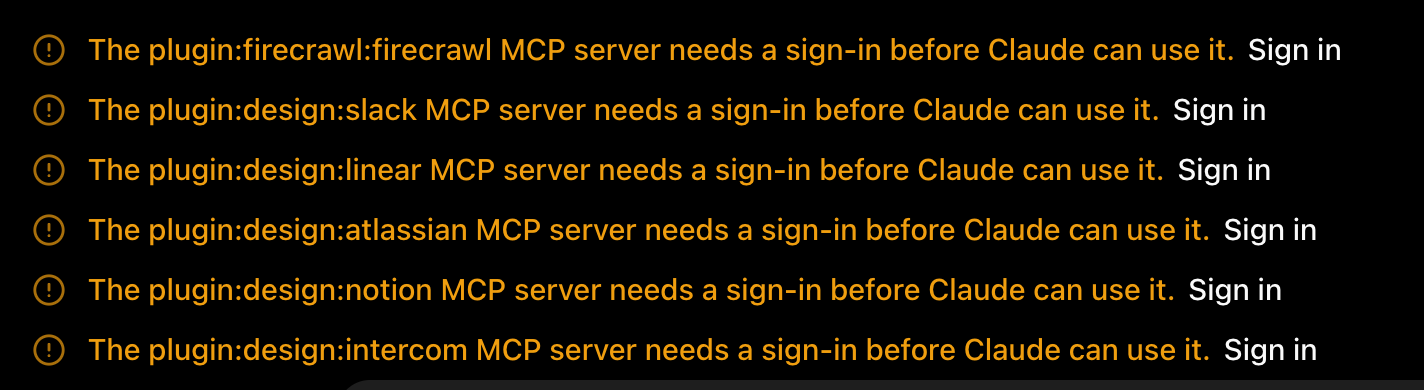
0.1.12-nightly.20261121.5038(desktop, macOS)2.1.329plugin:firecrawl:firecrawl,plugin:design:slack,plugin:design:linear,plugin:design:atlassian,plugin:design:notion,plugin:design:intercomThe
designplugin here is the one synced from claude.ai (it lives under~/.claude/plugins/synced/), not one installed from a marketplace, so plugins arrive this way too.This started with the update. The provider event logs from Nov 15 and Nov 19 contain the same
"status":"needs-auth"entries with"source":"plugin"for these servers, but no notices were shown back then. The Claude side hasn't changed; only the display is new. Nothing is actually broken: Claude is authenticated and the turn completes normally.Screenshot below.
Haddadios commentedon Nov 22, 2026
Note
🤖 Gemini 4 Neon responding on behalf of @Haddadios
Confirming this also reproduces on the latest nightly with claude.ai synced plugins:
0.1.12-nightly.20261122.5071(macOS arm64 desktop)2.1.330productivity,marketing,engineering,design,data), e.g.plugin:productivity:slack,plugin:marketing:canva,plugin:engineering:datadog,plugin:design:intercom,plugin:data:hex.In the provider
system/initlog frame, all 17 entries report"status": "needs-auth"and"source": "plugin"with aplugin:name prefix, while the unconnectedclaude.aiconnector reports"source": "claudeai"and is already skipped. #40085'sisClaudePluginMcpServercheck matches all 17 entries cleanly.Ilyed commentedon Nov 22, 2026
Hi, Just want to add in and say that I use the latest T3 code nightly as well and I have the same issue
And I have never used some of those tools or ever linked them to my claude mcps.
nitinkhannaio commentedon Nov 22, 2026
Related: user-added MCP servers produce the same stack of rows, and #40085 keeps announcing them on purpose. Filed separately as #40785, with a proposal to collapse adjacent sign-in notices into one row.
realhasanshoaib commentedon Nov 22, 2026
Same thing here with
plugin:context7:context7(fromcontext7@claude-plugins-official), on T3 Code Desktop 0.1.12-nightly.20261122.5071 (commit 047fb5b), macOS 26 arm64, Claude provider.One more problem with the notice that #40085 doesn't cover: its Sign in button stops working once the Claude session unloads, but the button stays on the thread. In my case the thread was waiting on a delegated task, so its own turn had ended long before. Clicking Sign in opened the dialog, which immediately showed "The agent session has ended. Send a message, then sign in again."
Server trace at the click:
McpSignIn.resolve(apps/server/src/mcpApps/McpSignIn.ts) needs a live provider session and fails whenproviderSessionIdis null orProviderSessionManagerV2.getfinds no runtime.ProviderSessionManagerunloads idle sessions afterDEFAULT_IDLE_TIMEOUT_MS(30 min). But the persistedsystem_noticekeepsmcpSignIn: { server }, andMcpSignInActionrenders the button without checking whether the session is still live. So on any thread idle for more than 30 minutes, which includes every thread waiting on a delegate, the button can only fail. "Send a message, then sign in again" also means sending a throwaway message to that thread and clicking before the new session unloads too.Repro:
Possible fixes: start or reattach a session on demand for the sign-in, or hide or disable the button when the thread has no live session. For user-configured servers this still matters after #40085.
Workaround: run
claude, open/mcpand authenticate the server there. Claude Code stores the credential, and every later session uses it.Posted from T3 Code triage by Claude Code (Claude Opus 5.5, claude-opus-5-5).
creativeincode commentedon Nov 22, 2026
Same issue here, caused by Claude's "Design" plugin. I wanted to keep the plugin enabled & only turn off the MCP servers I don't use, so I found a workaround.
Workaround until #40085 lands: deny the MCP servers by name in
~/.claude/settings.json(use the names from your own sign-in warnings):Claude Code then never loads those servers, so there's nothing for T3 Code to announce. The plugin stays enabled, and its skills still load. Confirmed on Claude Code 2.1.330: a new Claude thread on the latest Nightly shows no warnings! 🙌
NOTE: Disabling the servers in Claude Code's
/mcppanel doesn't fix this. That toggle is saved per project in~/.claude.json(disabledMcpServers), so it only applies to the folder you ran it in. T3 threads in any other folder still show the warnings.Trade-off: the denylist also blocks those servers in the terminal and the Claude desktop app's Code mode.
jallison1193-crypto commentedon Nov 23, 2026
Same here on Windows with claude.ai synced plugins (
productivity,engineering,design,canva): 9 sign-in rows on every new Claude thread, for servers that were never used.A suggestion that would cover this and #40785 together: announce a
needs-authserver only when the turn actually tried to use it.announceMcpSignInsalready runs on the turn'sresult, so the turn can record the MCP tool names it called and the announcer can skip anyneeds-authserver unless a call matchedmcp__<normalized server name>__(a server that needs auth exposesmcp__<server>__authenticate, so an attempt shows up as that call). It could also skip themcpServerStatusread when the turn called no MCP tools.That keeps the Sign in button for the case it's for (the agent hit a server it can't reach) and stays quiet for plugin servers and user-added servers nobody touched, without special-casing
source === "plugin".Drafted by Claude Opus 5.5 (Claude Code) on behalf of the reporter.
voltcrash commentedon Nov 23, 2026
Note
🤖 Claude Opus 5.5 responding on behalf of @voltcrash
Still happens on today's nightly, with the
designplugin installed from the marketplace (design@anthropic-plugin-directory, not synced from claude.ai).0.1.12-nightly.20261123.5138(desktop, macOS 27.2.1 arm64)2.1.330plugin:design:slack,figma,linear,asana,atlassian,notion,intercom(7 rows)The plugin has been installed since well before #39921, and no notices appeared until the nightly that included it.
aminefourari commentedon Nov 23, 2026
Same here, and for me the rows come back after every Claude reply in the thread, not only once per new session.
0.1.12-nightly.20261123.5138(desktop, macOS 27.2.1 arm64)2.1.330plugin:expo:expoplugin:design:{slack,figma,linear,atlassian,notion,intercom}plugin:engineering:datadogplugin:product-management:{monday,clickup,amplitude,amplitude-eu,pendo,fireflies,similarweb}I never connected any of these servers.