
A NetBox plugin I wrote to fix a visibility gap in rack elevations: devices with device bays render as a single opaque block, hiding what's actually installed. This plugin subdivides that block into labeled, color-coded, clickable sections — one per bay.
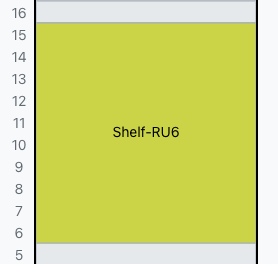
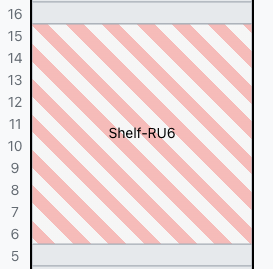
Out of the box, NetBox shows a device-bay device as one rectangle with an occupancy count like "3/4". To see what's installed, you have to click into the parent and check the Device Bays tab.
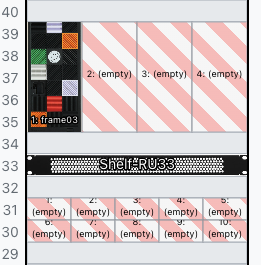
I patched RackElevationSVG._draw_device so each bay gets its own section showing:
- Bay index (1, 2, 3, ...) sorted by bay name
- Child device name with text wrapping for long names, or "(empty)"
- Role color on the front face (rear renders grey, matching stock behavior)
- If you Device tpyes have front and/or rear images attached, it will render images instead of color
- Clickable link to the child device page
- Optional device type images with label overlay (
enable_images) - Auto grid layout for dense shelves (multiple bays arranged in columns)
Devices without bays are untouched.
| Without plugin - Front | Without plugin - Rear | With plugin - Front | With plugin - Rear |
|---|---|---|---|
 |
 |
 |
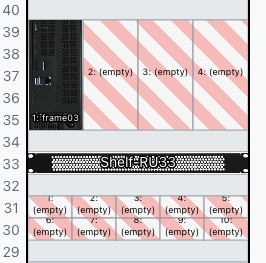 |
| Single opaque block | Single opaque block | Subdivided with bay labels and role colors | Subdivided with bay labels and role colors |
Bays sort alphabetically by name — there's no numeric position field in NetBox's device bay model. Name them "Slot 01", "Slot 02", etc. for predictable ordering.
| NetBox | Plugin | Status |
|---|---|---|
| 4.6.0 - 4.6.5 | 0.2.1 | Tested |
-
Add netbox-render to local_requirements.txt
echo "netbox-render" >> local_requirements.txt
-
Install Plugin
pip install netbox-render
-
Add to
configuration.py:PLUGINS = ['netbox_render']
-
Restart NetBox:
sudo systemctl restart netbox netbox-rq
-
Local install
pip install -e .
PLUGINS_CONFIG = {
    'netbox_render': {
        'enable_images': True,       # default: False
        'layouts': {},               # default: {} (auto-calculate)
    },
}PLUGINS_CONFIG = {
'netbox_render': {
'enable_images': True, # default: False
'layouts': { # default: {} (auto-calculate)
'mac-mini-shelf-2u': {'columns': 3},
'rpi-cluster-2u': {'columns': 5},
},
},
}| Key | Default | Description |
|---|---|---|
enable_images |
False |
Show device type front/rear images in bay sections |
layouts |
{} |
Per-device-type grid layout overrides (key = device type slug) |
The plugin auto-calculates the optimal column count by minimizing cell aspect ratio. When layouts tie (e.g. 2×2 vs 4×1), it prefers fewer empty cells and more columns — so typical shelves auto-detect a horizontal row while tall chassis devices stack vertically.
Override with layouts using the device type slug as the key and {'columns': N} as the value. Invalid values (zero, non-integer, exceeding bay count) fall back to auto-calculation with a logged warning.
See the shelf devices guide for detailed examples.
See Shelf-devices Guide for a walkthrough on modeling rack shelves using device bays and how this plugin renders them.
- Bay ordering is name-based, not positional — no way around this without modifying NetBox's data model
- Images off by default
- Rear face always renders grey (matches stock NetBox)
- Both faces show the same bay breakdown
- No migrations, no DB changes — rendering only
- Monkeypatch approach: I patch an internal method, so test after every NetBox upgrade
- Bugs / feature requests: GitHub Issues
- Questions: GitHub Discussions
- Security: Security Advisories (not public issues)
Apache-2.0