Create signature graphics, bilingual company seals, personal name chops, and office stamps from the terminal. Export transparent PNGs and physically sized SVGs for contracts, proposals, stationery, and document templates.
Made by Boris Djordjevic at Paperfoot. Free, open source, and rendered locally.
Homebrew — installs the command and its runtime:
brew install paperfoot/tap/stamp-cli
stamp --help
uv — install the published wheel in an isolated environment:
uv tool install --python 3.14 https://github.com/paperfoot/stamp-cli/releases/download/v0.3.2/stamp_cli-0.3.2-py3-none-any.whlBoth install stamp and stamp-cli. Tested on macOS and Linux with Python 3.12 and 3.14. For fonts, platform setup, and upgrade commands, see installation.
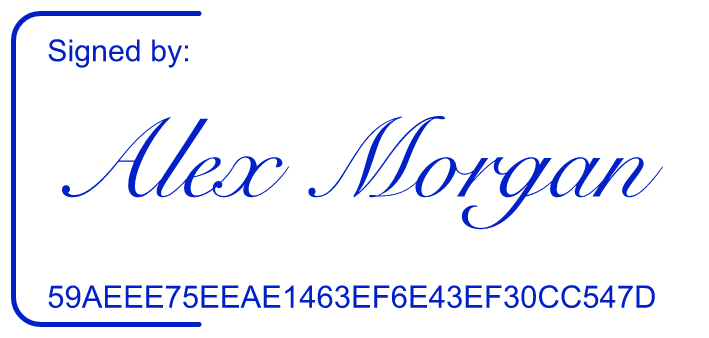
stamp sign --name 'Alex Morgan' -o signature.pngPrefer a quieter layout? Hide the reference, change the ink, or keep only the signature:
stamp sign --name 'Alex Morgan' --layout clean --no-show-id --color '#242A30' -o clean.png
stamp sign --name 'Alex Morgan' --layout signature-only -o signature.svg
Use your own scan with --signature ./signature-scan.png. Stamp removes white paper and crops surrounding blank space, then fits the visible ink without stretching it. Tall signatures get additional height within the layout's limits.
| Bilingual company seal | Office stamp | Personal name chop |
|---|---|---|
 |
 |
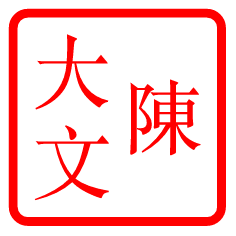 |
All examples use fictional names and companies.
# Bilingual circular seal with independent English and Chinese tracking
stamp hk circle --en 'EXAMPLE COMPANY LIMITED' --zh-line1 '示例有限公司' \
  --en-spacing 2 --zh-spacing 1.5 --no-star -o company-seal.png

# A 38 mm office stamp, exported at 600 DPI
stamp western text --preset APPROVED --width-mm 38 --dpi 600 -o approved.png

# Browse all 14 styles in an offline gallery
stamp preview --open
The catalog covers Hong Kong round, oval, and rectangular seals; mainland Chinese company and department seals; personal chops; Western text stamps; and three signature layouts. Run stamp list to see them all.
- Measured typography. Circular text sits between the rings using visible glyph bounds. English and Chinese tracking are independent, and long text fits within the available space or returns a clear error.
- Print sizing. Set width in millimetres, resolution in DPI, or an exact PNG pixel width. PNG defaults to 300 DPI; SVG retains vector geometry.
- Consistent exports. Transparent or solid backgrounds, custom ink colours, and optional seeded wear work across PNG and SVG. Existing files are protected unless you pass
--force. - Local rendering. No account or upload is needed to create a graphic. Font downloads are explicit. Imported PNG source paths, EXIF, and colour profiles are removed from the export.
- Scriptable commands. JSON output, schema discovery, input validation, and documented exit codes support batch jobs and agent workflows.
PNG preserves the rendered appearance across devices. SVG text needs the same fonts on the viewing or conversion system. See the usage guide for font selection, output flags, spacing controls, and troubleshooting.
stamp agent-info --json
stamp validate --style hk.oval --params params.json --json
stamp generate --style hk.oval --params params.json -o company-seal --json
stamp inspect company-seal.png --json
agent-info exposes the same parameter definitions and defaults that drive the renderer. inspect reports the exact file's SHA-256; verify compares it with a checksum you recorded separately.
The optional 32-character reference is a fingerprint of the generated graphic. It is not a digital signature certificate and does not establish identity, consent, or signing time. Stamp creates visual assets; it does not cryptographically sign PDFs, register company seals, or certify their legal validity.
git clone https://github.com/paperfoot/stamp-cli.git
cd stamp-cli
uv sync --frozen
uv run python -m pytest -q
Bug reports with reproducible commands, synthetic examples, and platform/font details are welcome in Issues. Please use fictional names and never attach a real signature, private seal, or confidential document.
MIT. Fonts retain their own licences. Optional Noto symbol fonts use the SIL Open Font License; see the font documentation.