
Build, skin, release and distribute native plugins for Akai MPC OS standalone devices (MPC Live/One/X/Key, Force).
Plugins run inside MPC's built-in JUCE plugin host, so they behave like MPC's own instruments and effects: you add them to a
track, play them from pads, keys or the sequencer, turn them with Q-Links, and they save with the project. Each one gets its
own native MPC touchscreen page. No bridge, no background app, no LD_PRELOAD for plugins.
Open MPC and Akai's SDK. Akai's MPC Plugin SDK is for building a
plugin. Open MPC is the layer around it that users touch: the catalog (checks, CPU ratings, reports),
the Plugin Manager, the installer app and sticks, MPC OS 3.9.1 support, browser tiles
and skin themes. New plugins are built with the SDK (vendored here at vendor/mpc-plugin-builder-sdk); Open MPC releases, lists,
installs and updates them, along with the plugins built on this repo's own wrapper.
💬 Community: join Open MPC on Discord for support, release announcements, plugin requests and MPC hacking.
Plugin catalog · Installer app · Plugin Manager VST · Build guide · Release workflow

MPC OS 3.10.1 adds official support for third-party VST2 plugins: turn on Preferences, Enhancements, External Plugin Support and
MPC lists every plugin folder in a VST2 Plugins folder at the root of any drive (internal, SD card, USB) under
External VST Plugins. No SSH, no root, no settings edits. Every plugin in the catalog works this way.
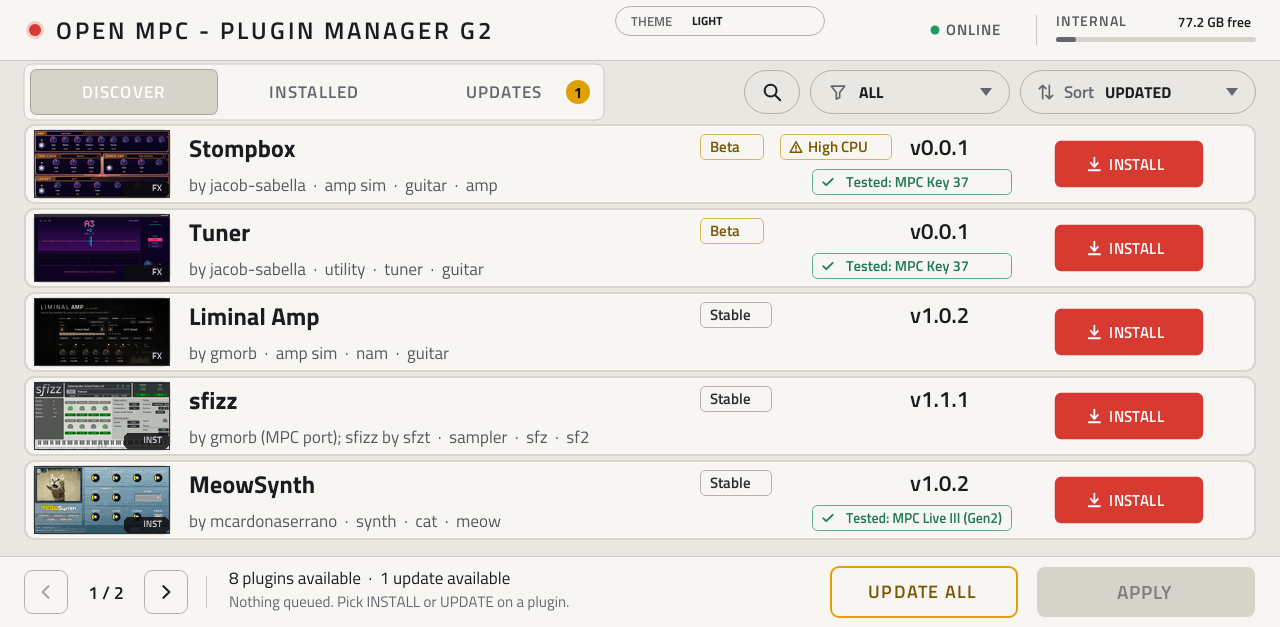
- New to this? Install the Plugin Manager (or Getting started): put the OpenMPC Plugin Manager VST on a USB stick (one click in the installer app, or copy its folder yourself), add it to a track, and open the address it shows on your phone or computer: browse the catalog, install, update, move old installs and add ROMs from there, or on the MPC's own screen.
- Already have plugins installed (with the installer, the Plugin Manager or a stick)? On 3.10.1 the plugin browser only lists
plugins in
VST2 Plugins. Your plugins and saved projects are fine; move them with one tap in the Plugin Manager 1.0, or with the installer app's Move button. Details in Getting started. - Making plugins? Start with Akai's MPC Plugin SDK for a new plugin. This repo adds what it does not cover: porting existing engines (docs/PORTING.md), the Skin Studio for screen skins (docs/SKIN_STUDIO.md), host tests and CPU benchmarks, and the catalog, which lists SDK-built plugins too.
- Force: MPC OS 3.10.1 is out for the Force too: use the Gen1 steps (the Gen1 Plugin Manager zip). On 3.9.1, the stick and the installer app work as before.
- MPC OS 2.x: the Plugin Manager and its stick need MPC OS 3.x. On 2.x, install plugins marked 2.x-compatible over SSH, with the installer app or by hand (MPC OS 2.x vs 3.x).
| Plugins | Synths, samplers, drum machines, sequencers, effects and app-like plugins, ported from existing C/C++ engines. |
| Addins | Libraries MPC preloads at start-up: web remote control, USB audio, rolling recorder and similar. docs/ADDINS.md |
| Device patches | Opt-in changes to the device itself: 16-pad drum layout, button remap, drive exec, auto exec. tools/mpc_patch |
| Catalog | One browsable list of everything above, with versions, SHA-256 checksums and hardware-test status. |
| Installers | Desktop app, an on-device Plugin Manager VST, a shell command and USB-stick routes. |
| Toolchain | Everything to port, skin, test, benchmark, package and publish your own. |
- Instruments and effects that play from pads, keys and MIDI clips, with Q-Links, automation, presets in MPC's PRESET menu and settings saved in the project.
- Ports of existing engines: describe the parameters in one small
vst.jsonand the tools build the plugin, its page and its Q-Link map. Engines written for Ableton Move's Schwung host build unchanged through an adapter. - MIDI generators: sequencers and arpeggiators that play other tracks, synced to MPC's tempo.
- App-like plugins that use the network (HTTP/HTTPS), read and write files or run helper programs, such as a record-digging streamer.
- Native pages: knobs, faders, switches, buttons, option selectors, pop-up lists, live text readouts and your own artwork (any font, knob style or Inkscape drawing, baked into the page).
- Pages on the MPC Sample, whose own UI shows no plugin pages: a page of the plugin's own on the Sample's screen, driven by
its keys, dial and knobs (
vst.json"sample_page"; needs the mpc-addin-sample-draw-handler addin). docs/PORTING.md - Ports for the desktop: the same port as a VST3 for local use in a DAW, showing its MPC skin. docs/DESKTOP_VST3.md
describe -> build -> skin -> test on PC -> bench on device -> release -> list in catalog -> users install
- Describe the engine in a
vst.json: name, UID, parameters, sources. docs/PORTING.md - Build with
tools/build_port.sh vst.json: the.so(armhf, glibc 2.31; aarch64 for Gen2), the skin and theMPC.settingsentry. - Skin it automatically, in the browser-based Skin Studio (
SkinStudio.command/.bat/.sh, needs Python 3), or from a layout you design. docs/SKIN_STUDIO.md - Test offline with
tools/test_port.sh vst.json(x86 host test under ASan), then benchmark on the device withtools/bench.sh. docs/BENCH.md - Release with
tools/release.pyor the reusablevst-release.ymlGitHub Actions workflow, which builds, tests, previews and packages a draft release. Test the draft zip on a device, then publish. docs/RELEASING.md - List it: open one PR adding
catalog/plugins/<id>.json. After that the catalog reads your releases every night and checks each zip. Getting listed - Users install it from the catalog with the installer app, the Plugin Manager VST or
mpc-store.sh.
Emulator and firmware ports (big.LITTLE pinning, ring buffers, PGO): docs/EMULATOR_PORTS.md.
open-mpc.github.io lists the community's plugins, addins and device patches.
- Find: search; filter by kind, style, developer, license, MPC OS support or distribution; sort by recently updated or most downloaded.
An Atom feed (
feed.xml) announces new releases. - Trust tiers: Verified (newest release tested on real hardware and the test recorded, per generation), Listed (passed the automatic release checks, no hardware test recorded) and Experimental (new or unproven, hidden unless you ask). This is not a security review: nobody reads each plugin's code, so stick to developers you trust.
- Every version shows its date, SHA-256 and what it was tested on. A failed check hides the version and opens an issue.
- Collections: plugins one developer publishes from one repo are one card.
- Build it yourself: ports built from your own firmware can never ship a zip, so they list the exact build command instead.
- Contribute: catalog/README.md (how), docs/CATALOG.md (design), docs/CATALOG_SPEC.md (formats). Open-source licenses, or public source with a limited-use license (shown as "Restricted use").
| Route | For |
|---|---|
| Installer app (Windows, Mac, Linux) | Connects over SSH, installs a batch of catalog plugins or your own zips with one MPC restart, backs up settings first, removes plugins, installs to SD/USB, runs device patches. |
| Plugin Manager VST | A plugin that browses the catalog and installs, updates and removes plugins on the MPC itself, with rollback. Gen1 and Gen2. |
tools/mpc-store.sh |
The same install, update, remove and sync from a shell on the device. |
| USB stick, no SSH | docs/USB_STICK.md (Gen1/Force), docs/GEN2.md (Gen2). |
| Release zip | Each zip carries its own install.sh, uninstall.sh and INSTALL.md. Install guide |
Not everything is a plugin. Two more kinds of community work are in the catalog and use the same tooling:
- Addins are libraries MPC loads at start-up (
LD_PRELOAD), installed to/data/mpc-addins/by one shared, collision-safe installer and released withtools/release_addin.py. Rules and examples: docs/ADDINS.md. - Device patches change the device rather than add files: the 16-pad drum layout, drive exec, auto exec, button remap and addin
restore. Each is a standalone script with
status/install/uninstall, a backup and a typed confirmation, and none ever applies by default. Run them by hand or from the installer app's Advanced step; they also have a Device patches tab and guide pages in the catalog. tools/mpc_patch/README.md, docs/PATCHES.md
| Gen1 (ARM32): Live/Live II, One, X, Key 61, Force | Gen2 (aarch64): Live III, One G2, Key(s) G2 | |
|---|---|---|
| Plugin build | armhf against glibc 2.31 | separate aarch64 build per plugin |
| Setup | root SSH, or USB stick | USB script / Plugin Manager VST; root filesystem is read-only |
| MPC OS | 2.x (glibc 2.32) and 3.x (2.39) | 3.x |
| Checked on | Force 3.9.1 (reference), MPC Live 2.15.1 | Live III |
Every release is built on a pinned toolchain, checked against the catalog's rules (layout, checksums, glibc and CPU limits), smoke-tested on a device and labelled 2.x + 3.x or 3.x only from its library and skin. A 3.x-only plugin loads on 2.x and plays from the Q-Links, but its page stays empty until its developer ships a compatible skin. Details, the 2.x skin shape and device internals: docs/COMPATIBILITY.md, docs/OS2_SKINS.md.
VST2 only (a desktop VST3 build exists) · no native drop-down picker or text entry · live-drawn widgets limited (Envelope works) · three font families for live text (Titillium Web, Roboto; Nexa untested) · plugin MIDI out is ignored by MPC (generators open their own port) · notes land on 128-sample blocks unless a port opts into sample-accurate starts · a plugin crash takes MPC down · Gen1 gives a plugin about 2.9 ms per audio block, shared with the whole project. Full list: docs/COMPATIBILITY.md. What is next: docs/ROADMAP.md.
| I want to... | Read |
|---|---|
| Port an engine | PORTING.md, EMULATOR_PORTS.md, MIDI_TIMING.md |
| Design a page | SKIN_STUDIO.md, SKIN_VARIANTS.md, COMMUNITY_SKINS.md |
| Measure and ship | BENCH.md, RELEASING.md, CATALOG.md |
| Know what is verified | NOTES.md (hardware facts, dated), MPC_OS_REFERENCE.md, AZ0X_SOURCE.md (inMusic's published source) |
| Target the MPC Sample | MPC_SAMPLE.md |
| Work with Gen2 or MPC OS 2.x | GEN2.md, OS2_SKINS.md, COMPATIBILITY.md |
| Run an addin or patch | ADDINS.md, PATCHES.md |
Repository map: docs/COMPATIBILITY.md.
The route was first described on the MPC-Forums thread "Proof of Concept: Custom Standalone Plugins" (Sep 2026) by NoQuestion and
dustyslices. Schwung by @charlesvestal, the open module platform for Ableton Move,
inspired a good part of how this project is built: the small engine interface our wrapper and the adapters/schwung adapter follow,
the build, test and release workflow for modules, and the catalog model. We made our own versions for MPC OS; thank you for building
it in the open. The Plugin Manager VST began as a fork of poloq's MIT-licensed mpc-vst-manager.
Credits also to the MockbaMod community for assistance in development, especially @Locrian.
The code in this repository is under the MIT licence (see LICENSE); vendored third-party files keep their own licences. Akai's MPC Plugin SDK is a git submodule at vendor/mpc-plugin-builder-sdk (MIT; clone with --recursive).
VST2 is a deprecated Steinberg format; this project uses a hand-written ABI header and is for personal, non-commercial
experimentation on hardware you own. No Akai content is redistributed. Editing MPC.settings is at your own risk; back it up first.