






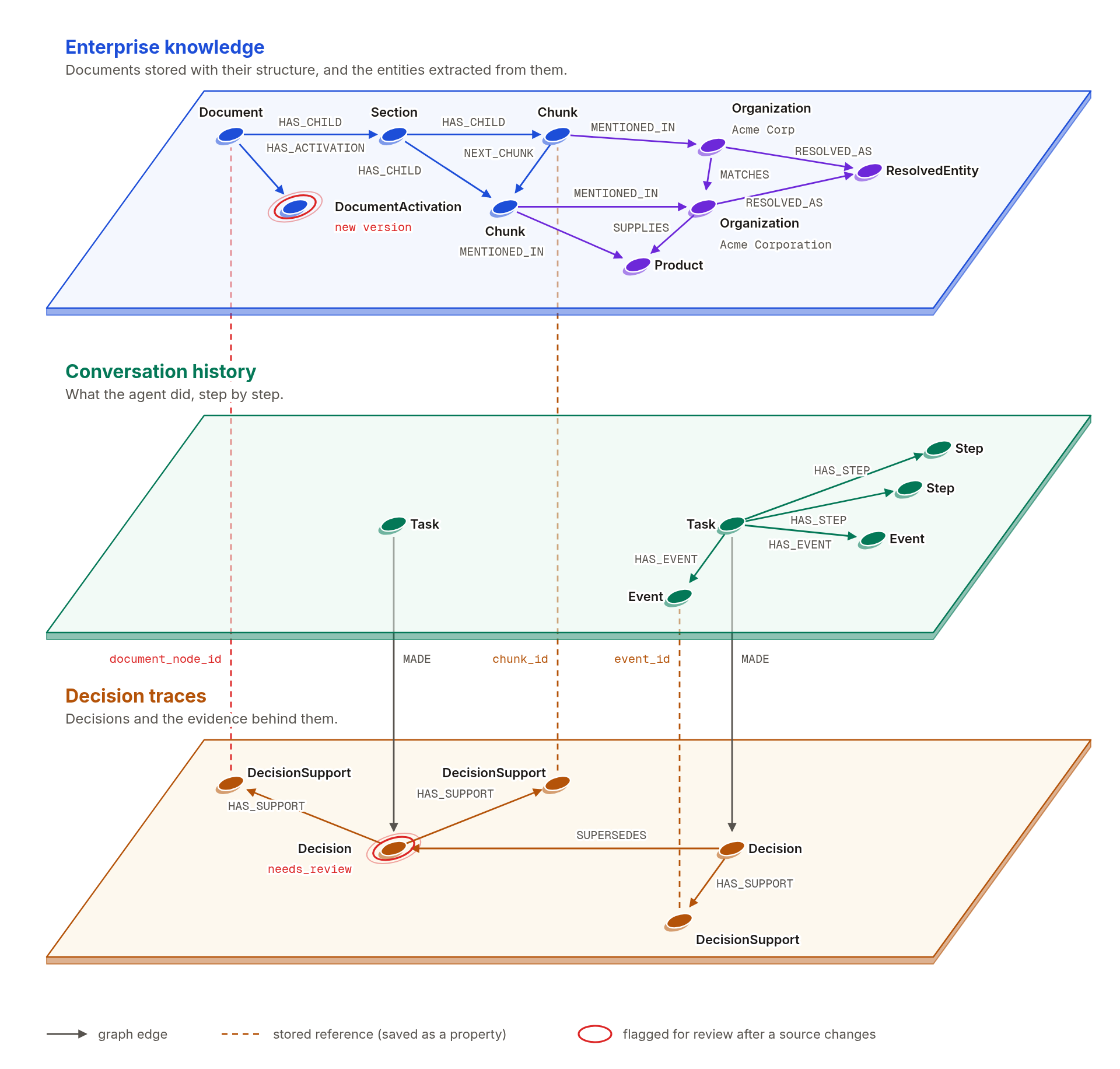
Agentic GraphRAG is an open source framework that builds one graph connecting your enterprise knowledge to the conversations your agents have and the decisions they make. Each decision links back to the passages and task events behind it, so agents can look up earlier decisions with their evidence, resume work across sessions, and review a decision when its sources change.
- Evidence you can cite: Documents become a graph shaped by your schema. Agents search it, read the exact passage behind each result, and cite it. A citation check flags any source the agent never read. Each passage keeps its source and location, a relation links to the passages that support it, and a citation to an older version of a document still leads to the text that was cited.
- Work that resumes: A task stores its goal, an ordered log of messages, tool calls, and tool results, and its named steps in the graph. A later run, even in another process, continues from the stored steps and reruns only the unfinished ones.
- Decisions tied to their sources: A decision stores its conclusion, rationale, and assumptions with links to the passages, task events, and earlier decisions it relies on. When a cited document gets a new version, the decision is flagged for review, and the built-in agent leaves it out of its search for earlier decisions until a reviewer reaffirms, replaces, or rejects it.
- Fits your stack: Use it from Python, run the built-in agent, or connect your own agent through MCP. It runs on Neo4j or FalkorDB, and vectors can live in the graph or in Qdrant, Milvus, or Weaviate.
Docling reads the layout, and the hierarchy becomes graph structure.
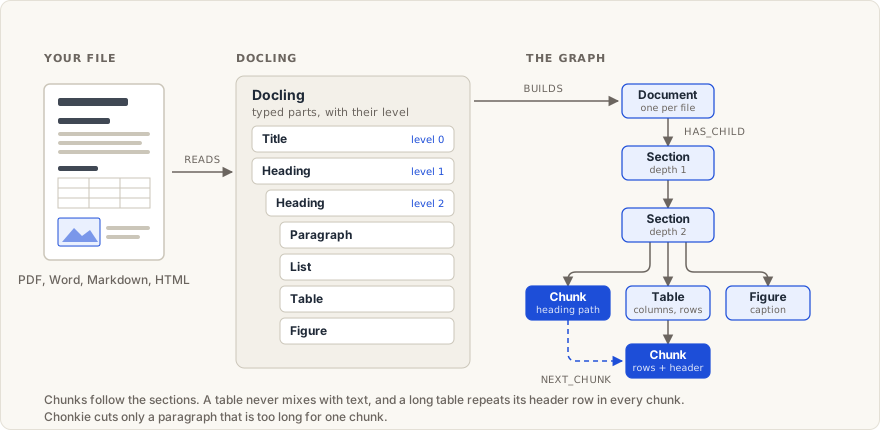
Docling reads each file and reports its parts with their type and level. Agentic GraphRAG does not cut the text into arbitrary windows. It keeps the hierarchy and stores it in the graph, so an agent can use a match at any level.
- Docling loading: It reads Markdown, HTML, AsciiDoc, Word, PowerPoint, and Excel files, and PDFs and images with an optional install. Plain text, XML, CSV, TSV, JSON, and JSON Lines have their own loaders, and a CSV row or a JSON record becomes a document of its own. Running page headers and footers are left out.
- Hierarchy levels: A title is level 0, and headings run from level 1 downward, so a level 2 heading sits under a level 1 heading. Paragraphs, lists, code, formulas, tables, and figures sit under the heading that introduces them. Where a source does not report heading depth, as a PDF often does not, the depth comes from its outline or from numbered headings.
- Structure-aware chunks: Paragraphs and lists are packed within a section up to a size limit, and a chunk that stays small continues into the next section instead of standing alone. A table never mixes with text, and a long table is split into groups of rows that each repeat the header row. Chonkie cuts only a paragraph that is too long for one chunk.
- Graph structure: A Document holds Sections nested by depth. A Section holds Chunks, Tables, and Figures in reading order, and a Table holds its row-group Chunks. These nodes are joined by
HAS_CHILD, andNEXT_CHUNKlinks neighboring chunks. - Access at every level: A chunk keeps its heading path and its page or character position. From a matching chunk, an agent can read the section around it, the sibling sections, the chunks next to it, or a table with its header row.
Your ontology is the base for the whole pipeline.
Enterprise knowledge already has a defined structure. Platforms such as Palantir Foundry and Microsoft Fabric IQ describe a business as object or entity types, their properties, and the links between them, and industry standards such as FIBO do the same for finance. Agentic GraphRAG takes that ontology as its starting point, and the whole pipeline is grounded in it.
- Extraction: The extractor sees each entity type and relation with its description, and it can return only what the schema declares. A relation survives only when its source and target types form an allowed pair.
- Graph creation: Each entity type becomes a node label, and a type with parents also carries the labels of its parents. Relations become typed relationships between the allowed pairs, and each label gets its own indexes.
- Retrieval: Entity search runs for each schema label, and relationship exploration follows only the relation types the schema declares. The queries are built from the schema's labels, relation types, and properties.
- Agents: The built-in agent and any MCP client use the same labels and relation types, and every entity they get back carries its schema label and properties.
- Change: Anything the models find outside the schema is saved as a candidate with links to its source passages. Approving one returns a schema patch to apply.
An ontology is mapped to a schema. Classes become entity types, subclasses become parent types, properties become entity properties, and links become relations between allowed pairs of types.
Accepted formats:
- A Python list or dict
- A YAML or JSON file
- Pydantic classes
- An OWL or RDFS Turtle file
- A shipped schema:
default,operations, orlegal
Schemas export to JSON Schema, JSON-LD (an OWL vocabulary), and SHACL shapes. For more detail on the supported ontologies, see ontology formats and examples.
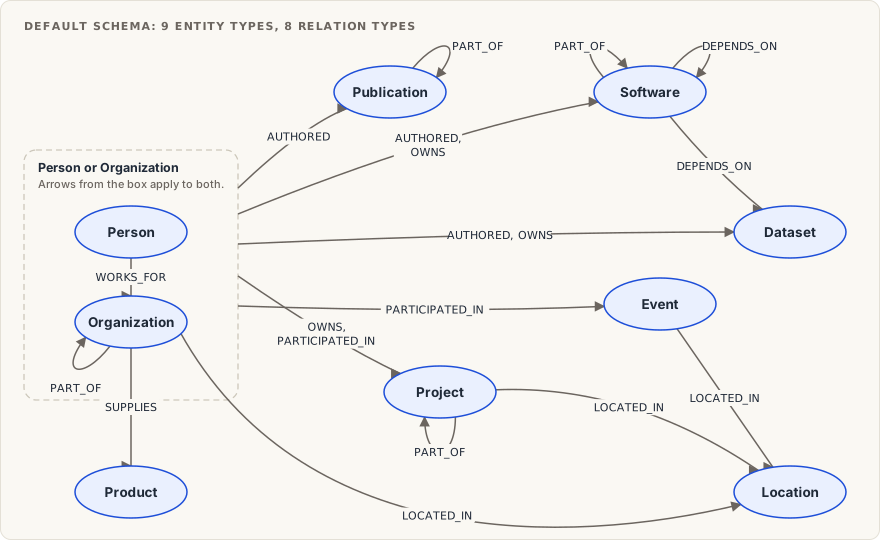
Each entity type and relation, with the pairs it joins, is defined in the default schema reference. The domain-specific presets are operations and legal.
Local-first extraction, with LLM review constrained by your schema.
Extraction reads each chunk and returns typed entities and the relationships between them, all declared in your schema.
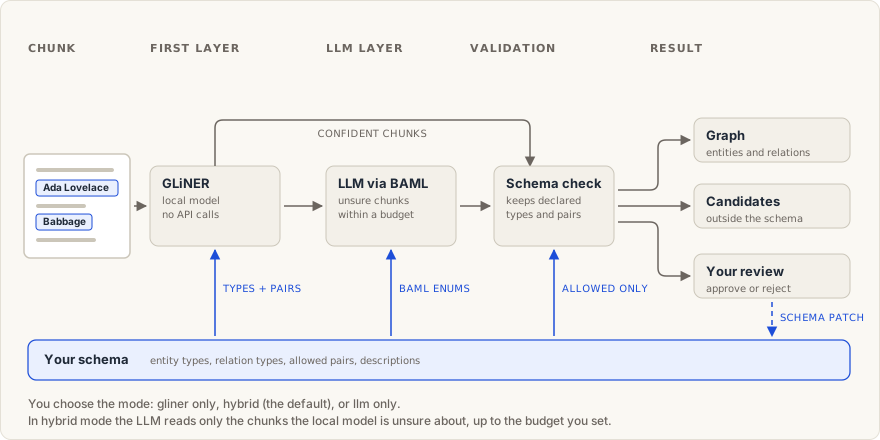
- GLiNER: GLiNER is a compact encoder model trained to extract any entity types you define. Your schema's types and descriptions are its input. It runs on your machine, reads every chunk, and returns entities and relations with confidence scores, with no API calls and no LLM key. You choose the mode:
gliner(local model only),hybrid(the default), orllm(LLM only). - Schema-constrained LLM: In hybrid mode, the LLM reads only the chunks the local model is least sure about, up to the budget you set. BAML builds its allowed entity and relation labels from your schema at call time, so it can only return declared types. It keeps, corrects, drops, or adds to the local entities. Validation then removes anything undeclared, including relations whose pair of types is not allowed.
- Candidate review: Anything outside the schema, or below a confidence threshold, is saved as a candidate with a link to its source chunk, and it stays out of search. You approve or reject each one. Approval returns a schema patch. You apply it, raise the schema version, and convert approved candidates into entities, relations, or properties. A rejected candidate is not created again.
Deduplication that checks the cheapest signal first, and links near duplicates instead of merging them.
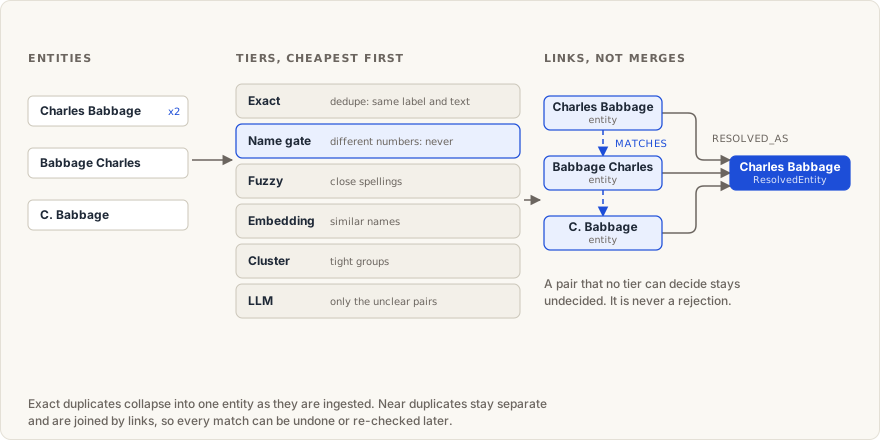
Resolution decides which extracted entities name the same real-world thing.
- Deduplicate: Entities with the same label and the same text collapse into one entity as they are ingested.
- Link: Any other match becomes a link between two entities. The entities stay separate, so every match can be previewed, undone, or re-checked.
- Group: Linked entities are grouped under one resolved entity.
- Undecided: A pair that no step can decide stays undecided. It is never treated as a rejection.
- Cheapest first: Each pair goes down the steps below, and the first step that is sure decides. Only unclear pairs reach the LLM.
- Whole graph: The same steps run over the whole graph on demand, for example after you add an LLM, with a preview before you apply the matches.
The steps, in order:
- Same label: Only entities with the same label are compared.
- Exact: Entities with the same text collapse into one entity, with no judgment needed.
- Name gate: A pair whose names carry different numbers, or a name that is very long, is blocked from matching.
- Fuzzy: Names that differ only in spelling or word order match.
- Embedding: Names with close embeddings match, clearly different names are dropped, and the rest are ambiguous.
- Cluster: Ambiguous pairs are grouped, and a tight group matches without an LLM call.
- LLM: Only the pairs that are still unclear. It answers match, no match, or uncertain, and only a match counts.
Leiden clusters and reports that make thematic questions searchable.
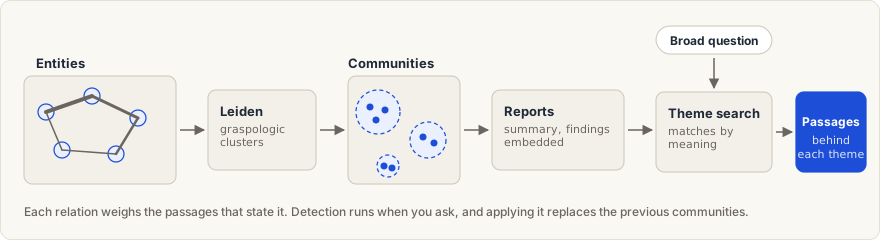
- Clustering: Hierarchical Leiden (Traag et al.), from the native implementation in graspologic, groups entities that are densely connected by relations. Each relation is weighted by the passages that state it, and a relation with no supporting passage weighs zero. The graph keeps one level of groups, each with at least two entities.
- Reports: A well-supported group gets an LLM-written report with a title, summary, and findings. Other groups, and every group when no LLM is set up, get a template report with no LLM call.
- Thematic search: Each report is embedded, so a broad question, such as the main themes of a corpus, is matched against the reports by meaning. Theme search returns the matching themes with their entities and the passages that mention them, inside your document scope. It never returns the report text.
- Schema fit: Communities group the entities your schema defines through their relations, and extraction writes only the relations your schema declares. Document structure, links from entities to passages, history, and candidates are not part of the clustering.
Communityis a graph-owned label, so a schema cannot declare an entity type with that name. - Freshness: Detection runs when you ask, with a dry run by default, and applying it replaces the previous communities. Membership is as current as the last run, and deleted or superseded passages drop out at once.
Search the documents you allow, read the exact text, and check every citation.
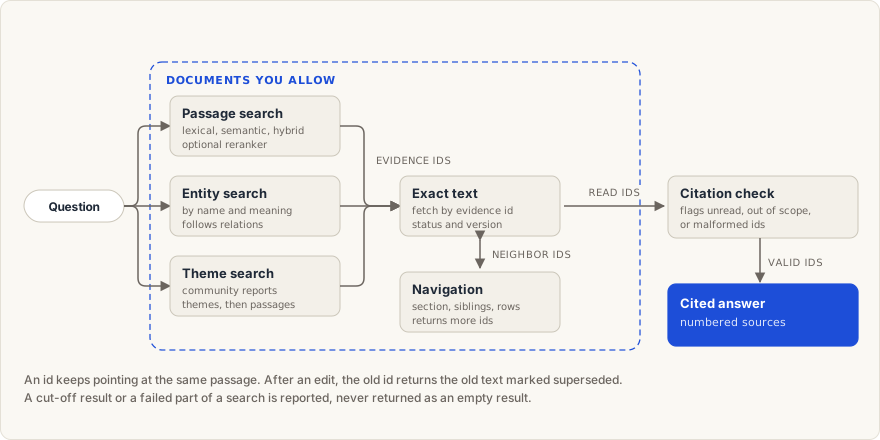
- Passage search: Lexical, semantic, or hybrid search, with an optional reranker on the top hybrid results. Each result is a short preview with an evidence id. Search reads the passages directly, so a passage is still found when extraction missed the fact it contains.
- Entity search: Finds entities by name and by meaning within your schema's labels, with the passages that mention each one. An agent can follow relations a few steps out, and each relation is marked as backed by a passage or as a bare connection.
- Theme search: A broad question, such as the main themes of a corpus, is matched against the community reports, and the passages behind each matching theme come back.
- Exact text: Fetch returns the stored passage with its status and document version. An evidence id keeps pointing at the same text, and after an edit the old id returns the old text marked superseded. Only text read this way can be cited.
- Document navigation: From any passage, an agent can reach its section, the sibling sections, the passages around it, and the rows of a table with their header.
- Scope: You choose the documents, and the limit is enforced outside the model. An id from outside the scope comes back as unavailable.
- Citation check: Flags every cited id that was never fetched, is out of scope, or is malformed.
- Incomplete results: A cut-off result or a failed part of a search is reported as such. An empty list means that the search ran and found nothing.
Search, fetch, navigation, and the citation check are the evidence tools that the built-in agent and the MCP server share.
Record agent work, and review decisions when their sources change.
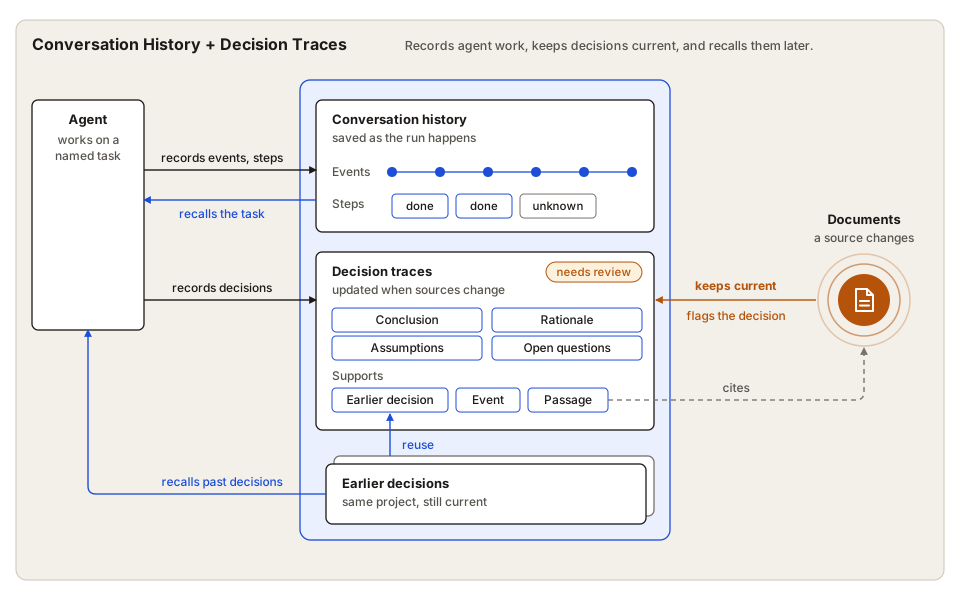
- The agent records its work: The built-in agent saves each message, tool call, and tool result as a task event, and it tracks progress as steps.
- Decisions have explicit supports: A decision records a conclusion, a concise rationale, assumptions, and open questions. Its supports point to passages, task events, or earlier decisions.
- Source changes flag decisions: When a document behind a decision is updated or removed, the decision is flagged for review, and so are the decisions that depend on it.
- Reviews end in a clear action: A reviewer can reaffirm a decision after reading the current text, replace it with a new one that explains the change, or reject it. The earlier version stays in the history.
- Tasks resume from recorded state: When a task resumes, the agent sees its goal, events, steps, and decisions, including any that need review. It reuses finished work that is still valid and runs an interrupted step again.
- Past decisions inform new ones: Agents can search earlier decisions in the same project. The built-in agent's search leaves out decisions that need review, and the agent cannot cite one as support.
The same records are available from Python without the built-in agent. The decision traces guide records and reviews decisions end to end.
Use the built-in agent, or connect your own through MCP.
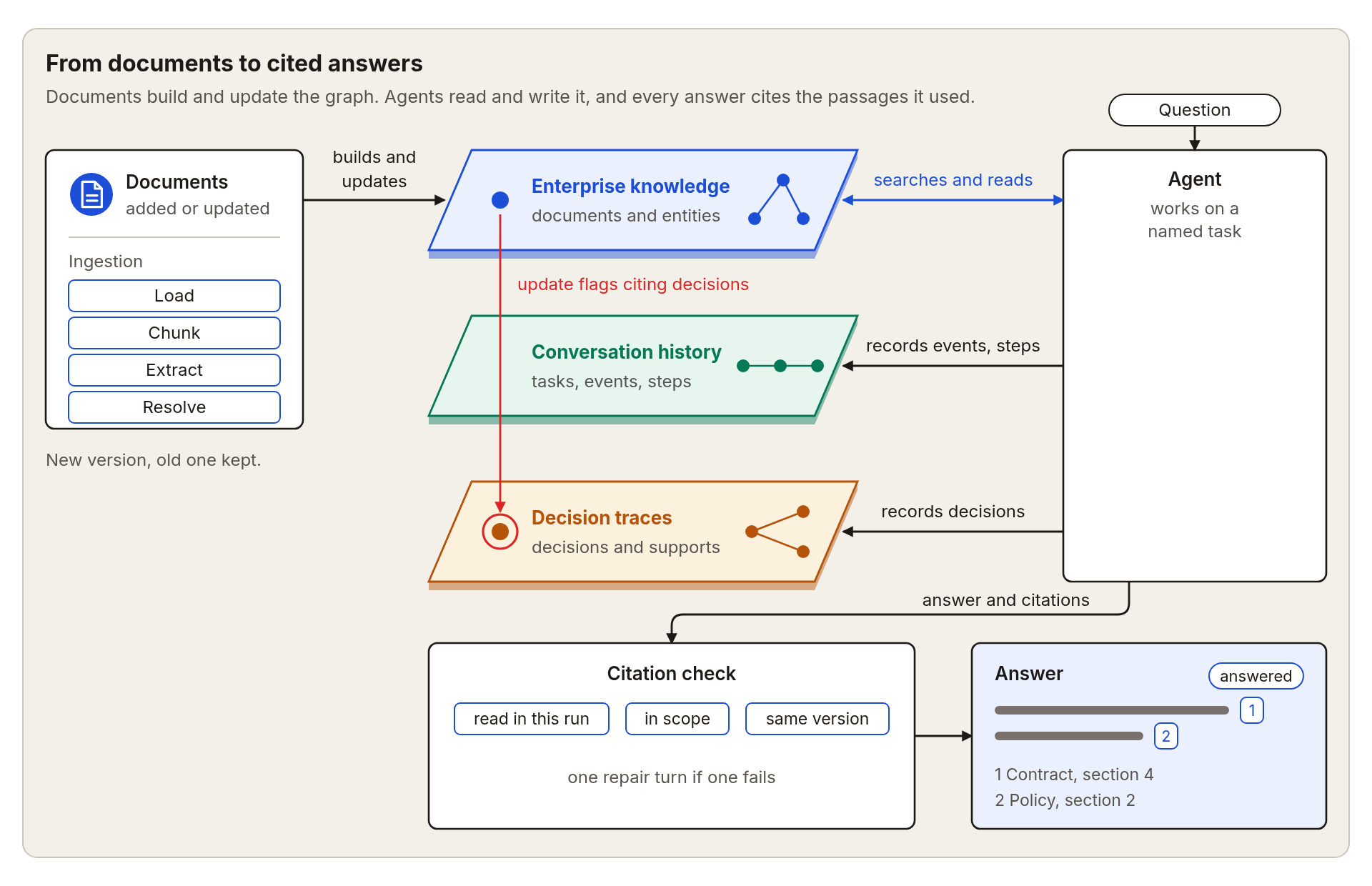
- Answers cite numbered sources: The built-in agent searches your documents, reads passages, and answers with numbered sources.
- Every citation is checked: The passage must have been read during that run, it must belong to the documents the agent may use, and it must match the version cited. If a citation fails the check, the agent gets one chance to fix it.
- Every run ends with a status: The status tells you whether the agent answered, found too little evidence, or reached a limit. You set how many steps and tool calls a run may use.
- Choose your model: Use Anthropic, OpenAI, Google, or any OpenAI-compatible model, alone, in a fallback chain, or in rotation.
- The same tools work through MCP: A local MCP server gives other agents the same tools. It starts read-only and shows only the documents you choose. You control whether a client may record conversation history and decisions.
- Evaluate your runs: The evaluation tools score answers, citations, and agent runs on your own questions.
OpenTelemetry traces for ingestion, retrieval, and agent runs.
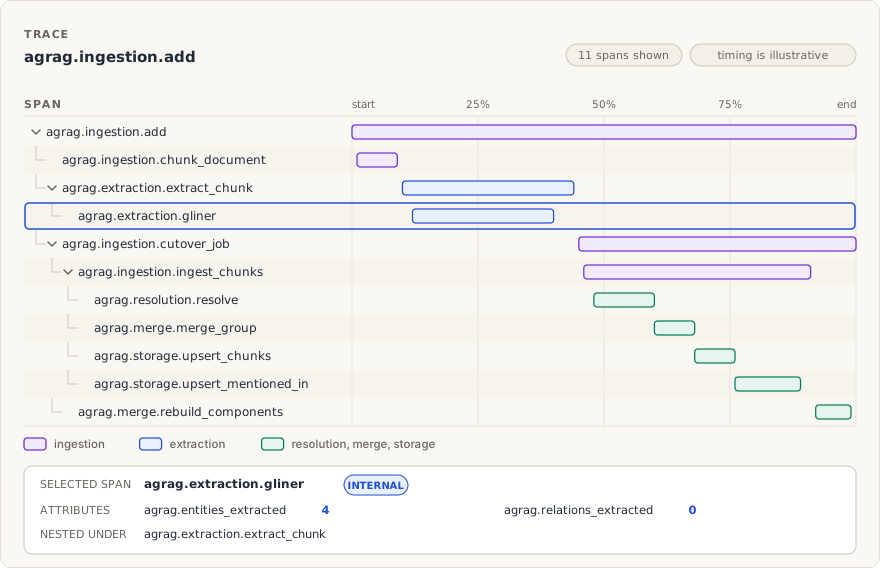
- OpenTelemetry: Traces use the OpenTelemetry standard, so any tool that reads it can show an Agentic GraphRAG trace.
- Opt in: You pass a tracer to the graph, the agent, the stores, the embedders, and the extractors. Without a tracer, nothing is recorded, and no global provider is installed.
- Pipeline spans: A span covers each step of loading, chunking, extraction, resolution, merging, storage, search, and LLM calls, including each attempt and its token counts.
- Agent runs: Tool calls and model calls appear as spans under your active span.
- Failures: Each failure record carries the trace and span it came from, so you can go from a failure to its trace.
- Data control: Spans can hold full text, such as questions, evidence, and model requests. Choose a destination and retention policy that fit your data controls.
In this example you add one document, ask a question about it, and get an answer with numbered sources. You need Python 3.11 or newer, a running Neo4j database, and an OpenAI-compatible LLM endpoint.
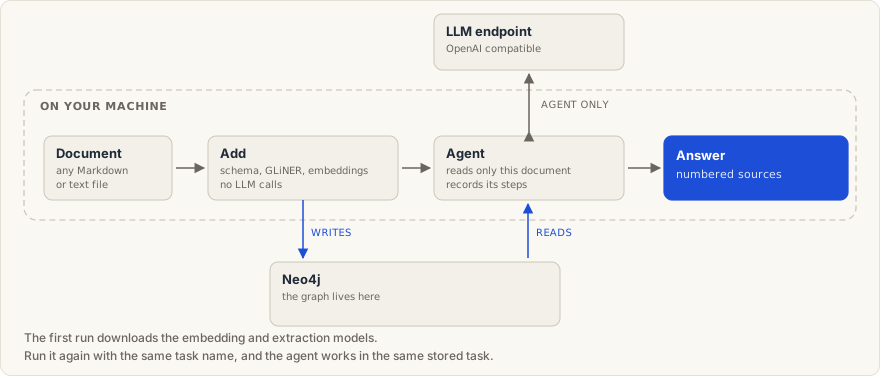
Start a local database with Docker, or use Neo4j Aura. The password in the command must match the one you set in step 3.
docker run -d --name agrag-neo4j -p 7687:7687 \
-e NEO4J_AUTH=neo4j/your-neo4j-password neo4j:5.26.0-communityInstall the package from PyPI into a fresh virtual environment:
uv venv
source .venv/bin/activate
uv pip install "agentic-graphrag[neo4j,extract,agents]" --torch-backend=auto
See Installation for other package managers and the optional parts you can add.
Create a file named .env in the folder where you will run the example. Replace the values with your own, and keep the file out of version control.
NEO4J_URI=bolt://localhost:7687
NEO4J_USERNAME=neo4j
NEO4J_PASSWORD=your-neo4j-password
AGENT_LLM_BASE_URL=https://your-endpoint.example.com/v1
AGENT_LLM_API_KEY=your-api-key
AGENT_LLM_MODEL_ID=your-model-id
The last three lines are the address, key, and model of your OpenAI-compatible LLM endpoint. The address ends at /v1, because the client adds the /chat/completions path itself. For a Neo4j database on another machine, see Configuration.
Put any Markdown or text file in the same folder and name it your-document.md. Save the following as example.py and run python example.py. The first run downloads the embedding and extraction models, so it takes longer than later runs.
import asyncio
from pathlib import Path

from agrag.agents import AgentLLMSettings, build_agent
from agrag.embedding import build_embedder
from agrag.graphdb import build_graph_store
from agrag.ingestion import ExtractionSettings, Graph

# Any Markdown or text file you have.
DOCUMENT = Path("your-document.md").resolve()


async def main() -> None:
    # Connect to the database and load the model that turns text into vectors.
    store = build_graph_store("neo4j")
    embedder = build_embedder("ibm-granite/granite-embedding-small-english-r2")
    try:
        # Read the document into the graph. This step runs on your machine.
        # "operations" is a preset schema, and max_llm_pairs=0 sends no
        # duplicate-matching pairs to an LLM.
        graph = await Graph.open(
            schema="operations",
            graph_store=store,
            embedder=embedder,
            extraction_settings=ExtractionSettings(mode="gliner"),
            max_llm_pairs=0,
        )
        await graph.add(DOCUMENT)

        # Create an agent that may read only this document.
        agent = build_agent(
            graph_store=store,
            embedder=embedder,
            scope=frozenset({str(DOCUMENT)}),
            project_id="my-project",
            agent_id="researcher",
            llm_settings=AgentLLMSettings.from_openai_compatible_env(),
        )

        # Ask a question about the document.
        result = await agent.ainvoke({
            "task_name": "first-question",
            "question": "What are the main points of this document? Cite your sources.",
        })
        print(result["answer"])
    finally:
        await store.close()


asyncio.run(main())
The script prints the answer and a Sources list. References are numbered by document, so a one-document run has a single source. Run it again with the same task name, and the agent works in the same stored task.
![Output of the quickstart script on a sample document. The answer has three numbered points, and every reference is [1] because all cited passages come from one document. A Sources list ends the output with one entry, the document title.](https://raw.githubusercontent.com/ontogr/agentic-graphrag/main/docs/static/img/readme/quickstart-output.svg)
To run the example on FalkorDB, follow the FalkorDB setup, replace the neo4j install extra with falkordb, use FALKORDB_* connection settings, and change the store selection to build_graph_store("falkordb").
Run agrag-mcp to give an MCP client tools that search your documents, read exact passages, check citations, and access conversation history and decision traces.
Install the server in the same virtual environment as before:
uv pip install "agentic-graphrag[neo4j,mcp]"The server must read the graph that you built with ingestion, with the same embedding model. Set EMBEDDING_MODEL to the model you used for ingestion if you changed the default. Then add the server to your MCP client. Replace the document path with the full path of a file you added to the graph. It must equal the path that ingestion stored, which is the value of str(DOCUMENT) in the quickstart.
{
  "mcpServers": {
    "agrag": {
      "command": "agrag-mcp",
      "env": {
        "NEO4J_URI": "bolt://localhost:7687",
        "NEO4J_USERNAME": "neo4j",
        "NEO4J_PASSWORD": "your-neo4j-password",
        "MCP_SCOPE_DOCUMENT_KEYS": "/full/path/to/your-document.md",
        "MCP_PROJECT_ID": "my-project",
        "MCP_AGENT_ID": "researcher"
      }
    }
  }
}
If your client cannot find agrag-mcp, use its full path inside the virtual environment, for example /full/path/to/.venv/bin/agrag-mcp. The server starts read-only and reads only the documents you list. The project and agent IDs enable history and decision tools, but writes remain disabled until you change the server settings. See the MCP server guide for the other settings.
For FalkorDB, install agentic-graphrag[falkordb,mcp] instead. In the client configuration, replace the NEO4J_* entries with "MCP_GRAPH_STORE": "falkordb", "FALKORDB_URL": "redis://localhost:6379", and "FALKORDB_GRAPH": "agrag".
We welcome bug fixes, new features, documentation improvements, and other contributions. Please read our Contributing guide before submitting a pull request.
Agentic GraphRAG builds on the work behind these projects and papers.
- Graphiti for layered graph search and entity-aware retrieval
- Cognee for data pipelines, graph memory, and consolidation
- FalkorDB GraphRAG SDK for graph-native retrieval and entity resolution
- Neo4j GraphRAG for Neo4j retrieval and vector integration
- GLiNER for generalist zero-shot information extraction
- BAML, Docling, and Chonkie for typed LLM calls, document parsing, and chunk splitting
Agentic GraphRAG is licensed under the Apache License 2.0.