This project provides a modern Quill editor implementation for React using TypeScript. This is a fresh implementation of Quill for React using TypeScript, inspired by the official Quill playground (https://quilljs.com/playground/react), offering better compatibility and flexibility.
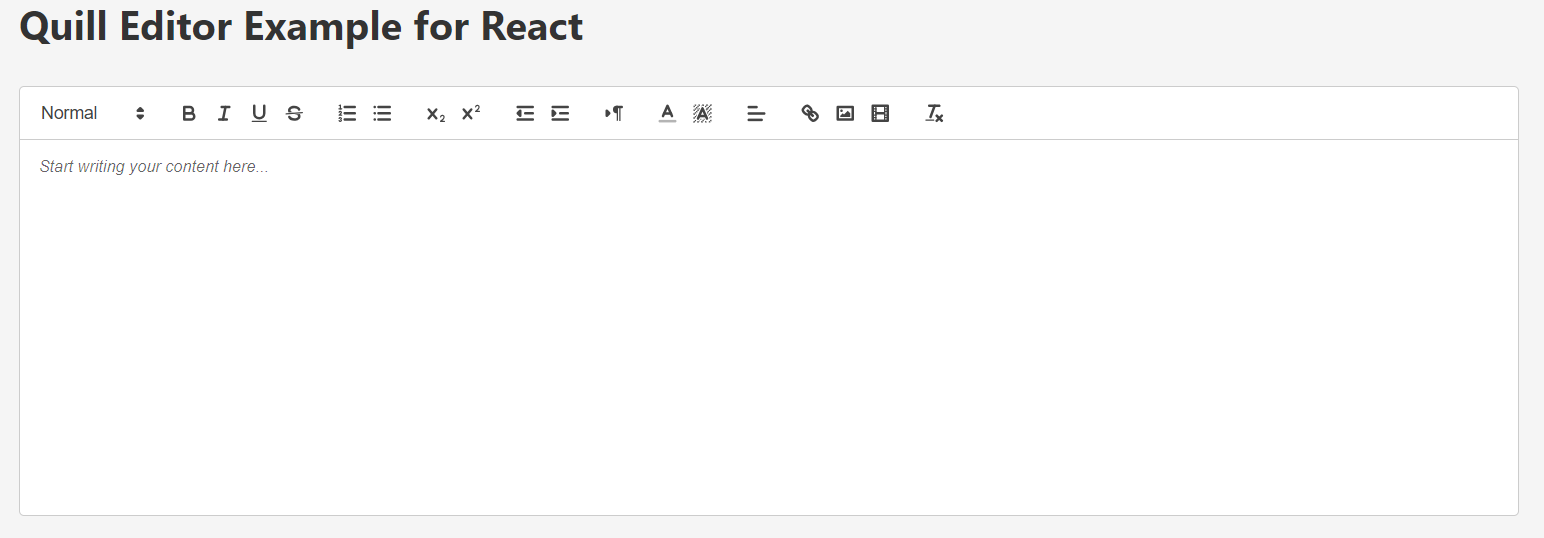
-
Fully compatible with React 18/19+
-
Built using TypeScript for strong typing
-
Supports custom toolbar options
-
Provides full control over Quill’s lifecycle
-
Lightweight and efficient state management
Ensure you have a React project set up, then install Quill:
npm install quill
Example: Create a file App.tsx and use the custom Quill editor.
import { useState } from 'react';
import CustomEditor from './editor/custom-editor';
import './App.css';

function App() {
  const [editorContent, setEditorContent] = useState('');

  const handleEditorChange = (content: string) => {
    setEditorContent(content);
  };

  return (
    <div className="app-container">
      <h1>Quill Editor Example for React</h1>
      <div className="editor-wrapper">
        <CustomEditor
          value={editorContent}
          onChange={handleEditorChange}
          placeholder="Start writing your content here..."
          readOnly={false}
        />
      </div>
    </div>
  );
}

export default App;Create editor/custom-editor.tsx and initialize Quill dynamically.
The complete code is located in editor/ folder
import { forwardRef, useEffect, useRef, useState } from 'react';
import Quill from 'quill';
import 'quill/dist/quill.snow.css';
import './custom-editor.css';

interface CustomEditorProps {
  value?: string;
  onChange?: (content: string) => void;
  readOnly?: boolean;
  placeholder?: string;
}

const CustomEditor = forwardRef<Quill, CustomEditorProps>(({ value = '', onChange, readOnly = false, placeholder = 'Write something...' }, ref) => {
  const editorRef = useRef<HTMLDivElement>(null);
  const quillRef = useRef<Quill | null>(null);
  const [editorId] = useState(`quill-editor-${Math.random().toString(36).substring(2, 9)}`);

  useEffect(() => {
    const destroyQuill = () => {
      if (quillRef.current) {
        quillRef.current = null;
      }
      document.querySelectorAll('.ql-toolbar').forEach(toolbar => toolbar.remove());
      if (editorRef.current) {
        editorRef.current.innerHTML = '';
        const editorElement = document.createElement('div');
        editorElement.id = editorId;
        editorRef.current.appendChild(editorElement);
        return editorElement;
      }
      return null;
    };

    const editorElement = destroyQuill();
    if (!editorElement) return;

    const modules = {
      toolbar: [
        [{ 'header': [1, 2, 3, false] }],
        ['bold', 'italic', 'underline'],
        [{ 'list': 'ordered' }, { 'list': 'bullet' }],
      ],
    };

    quillRef.current = new Quill(editorElement, {
      theme: 'snow',
      modules,
      placeholder,
      readOnly,
    });

    quillRef.current.on('text-change', () => {
      if (onChange) onChange(quillRef.current!.root.innerHTML);
    });
  }, []);

  return <div ref={editorRef} className="custom-editor-container" />;
});

export default CustomEditor;Add the following styles in editor/custom-editor.css:
/* Quill specific styles */
.ql-toolbar.ql-snow {
    border: none !important;
    border-bottom: 1px solid #ccc !important;
    border-radius: 4px 4px 0 0;
}

.ql-container.ql-snow {
    border: none !important;
    min-height: 300px;
}

.quill-editor {
    min-height: 300px;
}

.preview-section {
    margin-top: 2rem;
    padding: 1rem;
    border: 1px solid #eee;
    border-radius: 4px;
    background: white;
}

.preview-section h2 {
    margin-top: 0;
    color: #333;
}Contributions are welcome! Feel free to submit a pull request or open an issue.
This project is licensed under the MIT License.