
Async VK bot framework with FastAPI-style decorators and aiogram-style FSM.




Source Code: https://github.com/ndugram/fastvk
FastVK is a modern async VK bot framework for Python. It brings a decorator-based handler API — similar to FastAPI and aiogram, but for VK — with FSM, middleware, filters, keyboard builder, and a real-time dashboard out of the box.
Key features:
- Familiar — if you know FastAPI or aiogram, you already know FastVK. Same patterns, same ergonomics.
- CallbackData — typed callback data factory with
pack()/unpack()— inspired by aiogram. - Auto-retry — built-in exponential backoff for VK API calls (network errors, flood control).
- Auto-pagination —
bot.collect()iterates paginated methods (members, posts, history) with no manual loops. - Async — built on aiohttp with full async/await support from top to bottom.
- FSM — built-in Finite State Machine with
State,StatesGroup, and pluggable storage: Memory, Redis, SQLite. - Filters —
Command,Text,StateFilter,FromUser,IsChatand custom filters via any callable. - Keyboard — fluent keyboard builder with text, callback, link, location, and VK Pay buttons.
- Injection — handler parameters injected by type:
message,state,bot,update— no manual wiring. - Routers — split handlers across multiple
Routerinstances and include them into the main bot. - Middleware — intercept every update before and after handlers with
BaseMiddleware. - Webhook — built-in Callback API server via
run_webhook(), no extra setup needed. - Dashboard — real-time monitoring UI with live stats, activity feed, and handler search.
- Logging — colored, structured terminal output with per-logger colors and event highlighting.
- Typed — full type annotations throughout; works great with mypy and pyright.
Python 3.10+
FastVK depends on:
aiohttp— async HTTP transport for Long Poll, Webhook, and VK API calls.pydantic— typed data models for VK event objects.
$ pip install fastvk

---> 100%Create a file main.py:
from fastvk import FastVK
from fastvk.filters import Command
from fastvk.types import Message

bot = FastVK(token="vk1.a.YOUR_TOKEN")


@bot.message(Command("start"))
async def start(message: Message) -> None:
    await message.answer("Привет! Я FastVK бот.")


if __name__ == "__main__":
bot.run_polling()$ python main.pyYou will see colored output like:
10:35:42  INFO     fastvk                  FastVK started (group_id=123456789)
10:35:44  INFO     fastvk                  ← message_new  →  start()  [Иван  id=123]
Send /start to your bot — it replies instantly.
With FSM (multi-step forms)...
Use StatesGroup and State to collect data across multiple messages:
from fastvk import FastVK
from fastvk.filters import Command, StateFilter
from fastvk.fsm import FSMContext, State, StatesGroup
from fastvk.types import Message

bot = FastVK(token="vk1.a.YOUR_TOKEN")


class Form(StatesGroup):
    waiting_name = State()
    waiting_age  = State()


@bot.message(Command("start"))
async def cmd_start(message: Message, state: FSMContext) -> None:
    await state.set_state(Form.waiting_name)
    await message.answer("Как тебя зовут?")


@bot.message(StateFilter(Form.waiting_name))
async def got_name(message: Message, state: FSMContext) -> None:
    await state.update_data(name=message.text)
    await state.set_state(Form.waiting_age)
    await message.answer(f"Отлично, {message.text}! Сколько тебе лет?")


@bot.message(StateFilter(Form.waiting_age))
async def got_age(message: Message, state: FSMContext) -> None:
    data = await state.update_data(age=message.text)
    await state.clear()
    await message.answer(f"Готово!\nИмя: {data['name']}\nВозраст: {data['age']}")


if __name__ == "__main__":
    bot.run_polling()
With persistent FSM storage (SQLite)...
FSM state survives restarts — no Redis required:
from fastvk import FastVK
from fastvk.fsm import SQLiteStorage

bot = FastVK(
    token="vk1.a.YOUR_TOKEN",
    storage=SQLiteStorage("bot.db"),
)
Install the optional dependency first:
$ pip install fastvk[sqlite]For Redis:
from fastvk.fsm import RedisStorage

bot = FastVK(..., storage=RedisStorage("redis://localhost:6379/0"))
$ pip install fastvk[redis]With keyboard buttons...
Build keyboards with a fluent API:
from fastvk import FastVK
from fastvk.filters import Command
from fastvk.keyboard import Button, Keyboard
from fastvk.enums import Color
from fastvk.types import Message

bot = FastVK(token="vk1.a.YOUR_TOKEN")


@bot.message(Command("menu"))
async def menu(message: Message) -> None:
    kb = (
        Keyboard(one_time=True)
        .row(
            Button.text("Да",  color=Color.POSITIVE),
            Button.text("Нет", color=Color.NEGATIVE),
        )
        .row(Button.text("Отмена"))
    )
    await message.answer("Выберите:", keyboard=kb)


@bot.message(Command("pay"))
async def pay(message: Message) -> None:
    kb = (
        Keyboard(inline=True)
        .row(Button.vkpay(action="pay-to-group", group_id=123456789, amount=100, description="Донат"))
    )
    await message.answer("Поддержать проект:", keyboard=kb)
With inline buttons (callback)...
Handle button clicks from inline keyboards:
from fastvk import FastVK
from fastvk.filters import Command
from fastvk.keyboard import Button, Keyboard
from fastvk.types import CallbackQuery, Message

bot = FastVK(token="vk1.a.YOUR_TOKEN")


@bot.message(Command("vote"))
async def vote(message: Message) -> None:
    kb = (
        Keyboard(inline=True)
        .row(
            Button.callback("👍 За",    payload={"v": "yes"}),
            Button.callback("👎 Против", payload={"v": "no"}),
        )
    )
    await message.answer("Голосование:", keyboard=kb)


@bot.callback()
async def on_vote(cb: CallbackQuery) -> None:
    choice = cb.payload.get("v")
    await cb.answer(f"Вы проголосовали: {'за' if choice == 'yes' else 'против'}")
With CallbackData (typed payloads)...
Use typed callback data instead of raw dicts — inspired by aiogram's CallbackData:
from typing import ClassVar

from fastvk import FastVK, CallbackData
from fastvk.filters import Command
from fastvk.keyboard import Button, Keyboard
from fastvk.types import CallbackQuery, Message


class ProductCallback(CallbackData):
    prefix: ClassVar[str] = "product"
    product_id: int
    action: str = "view"


bot = FastVK(token="vk1.a.YOUR_TOKEN")


@bot.message(Command("shop"))
async def shop(message: Message) -> None:
    kb = (
        Keyboard(inline=True)
        .row(
            Button.callback("Товар 1", payload=ProductCallback(product_id=1).pack()),
            Button.callback("Товар 2", payload=ProductCallback(product_id=2).pack()),
        )
    )
    await message.answer("Каталог:", keyboard=kb)


@bot.callback()
async def on_product(callback: CallbackQuery) -> None:
    cb = ProductCallback.unpack(callback.payload)
    await callback.answer(f"Товар #{cb.product_id}: {cb.action}")
# Compact payload format: product:{"product_id":1,"action":"view"}With routers...
Split handlers into separate modules and include them into the bot:
# shop.py
from fastvk import Router
from fastvk.filters import Command, Text
from fastvk.types import Message

router = Router()


@router.message(Command("catalog"))
async def catalog(message: Message) -> None:
    await message.answer("Наш каталог: ...")


@router.message(Text("цена", contains=True, ignore_case=True))
async def price_mention(message: Message) -> None:
    await message.answer("Цены начинаются от 99₽")
# main.py
from fastvk import FastVK
from shop import router
bot = FastVK(token="vk1.a.YOUR_TOKEN")
bot.include_router(router)
if __name__ == "__main__":
bot.run_polling()With middleware...
Intercept every incoming update to add logging, rate limiting, or custom data:
from collections.abc import Awaitable, Callable
from typing import Any

from fastvk import FastVK
from fastvk.middleware import BaseMiddleware
from fastvk.filters import Command
from fastvk.types import Message


class LoggingMiddleware(BaseMiddleware):
    async def __call__(
        self,
        handler: Callable[[Any, dict], Awaitable[Any]],
        event: Any,
        data: dict,
    ) -> Any:
        print(f"incoming: {type(event).__name__}")
        result = await handler(event, data)
        print("handled")
        return result


bot = FastVK(
    token="vk1.a.YOUR_TOKEN",
    middleware=[LoggingMiddleware()],
)
With error handlers...
Catch exceptions raised inside handlers — by type, with full context injection:
from fastvk import FastVK
from fastvk.exceptions import VKAPIError
from fastvk.filters import Command
from fastvk.types import Message

bot = FastVK(token="vk1.a.YOUR_TOKEN")


@bot.message(Command("risky"))
async def risky(message: Message) -> None:
    raise ValueError("что-то пошло не так")


@bot.exception_handler(VKAPIError)
async def on_vk_error(error: VKAPIError, message: Message) -> None:
    await message.answer("VK API недоступен, попробуй позже.")


@bot.exception_handler()
async def on_any_error(error: Exception, message: Message) -> None:
    await message.answer(f"Ошибка: {error}")


if __name__ == "__main__":
    bot.run_polling()
With webhook...
Receive updates via VK Callback API instead of Long Poll:
from fastvk import FastVK
from fastvk.filters import Command
from fastvk.types import Message

bot = FastVK(token="vk1.a.YOUR_TOKEN")


@bot.message(Command("start"))
async def start(message: Message) -> None:
    await message.answer("Привет через webhook!")


if __name__ == "__main__":
    bot.run_webhook(
        confirmation_token="abc123def",  # from VK group settings
        host="0.0.0.0",
        port=8080,
        path="/vk",
        secret="my_secret",             # optional
    )
With filters...
Combine built-in and custom filters on any handler:
from fastvk import FastVK
from fastvk.filters import Command, FromUser, IsChat, Text
from fastvk.types import Message

ADMIN_ID = 123456789
bot = FastVK(token="vk1.a.YOUR_TOKEN")


@bot.message(Command("ban"), FromUser(ADMIN_ID))
async def admin_ban(message: Message) -> None:
    await message.answer("Пользователь заблокирован.")


@bot.message(IsChat("private"), Text("помощь", contains=True, ignore_case=True))
async def help_in_pm(message: Message) -> None:
    await message.answer("Список команд: /start, /help")


def is_long_message(message: Message, data: dict) -> bool:
    return len(message.text or "") > 200


@bot.message(is_long_message)
async def long_message(message: Message) -> None:
    await message.answer("Это очень длинное сообщение!")
With raw VK API calls...
Access the full VK API via the injected bot parameter:
from fastvk import Bot, FastVK
from fastvk.filters import Command
from fastvk.types import Message

bot = FastVK(token="vk1.a.YOUR_TOKEN")


@bot.message(Command("me"))
async def cmd_me(message: Message, bot: Bot) -> None:
    users = await bot.users.get(user_ids=message.from_id, fields="photo_200")
    name = f"{users[0]['first_name']} {users[0]['last_name']}"
    await message.answer(f"Ты: {name}")


@bot.message(Command("members"))
async def cmd_members(message: Message, bot: Bot) -> None:
    data = await bot.groups.getMembers(group_id=123456789, count=1)
    await message.answer(f"Участников: {data['count']}")
With event handlers...
Handle any VK event type — not just messages:
from fastvk import Bot, FastVK
from fastvk.types import GroupJoinEvent, GroupLeaveEvent, Update, User, WallPostEvent

bot = FastVK(token="vk1.a.YOUR_TOKEN")


@bot.group_join()
async def on_join(event: GroupJoinEvent, user: User, bot: Bot) -> None:
    await bot.messages.send(
        peer_id=event.user_id,
        message=f"Добро пожаловать, {user.first_name}!",
        random_id=0,
    )


@bot.group_leave()
async def on_leave(event: GroupLeaveEvent) -> None:
    action = "сам покинул" if event.is_self else "был исключён из"
    print(f"Пользователь {event.user_id} {action} группы.")


@bot.wall_post_new()
async def on_new_post(event: WallPostEvent) -> None:
    print(f"Новый пост #{event.id}: {event.text[:80]!r}")


@bot.on("photo_new")
async def on_photo(update: Update) -> None:
print(f"Новое фото: {update.object}")Enable the real-time monitoring dashboard by passing a BaseDashboard instance:
from fastvk import FastVK
from fastvk.dashboard import BaseDashboard, DashboardConfig

class MyDashboard(BaseDashboard):
    config = DashboardConfig(
        dashboard_host="127.0.0.1",
        dashboard_port=8080,
    )

bot = FastVK(
    token="vk1.a.YOUR_TOKEN",
    dashboard=MyDashboard(),
)
Open http://127.0.0.1:8080 in your browser.
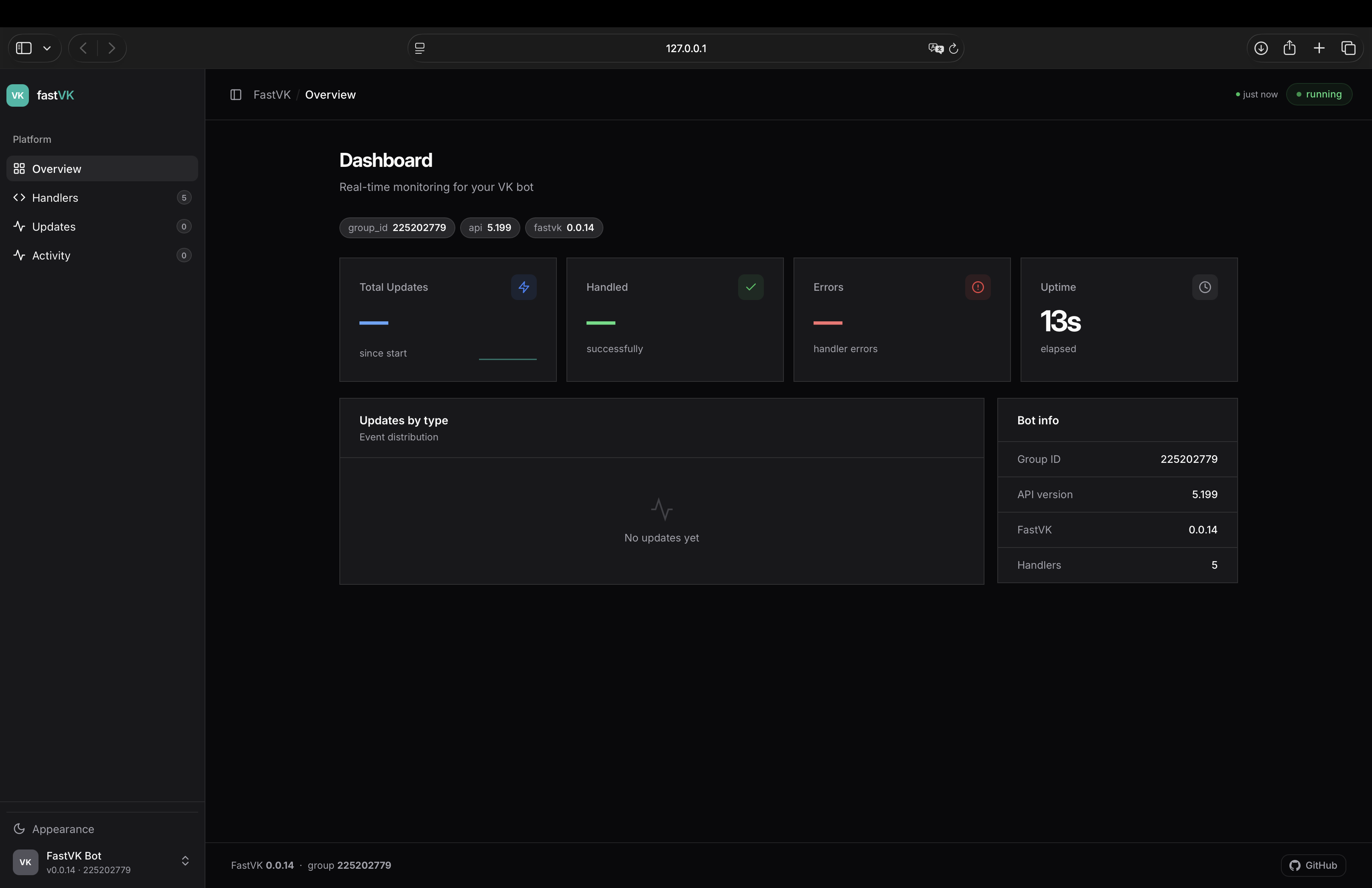
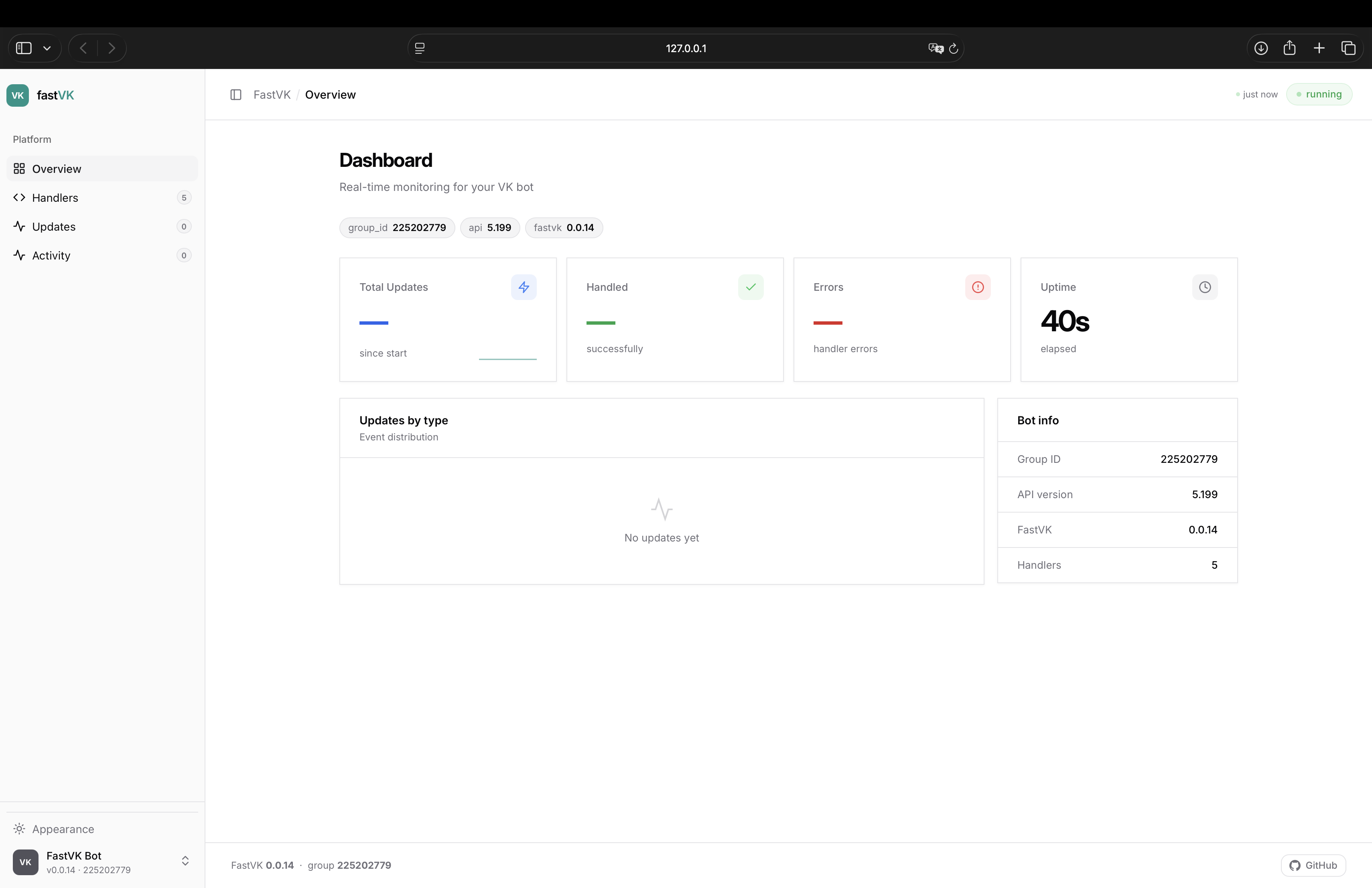
The dashboard shows:
- Overview — total updates, handled, errors, uptime, sparkline, updates/min, event distribution
- Handlers — registered handlers with filters, searchable
- Updates — live event type breakdown with percentages
- Activity — real-time event feed with timestamps, last 200 events
Handler parameters are injected by type — declare what you need, the framework provides it:
| Type | What you get |
|---|---|
Message |
Parsed incoming message (message_new events) |
CallbackQuery |
Inline button click payload (message_event events) |
FSMContext |
FSM state accessor for the current user |
Bot |
VK API client |
Update |
Full raw update object |
BackgroundTasks |
Fire-and-forget background tasks |
Your CallbackData subclass |
Unpacked callback payload (when using CallbackDataFilter) |
@router.message()
async def handler(
    message: Message,
    state: FSMContext,
    bot: Bot,
) -> None:
...| Extra | Installs | Use |
|---|---|---|
fastvk[sqlite] |
aiosqlite |
SQLiteStorage — persistent FSM without Redis |
fastvk[redis] |
redis |
RedisStorage — Redis-backed FSM storage |
$ pip install fastvk[sqlite]
$ pip install fastvk[redis]Contributions are welcome! Please open an issue before submitting a pull request.
Found a bug? Open an issue on GitHub.
This project is licensed under the terms of the MIT license.