




TIMECODE-AGENT helps coding agents turn long video into a local, reusable evidence ledger.
- Transcript first. Ingest produces a timestamped transcript (reusing the uploader's captions when they exist) plus deterministic placement signals — scenes, audio energy, OCR, faces — before any frame is sent to a model.
- Lazy visual verification. The coding agent inspects only the moments where a claim needs visual confirmation, and records what it verified as time-addressed checkpoints instead of a one-shot answer.
- Evidence that persists. Checkpoints, capture provenance, and edit decisions live in append-only ledgers; indexes, a static corpus browser, and wiki pages are rebuildable projections over them.
- Grounded editorial handoff. EDL, FCPXML, and OTIO exports are derived from recorded checkpoints or a pinned sequence — not from an unstored model reply; clip extraction and SRT rendering are supporting utilities that work on any span or the full transcript.
Typical uses: answering questions about long footage without re-watching it, cutting highlights or shorts with receipts for every cut, and growing a searchable corpus and wiki across many videos.
git clone https://github.com/mupozg823/timecode-agent.git && cd timecode-agent
uv tool install --python 3.12 .

va ingest show.mp4 --model small --signals
va brief va-out/show
va capture va-out/show -t 1:23 -t 95
va status va-out/show
The first pass builds reusable local artifacts. Your coding agent reads those artifacts, inspects decision-critical gaps, and records supported checkpoints before any grounded edit is exported.

- Legacy workspaces promote in place —
va rebindbackfills pre-0.3.0 workspaces into revision binding (dry-run by default) and refuses when the source is gone, so frozen corpora accept new evidence again. - Procedures compile into skill drafts — recurring, visually grounded
task-*steps become approval-pending skill drafts gated on tool-consensus intent coherence;va skillgen --routenames what still blocks each candidate. - Beat-quantized rhythm editing —
va beatsextracts a beat grid from a music track andva beat-evalgates sequence joins against it (p90 offset <= 40 ms), with a ledger-preserving snap proposal. - Story Map — both ledgers projected onto one proportional timeline with grounding cross-highlight, a cut-provenance lane and speaker ribbons.
- Persistent BM25 search index — fingerprint-incremental FTS5 with hybrid Korean recall and RRF-routed ranking.
- Experimental Windows support — the workspace lock has an
msvcrtfallback and CI runs a Windows smoke job; see Requirements.
All shipped to main. The current release is
v0.4.0;
v0.1.0 was
the first.
A fixed-sampling workflow sends frames to a model before it knows which moments matter. Short events can fall between samples, similar frames consume the same budget repeatedly, and the next question often starts with no durable state from the previous one.
TIMECODE-AGENT separates two concerns:
- Placement: deterministic signals and bundled perception tools locate moments that may deserve attention.
- Selection: the coding agent decides what a claim means, what evidence can support it, and whether more inspection is worth the cost.
The package stores those decisions as time-addressed artifacts instead of leaving them in a one-shot model response.
| Fixed-sampling baseline | TIMECODE-AGENT | |
|---|---|---|
| First pass | frames first | transcript and deterministic signals first |
| Visual inspection | fixed interval or every detected change | frames selected when a claim or request needs visual confirmation |
| Durable result | summary or answer | timestamped checkpoint and evidence artifacts |
| Later question | sample or decode again | search stored artifacts before targeted re-inspection |
| Editorial delivery | flat cut list or none | evidence-gated EDL / FCPXML / OTIO handoff |
This table describes an architectural contrast, not a performance claim. The included public benchmark is a regression gate; it does not establish answer superiority, optimal frame selection, or human editing preference.
flowchart TB
    V["video file or URL"] --> I["ingest"]
    I --> T["timestamped transcript"]
    I --> S["placement signals<br/>scenes · audio · OCR · faces"]
    T --> A["understanding loop — Kubrick"]
    S --> A
    A --> C["checkpoints.jsonl<br/>claims · spans · support"]
    C --> P["indexes · static view · wiki · answers"]
    C --> E["editing loop — Kuleshov<br/>read-only understanding snapshot"]
    E --> D["sequences.jsonl<br/>selection · order · trim"]
    D --> O["clips · EDL · FCPXML · OTIO · SRT"]
    D -. "never rewrites facts" .-> C
Ingest reuses transcripts the uploader already made: a manual caption track
wins, then the uploader's original-language automatic track (*-orig is
requested first); a different-language track is only a last-resort fallback,
and caption requests are currently limited to ko/en. Only when no usable
caption track exists does whisper transcribe the audio — --force-whisper
opts back into transcription when word-level timing matters.
The signal layer proposes where evidence may be useful; it does not establish semantic truth. The coding agent performs meaning-level selection and records claims with resolvable time spans and evidence references.
Understanding and editing are separate write domains. Editing reads a pinned understanding snapshot and records its own decisions. If a fact changes, the checkpoint is corrected upstream and the affected edit is re-derived.
The two procedures above carry director names in the Agent Skill, so a request lands in the right loop with the right write permissions. The names describe procedures, not installed modules.
| Kubrick — the understanding engine | Kuleshov loop — the editing loop | |
|---|---|---|
| Question | what is in this video, and how sure am I? | does this cut hold, and can it be defended? |
| Writes to | checkpoints.jsonl — the fact ledger |
sequences.jsonl — the edit-decision ledger |
| Round trip | hypothesize from the transcript → pick verification points → capture → verify or correct → converge | draft cut alternatives → evaluate every cut boundary → re-snap → promote a terminal sequence |
| Never does | export a cut | rewrite a fact |
Using Kubrick — this is what the Agent Skill runs when you ask "analyze this video"; every step also works by hand:
va ingest lecture.mp4 --signals   # transcript + placement signals
va brief va-out/lecture           # entry point: what is known so far
va filmstrip va-out/lecture --auto   # low-res overview of uncertain stretches
va capture va-out/lecture -t 95 --reason "speaker change"
# capture prints the evidence path — a nonempty --reason is slugged into it
va checkpoint add va-out/lecture --json-file - <<'JSON'
{"id":"cp-001","span":[83,125],"status":"verified",
 "hypothesis":"Q&A opens; a second speaker joins",
 "confidence":0.9,
 "visual_evidence":["frames/t000095000-speaker-change.jpg"]}
JSON
va status va-out/lecture          # coverage and readiness (advisory)
The loop converges when decision-critical claims have current support and another observation is unlikely to change the answer — not when a fixed frame budget is spent.
Using the Kuleshov loop — what runs when you ask for a defensible cut; the Cut workflow is its everyday entry:
va highlights va-out/lecture --json          # placement candidates
va sequence add va-out/lecture --json-file - <<'JSON'
{"id":"seq-001","intent":"lecture highlight",
 "cuts":[{"span":[83.0,125.0],"order":1,"role":"hook",
          "checkpoint_ids":["cp-001"]}],
 "status":"assembled"}
JSON
va boundary-eval va-out/lecture --sequence seq-001   # score cut edges and joins
# inspect and re-snap, then promote the same id to boundary_verified —
# exporting an "assembled" sequence would leave the receipt's
# checkpoint-revision map empty
va sequence add va-out/lecture --json-file - <<'JSON'
{"id":"seq-001","intent":"lecture highlight",
 "cuts":[{"span":[83.0,125.0],"order":1,"role":"hook",
          "checkpoint_ids":["cp-001"]}],
 "status":"boundary_verified"}
JSON
va clip va-out/lecture --start 83 --end 125 --accurate
va export va-out/lecture --format otio --sequence seq-001 -o cut.otio --receipt
The boundary between the loops is one-directional: the Kuleshov loop reads the fact ledger and never writes it. A cut that rests on a wrong fact is not patched in the sequence — the checkpoint is corrected in Kubrick and the edit is re-derived.
Current scope
- The Python package performs media operations, deterministic signals, and persistence; the coding-agent harness supplies semantic judgment.
- Understanding and edit decisions use separate physical ledgers in one runtime.
- This release does not ship a separate
editcode-agent, caller-specific write capabilities, or a typed evidence-request hand-back protocol. - Wiki
tca:notesand the workspace scene-log narrative remain preserved authored blocks rather than ledger-replayed state.
After an agent has checked the example span and the captured frame supports its reading, record that support before exporting:
va checkpoint add va-out/show --json-file - <<'JSON'
{"id":"cp-001","span":[83,125],"status":"verified","hypothesis":"Verified answer segment","confidence":0.9,"visual_evidence":["frames/t000095000.jpg"]}
JSON
va export va-out/show --format edl --ids cp-001 -o cut.edl
grep -q '^001 ' cut.edl
The values are illustrative; use the span and evidence established for your
own video. The final command fails this example check if the EDL contains no
edit event. For revision-pinned, machine-gated multi-cut delivery, record a
terminal sequence and export it with --sequence.
va view writes a self-contained static corpus browser and per-video
players — single HTML files, no server and no frontend framework. The pages
follow the OS color scheme; dark mode is shown here.
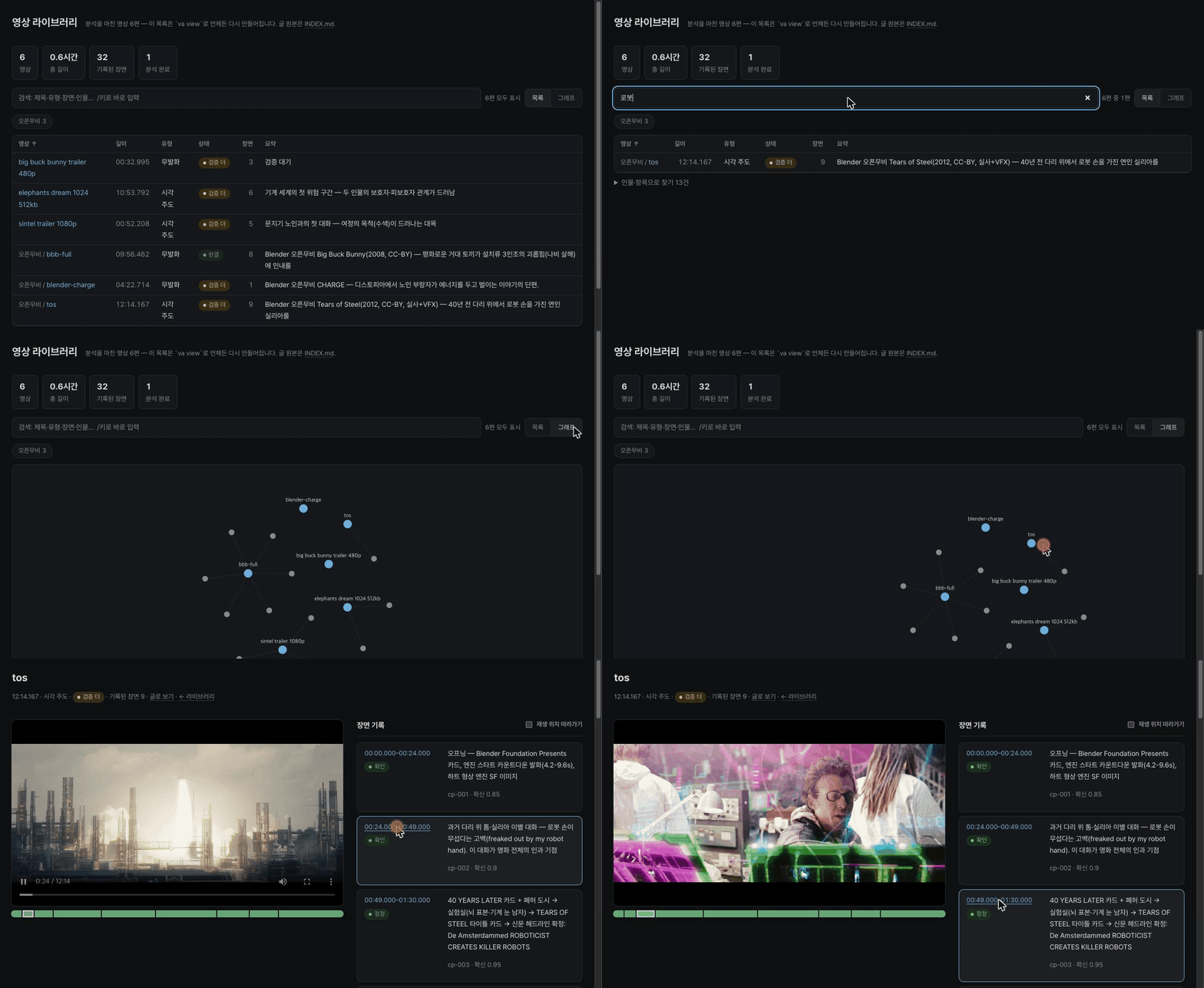
Live tour: filter the library, explore the relation graph, then click a scene record — the player jumps to that timestamp.
| Corpus library — search, type, status, scene counts | Relation graph — videos ↔ people and entities |
|---|---|
 |
 |
| Workspace player — scene records beside the video | Timeline strip and verified scene cards |
|---|---|
 |
 |
The demo GIF and screenshots show a demo corpus built by running the tool on the Blender Foundation open movies Sintel, Elephants Dream, Big Buck Bunny, Tears of Steel, and Charge (CC-BY, © Blender Foundation — blender.org) — including the same freely fetchable fixtures the reproducible benchmark uses.
Each workspace keeps a manifest, transcript, append-only checkpoint events, capture provenance, corrections, and optional edit decisions. Indexes, HTML views, wiki pages, and NLE files are rebuildable projections.
va-out/
├── INDEX.md
├── view.html
├── show/
│   ├── manifest.json
│   ├── transcript.json
│   ├── checkpoints.jsonl
│   ├── image-provenance.jsonl
│   ├── corrections.jsonl
│   ├── sequences.jsonl
│   ├── .workspace.lock
│   ├── .checkpoint.lock
│   ├── .image-provenance.lock
│   ├── .sequences.lock
│   ├── frames/
│   └── wiki/
└── another-video/
Ingest publishes source, transcript, and timing revision IDs in the manifest.
New checkpoints, image-provenance events, sequences, and NLE receipts carry
that binding. va ingest will not overwrite a published workspace or a
manifest-less directory that already contains durable evidence; use va brief
to resume, or a fresh -o path for a new source or transcript generation. If
the first ingest fails before revision publication, the manifest remains
building and the same source plus -o path can be retried safely.
Seconds remain the CLI display/input surface, while new ledger records also
store a half-open stream PTS/time-base span. Before a revision-bound NLE
handoff, the complete decoded video timeline must prove one uniform rational
cadence, including every frame duration and the final boundary;
avg_frame_rate == r_frame_rate is only a hint. VFR, unknown, or irregular
timing stays blocked until decoded-frame snapping/export is available.
Pre-revision workspaces remain readable, but are read-only for new checkpoints,
image provenance, and sequences; create a fresh ingest workspace before adding
evidence. A new draft created directly through the current Python API binds its
source, transcript, and timing on the first evidence write.
va search "<terms>" queries a persistent FTS5 index (word and trigram
retrievers fused per source family) across workspace transcripts,
checkpoints, and OCR, synced incrementally per workspace fingerprint.
va view writes a self-contained static corpus browser. va wiki projects entities, relations, quotes, and scene
notes into Markdown. No vector database is the source of truth.
va index, va view, and va wiki accept one corpus root, or workspace
paths that share one explicitly supplied common root. Independent roots are
rejected before any projection is written so links cannot silently collide.
Commands hold a shared workspace operation lease while reading or writing;
ingest and whole-workspace garbage collection take the exclusive side of that
lease, so an active capture, transcription, signal pass, or projection cannot
be removed underneath the command.
Corpus commands operate on the exact workspace snapshot they leased rather
than rediscovering mid-run, and ingest keeps its exclusive lease through final
manifest or signal-summary output.
Published legacy workspaces without .workspace.lock serialize each command
through an exclusive lease on the existing workspace-directory inode.
| Family | Commands |
|---|---|
| Ingest and corpus | ingest glossary audit rebind search index view wiki skillgen bridge gc |
| Placement and inspection | brief capture keyframes audioevents diarize faces ocr filmstrip highlights scenes |
| Understanding state | checkpoint add/list/observe ask status |
| Editing and delivery | sequence add/list boundary-eval beats beat-eval clip export reframe |
| Runtime and configuration | runtime |
The same CLI is available as va and tca.
A few commands are worth a direct mention beyond the table above:
filmstriptiles a time window into a contact-sheet grid for fast visual scanning;--autosplits a long span into density-ruled windows instead of one oversized image. Run it locally against your own footage; this repository does not ship any third-party contact-sheet images.diarizeadds who-spoke-when speaker turns;--backend autoprefers the gatedpyannotemodel when a Hugging Face token is present (environment variable orhf auth logincache) and otherwise uses the ungatedsherpabackend. Run it before recording checkpoints or other transcript-dependent evidence: it advances the transcript revision, and is refused once such evidence exists.va checkpoint observe <workspace> --id <id> --frame <frames/...jpg> --subject "seated man" --state present|absent|uncertain --hypothesis "..."records one query-selected, provenance-tracked, uncropped frame as a typedperson_presencecheckpoint. The command derives the observation timestamp and matchingvisual_evidencepath from that frame. Useuncertainwhenever the frame does not resolve presence; it remains a hypothesized observation.va ask <workspace> "how many times did the seated man leave the screen?"accepts narrow English and natural Korean variants of that one event-count intent. Its deterministic reader consumes typedperson_presenceobservations and current, provenance-tracked full-resolution frames. It reports verified departures separately from uncertain intervals; ambiguous subjects, actions, or count requests fail with a specific diagnostic. Default--format human --lang autorenders Korean questions in Korean and English questions in English;--lang ko|enoverrides detection.--format agent-jsonprojects the same once-calculated envelope as compact JSON with English identifiers and reason codes. It preserves a normalizedreply_locale(for example,ja-JPbecomesja) so a host LLM can localize without parsing human prose. The CLI itself neither invokes an LLM nor translates.va askis read-only and never appends or rewrites checkpoint or image provenance. Missing evidence is not a zero count or proof.
va ask va-out/clip "앉아 있던 남자가 화면 밖으로 몇 번 나갔나요?"
va ask va-out/clip "how many times did the seated man leave the screen?" --lang en
va ask va-out/clip "how many times did the seated man leave the screen?" \
--format agent-json --lang ja-JP{"v":1,"intent":"person_exit_count","subject":"seated_man","reply_locale":"ja","status":"partial","count":1,"verified":[{"from_ms":12000,"to_ms":18000,"evidence":["frames/frame-000012.000.jpg","frames/frame-000018.000.jpg"]}],"uncertain":[{"from_ms":0,"to_ms":12000,"code":"UNOBSERVED_PREFIX"},{"from_ms":18000,"to_ms":30000,"code":"UNOBSERVED_SUFFIX"}],"next_ms":[6000,24000]}boundary-evalscores a recorded sequence's cut points and joins (speech-cut, breath, loudness step) so an edit can be re-snapped before export instead of after review.beatsextracts a fixed-tempo beat grid (beats.json) from a music track;beat-evalgates a sequence's output-timeline joins against it (p90 offset <= 40ms), and--snapprints a span proposal that lands every join on a beat.
Every flag below is taken from each command's --help; defaults shown are
the argparse or effective runtime defaults, not documentation guesses.
Ingest and corpus
| Command | Flag | Default | Meaning |
|---|---|---|---|
ingest |
--max-height |
1080 |
URL download resolution cap |
ingest |
--cookies-from-browser |
none | chrome|safari|firefox — pass browser cookies to yt-dlp for a login-walled source; only needed when the source requires your own session |
ingest |
-o, --out |
./va-out/<stem> (local file) or ./va-out/url-<md5-prefix> (URL) |
fresh workspace directory — existing manifests or orphaned durable evidence fail closed; always pass it for URLs so the resume path is known in advance |
ingest |
--model |
small |
whisper size (tiny|base|small|medium|large-v3), or any CTranslate2 model — local path or HF repo id |
ingest |
--asr-backend |
auto |
ASR execution path (auto|faster-whisper|mlx) — auto follows the runtime profile: balanced/quality = faster-whisper, Apple Silicon low-power = MLX with VAD and a quality fallback |
ingest |
--lang |
auto-detect | e.g. ko, en |
ingest |
--hotwords |
auto-loaded from the va glossary cache |
domain terms fed to whisper |
ingest |
--force-whisper |
off | transcribe even when the video ships captions |
ingest |
--signals |
off | also compute highlights + scenes and print the brief (one-call session start) |
glossary |
workspaces (positional) |
prints current status | workspaces to update; omit to just view |
glossary |
--all |
off | collect corrections from every workspace under ./va-out |
audit, search, index, view, wiki, skillgen |
roots (positional) |
./va-out |
one corpus root, or workspaces sharing one explicit common root |
search |
query (positional) |
required | space-separated terms, prefix-matched |
search |
--top |
10 |
max results |
index |
--graph-reset |
off (created only if absent) | overwrite Obsidian's .obsidian/graph.json display preset with the shipped defaults |
wiki |
--include-hypotheses |
off | compatibility projection that also includes hypothesized (unverified) labels |
bridge |
vault (positional) |
required | existing brain-vault directory to attach |
bridge |
--corpus |
./va-out |
stub-source corpus root |
gc |
paths (positional) |
./va-out |
workspace or root paths |
gc |
--purge |
— | captures|media|clips|workspace, repeatable or comma-separated; media warns "no re-capture" and never touches transcript/checkpoint text |
gc |
--keep-days |
— | with --purge workspace: drop workspaces whose newest file is older than N days (required for that mode) |
gc |
--yes |
off | actually delete; otherwise a dry-run listing only |
Placement and inspection
| Command | Flag | Default | Meaning |
|---|---|---|---|
brief |
--why |
— | analysis intent/question — surfaces the relevant transcript spans and checkpoints in the briefing |
capture |
-t (repeatable) |
required | timestamp (12.5|1:23.5|01:02:03) |
capture |
--crop |
full frame | ffmpeg crop expression w:h:x:y (iw/ih allowed) — capture just a UI region |
capture |
--reason (repeatable) |
none | triggering signal, recorded as a causal edge in image-provenance.jsonl for session-crossing auditability |
capture |
--sharp |
off | sharpness gate — picks the crispest of t±window via Sobel edge energy across 3 candidates |
capture |
--window |
0.3 |
sharp-gate candidate offset, seconds |
keyframes |
--budget |
12 |
max frames to select |
keyframes |
--start, --end |
full video | selection window |
keyframes |
--min-gap |
1.0 |
minimum seconds between picks |
keyframes |
--explain |
off | show displaced candidates and why (min_gap_displaced/budget_exhausted) |
keyframes |
--legible-endcard |
off | pick the most static tail candidate instead of a fixed duration-1 endcard |
filmstrip |
--start, --end |
0 / video duration |
contact-sheet window |
filmstrip |
-n / --cols |
9 / 3 |
tile count, grid columns |
filmstrip |
--auto |
off | density-rule tiling: split the span into bounded windows with bounded cell gaps |
highlights |
--top |
5 |
number of peaks to return |
highlights |
--window |
0.5 |
RMS window, seconds |
scenes |
--threshold |
0.3 |
cut-detection sensitivity |
scenes |
--adaptive |
off | also catch gradual changes vs. a rolling average |
scenes |
--color-check |
off | cross-check detections with a brightness-free H-S histogram to flag lighting false positives |
audioevents |
--min-conf |
0.6 |
confidence floor |
diarize |
--num-speakers |
auto | expected speaker count |
diarize |
--backend |
auto |
auto prefers gated pyannote (HF token via env or hf auth login), falls back to ungated sherpa |
faces |
-t (required, repeatable) |
— | timestamp(s) to detect faces on |
faces, ocr |
--crop |
full frame | ffmpeg crop expression w:h:x:y |
ocr |
-t (repeatable) |
— | single timestamps |
ocr |
--every |
— | scan mode: OCR every N seconds, merge repeats into ocr_transcript.json |
ocr |
--start, --end |
0 / duration |
scan span |
ocr |
--lang |
ko-KR,en-US |
comma-separated language list |
Understanding state
| Command | Flag | Default | Meaning |
|---|---|---|---|
checkpoint add |
--json / --json-file |
— | checkpoint object as a JSON string / file path (- for stdin) |
checkpoint add |
--id / --span / --status / --hypothesis / --confidence / --segments / --visual-evidence / --note |
— | build the checkpoint from flags instead of JSON; mixing the two input paths is rejected, including an explicitly empty value |
checkpoint observe |
--id / --frame / --subject / --state / --hypothesis |
required | bind one tracked, uncropped point frame to a typed person_presence checkpoint; unresolved frames use uncertain and stay hypothesized |
ask |
workspace, question (positional) |
required | narrow, read-only seated-person screen-departure count from structured checkpoint observations and tracked timestamped frames |
ask |
--lang |
auto |
infer ko from a Korean question and otherwise en, or normalize an explicit BCP-47 primary language tag; direct human rendering supports ko and en |
ask |
--format |
human |
localized human text, or compact agent-json with English identifiers and reply_locale for host-LLM localization |
checkpoint list, status |
--json |
off | machine-readable output |
Editing and delivery
| Command | Flag | Default | Meaning |
|---|---|---|---|
sequence add |
--json / --json-file |
— | sequence object as a JSON string / file path (- for stdin) |
sequence list |
--json |
off | machine-readable output |
boundary-eval |
-t (repeatable) |
— | ad-hoc cut points to score |
boundary-eval |
--sequence |
— | score a recorded sequence's cuts and joins |
boundary-eval |
--window |
0.4 |
audio window around each boundary, seconds |
beats |
--seconds |
full length | analyze only the leading N seconds |
beats |
--out |
<media>.beats.json |
beat-grid artifact path |
beat-eval |
--beats |
required | beats.json produced by va beats |
beat-eval |
--sequence |
required | sequence id to gate |
beat-eval |
--gate-ms |
40 |
p90 join-to-beat tolerance, ms |
beat-eval |
--snap |
off | print a beat-snapped span proposal |
skillgen |
--route |
off | per-task gate status without compiling |
clip |
--start, --end |
required | clip boundaries |
clip |
-o, --output |
— | filename inside clips/ |
clip |
--accurate |
off (stream copy) | re-encode for exact boundaries |
clip |
--hw |
— | h264|hevc VideoToolbox hardware encode (macOS previews; requires --accurate) |
export |
--format |
required | edl|md|xml|otio|fcpxml|srt |
export |
--ids |
— | comma-separated checkpoint ids — the given order is the cut order |
export |
--sequence |
— | sequence id — export the edit ledger's cuts (edl/otio/fcpxml only, mutually exclusive with --ids) |
export |
-o, --output |
— | output path |
export |
--receipt |
off | <output>.receipt.json sidecar — output sha256 plus the evidence checkpoints' revision/status (edl/otio/fcpxml only, requires -o) |
reframe |
clip (positional) |
required | path or filename inside clips/ |
reframe |
--roi |
required | x,y,w,h, repeatable per person — face ROI in clip pixel coordinates |
reframe |
--mode |
pan |
pan|split |
reframe |
--min-dwell |
1.0 |
minimum seconds per pan segment; shorter blips merge into the previous speaker |
reframe |
-o, --output |
— | filename inside clips/ |
Commands that accept it also take --json for machine-readable output;
capture, diarize, and filmstrip do not.
Numbers below are from one machine and one input, stated so they are reproducible rather than persuasive — they describe this repository's own ingest path, not a comparison against another tool.
Device: Apple M4 Pro (8 performance + 4 efficiency cores), macOS. Input: a 43-minute (2,580 s) 1080p Korean YouTube vlog.
| Path | Wall time | Condition |
|---|---|---|
va ingest <url> end-to-end via whisper (535 MB video download + transcribe) |
~9 min | --force-whisper, small model, beam size 5, word timestamps |
va ingest <url> end-to-end, captions-first (default) |
24.5 s | the video carries an original-language caption track |
| Caption track download alone | 2.7 s | same video, caption fetch only |
small-model transcription alone, same audio |
~12 min | shown for comparison against the caption download above |
On one sampled phrase in this video the caption track was also the more
accurate source: the small model misheard "세계 정복" (world domination) as
"세계정보" (world information) while the uploader's caption carried the
correct text — a sample, not a generalization.
Caption-derived cues land on roughly 10-second boundaries after rolling
normalization (2,530 raw cues → 238 normalized cues covering 5.9–2,569.8 s in
this input); pass --force-whisper when a cut needs tighter word-level
timing than that grain.
This table describes one input on one machine and is not a benchmark; see Reproducible benchmark for the regression gate.
va ingest transcribes with faster-whisper 1.2.1. On the same 43-minute
Korean input above, its decode loop occasionally stopped emitting segments
past 1,092 seconds — no exception, no warning, exit code 0.
Isolating the boundary ruled out the obvious causes: ffmpeg's audio extraction was a complete, correctly-durationed 2,580.1 s WAV, and Silero VAD found 2,303.8 s of speech overall, including 1,274.6 s of it after the 1,092 s cutoff. The fault lived inside whisper's own decode loop, not the input.
It was also nondeterministic on identical input: 1 of 3 back-to-back runs
collapsed to 92 segments, while the other 2 completed with 757 and 895
segments respectively. A downstream consumer felt this directly — va brief
on the collapsed transcript concluded the video was "19% speech, visual-led";
on a complete transcript, the same video is "95% speech, speech-led."
The fix does not try to make faster-whisper's decode loop deterministic.
Instead, va ingest compares transcribed duration against VAD-detected
speech duration and records the ratio as transcript_coverage in the
manifest. Below a 0.5 coverage threshold — and only for files with at least
60 s of detected speech, so short or near-silent clips aren't churned
needlessly — it re-transcribes once with condition_on_previous_text=False
and keeps whichever attempt covers more of the detected speech, stamping
transcript_repair when that happens. In the two runs above, the collapsed
transcript scored 0.211 coverage (0.289 below the 0.5 gate) and the healthy
one 0.809 (0.309 above it) — not a hair's-width threshold call on this input.
(Implementation: _transcript_collapsed in src/video_agent/ingest.py.)
The manifest also stamps asr_backend — which backend produced the adopted
transcript (faster-whisper, or an MLX fallback), suffixed +<backend>(tail)
when a tail retranscribe contributed part of it — so a quality comparison can
name its own source instead of guessing. It is null when no ASR ran at all,
which is exactly the uploader-caption path: read transcript_source
(subtitles) to identify that case.
- Python 3.12 on macOS or Linux (
uvprovisions it:uv tool install --python 3.12 .) ffmpegandffprobeonPATHyt-dlpfor URL ingest- A coding-agent harness that can discover the included Agent Skill
- Interface language: mixed. Most
--helptext is English, while diagnostics, theva brief/va statussummaries, and theva viewUI are Korean; no global locale switch exists. The narrowva asksurface is the exception: deterministic human output supports Korean and English, whileagent-jsoncarries other reply locales to the host LLM. Ledgers and handoffs speak whatever language you write into them; see Notes. - Windows is experimental: the core CLI, ledgers, and workspace locking run
(shared locks degrade to exclusive via
msvcrt), a CI smoke job exercises install → import → lock round-trip → CLI startup, and the Apple-backed cues (OCR, faces, semantic audio events) are unavailable as on Linux
| Dependency | macOS | Linux |
|---|---|---|
ffmpeg + ffprobe |
brew install ffmpeg |
sudo apt install ffmpeg (or your distro's package manager) |
yt-dlp (URL ingest only) |
brew install yt-dlp |
uv tool install yt-dlp |
Verify both are reachable before the first ingest:
ffmpeg -version && ffprobe -version
yt-dlp --version
The first va ingest for a given --model size downloads that
faster-whisper model into the Hugging Face hub cache
(HF_HOME/~/.cache/huggingface) — small measured 484 MB on disk here;
check upstream before assuming a number on a metered connection, since
published weights can change.
Media ingest, signal extraction, and persistence run locally by default.
URL ingest uses the network. scripts/install.sh prepares the ungated default
model artifacts up front; a direct package install may download them on first
use. The coding-agent harness may use an external model service or incur its
own cost.
| Capability | macOS | Linux |
|---|---|---|
| Core CLI, ffmpeg signals, transcription, ledgers | supported | supported and exercised by the portable CI surface |
| ASR acceleration | faster-whisper in the measured balanced default; MLX + VAD + quality fallback in low-power on Apple Silicon |
faster-whisper |
| URL ingest | yt-dlp required |
yt-dlp required |
| OCR and face cues | Apple Vision backend installed by default | unavailable; workflow degrades to other evidence |
| Semantic audio events | Apple Sound Analysis backend installed by default | unavailable; energy highlights remain available |
| Diarization | ungated sherpa installed by default; gated pyannote via the diarize extra (the installer includes it) |
same |
| OTIO editorial handoff | OpenTimelineIO installed by default | same |
| Hardware clip preview | VideoToolbox + AudioToolbox AAC in low-power or by explicit selection |
software encoding |
Set VIDEO_AGENT_CACHE_DIR to choose the cache root for diarization model
assets and the glossary cache (whisper models live in the Hugging Face hub
cache above). On Linux,
XDG_CACHE_HOME is honored when the explicit override is absent.
The portable installer checks dependencies, installs the standalone CLI with Python 3.12 and every supported runtime backend, prepares faster-whisper, MLX (Apple Silicon), and ungated sherpa model assets, and copies the Agent Skill so it survives moving or deleting the checkout:
scripts/install.sh --dry-run
scripts/install.sh
The installer includes the diarize extra, so pyannote's Python runtime is
present after scripts/install.sh; its remote model stays account-gated by
Hugging Face, and without an accepted token the prepared ungated sherpa
backend handles diarization immediately. A bare
uv tool install --python 3.12 . skips pyannote's ~700 MB torch stack
entirely (sherpa still works); opt back in any time with
uv tool install --python 3.12 '.[diarize]'. --skip-models is the
explicit opt-out from initial model preparation.
Every feature starts enabled. Runtime policy can be inspected and changed without reinstalling:
va runtime status
va runtime set profile low-power
va runtime set asr-backend mlx
va runtime set clip-encoder hevc-videotoolbox
va runtime set feature.ocr off
va runtime reset
balanced deliberately retains the measured stable paths: faster-whisper for
ASR and software encoding for accurate delivery clips. low-power selects MLX
and VideoToolbox only on Apple Silicon; MLX uses speech-only timestamps and
falls back to faster-whisper when its repetition/quality gate fails. Installing
all backends therefore adds download time and disk use, but does not force the
slower path or import every heavy model on ordinary commands.
Optional Obsidian and Media Extended setup is available through
scripts/install.sh --all. The default installer does not alter an Obsidian
vault. Contributors who intentionally want the CLI to follow a development
checkout can use:
uv tool install --python 3.12 --editable .# A YouTube / URL source — always pass -o so you know the resume path
va ingest "https://youtu.be/..." --signals -o va-out/my-video
va brief va-out/my-video
# A local file, Korean transcript, signals in one call
va ingest lecture.mp4 --model small --lang ko --signals
# Captions exist but a cut needs word-level timing — transcribe into a
# FRESH workspace (re-ingesting a populated one is refused before mutation)
va ingest "https://youtu.be/..." --force-whisper -o va-out/my-video-whisper
# Login-walled source (e.g. Instagram): add --cookies-from-browser chrome
# (or safari / firefox) — only pass this when you need your own session
va ingest "https://instagram.com/reel/..." --cookies-from-browser chrome -o va-out/reelAsk questions through your coding agent (the Agent Skill below), then come
back to the same workspace later with va search "<terms>" and
va brief <workspace> — stored artifacts answer before any re-inspection.
Open the corpus browser any time with va view (writes va-out/view.html).
The Agent Skill names the four everyday command chains so a request can be routed without memorizing flag combinations. Import and Search feed the Kubrick engine; the Cut workflow is the everyday entry into the Kuleshov loop; the Archive projects what both loops recorded:
| Workflow | What it does | Command chain |
|---|---|---|
| Import (가져오기) | first pass over new footage: transcript, signals, first brief | va ingest --signals → va brief |
| Search (검색) | recall over an existing corpus — no re-ingest | va search → va brief <workspace> |
| Cut (컷) | evidence-gated highlight / shorts assembly | va highlights → va sequence add → va boundary-eval → va clip / va reframe → va export |
| Archive (아카이브) | knowledge projection over the corpus | va index → va wiki → va view → va bridge |
Saying "import and analyze this file" or "cut workflow, 9:16" to a harness with the skill installed resolves to these chains.
skill/ is the canonical Agent Skill source. Install the whole directory
through your harness's documented skill mechanism. The installer copies it to
the supported Claude Code and Codex-compatible discovery locations; symlinks
are reserved for explicit development mode through --link-skills.
The default copy targets are
$HOME/.claude/skills/timecode-agent and
$HOME/.agents/skills/timecode-agent. Invoke it explicitly as
/timecode-agent in Claude Code or $timecode-agent in Codex; compatible
harnesses may also discover it from the task description.
The installed directory must be named timecode-agent so its basename matches
the Agent Skill frontmatter name. The repository keeps the canonical source
under skill/; scripts/install.sh applies the required installed name. Use
timecode-agent as the directory name for manual links or uploaded archives.
The skill defines the transcript-first inspection loop, evidence selection, checkpoint updates, convergence checks, and editorial handoff. The package does not embed an LLM.
va index and va wiki emit plain Markdown, so the corpus does not require a
particular notes application. Open va-out/INDEX.md in any Markdown viewer,
or use va view for the generated static browser.
Obsidian is an optional reader for links, backlinks, properties, graphs, and timestamp navigation:
- Open
va-out/directly as a vault. - Use Obsidian's bundled graph, properties, backlinks, search, and file explorer features.
- Optionally install Media Extended for timestamped playback from note links.
See Obsidian setup for the guarded installer path.
The public regression gate uses declared CC-licensed Blender open-movie fixtures that are fetched at run time:
uv run --python 3.12 --no-dev python benchmarks/run_bench.py --set public --fetchWhat is measured — and what is not
The runner checks broad expected ranges for ingest and deterministic signal artifacts, recommended content mode, readiness state, and a generous runtime ceiling intended to catch regressions rather than rank hardware.
It does not measure answer correctness, aesthetic quality, human editing preference, evidence-selection optimality, cross-video generalization, token cost, or a compile-once break-even point.
This is a different measurement from the Measured numbers section above: that section reports one machine's ingest wall-clock times on one real video; this benchmark is a CI regression gate over synthetic public fixtures, not a source of performance claims either.
- Language is mixed, and handoffs inherit yours. Roughly two thirds of the
--helpstrings are English, while diagnostics, theva brief/va statussummaries, and theva viewUI are Korean; no global locale switch is implemented.va askalone has a narrow dual surface: direct human output follows Korean-versus-English question detection (or--lang ko|en), while compactagent-jsonpreserves another requested reply locale for the host LLM. It does not perform translation itself. Timestamps and structural fields are language-neutral, but prose is not:srtcarries transcript text,mdrenders checkpoint hypotheses, andedl/xml/fcpxml/otioembed the checkpointsituationorhypothesisin comments, markers, and metadata. Whatever language you write into the ledger is the language your NLE handoff speaks — the agent writes those fields in the language you asked in. - Only ingest content you have the right to download and analyze. The
--cookies-from-browseroption exists for your own authorized sessions — never ship credentials in a repository. - One workspace per source/transcript revision. Resume with
va brief <workspace>— re-runningva ingestinto a ready or pre-revision workspace is rejected before manifest or transcript mutation. Only an explicitly incompletebuildingingest can retry the same source and-opath; use a fresh-opath for a different source or transcription. Reclaim space withva gc(dry-run by default) rather than deleting files by hand.
- Architecture — implemented boundaries and current system model
- Research basis — adjacent research and claim limits
- Agent Skill — operational loop used by coding agents
MIT — see LICENSE. Benchmark fixtures are CC-licensed Blender
Foundation open movies fetched at benchmark time; no third-party media ships
in this repository beyond the attributed interface screenshots. Every image
file in this repository is one of: brand artwork under assets/brand/, a
synthetic fixture rendered locally by
scripts/render_homepage_preview_fixture.py, or an interface screenshot
under assets/screenshots/ whose visible video frames come from the CC-BY
Blender Foundation open movies credited in
What it looks like.