

DeepSeek-V4-Flash gives you a lot of model for very little money: fast, strong, and its one real flaw is no multimodal. And it's not just DeepSeek. Every text-only model running inside Codex, Claude Code, Pi Agent, or OpenClaw hits the same wall.
ModLens fixes this the lightest way possible. It never touches your config and never adds a local proxy. It's just a vision plug-in, usable as a CLI or as an Agent Skill, that turns any image into structured visual evidence: text, layout, regions, entities, relations, visual clues. Under the hood it runs on Antigravity CLI (agy), whose vision comes from free-quota Gemini 3.6 Flash. And Gemini's image understanding is famously good, good enough to embarrass most flagships, Fable 5 included. How it works:
text-only model in your agent harness ──▶ modlens skill (auto-triggers on images)
                              │
                              ▼
                   agy · Gemini 3.6 Flash (free quota)
                              │
                              ▼
              structured JSON evidence ──▶ model answers with sight
1. Install Antigravity CLI and sign in (one-time):
curl -fsSL https://antigravity.google/cli/install.sh | bash
agy    # opens browser sign-in, then exit
2. Install the skill. Just tell your agent (Claude Code, Codex, OpenClaw, Cursor, ...):
Install the skill from https://github.com/liustack/modlens
or do it yourself:
npx -y skills add liustack/modlens3. Use it. Paste an image path into the CLI and ask anything. The skill fires on its own.
npx @liustack/modlens -i workflow.jpgReal output, truncated:
{
  "image": "/Users/leon/projects/liustack/assets/loop.jpg",
  "provider": "antigravity-cli",
  "result": {
    "summary": "A workflow diagram with four nodes connected by labeled arrows.",
    "ocr": {
      "full_text": "/shaping\nBEFORE YOU BUILD\n\n/coding\nWHILE YOU BUILD\n\nIT BREAKS\n/dig\nROOT CAUSE FIRST\n...",
      "lines": [
        { "language": "en", "text": "/shaping" },
        { "language": "en", "text": "BEFORE YOU BUILD" }
      ]
    },
    "layout": {
      "regions": [
        {
          "reading_order": 1,
          "text": "/shaping BEFORE YOU BUILD",
          "type": "other"
        }
      ]
    },
    "uncertainty": []
  },
  "meta": { "model": "gemini-3.6-flash-low", "durationSeconds": 25.4 }
}
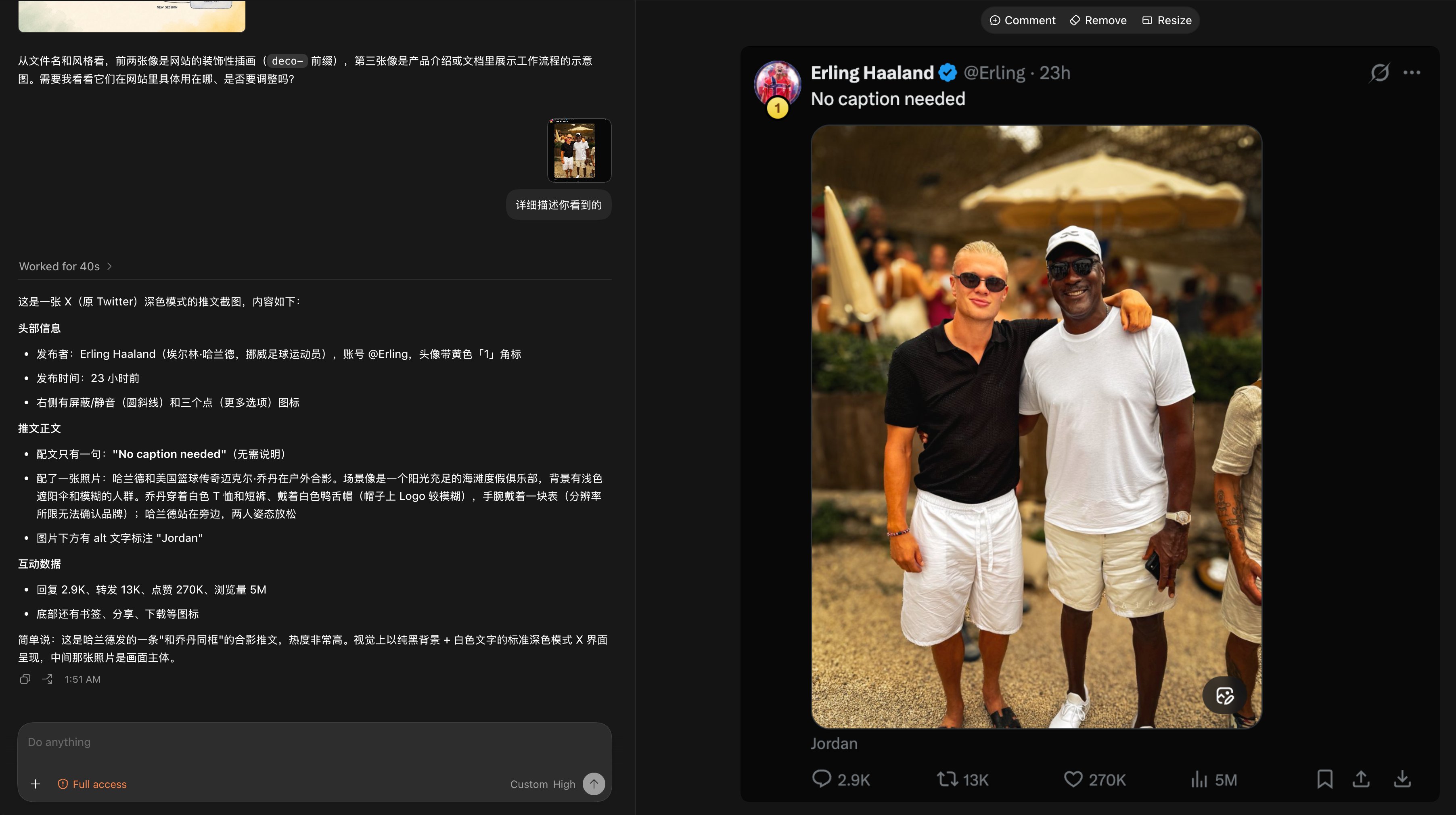
Here is the whole loop inside the Codex desktop app: drop in a tweet screenshot, and a text-only DeepSeek-V4-Flash reads all of it through ModLens: the caption, the engagement numbers (2.9K replies, 270K likes, 5M views), even the image's alt text. Where the resolution runs out, it says so instead of guessing.
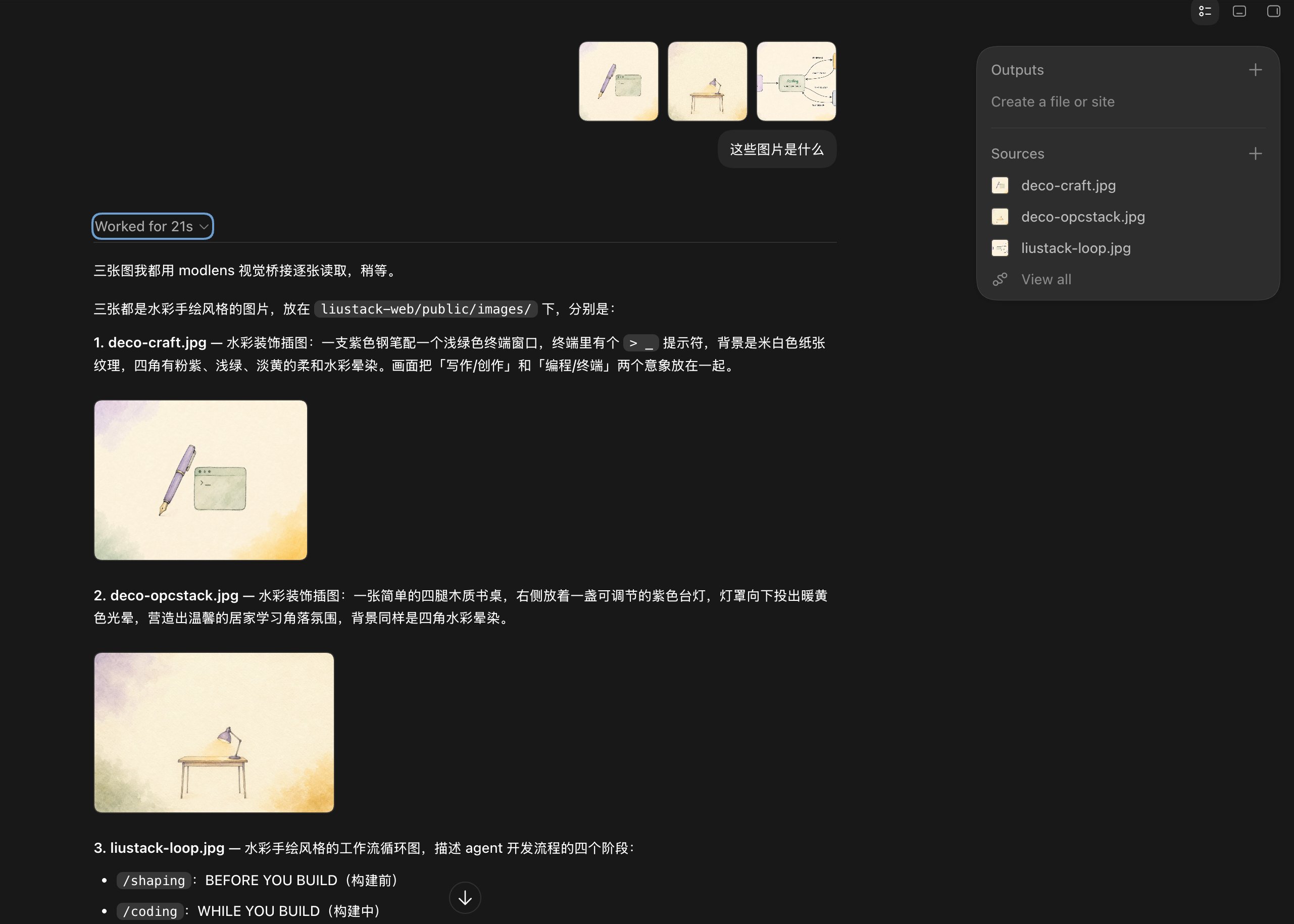
Batch mode works too: drop three illustrations at once, and the model announces it will read them one by one through ModLens, then delivers all three descriptions in 21 seconds, design intent included.
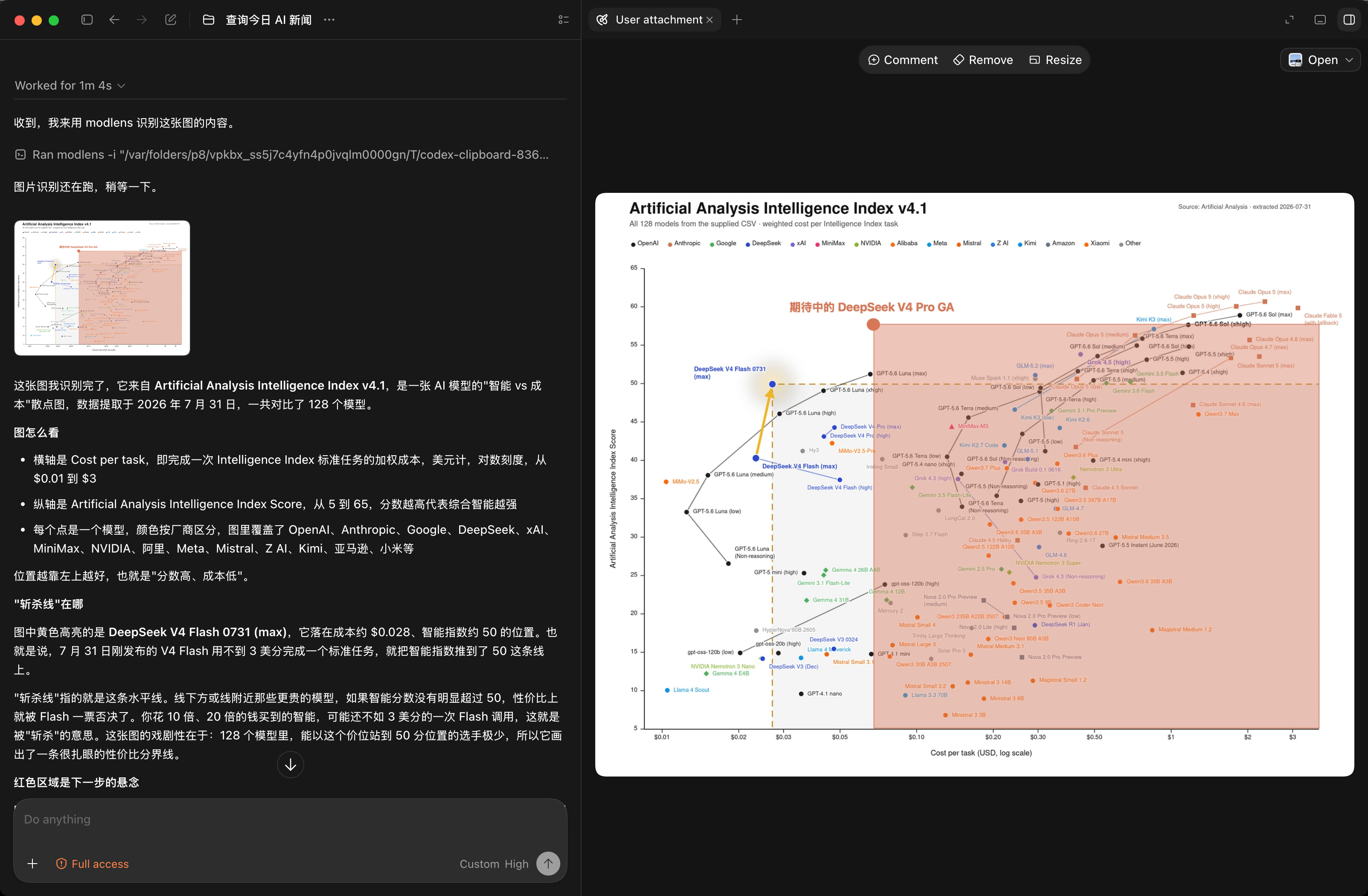
Stress test: a scatter plot of 128 models. ModLens pulls out the axes, the log scale, and the highlighted DeepSeek V4 Flash point at $0.028 and score 50, then walks through the cost-performance cutoff line. Dense charts are where vision models usually fold; this one holds.
modlens -i <image-path-or-url> [options]| Flag | Meaning | Default |
|---|---|---|
-i, --input <path|url> |
Image to analyze (required) | |
-o, --output <path> |
Also write JSON to a file | |
-m, --model <name> |
Provider model | gemini-3.6-flash-low |
-p, --provider <name> |
Vision provider | antigravity-cli |
--prompt <text> |
Extra focus, e.g. "extract the table" |
|
--timeout <ms> |
Provider timeout | 180000 |
--provider-bin <path> |
Provider binary | agy |
--workdir <path> |
Working directory for the provider |
Reach for -m gemini-3.1-pro-high on dense screenshots or tricky documents. Output contract: skills/modlens/references/output-schema.md.
Two more subcommands: modlens config <init|set|show> manages providers and keys (details below), and modlens recover-paste rescues images pasted into Claude Code:
modlens recover-paste                 # newest pasted image, path printed as JSON
modlens recover-paste --count 3       # the three newest
modlens recover-paste --session <id>  # exact session (skills pass ${CLAUDE_SESSION_ID})
# --transcript <path> overrides everything; --cwd <dir> sets the project directoryModLens ships five vision providers. antigravity-cli stays the default: zero keys, pure free quota.
| Provider | Needs | Typical speed | Notes |
|---|---|---|---|
antigravity-cli (default) |
agy signed in |
15-40s | free quota, full agent loop |
gemini-api |
free AI Studio key | 5-10s | fastest free route, schema enforced server-side |
openai |
baseUrl + apiKey + model | endpoint-dependent | any OpenAI-compatible multimodal endpoint (qwen-vl, GLM, ...) |
anthropic |
ANTHROPIC_API_KEY |
a few seconds | Claude Haiku by default, schema via forced tool call |
claude-cli |
Claude Code signed in | 20-45s | no key, rides your Claude subscription, Read-only permissions |
Config lives in ~/.modlens/config.json. Environment variables override the file (GEMINI_API_KEY, OPENAI_API_KEY, OPENAI_BASE_URL, ANTHROPIC_API_KEY), and CLI flags override everything.
modlens config init                          # write a starter config
modlens config set gemini-api.apiKey <key>   # saved with 0600 perms
modlens config show                          # keys come out masked
modlens config set provider gemini-api       # switch the default provider
The free Gemini key takes three minutes at aistudio.google.com, no credit card. Or skip the manual work entirely and tell your agent: "configure modlens with my Gemini API key".
Codex speaks only the Responses API, and DeepSeek's official endpoint supports it natively. Start with the official integration guide: its models.json declares deepseek-v4-flash as text-only (input_modalities: ["text"]), and that one line is what unlocks the whole flow.
One catch: once text-only is declared, the Codex TUI blocks Ctrl+V image paste outright (Model deepseek-v4-flash does not support image inputs). The gate sits in the input box itself, so the image never makes it into the message. Two moves get around it, both verified end to end with deepseek-v4-flash:
- Drag the image file into the terminal, or type its path. The path lands as plain text, and the modlens skill picks it up from there.
- Attach it with
codex exec -i image.png "...". The skill reads the path out of the message tag.
No setup needed: drag the image file into the terminal, or type its path, and the skill takes over.
Paste is trickier. If you run a text-only model behind ANTHROPIC_BASE_URL, Claude Code never writes pasted images to a regular temp file and has no modality switch, so a pasted image reaches the model as a pathless [Unsupported Image] placeholder (lenient gateways like DeepSeek's Anthropic endpoint) or breaks the request outright (#62009). But the bytes are not gone: Claude Code appends every user message, images included, to the local session transcript before the gateway ever sees it. That is what modlens recover-paste exploits: it pulls the most recent pasted images back out of the transcript and prints real file paths, ready for modlens -i. The skill runs this automatically when it spots the placeholder. Verified end to end in a real DeepSeek-gateway Claude Code session: paste an image, the model sees only the placeholder, recovers the file by session id, and answers with full image content. Transcripts are per-session files. Skills can pass the exact session via --session (Claude Code substitutes ${CLAUDE_SESSION_ID} into skill text since v2.1.9); without it, recovery picks the transcript holding the newest pasted image by message timestamp, so concurrent sessions in the same project do not confuse it either way. Pi stores sessions the same way (~/.pi/agent/sessions/, images as base64 in JSONL), and recover-paste auto-detects both harnesses, verified live against a real pi session. One honest caveat: transcript layouts are internal implementation details of those tools with no compatibility promise; if recovery ever breaks, dragging the file still works everywhere.
- Keep your model. You picked DeepSeek-V4-Flash (or gpt-oss, or whatever else) for its price and its reasoning, not its eyesight. ModLens adds sight without touching that choice.
- Evidence beats pixels. Text models reason best over structured text, not raw pixels. ModLens hands them OCR plus layout plus semantics, already decoded, not a base64 blob.
- Engines die, the bridge survives. v1 ran on Gemini CLI's free tier until Google shut it down in June 2026. v2 moved to its successor, Antigravity CLI, behind the same provider interface, so the next engine swap costs one file, not a rewrite.
ModSearch, ModLens's sibling project, plays the same trick for web search and page fetching: liustack/modsearch.
This project runs on LIUSTACK Skills. ModLens v2 was shaped, coded, and shipped with liustack end to end: shaping before you build, coding while you build, dig when it breaks, snapshot when you hand off. Lighter than Superpowers, and sharper.
ModLens gives your model eyes. LIUSTACK Skills gives your dev workflow wings:
npx -y skills add liustack/liustack -g⭐ Like it? Star ModLens and star liustack. Stars are how the next developer finds them.
- ModLens runs
agywith--dangerously-skip-permissions, because print mode can fail in some setups without it. The prompt keeps the agent to reading that one image and tells it to treat image content as data, never as instructions. Even so, only point it at images you would open yourself, and run it inside a sandboxed workspace when you can. - Vision output is evidence. Anything the engine cannot read lands in
uncertaintyinstead of getting invented. Pixel bounding boxes and confidence scores were dropped in v2 because models fabricate them.
Personal learning and experimentation only, not for commercial use. Antigravity CLI usage runs under your own Google account's terms and quota.
MIT