

Never half-ship a release.
An interactive release CLI that bumps, tags, publishes, and ships to npm · Cargo · Homebrew · GitHub.




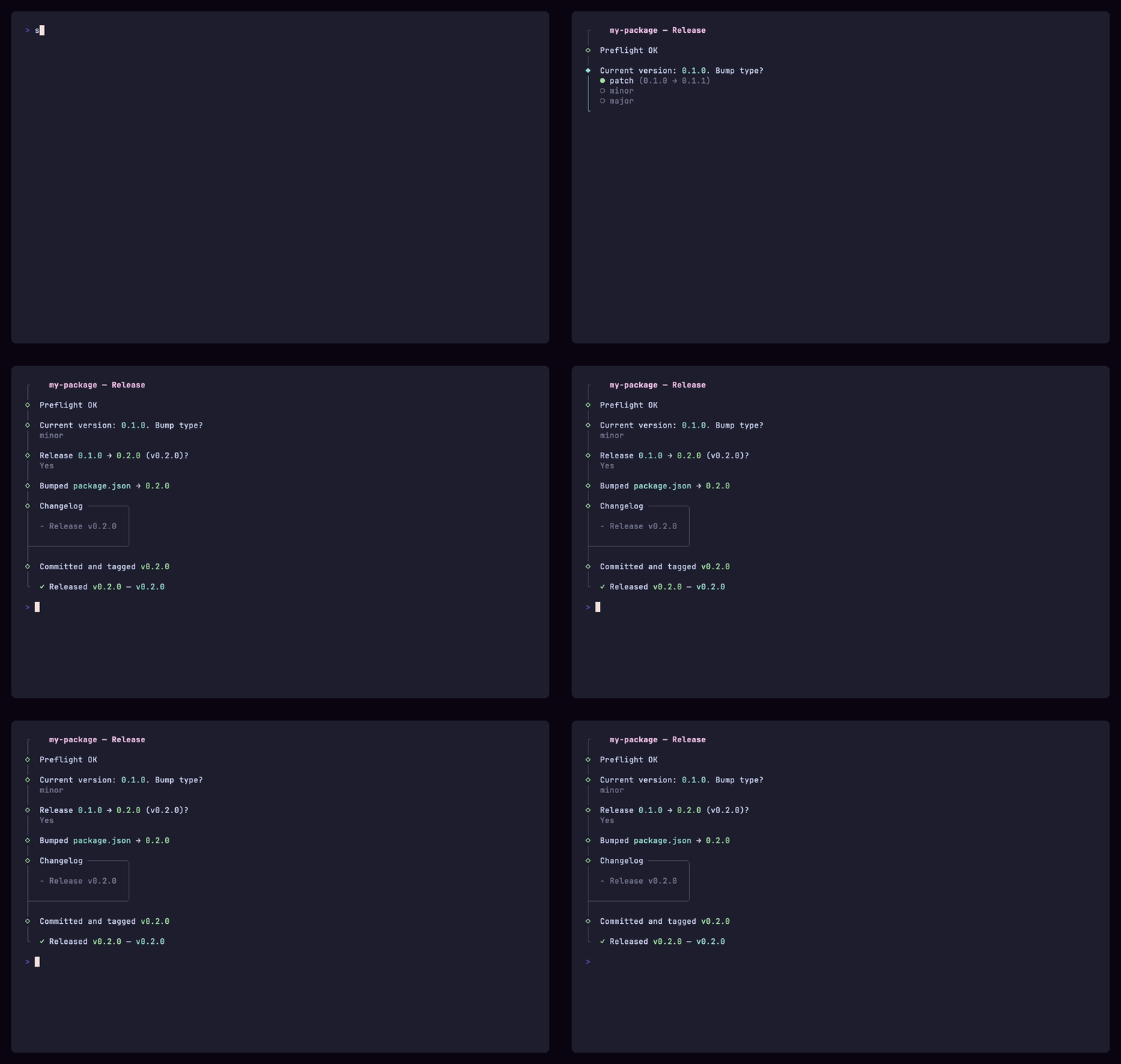
Note
shipx is a thin, opinionated wrapper around npm publish, git tag, gh release, cargo set-version, and a Homebrew formula update. It's a beautiful pipeline for the release ritual you already know — not a magic black box.
The worst release is half of one: the tag is pushed, the GitHub release is up, and npm publish died on a 2FA timeout. shipx runs the whole chain in order (bump, changelog, commit, tag, push, GitHub release, publish), stops before it starts if something is wrong, retries the publish instead of quitting, and checks the registry before it calls the release done.
- Beautiful interactive UI built on @clack/prompts — spinners, prompts, and confirms that you actually enjoy looking at.
- One config, every channel. npm, GitHub releases, Cargo workspaces (Tauri-friendly), and Homebrew tap formula — all from a single
shipx.config.mts. - Stop on red. Preflight refuses to run on a dirty tree or the wrong branch. Each step is a single shell-out — no hidden state, no surprises.
- Beta path.
shipx --betaincrements-beta.Nand publishes with thebetadist-tag. Homebrew is skipped automatically. - Recoverable. If
npm publishfails (auth, OTP, network), shipx drops into an interactive retry loop instead of aborting the whole pipeline. - Zero install.
npx @lacymorrow/shipxruns against the project in your current directory.
# Global
npm install -g @lacymorrow/shipx
shipx

# One-off
npx @lacymorrow/shipx

# In your repo
npm install --save-dev @lacymorrow/shipx
Requires Node ≥20. gh CLI is required for githubRelease. cargo-edit is required if you bump Cargo workspaces.
# Interactive — prompts for patch / minor / major
shipx

# Skip the prompt
shipx patch
shipx minor
shipx major

# Explicit version
shipx 2.0.0

# Beta release (publishes with --tag beta, skips Homebrew)
shipx --beta

# Multi-project deploy — scan parent dir, batch-publish with one OTP
cd ~/repo && shipx --multi
Tip
Set SHIPX_ROOT=/path/to/project to run shipx against a project other than the current directory — useful in monorepo automation.
flowchart LR
    A[preflight] --> B[bump version]
    B --> C[changelog]
    C --> D[commit + tag]
    D --> E[push]
    E --> F[GitHub release]
    F --> G[npm publish]
    G --> H[Homebrew]

    style A fill:#c026d3,stroke:#c026d3,color:#fff
    style H fill:#c026d3,stroke:#c026d3,color:#fff
Each step is independently toggleable. Set steps.<name>: false to skip it.
shipx looks for config in this order, first hit wins:
shipx.config.mts/.ts/.mjs/.js.shipxrc.json/.shipxrc"shipx"key inpackage.json- Defaults (auto-detects
package.json,src-tauri/Cargo.toml, and sibling../homebrew-tap)
Use shipx.config.mts. It's always an ES module, so it works the same whether or not your package.json sets "type": "module". Existing shipx.config.ts files keep working too.
import type { ShipConfig } from "@lacymorrow/shipx";

export default {
  packageJsonPaths: ["package.json", "packages/core/package.json"],
  bumpFiles: [
    {
      path: "bin/cli",
      pattern: /^VERSION="[^"]*"/m,
      replacement: (v) => `VERSION="${v}"`,
    },
  ],
  cargoWorkspaces: ["src-tauri"],
  steps: {
    homebrew: true,
    githubRelease: true,
  },
  git: {
    releaseBranch: "main",
    tagPrefix: "v",
    extraTags: ["cua-{tag}"],
    commitMessage: "release: {tag}",
  },
  npm: {
    access: "public",
  },
  homebrew: {
    tapPath: "../homebrew-tap",
    formulaFile: "Formula/mytool.rb",
    repoSlug: "user/repo",
  },
} satisfies ShipConfig;| Option | Type | Default | What it does |
|---|---|---|---|
packageJsonPaths |
string[] |
Auto (["package.json"]) |
Paths to package.json files to bump |
bumpFiles |
BumpFileConfig[] |
[] |
Additional files with regex-based version bumping |
changelogFile |
string |
"CHANGELOG.md" |
Keep a Changelog file to record each release in. Only updated if it already exists; shipx never creates one. Use "" to leave it alone. |
cargoWorkspaces |
string[] |
Auto (["src-tauri"] if exists) |
Cargo workspace dirs to bump via cargo set-version --workspace. Use [] to opt out. |
steps.preflight |
boolean |
true |
Require clean tree + correct branch |
steps.bumpVersion |
boolean |
true |
Update version in package.json + bump files |
steps.changelog |
boolean |
true |
Generate the release notes from git log since last tag, and record the release in changelogFile |
steps.commit |
boolean |
true |
Single commit for all bumped files |
steps.tag |
boolean |
true |
Create git tag (plus any extraTags) |
steps.push |
boolean |
true |
Push commit + tag(s) to origin |
steps.githubRelease |
boolean |
true |
Create GitHub release via gh CLI |
steps.npm |
boolean |
true |
Publish to npm (with interactive retry) |
steps.homebrew |
boolean |
true |
Update Homebrew formula SHA + URL |
steps.watchCi |
boolean |
true |
When githubRelease or homebrew is delegated to CI (set to false), watch the runs the pushed tag(s) triggered and exit non-zero if one fails. Needs gh. Disable with --no-watch-ci |
git.releaseBranch |
string |
"main" |
Branch required for stable releases |
git.tagPrefix |
string |
"v" |
Prefix prepended to the version |
git.extraTags |
string[] |
[] |
Additional tags. Templates support {tag} (full, e.g. v0.5.3) and {version} (bare) |
git.commitMessage |
string |
"release: {tag}" |
Commit message template |
git.commitFlags |
string |
"--no-verify" |
Flags passed to git commit |
git.pushFlags |
string |
"--no-verify" |
Flags passed to git push |
npm.cwd |
string |
Project root | Working directory for npm publish |
npm.access |
"public" | "restricted" |
"public" |
npm publish access |
homebrew.tapPath |
string |
Auto (sibling ../homebrew-tap) |
Path to your tap repo |
homebrew.formulaFile |
string |
Auto-derived | Formula file, relative to tapPath |
homebrew.repoSlug |
string |
Auto-derived from origin |
owner/repo for the tarball URL |
homebrew.commitMessage |
string |
"{formula}: update to {tag}" |
Tap commit message template |
shipx auto-detects src-tauri/Cargo.toml and adds it to cargoWorkspaces. Requires cargo install cargo-edit.
// shipx.config.mts
export default {
  cargoWorkspaces: ["src-tauri"], // explicit; or omit for auto-detection
  steps: { npm: false }, // Tauri apps usually don't publish to npm
} satisfies ShipConfig;All packages bump to the same version:
export default {
  packageJsonPaths: [
    "package.json",
    "packages/core/package.json",
    "packages/cli/package.json",
  ],
} satisfies ShipConfig;
For independently-versioned monorepos, use changesets instead — shipx isn't built for that.
Drop your tap repo next to your project as a sibling (../homebrew-tap) and shipx finds it. Or configure it explicitly:
export default {
  homebrew: {
    tapPath: "../homebrew-tap",
    formulaFile: "Formula/mytool.rb",
    repoSlug: "lacymorrow/mytool",
  },
} satisfies ShipConfig;
shipx downloads the tarball, computes SHA256, updates url/sha256 in the formula, commits, and pushes from the tap.
Got a bunch of repos in ~/repo/? Deploy them all at once:
cd ~/repo
shipx --multi
shipx scans for subdirectories with a package.json, detects which have unreleased commits, and lets you pick which to release. The killer feature: npm publishes are batched — enter your OTP once and it's reused across all packages, so your 2FA code doesn't expire mid-deploy.
The flow:
- Select projects — sorted by change count, with dirty/private indicators
- Pick versions — individually, or apply the same bump type to all
- Prepare — each project gets its own bump → commit → tag → push → GitHub release
- Batch publish — all npm publishes happen back-to-back with a shared OTP
- Homebrew — formulas updated for non-beta releases
Combine with --beta for beta batch releases: shipx --multi --beta.
shipx --beta- If current version is
1.0.0, becomes1.0.0-beta.0 - If current version is
1.0.0-beta.0, becomes1.0.0-beta.1 - Publishes to npm with
--tag beta(yourlatestdist-tag is untouched) - Skips the branch check in preflight (release from any branch)
- Skips Homebrew automatically
| shipx | np | release-it | changesets | |
|---|---|---|---|---|
| Interactive UI | ✅ (@clack) | ✅ (Listr) | partial | ❌ |
| npm publish | ✅ | ✅ | ✅ | ✅ |
| GitHub release | ✅ | ✅ | ✅ | via Action |
| Cargo workspaces | ✅ | ❌ | via plugin | ❌ |
| Homebrew formula | ✅ | ❌ | via plugin | ❌ |
| Beta / pre-release | ✅ | ✅ | ✅ | ✅ |
| Multi-project batch deploy | ✅ | ❌ | ❌ | ❌ |
| Multi-package monorepo (coupled) | ✅ | ❌ | ✅ | ✅ |
| Multi-package monorepo (independent) | ❌ | ❌ | ✅ | ✅ |
| Changelog from PR labels | ❌ | ❌ | via plugin | ✅ |
| Zero plugins required | ✅ | ✅ | ❌ | ✅ |
TL;DR — Use shipx for single-package or coupled-version projects that ship to multiple registries (especially Cargo + Homebrew). Use changesets for independently-versioned monorepos. Use np if you want a smaller, npm-only tool.
How is shipx different from np?
np is excellent and the spiritual predecessor of shipx. The differences:
- shipx uses @clack/prompts instead of Listr — the UI feels more modern.
- shipx bumps Cargo workspaces and updates Homebrew formulas out of the box. np is npm-only.
- shipx is intentionally tiny (~600 lines of TS, two runtime deps). np is more battle-tested with more options.
What if npm publish fails?
shipx drops into an interactive retry loop with four options:
- Enter OTP — for 2FA accounts (validates that you typed 6 digits)
- Log in to npm — runs
npm login, then retries - Retry — just try again (good for transient errors)
- Skip — abandon
npm publishand continue to remaining steps
Everything before npm publish (the bump, commit, tag, push, GitHub release) is already done — you can always re-publish manually.
Can I disable a step?
Yes. Every step in the pipeline has a steps.<name> boolean flag. Set it to false to skip:
export default {
  steps: { homebrew: false, githubRelease: false },
} satisfies ShipConfig;
Does shipx sign tags or commits?
shipx delegates to your local git config. Set commit.gpgsign=true / tag.gpgsign=true and your tags will be signed. The default commitFlags / pushFlags of --no-verify is overrideable via config if you have hooks you actually want to run.
Can I extract the changelog before shipping?
shipx generates a changelog from git log <last-tag>..HEAD --pretty=format:"- %s (%h)" and uses it as the GitHub release body. It's printed to the terminal during the release. If you need a CHANGELOG.md file, write your own bumpFile entry — or use git-cliff before invoking shipx.
Other projects by the author:
- album-art — Fetch an album or artist image URL.
- crossover — A crosshair overlay for any screen.
- cinematic — Gorgeous desktop movie collections.
shipx stands on the shoulders of:
- @clack/prompts by Nate Moore — the prompt UI that makes shipx feel delightful.
- np by Sindre Sorhus — the original prior art for a "better
npm publish". - picocolors by Alexey Raspopov — fast, tiny ANSI colors.
- Bun — the bundler that ships shipx itself.
- Charmbracelet VHS — used to record the demo above.
Bug reports and pull requests welcome. See CONTRIBUTING.md and the security policy. For a high-level architecture overview, see CLAUDE.md.