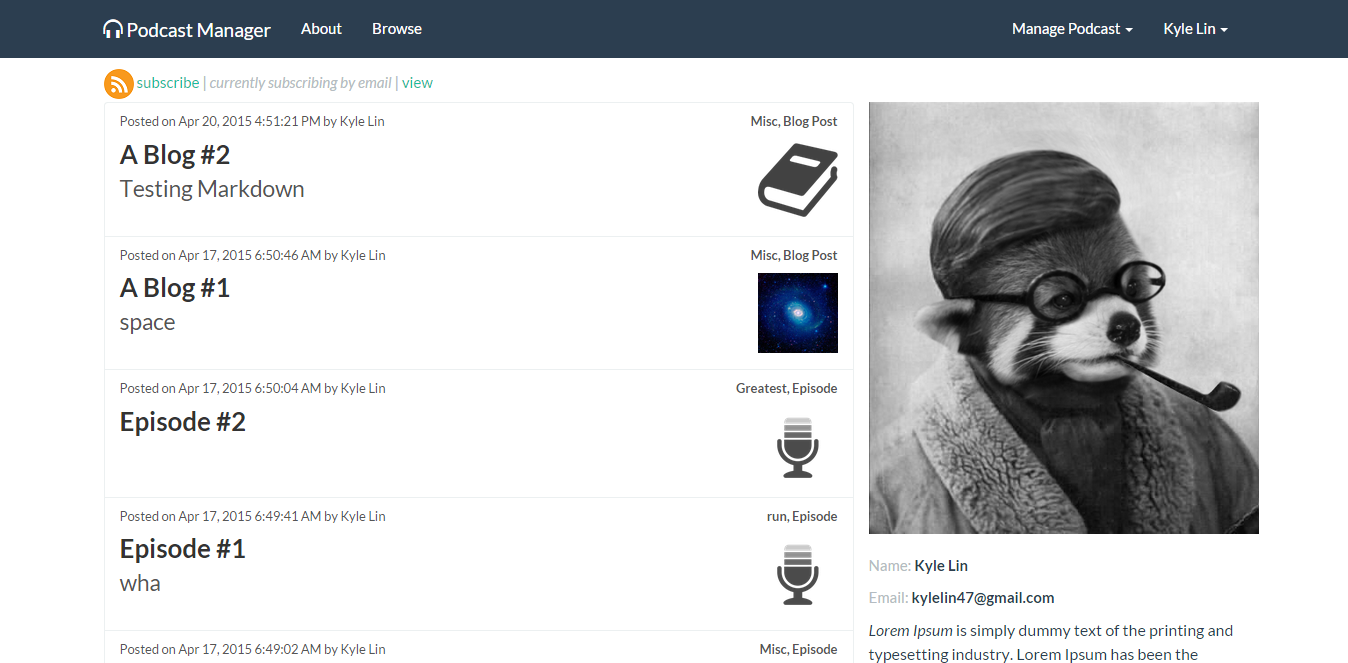
| Members | Username |
|---|---|
| Kyle Lin | kylelin47 |
| Joachim Jones | jonesguy14 |
| Qian Wang | qianwang1013 |
| Matthew Tschiggfrie | mtschiggfrie |
User Stories
https://trello.com/b/zHEzMTHa/great-unknown-cen3031
Prerequisites
Make sure you have installed all of the following prerequisites on your development machine:
- Node.js - Download & Install Node.js and the npm package manager. If you encounter any problems, you can also use this GitHub Gist to install Node.js.
- MongoDB - Download & Install MongoDB, and make sure it's running on the default port (27017).
- Bower - You're going to use the Bower Package Manager to manage your front-end packages. Make sure you've installed Node.js and npm first, then install bower globally using npm:
$ npm install -g bower- Grunt - You're going to use the Grunt Task Runner to automate your development process. Make sure you've installed Node.js and npm first, then install grunt globally using npm:
$ npm install -g grunt-cliSetup
- git clone https://github.com/kylelin47/great-unknown.git
- cd great-unknown
- npm install
- Set relevant environment variables: FACEBOOK_ID, FACEBOOK_SECRET, TWITTER_KEY, TWITTER_SECRET, NODE_ENV if you want to use your own apps. Else it will default to ours.
- Create a file called 'secretkey.js' in public\modules\podcasts\controllers containing your Amazon credentials for a properly configured IAM user that only accepts GET/PUT from your specific URL in this format:
var amazon_credentials =
		{
		  bucket: 'my-bucket',
		  access_key: 'my-access-key',
		  secret_key: 'my-secret-key',
		  region: 'my-region-1'
		};
Not particularly secure, but easy to work with at the moment. If region is not provided, it will assume us-east-1, which is the default in Amazon S3 if you have not configured it.
Running the App
- Start mongodb
- 'grunt' starts the server
- View at localhost:3000
- To create episodes and do admin stuff create an account with the username 'admin' (no quotes)
Client/Server Side Testing
Run tests
$ 'grunt test'
Run server tests
$ grunt test:server
Run client tests
$ grunt test:client
Protractor Testing
- may need 'npm install -g protractor' if you haven't installed protractor before
- use grunt and mongodb to start the app
- keeping the app running, in new cmd prompt enter "webdriver-manager start"
- keeping both app and web driver running, in new cmd prompt cd to Protractor folder in great-unknown
- enter "protractor conf.js"
- protractor assumes your admin password is 'admin123' (no quotes)
Development Information
To emulate a website for things like Facebook sharing:
To add new packages and have it added to package.json:
$ npm install <pkg> --save
or for bower.json:
$ bower install <pkg> --save
We're using tabs, not spaces. Look into installing EditorConfig
To use a new Bootstrap Theme:
- Copy this file over your current bootstrap.css in public/lib/bootstrap/dist/css
- http://bootswatch.com/flatly/bootstrap.css
- Then delete bootstrap-theme.css from that same folder
- Now it should look cool
To Upload Your App
- install node.js https://nodejs.org/download/
- then open up a command prompt (use windows search for "cmd")
- type: npm install -g bower
- go to: start.heroku.com
- sign up and confirm your email address
- follow the step by step instructions on how to set up your site