


Turn a browser authorization into a validated OAuth 2.0 authorization code on a loopback redirect URI, in Node.js, Deno and Bun. For CLI tools and desktop apps, with a one-line browser authorization provider for the MCP SDK.
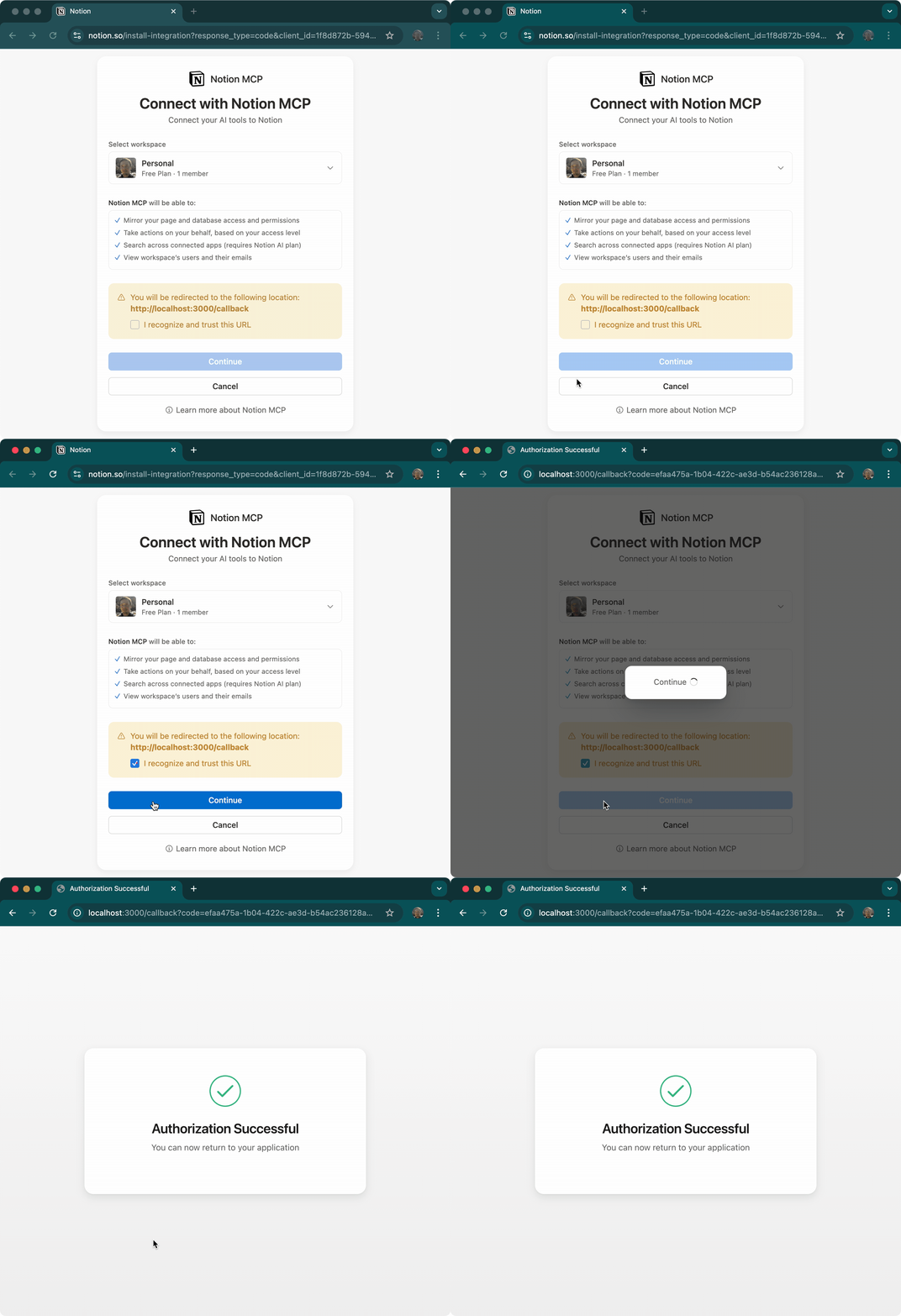
- 🚀 Node.js 22+, Deno 2 and Bun — one
node:httplistener everywhere - 🔌 Ephemeral loopback ports (RFC 8252) — the default for
getAuthCode(): no port collisions, no port config - 🛡️ Secure by default —
stateon every flow, strict callback and URL validation, neutral pages with security headers - 🤖 MCP SDK integration —
browserAuth().connect(client)handles the whole browser flow - ⚡ Zero runtime dependencies — the browser launcher is bundled and loaded lazily
- 🎯 Small, typed API — one function, one error class
bun add oauth-callback   # or: npm install oauth-callback

# for oauth-callback/mcp, also the MCP SDK (optional peer dependency)
bun add @modelcontextprotocol/clientimport { getAuthCode } from "oauth-callback";
const { code, redirectUri } = await getAuthCode(() => {
const url = new URL("https://github.com/login/oauth/authorize");
url.searchParams.set("client_id", CLIENT_ID);
return url; // redirect_uri and state are appended
});
await exchangeCode({ code, redirectUri }); // your token requestgetAuthCode() binds http://127.0.0.1:<free port>/callback, calls your builder with that redirect URI and a fresh state, opens the system browser, and resolves with the code once a callback with the right state arrives. The listener is always closed afterwards.
// Builder (recommended): the library picks the port and the state
await getAuthCode(({ redirectUri, state, signal }) =>
  buildUrl(redirectUri, state),
);

// Prebuilt URL: listens on its redirect_uri, appends state if missing
await getAuthCode(
  "https://auth.example.com/authorize?client_id=app&response_type=code&redirect_uri=http%3A%2F%2F127.0.0.1%3A8765%2Fcallback",
);

// Prebuilt URL without redirect_uri (the provider uses its registered one)
await getAuthCode(authUrl, { redirectUri: "http://127.0.0.1:8765/callback" });
Use the builder for PAR/JAR: put the provided redirectUri and state into the pushed request and return the short URL. signal aborts with the flow, so pass it to fetch.
const { code, redirectUri } = await getAuthCode(
  async ({ redirectUri, state, signal }) => {
    const res = await fetch(PAR_ENDPOINT, {
      method: "POST",
      body: new URLSearchParams({
        client_id,
        response_type: "code",
        redirect_uri: redirectUri,
        state,
        code_challenge,
        code_challenge_method: "S256",
      }),
      signal,
    });
    const { request_uri } = await res.json();
    return `${AUTHORIZE}?client_id=${client_id}&request_uri=${encodeURIComponent(request_uri)}`;
  },
);await getAuthCode(build, {
redirectUri: "http://127.0.0.1:8765/callback", // default http://127.0.0.1:0/callback (port 0 = free port)
launch: (url) => console.log(`Open ${url}`), // default: system browser
timeout: 120_000, // ms, default 300_000
signal: controller.signal,
successHtml: "<h1>Done — back to the terminal</h1>",
errorHtml: "<h1>Authorization failed</h1>",
});launchreceives the final URL. Use it for headless/SSH sessions, QR codes, webviews or tests. Its return value is ignored; if it throws or rejects, the flow fails with that error.redirectUrimust behttp:on127.0.0.1,[::1]orlocalhost, withoutstate,code,error*orissin its query. The result'sredirectUriis the exact string, never re-serialized (with a builder, the one the builder got): when the authorization request carriedredirect_uri, pass it verbatim to your token request.- Pages never show callback data.
successHtml/errorHtmlare served as-is.
import { getAuthCode, OAuthCallbackError } from "oauth-callback";

try {
  const { code } = await getAuthCode(build, { signal });
} catch (error) {
  if (error instanceof OAuthCallbackError) {
    error.error; // e.g. "access_denied"
    error.description; // provider text, untrusted
    error.message; // Authorization failed: "access_denied" (safe to log)
  } else if (error instanceof DOMException && error.name === "TimeoutError") {
    // no callback within `timeout`
  } else if (signal.aborted) {
    // cancelled: `error` is signal.reason
  }
}
Invalid options and unsafe or unusable authorization URLs (javascript:, remote http:, response_type other than code, response_mode other than query, both request and request_uri, …) throw TypeError/RangeError before the browser opens (options and prebuilt URLs before anything binds).
import { Client, UnauthorizedError } from "@modelcontextprotocol/client";
import { homedir } from "node:os";
import { join } from "node:path";
import { browserAuth, fileStore } from "oauth-callback/mcp";

const auth = browserAuth({
  serverUrl: "https://mcp.notion.com/mcp",
  redirectUri: "http://127.0.0.1:8765/callback",
  clientName: "Acme CLI",
  store: fileStore(join(homedir(), ".config/acme/notion.json")),
});

const client = new Client({ name: "acme", version: "1.0.0" });
await auth.connect(client); // opens the browser if needed; resolves once connected
The MCP SDK does the OAuth work (discovery, dynamic client registration, PKCE, token exchange, refresh, issuer checks). browserAuth() adds the browser, the loopback listener and credential storage. A second run reuses stored tokens without opening the browser.
Step-up (the server asks for more scope mid-session):
try {
  await client.callTool(request);
} catch (error) {
  if (!(error instanceof UnauthorizedError)) throw error;
  await auth.connect(client); // completes the pending authorization
  await client.callTool(request);
}
Options: serverUrl, redirectUri (fixed port; DCR registers it; give providers that may authorize at the same time their own port), either clientName (for DCR, optionally with a CIMD clientMetadataUrl) or clientInformation (pre-registered client with its issuer), clientMetadata (e.g. { scope }), store (default: memory), launch, timeout, successHtml, errorHtml.
Custom transports: pass auth as the transport's authProvider; on UnauthorizedError, call await auth.completeAuthorization(transport), close that transport, and reconnect with a new one. Only the transport that started a flow gets UnauthorizedError; another one gets An MCP authorization is already in progress. Always call completeAuthorization() after that UnauthorizedError: the flow stays pending until it does, even if it failed. Run OAuth work on caller-created transports one attempt at a time; connect() handles concurrency for you.
Storage: a CredentialStore is two methods over an opaque string, so a keychain store is four lines:
const store: CredentialStore = {
  load: () => keychain.get(name),
  save: (v) =>
    v === undefined ? keychain.delete(name) : keychain.set(name, v),
};
Use one store per MCP server. To sign out, close the client, then clear the credentials: await client.close(); await auth.invalidateCredentials("all").
- Every flow has a
state; only a callback with exactly thatstateand an unambiguouscodeorerrorcompletes it. Anything else is refused (400, or 404/405 for a wrong path or method) and the flow keeps waiting. - The listener binds loopback only and closes when the flow ends.
- Callback pages never render callback data and send
Content-Security-Policy,Cache-Control: no-store,Referrer-Policy: no-referrerandX-Content-Type-Options: nosniff. error_descriptionanderror_uriare provider text: treat them as untrusted.OAuthCallbackError.messagecarries only the escapederrorcode. In/mcp, the SDK checksissbefore trusting error callbacks.fileStore()writes atomically with owner-only permissions (0600) on POSIX. For production, prefer the OS keychain.
- Node.js 22+
- Bun 1.2+
- Deno 2:
--allow-net(listener),--allow-runand--allow-env(default launcher),--allow-read/--allow-write(fileStore)
These cover getAuthCode() and fileStore(), which CI smoke-tests on each minimum version. browserAuth() additionally depends on the runtime support of @modelcontextprotocol/client.
bun run example:demo     # mock authorization server, no credentials needed
bun run example:github   # GitHub OAuth App (GITHUB_CLIENT_ID, GITHUB_CLIENT_SECRET)
bun run example:notion # Notion MCP server with dynamic client registrationSee the migration guide.
bun install
bun run test            # unit + MCP e2e tests
bun run test:runtimes   # smoke test of the build on Node, Deno and Bun
bun run build
bun run docs:devContributions are welcome! See CONTRIBUTING.md for setup instructions.
Maintainers wanted — we're looking for people to help maintain this project. If interested, reach out on Discord or open an issue.
This project is released under the MIT License. Feel free to use it in your projects, modify it to suit your needs, and share it with others. We believe in open source and hope this tool makes OAuth integration easier for everyone!
- MCP Client Generator - Generate TypeScript clients from MCP server specifications. Perfect companion for building MCP-enabled applications with OAuth support (npm).
- React Starter Kit - Full-stack React application template with authentication, including OAuth integration examples.
Support this project by becoming a backer. Your logo will show up here with a link to your website.








Found a bug or have a question? Please open an issue on the GitHub issue tracker and we'll be happy to help. If this project saves you time and you'd like to support its continued development, consider becoming a sponsor. Every bit of support helps maintain and improve this tool for the community. Thank you!