



Reads your code's actual AST and writes the JSDoc for it — no AI, no guessing, same input always gives the same output.
Docs go stale because writing them by hand is boring and nobody updates them when the code changes. Asking an AI to write them instead just trades "stale" for "confidently wrong" — it can describe what a function probably does, not what it actually does. jsdoc-scribe skips both problems: it reads the real AST — actual parameter names, actual types, actual return paths — and generates from that. If the code changes, regenerate. There's nothing to keep in sync by memory, and nothing invented to fact-check.
Input — a plain function and method, no comments:
function calculateTotal(items, taxRate) {
  return items.reduce((sum, item) => sum + item.price * item.qty, 0) * (1 + taxRate);
}

async function getUserOrders(userId, db) {
  return db.orders.find({ userId });
}
gen-comments orders.js --write → this, in place, nothing else touched:
/**
 * Calculates the total.
 * @param {any} items - array of items.
 * @param {any} taxRate - tax rate.
 * @returns {any}
 */
function calculateTotal(items, taxRate) {
  return items.reduce((sum, item) => sum + item.price * item.qty, 0) * (1 + taxRate);
}

/**
 * Returns the user orders.
 * @async
 * @param {any} userId - user unique identifier.
 * @param {any} db - database connection.
 * @returns {any}
 */
async function getUserOrders(userId, db) {
  return db.orders.find({ userId });
}
That's really it — this is plain untyped JS, so the types come back any (see Known
limitations). Run it against a TypeScript file and the same param/return
types you already wrote show up in the JSDoc instead. gen-docs then turns files like this
into a browsable HTML site — live preview below.
npx jsdoc-scribe src --write # try it on your own code, right now, no installOnce it's actually installed (npm install --save-dev jsdoc-scribe — see
Install), gen-docs src --out docs builds a browsable HTML site from what you just
wrote.
Nothing gets sent anywhere — no network calls, no API key, no account. It's a CLI reading
files on your disk and writing files back to your disk, backed by one runtime dependency
(typescript, used purely as a syntax parser) and a self-test suite that runs on every
npm test and before every publish.
Yes, if: you want JSDoc coverage that doesn't drift from the code, want a docs site without wiring up a separate static-site generator, or want a CI gate that fails when something ships undocumented — without adding an LLM call to your pipeline.
Skip it if: you want prose that explains why the code does something, not just its shape. jsdoc-scribe only knows what's structurally true in the AST — a param name, a return type, a class hierarchy. It will never write "this exists to work around a vendor API quirk" for you, because it doesn't know that and won't pretend to.
jsdoc-scribe works on any plain JavaScript or TypeScript file — it reads the real AST, not
framework-specific conventions, so there's no allowlist of "supported frameworks" gating whether
gen-comments/gen-docs will run. What is framework-aware is the Architecture Insight
page (gen-docs's auto-generated read of your stack) — it explicitly detects and names these,
from your package.json dependencies (a .tsx/.vue file extension is used as a lower-confidence
fallback when no dependency evidence exists):
| Stack | Detected via | Try it against a real fixture |
|---|---|---|
| React | react dependency, or .tsx/.jsx files |
sample/react/ — function components, props, hooks |
| Next.js | next dependency |
sample/nextjs/ — App Router route handler, app/ page, pages/ dynamic route |
| Angular | @angular/core dependency |
sample/angular/ — component, service, pipe, directive |
| Vue | vue dependency, or .vue files |
detected via dependency/file-extension signals; no dedicated sample/vue fixture yet |
| Express | express dependency |
sample/express/ — app entry, routes, a controller, a service, auth middleware |
| NestJS | @nestjs/core dependency |
sample/nestjs/ — @Controller/@Injectable classes, a guard, a module |
| Plain JavaScript (CommonJS, no framework) | always — this is the baseline case | sample/vanilla-js/ — logger, event emitter, retry helper, validators |
| Plain TypeScript (no framework) | always | sample/*.ts top-level — DI container, error hierarchy, event bus, HTTP middleware, models, API layer |
Node.js >=14 is the only runtime requirement (see engines); CI tests against
Node 22/24/26. typescript (>=5.0.0 <7.0.0) is the one runtime dependency, used purely as a
syntax parser — every file jsdoc-scribe touches goes through it, .js included, not just .ts.
Run any CLI directly against a sample to see real output on real code, not a toy snippet:
gen-comments sample/nestjs --dry-run   # decorator-heavy NestJS classes
gen-comments sample/express --check    # coverage check on an undocumented Express app
gen-docs sample --out docs --title "jsdoc-scribe sample" --quality| Tool | What it does |
|---|---|
gen-comments |
Inserts /** */ JSDoc blocks into your source by reading the AST |
gen-docs |
Builds a static, multi-page HTML documentation site from your documented source |
- JSDoc linting without ESLint.
--lintruns the same category of checks eslint-plugin-jsdoc'srecommendedconfig does;--lint --fixauto-corrects what's mechanically safe (tag order, stray asterisks) and leaves aTODO:placeholder for what needs a human, never invented text. Already on ESLint? The same rules ship as a native flat-config plugin —eslint-plugin-jsdoc-scribe— not yet published to npm standalone; this repo dogfoods it directly via npm workspaces (seeeslint.config.js,npm run eslint). - ESLint + Prettier, set up the way any other Node project would be.
npm run eslintlintslib//bin//scripts//packages/*usingeslint-plugin-jsdoc-scribe's ownconfigs.recommendedpreset as-is — no project-specific rule overrides.npm run format/npm run format:checkruns Prettier. Both run in CI (.github/workflows/test.yml, report-only for now — see that workflow's inline comment for why). --check-driftflags JSDoc that no longer matches the code it's describing — a param renamed or removed, a return type that changed — the "docs quietly went stale" problem, caught in CI before merge.- Architecture Insight page. Every
gen-docsrun includes a plain-English read of your folder structure, detected framework, and architecture-pattern signals — each shown with the actual evidence (abinentry, matching directory names), never a bare guess. Details. - Optional Code Health dashboard (
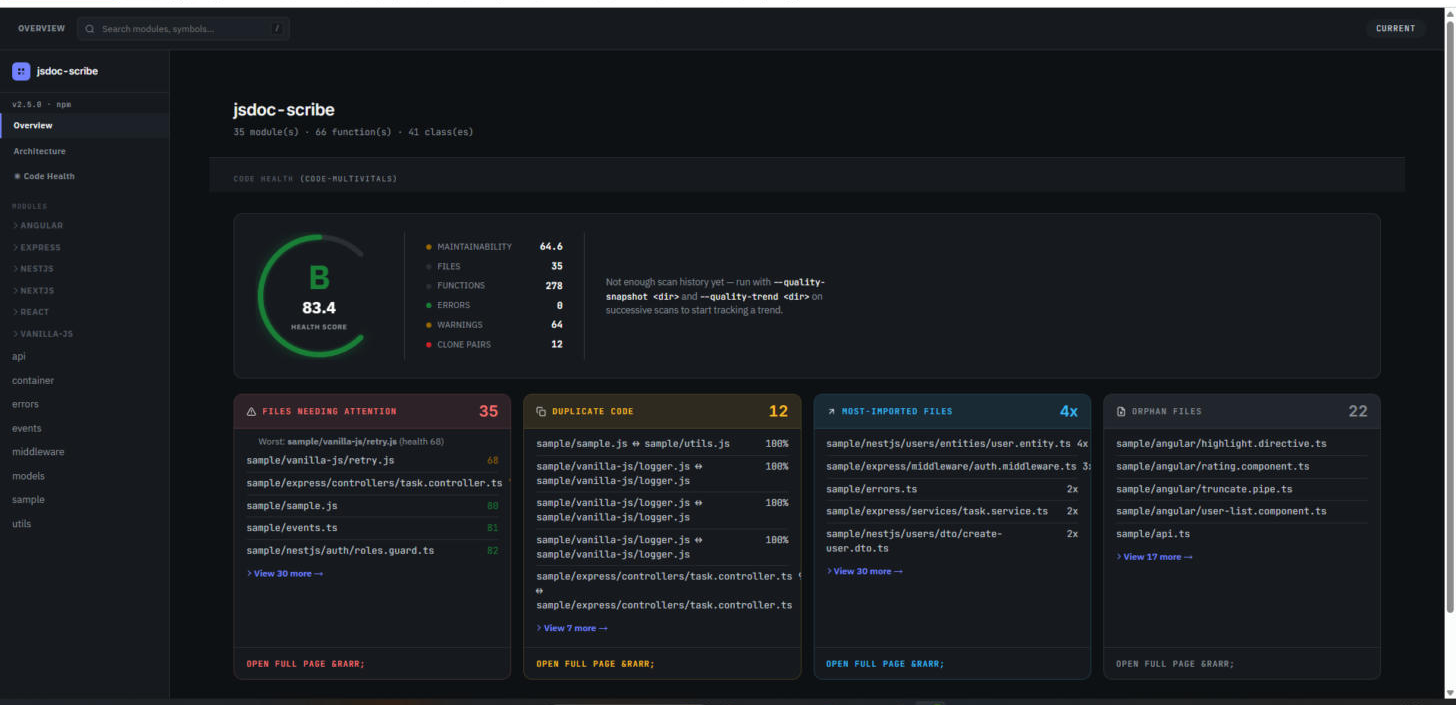
--quality, via the optional code-multivitals peer dependency) — complexity, maintainability, duplicate-code, and orphan-file stats on the same files you just documented.
| Comments | Docs | Lint | |
|---|---|---|---|
| CLI | gen-comments src --write |
gen-docs src --out docs |
gen-comments src --lint --fix |
| In your code | require('jsdoc-scribe').processFile(file, opts) |
require('jsdoc-scribe/docs').generateSite(['src'], opts) |
require('jsdoc-scribe/lint').lintModule(data) |
| CI (GitHub Actions) | npx gen-comments src --check (PR gate) |
npx gen-docs src --out _site (Pages deploy) |
npx gen-comments src --lint (PR gate) |
Every flag is a plain 0/1 exit code, so any row above drops straight into a run: step —
this repo's own test.yml and
docs.yml are the same pattern, running live. Full
walkthroughs: CLI Usage ·
Programmatic API ·
GitHub Actions.
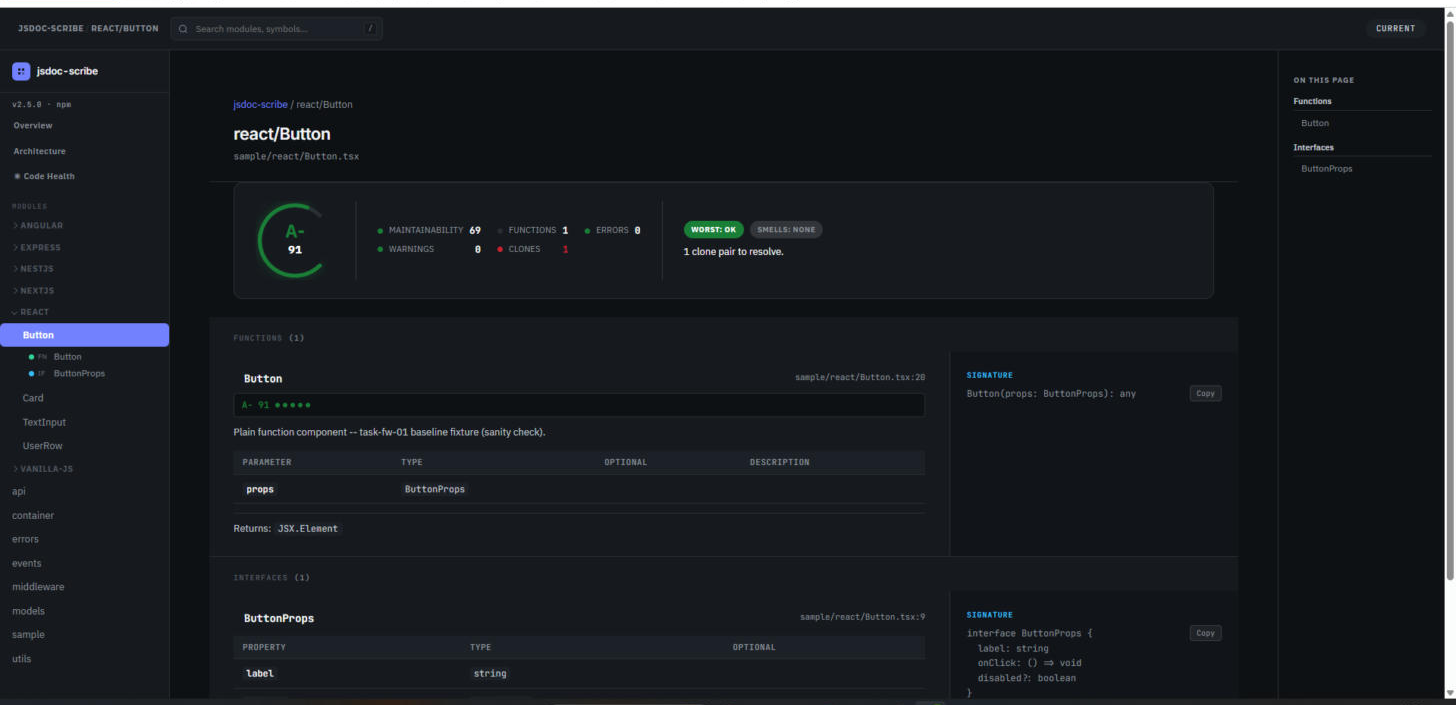
Real gen-docs output against sample/ — not a mockup.
No caching between runs, measured directly against the CLIs:
| Source size | gen-comments --dry-run |
gen-docs (single file) |
|---|---|---|
| 231 LOC | 1.15s | 0.49s |
| 23K LOC | 1.47s | 0.71s |
| 233K LOC | 4.17s | 2.29s |
A real 1,000-file/70K-LOC project finishes gen-comments --write in ~1s. Both CLIs scale
close to linearly with source size — gen-docs's multi-file build had a superlinear ceiling
past ~300-500 files, fixed and now enforced continuously in CI via npm run bench:perf-gate,
not just measured once. Full numbers: CHANGELOG.
Said plainly, not buried:
- Inline anonymous callbacks (
arr.map(x => x * 2)) aren't documented — named declarations only. - Type inference is 100% syntactic — no evaluation, no imports, no type-checking. Untyped JS
gets
any, same as the example above. - Multi-declarator statements (
const a = 1, b = 2;) get one combined block. .d.tsfiles are skipped.gen-docsdoesn't serve its output — usenpx serve docsor deploy statically.gen-docsholds every generated page in memory until the whole site is built, then writes it all at once — a memory-footprint concern at very large (thousands-of-files) scale, not yet sized against real hardware.- Not yet compatible with TypeScript 7 — the
typescriptnpm package's programmatic API isn't available at all under 7.0 (a stable API is expected in 7.1, ~October 2026);typescriptis pinned to<7.0.0until then.
npx jsdoc-scribe . --write            # run once, no install
npm install --save-dev jsdoc-scribe   # add to project
npm install -g jsdoc-scribe # or install globallyFull docs, quick-start, and every flag reference: imchintoo.github.io/jsdoc-scribe.
Real multi-framework sample code (Express, NestJS, plain JS) to try the CLIs against without
writing your own fixtures lives in sample/.
Bug reports and PRs welcome — see CONTRIBUTING.md (determinism is non-negotiable, no new runtime dependency without discussion first). This project follows the Code of Conduct. Found a security issue? See SECURITY.md rather than opening a public issue with exploit details.
MIT © Chintan