Both sides of an ID card on one sheet, at exact size, lined up back to back.
A single HTML file. No build step, no dependencies, no server, no uploads.


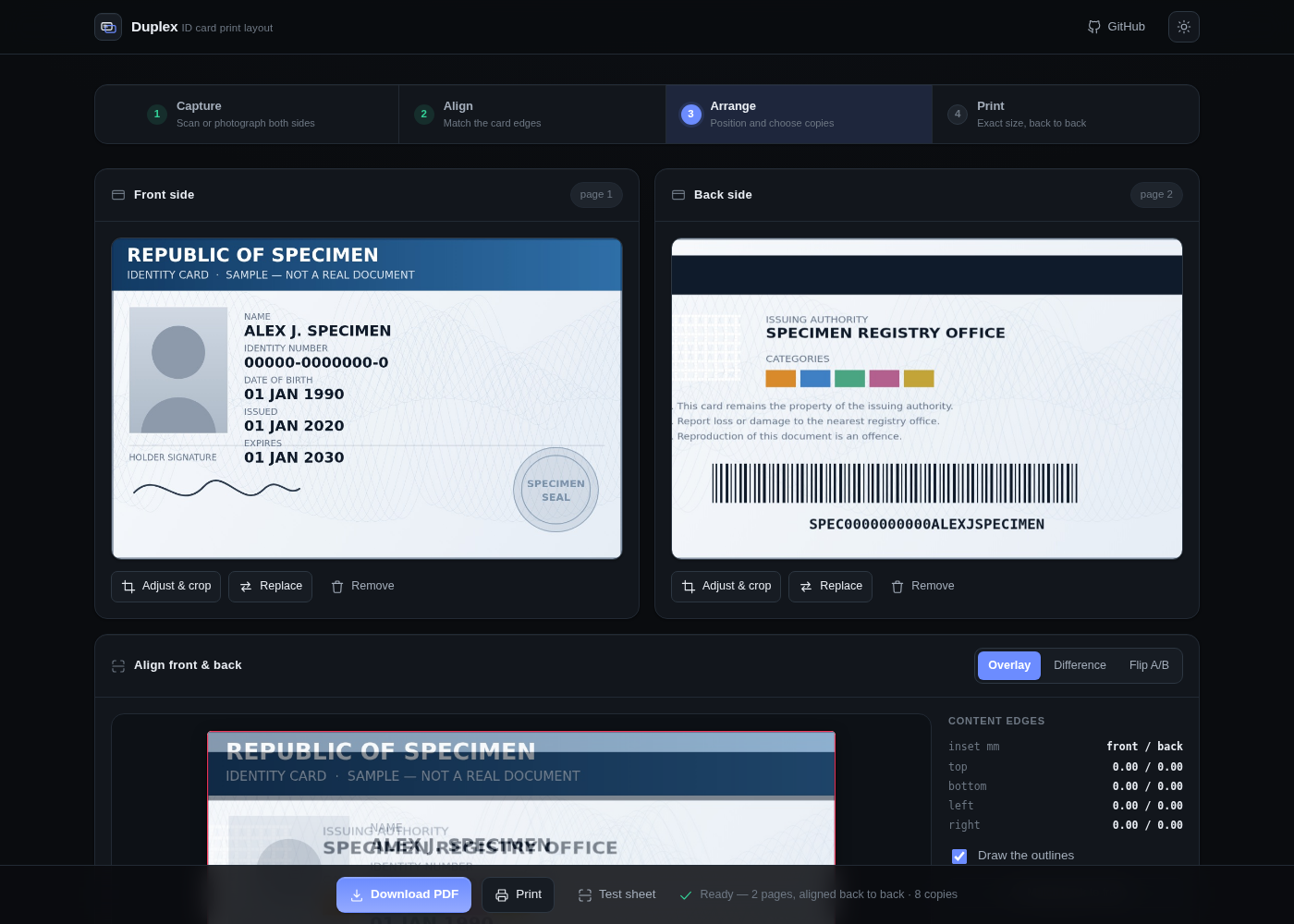
Photocopying an ID card onto one sheet is a guessing game. You put the card on the glass, print, flip the card, flip the paper, print again — and the second side lands somewhere you didn't want, upside-down, or a different size from the first. Repeat until the paper runs out.
Two things go wrong, and they're easy to confuse:
- Registration — the back doesn't land behind the front, because you can't predict what your printer does with a re-fed sheet.
- Scale — the two sides print at different sizes, because they were cropped differently.
Duplex fixes the first by construction and gives you the tools to see and fix the second.
Registration is computed, not guessed. Place the front 18 mm from the left edge of an A4
sheet and the back goes to 210 − 85.6 − 18 = 106.4 mm. Flip the paper and the two cards are
exactly on top of each other. The mirror is its own inverse, so you can drag either face and the
other follows. Change the paper and the arithmetic changes with it — the sheet is a variable,
not a constant baked into the layout.
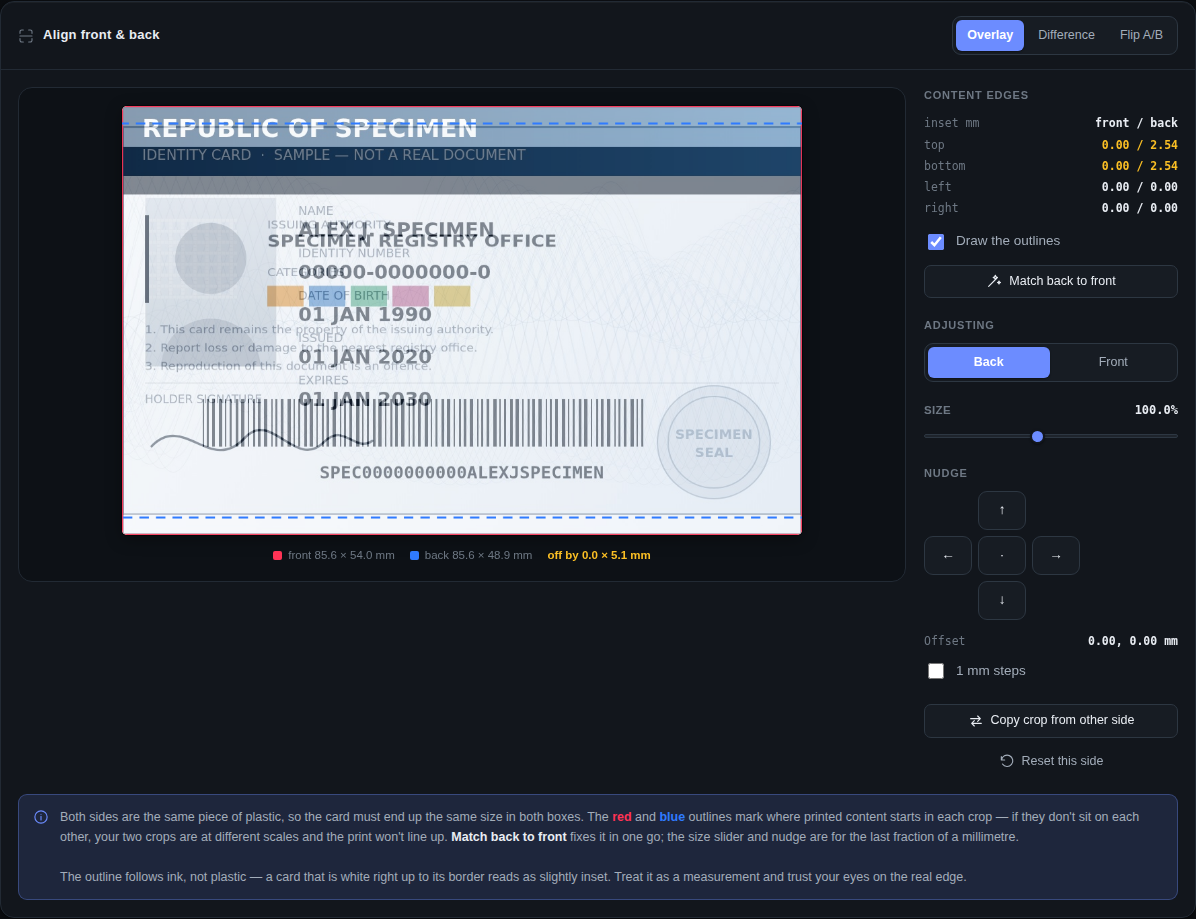
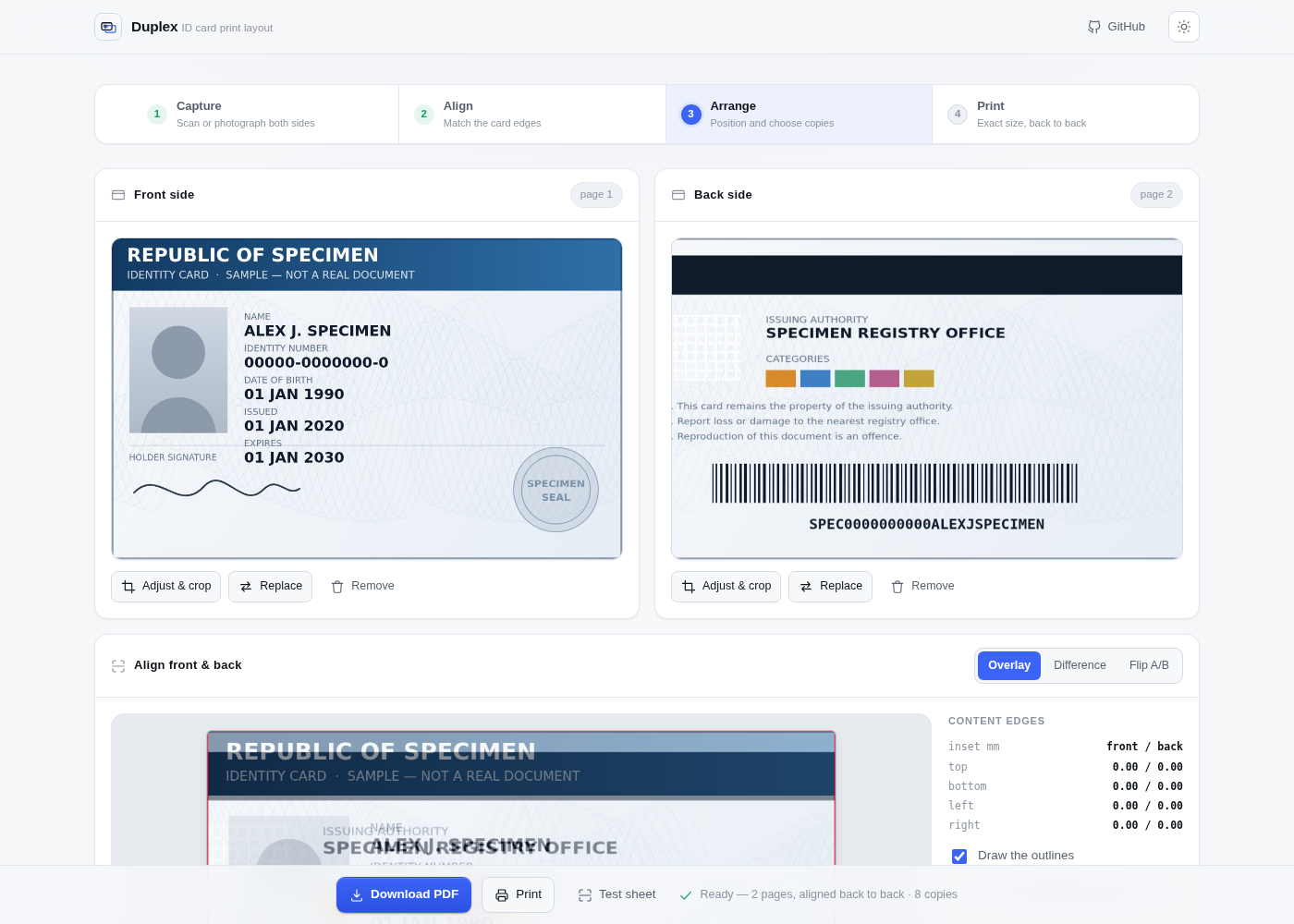
Scale is measured, not eyeballed. The Align panel scans both cropped sides for where printed content begins, draws each as an outline — front in red, back in blue — and reports the difference in millimetres, per edge. If the outlines don't sit on each other, your two crops are at different scales and the print cannot line up. Match back to front corrects it in one click; the size slider and 0.25 mm nudge are there for the last fraction.
| A mis-scaled back, caught | After Match back to front |
|---|---|
 |
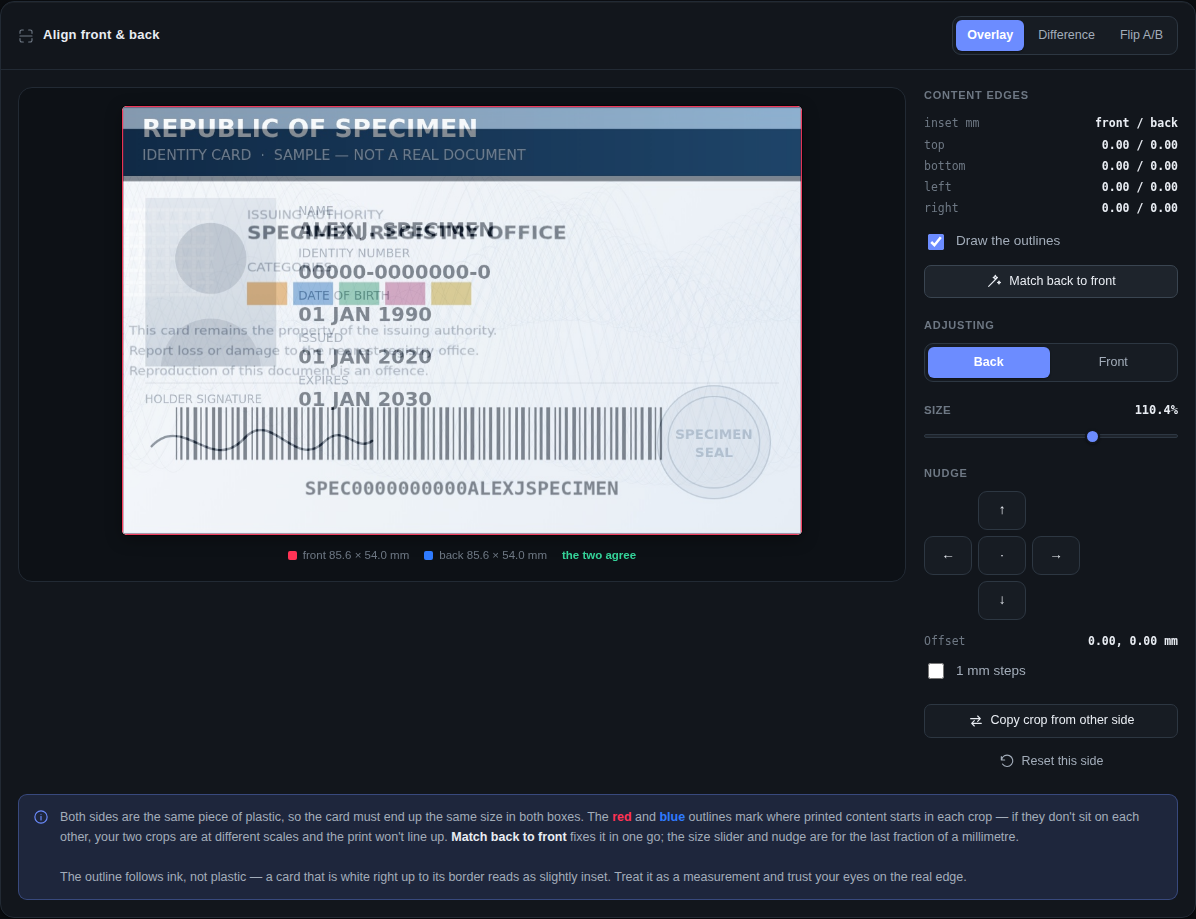 |
The back here was cropped ~2.5 mm loose top and bottom — the exact mistake that started this project. The panel reports it as "off by 0.0 × 5.1 mm" and locates it: top 2.54, bottom 2.54.
The outline follows ink, not plastic, so a card that is white right up to its border reads as slightly inset. It's presented as a measurement with the numbers attached, not as ground truth.
Exact millimetres. The PDF is written by hand, byte by byte, with the card placed via an explicit transformation matrix. No library, no rounding through a rasteriser. Verified at 600 dpi: cards land within 0.04 mm of target.
- Two-sided mode — a 2-page PDF, page 2 mirrored so it registers behind page 1
- One-face mode — front and back on a single side, for offices that want it that way
- Six paper sizes — A4, US Letter, US Legal, A5, A3, or a custom sheet in millimetres
- Up to 18 cards per sheet (A3), 8 on A4, so one card never wastes a whole page
- Alignment measurement — content-edge detection with per-edge millimetre readout, a one-click match, and overlay / difference / A-B flip views
- Printer calibration sheet — one scrap page tells you your printer's flip behaviour, for good
- Crop tool locked to the real 85.6 × 54 mm ID-1 aspect, with straighten and photo clean-up
- Scan or phone photo — EXIF-aware, with brightness/contrast/grayscale for a clean copy
- Follows your system theme, with a toggle that persists — and releases back to automatic when your choice matches the OS again
- Nothing leaves the browser — no network calls anywhere in the source
Open index.html. That's the whole installation.
git clone https://github.com/hafeee44-lab/duplex.git
cd duplex
open index.html # or just double-click it- Capture both sides. A flatbed scan is best; a phone photo works if you crop carefully.
- Crop to the card's edge. The box is locked to the correct aspect — put it on the card's actual border, not roughly around it.
- Check the overlay. Switch to Edges. Front is red, back is blue, shared edges go dark. If the outlines don't sit on each other, fix it with the size slider before printing.
- Calibrate once. Hit Test sheet, print page 1, reinsert the paper the way you intend to, print page 2. Hold it to the light — the boxes should overlap and both arrows point the same way. Arrows opposing → tick "back came out upside-down". Boxes not overlapping → switch the flip direction. You only ever do this once per printer.
- Print at 100%. Never "Fit to page". Margins: none. This is the one remaining way to get the wrong size.
Many cheap laser printers — the HP LaserJet M11xx/P11xx family among them — have no page description language. They can't interpret PostScript or PCL; the computer must rasterise every page and send raw bitmap data. It's why those printers often have no working driver on current macOS, and why a USB print-server dongle can't put them on your network.
None of that affects Duplex, which produces a normal PDF. It's worth knowing if you're trying to print from a phone to one of them — you'll need a computer with the driver in between.
The PDF writer (buildPdf) emits objects and computes the cross-reference table by tracking
byte offsets as it builds. Images are embedded as JPEG XObjects with DCTDecode — no
re-encoding, no decompression — and shared across both pages rather than duplicated.
Placement (cmFor) returns a 6-element transformation matrix. PDF image space puts sample
(0,0) at unit-square (0,1), so the rotation matrices are written to match what the on-screen
preview shows — an easy thing to get 180° wrong, and invisible in a duplex proof because both
sides rotate together.
The crop pipeline draws through a canvas transform rather than a source rectangle, so the crop window may extend past the image edge. Anything outside stays white instead of silently distorting the card.
N-up registration only works if the set of occupied grid cells is symmetric about the page centre — otherwise mirroring puts backs where no front was printed. Column count depends on both the paper and the card orientation (A4 landscape gives 2, A4 portrait 3, A3 portrait 4), so the app recomputes the offered copy counts whenever either changes and only lists ones that fill whole rows.
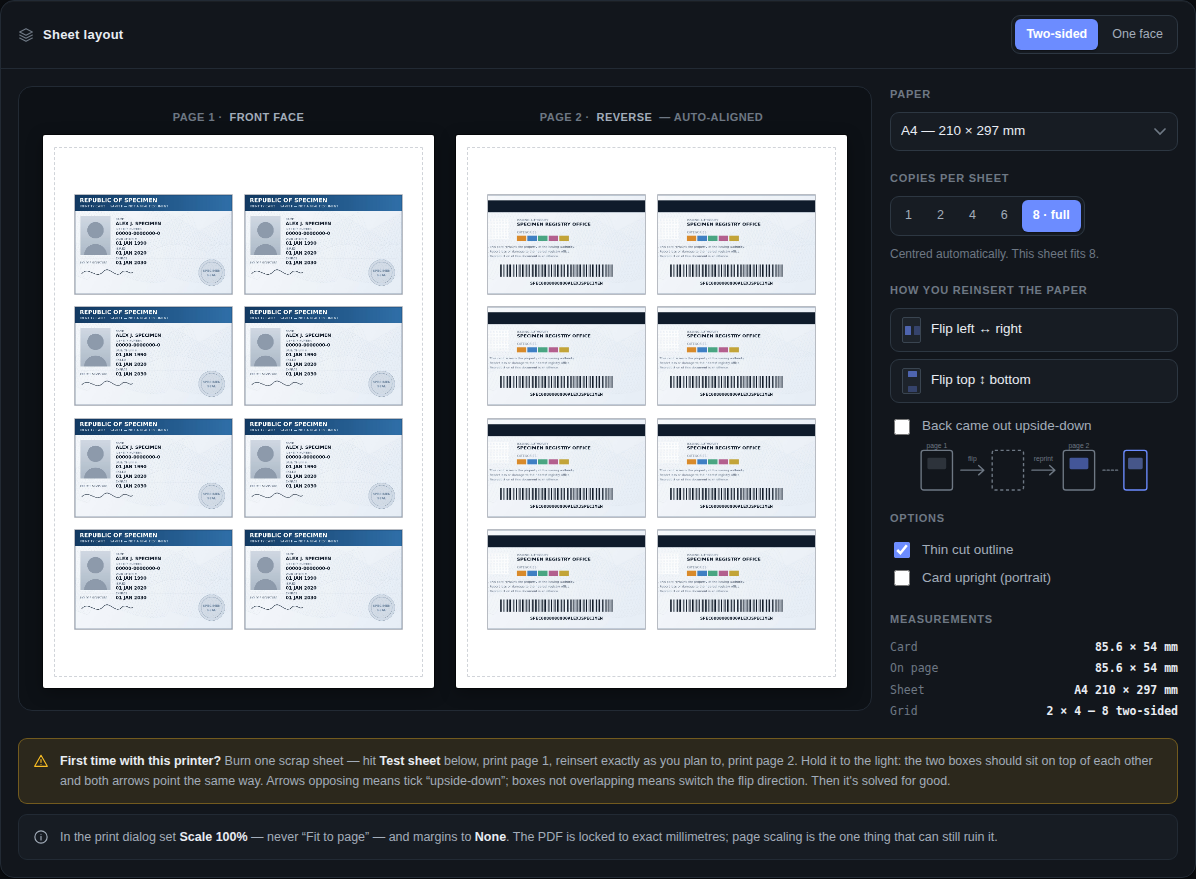
Eight two-sided copies on one A4 sheet, page 2 mirrored so it registers behind page 1:
| Dark | Light |
|---|---|
|
 |
All screenshots use a fictional specimen card generated by the test suite.
npm install playwright
node test/verify.js
74 assertions. The suite drives the real UI in headless Chromium and measures the real PDF with
pdftoppm (poppler-utils) plus Pillow/NumPy. It checks:
- Registration — un-mirroring every back position lands on a front, swept across all 20 reachable combinations of orientation, flip direction and copy count
- Rotation — the PDF's placed corner matches the same corner in the on-screen preview, for all four orientation/flip states. This is the assertion that catches a transposed rotation matrix, which is otherwise invisible in a duplex proof
- Exact size — the card measures 85.6 × 54 mm at the requested millimetre position
- Every paper size — each of the six sheets is selected through the real control, then the PDF's MediaBox, the printed card size, and the registration and bounds of every offered copy count are all checked against it. A custom sheet is driven through the inputs, including an absurd value to confirm it is clamped rather than obeyed
- Bounds — no card outside the 6 mm printable margin, in any configuration
- Alignment controls — the size slider changes only the targeted side, reset restores exactly, nudge steps land on 0.25 and 1 mm
- The screenshots tell the truth — the suite asserts the specimen back really is mis-scaled before capturing the "before" image, and that Match back to front really closes the gap before capturing the "after" one
- Theme resolution — a fresh profile follows the OS in both directions, a manual override
survives a reload, choosing what the OS already prefers releases the override, and everything
still works with
localStoragethrowing - Robustness — 1×1 images, non-image files, removing a side mid-edit, the flip timer stopping when the panel hides, rapid mode switching, no horizontal overflow at 390 px
It also regenerates every screenshot in docs/ from that specimen card, so the images in
this README cannot drift from what the app actually does.
Any current browser. Uses createImageBitmap with EXIF orientation where available and falls
back to <img> decoding. Canvas, Pointer Events, and Blob are the only other requirements.
MIT — see LICENSE.
Designed and built by Hafi