

Glim is a free, open-source file viewer for Mac. Open a contract, a folder of reference material or a project, and keep documents, images, spreadsheets, audio, video and code in one window. You can also make and save small text edits.
Free and open source · macOS · Apple Silicon & Intel · English / 简体中文
Website / 官网 · Download Glim →
Latest release · Release notes & checksums · Installation help
Mac downloads are not yet notarized by Apple. You may need to approve the first launch in System Settings. See instructions



At work, you might need a contract, a spreadsheet and a presentation together. When studying, you might have PDFs, ebooks and notes. A project folder can mix images, data and code. Glim keeps those files in a workspace for the task you are doing.
| Topic | Who it helps and what you can do |
|---|---|
| Office files | Read contracts, reports, spreadsheets and presentations |
| Reading and study | Read PDFs, ebooks, comics and study notes |
| Images and design assets | View photos, animation, SVGs and fonts; copy images or extract image text |
| Audio, video and subtitles | Play local media and folder playlists; read and edit subtitles separately |
| Notes and mind maps | Write Markdown and read XMind files, flowcharts and diagrams |
| Tables and data | Inspect CSV tables, JSON trees and interactive data graphs |
| Databases | Browse local SQLite tables, structure and records in read-only snapshots |
| Developers | Read source, webpages, configuration, logs and technical docs; make basic text edits |
| 2D graphics and 3D models | View SVGs, technical diagrams and static OBJ/STL mesh projections |
| GIS and tracks | Inspect GeoJSON fields and GPX/KML coordinates and source |
| AI and research files | Inspect model metadata, selected NumPy values and notebook structures |
| Archives and handoffs | Browse and extract ZIPs to a new directory, or inspect TAR listings and compressed text |
Explore tasks and limitations by topic · Look up a file format

Use a workspace for the files behind a task. Find files in the sidebar and switch between tabs. A window can hold multiple workspaces, and a file tab can move to its own window. Windows, workspaces and file tabs can return after restarting; general scroll positions and media playback positions are not fully restored.

If a local database sits beside your report, open it in Glim. Choose a table, filter or sort its records, and double-click a cell to read the full value. Glim uses a separate snapshot and keeps the source database read-only.
- Download the installer for your Mac and drag Glim into Applications.
- Press ⌘O to open a file, or ⌘⇧O to choose a folder. Open the files you already have.
- Switch between tabs, or between Preview and Source where available. Reading controls are usually near the bottom of the content; some appear when you move the pointer there.
- Press ⌘N for a note, or use Source for a small text edit. Edits to existing text files save automatically to the original; ⌘S also saves.
User guide · Common questions · Documentation
- Document, image, table, database and mind-map previews focus on viewing. Ordinary UTF-8 text supports basic editing, undo/redo, automatic saving and explicit saving.
- Complex Office layouts can differ. Excel displays saved formula results without recalculation. Use the appropriate specialist application for precise layout or advanced editing.
- GIS currently shows data and coordinates; 3D currently provides static projections. Each topic explains its specific coverage.
- Files open locally. Markdown remote images, HTML scripts and network resources, updates and enabled usage statistics can use the network. See privacy and network access.
- Apple Silicon and Intel Macs are supported. Installers are not yet notarized by Apple; first-launch instructions follow.
Open the latest Release page and choose the matching installer under Assets. That page contains the current version, release notes and checksums.
| Your device | Installer filename suffix |
|---|---|
| Mac · Apple Silicon (M series) | -macos-arm64.dmg |
| Mac · Intel | -macos-x86_64.dmg |
Not sure which Mac download to choose? Open Apple menu → About This Mac. An Apple M-series chip means Apple Silicon; an Intel processor means Intel.
Open the DMG and drag Glim into Applications. The app is ad-hoc signed, without Developer ID signing or notarization. If macOS blocks it, try opening it once, then go to System Settings → Privacy & Security → Open Anyway. Confirm the download came from this project's releases; there is no need to disable system security. Apple's instructions.
Release notes & SHA-256 checksums · All releases · Build from source
Found a file Glim should open better? Report a bug, request a format, or start a discussion. English and Chinese are welcome.
Contributing · Build from source · Roadmap · Security · MIT License
Thanks to everyone helping make Glim better.
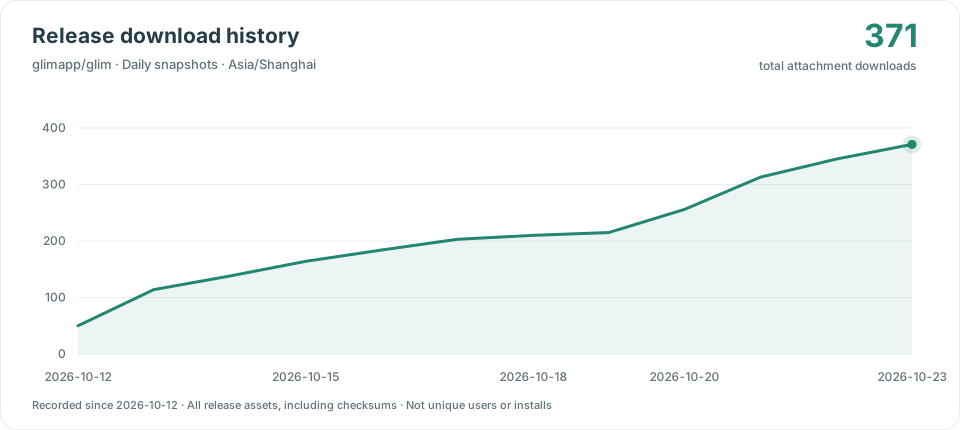
Daily snapshots count only .dmg installers from public GitHub Releases, including prereleases. The badge and chart share the same daily snapshot. DMG-only observations start on 2026-10-30; cumulative totals include downloads of older DMG releases. Earlier all-asset snapshots cannot be split by file type and remain archived separately. Feeds, checksums, ZIPs and other assets are excluded. Counts are downloads, not unique users or installations.