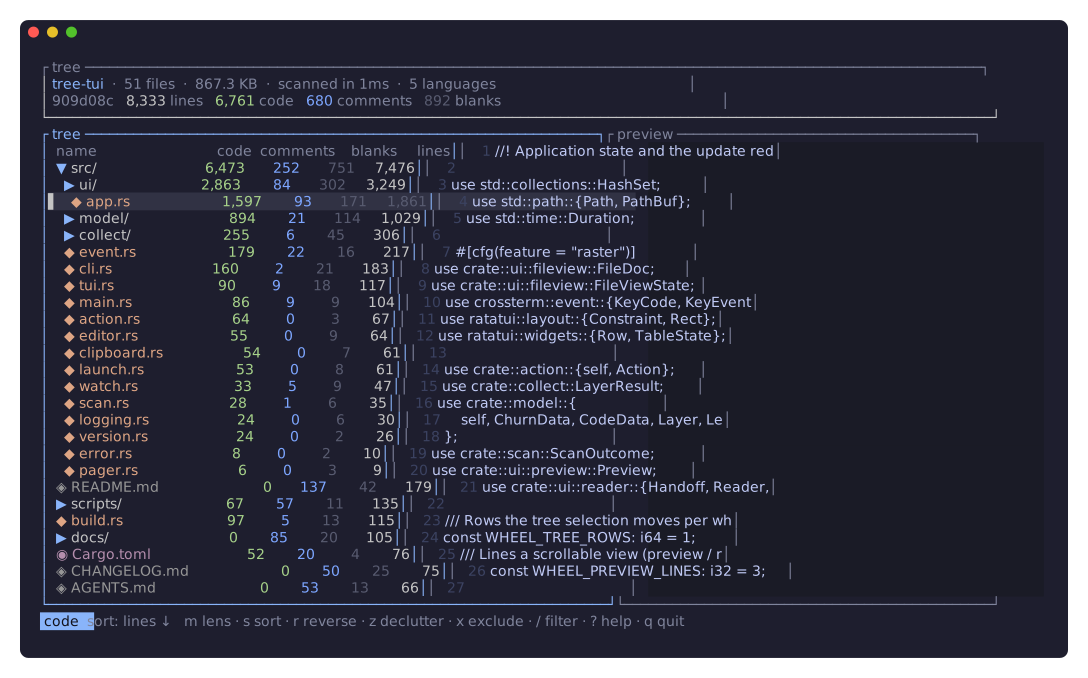
An interactive terminal directory visualizer for large, polyglot repos. tree walks a directory
once into a navigable directory tree, then lets you view it through swappable lenses — lines
of code, on-disk size, git churn, git working-tree status — each aggregated up every folder so you
can see where things actually concentrate.
tree [dir] # dir defaults to the current directory
Press m to cycle lenses (or 1–4 to jump). Every file git would show you shows up — source,
binaries, images, lockfiles, dotfiles like .github/ — not just code, so the size and git lenses are
meaningful too.
| Key | Lens | Shows |
|---|---|---|
1 |
code | lines of code / comments / blanks, with a per-language breakdown (via tokei) |
2 |
size | on-disk size in bytes, human-readable — find what's bloating the repo |
3 |
churn | lines added/deleted and how often files change, over recent git history |
4 |
status | uncommitted working-tree changes (added / modified / deleted), rolled up per folder |
The git lenses (churn, status) appear only inside a git repository; elsewhere they're skipped
when cycling.
Opening a directory does only the cheap filesystem walk (structure + size), so it's instant even on
huge trees. Each lens's data is computed the first time you open that lens, on a background
thread (a brief computing … shows in the footer), then cached for the session — switching back
is instant, and you never pay for git history unless you ask for it.
- One tree, many lenses — the same directory tree, re-measured on demand; switch with a keypress.
- Everything appears — every file git tracks, plus every untracked file it wouldn't ignore.
Dot-entries (
.github/,.gitignore) are ordinary files;.git/itself and anything gitignored stay out. Not only code, so size and git data have something to attach to. - Aggregated bottom-up — every directory totals its subtree under the active lens.
- Navigate & drill in — expand/collapse, jump to parent/child, page, go to top/bottom.
- Sort — by the active lens's columns (or by name / file count); reverse on demand.
- Declutter —
zhides rows that are zero under the active lens (e.g. non-code files incode). - Filter — live name filter that reveals matches together with their parent path.
- The whole row — every row carries its own breakdown: the lens's numbers plus the file count, the on-disk size, and the row's share of the tree under the active lens.
- File-type icons — every row carries a glyph for its type, in whichever tier your terminal can
render (
--icons nerd|unicode|ascii). - Preview & read anything — highlighted code, inline images, PDF pages, or a hex dump, in a side pane or a full-screen reader with search, folds, and soft wrap.
- Responsive — drag the divider to resize the panes; columns drop gracefully as the terminal narrows, with the code lens keeping its language breakdown longest. Works on any Unicode terminal.
With mise (macOS and Linux) — grabs the prebuilt binary from the GitHub release:
mise use -g github:getkono/tree-tui # installs the `tree` binaryHomebrew (macOS and Linux):
brew install getkono/tap/tree-tui # installs the `tree` binaryFrom source (with mise):
mise run install # cargo install --path . --force → installs the `tree` binaryNote: the binary is named
tree, so once installed it shadows the classictreecommand on yourPATH. That's intentional (tree [dir]is the spec); rename the binary inCargo.toml([[bin]]) if you'd rather keep both. The Homebrew formula declaresconflicts_with "tree"for the same reason.
tree [dir]           # explore [dir] (default: .) through swappable lenses
tree --icons <tier>  # glyph tier: unicode (default), nerd, or ascii
tree -V, --version   # print version + build info (commit, build time, profile, rustc, target)
tree -h, --help      # print usage
The syntax is strict: at most one directory, no unknown flags. Anything else prints usage and exits 2.
--icons defaults to unicode — geometric glyphs that need no font support, so a first run
renders on any terminal. --icons nerd gives per-file-type icons but needs a
Nerd Font, and shows tofu without one; --icons ascii drops to plain
characters. Set TREE_TUI_ICONS to make the choice stick.
| Key | Action |
|---|---|
j / k, ↓ / ↑ |
move selection |
g / G |
jump to top / bottom |
Ctrl-d / Ctrl-u, PgDn / PgUp |
page down / up |
l / → |
expand a directory, or descend into it |
Enter |
open the selected file in $EDITOR ($VISUAL, then vi), or expand a directory |
h / ← |
collapse a directory, or jump to its parent |
Space |
toggle the selected directory |
E / C |
expand all / collapse all |
m |
cycle the active lens |
1 – 4 |
jump to a lens (code / size / churn / status) |
s |
cycle the sort column (within the lens) |
r |
reverse the sort order |
z |
hide rows that are zero under the active lens |
p / Tab |
toggle the preview pane |
| drag | drag the divider between the tree and the preview to resize them |
/ |
filter by name (Esc clears) |
? |
toggle help |
q / Ctrl-c |
quit |
In the full-screen reader (Enter on a file), / and n search, : and <n>G go to a line,
w toggles soft wrap, and za / zM / zR fold the region under the top line, everything, or
nothing — folding everything turns the reader into an outline of the file. Images and PDF pages
render inline through the Kitty graphics protocol where the terminal supports it, and as truecolor
half-blocks where it doesn't.
The TUI owns the terminal, so logs go to a file and only when asked. Set TREE_LOG=path.log
(and optionally RUST_LOG=debug) to enable file logging.
tree separates a shared, metric-agnostic core from modular per-lens tools:
- Walk — an
ignore-based filesystem walk (the same crate tokei uses), unioned with the git index so a tracked-but-gitignored file still appears, builds the arena-backed tree skeleton and records each file's size. This runs once, eagerly. - Lenses — a
Lensis an exhaustive enum that decides what is shown and how (columns, the primary value, sortable sub-keys). Sorting reads a precomputed per-node value slice, so one routine serves every lens. - Collectors — each expensive metric has an independent collector (
tokeifor code,gixfor churn/status). When a lens is first opened, the event loop runs its collector on a blocking thread and reports the per-file result over a channel. - Aggregate + cache — the result is folded bottom-up into a per-node layer and cached; the
active lens re-sorts and re-renders. The
tokio::select!event loop redraws only on change.
See docs/ARCHITECTURE.md for the full design and recipes for adding a lens
or a collector.
- Language: Rust (edition 2024)
- TUI: ratatui + crossterm · Async: tokio
- Walk: ignore · Code stats: tokei · Git: gix (pure-Rust)
- File view: karet (fileview, editor, syntax, treesitter, filetype, theme, pdf)
- Errors: color-eyre / eyre, thiserror · Logging: tracing + tracing-appender
- Tooling & tasks: mise · Git hooks: hk
| Command | Description |
|---|---|
mise run dev |
Build and run (cargo run) |
mise run install |
Install the tree binary |
mise run test |
Run the test suite |
mise run fmt |
Format code |
mise run lint |
Lint with Clippy (deny warnings) |
mise run lint-fix |
Lint and auto-fix |
mise run check |
Format check + lint + test |
mise run svg |
Regenerate the README preview SVG |
- Rust (rustup) — toolchain, pinned via
rust-toolchain.toml - mise — manages dev tools and tasks
- hk — git hooks manager (
mise installthenhk install) - The
svgtask additionally needs freeze (provisioned bymise install) andtmux(a system package; it captures a frame of the running TUI — seescripts/gen-svg.sh)
This project uses hk. The pre-commit hook auto-fixes formatting and Clippy
lints on staged Rust files and re-stages them; the pre-push hook runs format checks, Clippy (deny
warnings), and the test suite. Run hk install once after cloning to activate them.
GitHub Actions runs format checks, Clippy, tests, and a build check for each released target
on pushes to master and pull requests.
Licensed under either of MIT or Apache-2.0 at your option.