- Spring Cloud focuses on providing good out of box experience for typical use cases and extensibility mechanism to cover others.
- Distributed/versioned configuration
- Service registration and discovery
- Routing
- Service-to-service calls
- Load balancing
- Circuit Breakers
- Distributed messaging
- Short lived microservices (tasks)
- Consumer-driven and producer-driven contract testing
Spring Boot makes it easy to create stand-alone, production-grade Spring based Applications that you can "just run".
Most Spring Boot applications need minimal Spring configuration (by user).
Spring boot guess the details based on
- available classes in classpath
- existing bean (created by developer)
- property value (application.properties)
- annotated items
- spring initializr
- intelliJ
- https://spring.io/projects/spring-cloud/
  <properties>
    <java.version>17</java.version>
    <spring-cloud.version>2023.0.0</spring-cloud.version>
  </properties>
  <dependencies>
    <dependency>
      <groupId>org.springframework.cloud</groupId>
      <artifactId>spring-cloud-starter-config</artifactId>
    </dependency>

    <dependency>
      <groupId>org.springframework.boot</groupId>
      <artifactId>spring-boot-starter-test</artifactId>
      <scope>test</scope>
    </dependency>
  </dependencies>

  <dependencyManagement>
    <dependencies>
      <dependency>
        <groupId>org.springframework.cloud</groupId>
        <artifactId>spring-cloud-dependencies</artifactId>
        <version>${spring-cloud.version}</version>
        <type>pom</type>
        <scope>import</scope>
      </dependency>
    </dependencies>
  </dependencyManagement>
- Netflix
- Cluster
Eureka receives heartbeat messages from each instance belonging to a service. If the heartbeat fails over a configurable timetable, the instance is normally removed from the registry.
- spring-cloud-starter-netflix-eureka-server
- @EnableEurekaServer
- works in cluster
- default port 8761
By default, every Eureka server is also a Eureka client and requires (at least one) service URL to locate a peer.
standalone mode
server:
  port: 8761

eureka:
  instance:
    hostname: localhost
  client:
    registerWithEureka: false
    fetchRegistry: false
    serviceUrl:
defaultZone: http://${eureka.instance.hostname}:${server.port}/eureka/- spring-cloud-starter-netflix-eureka-client
- @EnableEurekaClient (optional)
- client register itself (provides meta-data)
- host,
- port,
- health indicator URL (/info and /health),
- home page, and other details
- send heartbeat (hostname:app-id:port)
- status: UP, DOWN, STARTING, OUT_OF_SERVICE and UNKNOWN
eureka:
  client:
    serviceUrl:
defaultZone: http://localhost:8761/eureka/- maintenance mode
- outdated
- no support
- Spring Cloud Commons
- reactive support
- cached (spring.cloud.loadbalancer.cache.ttl)
- capacity (spring.cloud.loadbalancer.cache.capacity)
- ttl: 35, initialCapacity: 256.
- Weighted
- pluggable algorithm
- endpoint selection
- instance list suppliers
- filters
- RestTemplate/WebClientBuilder/WebClient/RestClient
- dependency spring-cloud-starter-loadbalancer
Spring Cloud LoadBalancer creates a separate Spring child context for each service id. By default, these contexts are initialised lazily, whenever the first request for a service id is being load-balanced.
The ReactiveLoadBalancer implementation that is used by default is RoundRobinLoadBalancer.
use the @LoadBalanced
@Configuration
@LoadBalancerClient(name = "say-hello", configuration = SayHelloConfiguration.class)
public class WebClientConfig {

  @LoadBalanced
  @Bean
  WebClient.Builder webClientBuilder() {
    return WebClient.builder();
  }
}
private final WebClient.Builder loadBalancedWebClientBuilder;
public UserApplication(WebClient.Builder webClientBuilder) {
this.loadBalancedWebClientBuilder = webClientBuilder;
}
@RequestMapping("/hi")
public Mono<String> hi(@RequestParam(value = "name", defaultValue = "Mary") String name) {
return loadBalancedWebClientBuilder.build().get().uri("http://say-hello/greeting")
.retrieve().bodyToMono(String.class)
.map(greeting -> String.format("%s, %s!", greeting, name));
}With the Config Server you have a central place to manage external properties for applications across all environments.
- Environment and PropertySource abstraction
- supports labelled versions of configuration environments
- HTTP, resource-based API for external configuration
- Encrypt and decrypt property values (symmetric or asymmetric)
- Retry support
- Pluggable
- Git (default)
- File System
- Vault
- Jdbc
- S3
- @EnableConfigServer
- spring-cloud-config-server
- proposed port : 8888
- /env endpoint
- /{name}/{profile}/{label}
spring.config.name=configserver (start on 8888 automatically)
@SpringBootApplication
@EnableConfigServer
public class ConfigServer {
  public static void main(String[] args) {
    SpringApplication.run(ConfigServer.class, args);
  }
}
The Environment resources are parametrized by three variables:
- {application}, which maps to spring.application.name on the client side.
- {profile}, which maps to spring.profiles.active on the client (comma-separated list, Environment.getActiveProfiles()).
- {label}, which is a server side feature labelling a "versioned" set of config files. f.e. "master"
Active profiles take precedence over defaults, and, if there are multiple profiles, the last one wins
- Bind to the Config Server and initialize Spring Environment with remote property sources
- server default endpoint: http://localhost:8888
- high availability solution
- comma-separated list under the spring.cloud.config.uri property
- all instances register in a Service Registry like Eureka
Spring Boot 2.4
Spring Boot Config Data resolves configuration in a two step process.
- loads all configuration using the default profile. This allows Spring Boot to gather all configuration which may activate any additional profiles.
- After it has gathered all activated profiles it will load any additional configuration for the active profiles.
application.properties
spring.config.import=optional:configserver:Removing the optional: prefix will cause the Config Client to fail if it is unable to connect to Config Server.
- Health Indicator attempts to load.
- The response is cached for performance reasons (for 5 minutes).
- Health indicator is disabled for security reason
Because of default label is main we have to override.
management.endpoints.web.exposure.include=refresh
spring.cloud.config.server.git.default-label=master
POST http://127.0.0.1:8082/actuator/refresh- key-value storage
- value/file per key
- auto refreshed
Distributed
- tracing
- logging
- debugging
This project provides a libraries for building an API Gateway on top of Spring WebFlux or Spring WebMVC. Spring Cloud Gateway aims to provide a simple, yet effective way to route to APIs and provide cross cutting concerns to them such as: security, monitoring/metrics, and resiliency.
- Built on Spring Framework and Spring Boot
- Able to match routes on any request attribute.
- Predicates and filters are specific to routes.
- Circuit Breaker integration.
- Spring Cloud DiscoveryClient integration
- Easy to write Predicates and Filters
- Request Rate Limiting
- Path Rewriting
- Server side load balancing
- Middle layer among
- clients
- service implementation
- Sleuth support
- API gateway
- Service discovery
- Retry support
- filter chains (chain of responsibility pattern)
- dependency
- spring-cloud-starter-gateway vagy
- spring-cloud-starter-gateway-mvc
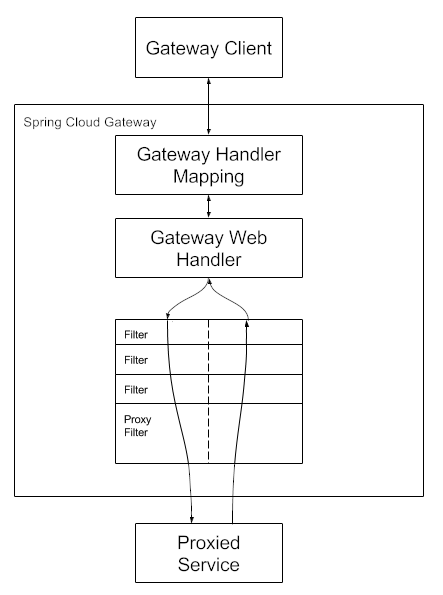
Route: The basic building block of the gateway. It is defined by an
- ID,
- a destination URI,
- a collection of predicates, and
- a collection of filters.
A route is matched if the aggregate predicate is true.
Predicate: This is a Java 8 Function Predicate. The input type is a Spring Framework ServerWebExchange. This lets you match on anything from the HTTP request, such as headers or parameters.
f.e. r -> r.path("/get")
Filter: These are instances of GatewayFilter that have been constructed with a specific factory.
URI: uri of service provider. If the URL has a lb scheme (e.g., lb://articles), it’ll use the Spring Cloud LoadBalancerClient to resolve the name (i.e., articles) to an actual host and port.
Here, you can modify
- requests
- responses.
It can be applied
- before
- after
sending the downstream request.
Example java based config
@SpringBootApplication
public class DemogatewayApplication {
	@Bean
	public RouteLocator customRouteLocator(RouteLocatorBuilder builder) {
		return builder.routes()
			.route("path_route", r -> r.path("/get")
				.uri("http://httpbin.org"))
			.route("host_route", r -> r.host("*.myhost.org")
				.uri("http://httpbin.org"))
			.route("rewrite_route", r -> r.host("*.rewrite.org")
				.filters(f -> f.rewritePath("/foo/(?<segment>.*)", "/${segment}"))
				.uri("http://httpbin.org"))
			.route("hystrix_route", r -> r.host("*.hystrix.org")
				.filters(f -> f.hystrix(c -> c.setName("slowcmd")))
				.uri("http://httpbin.org"))
			.route("hystrix_fallback_route", r -> r.host("*.hystrixfallback.org")
				.filters(f -> f.hystrix(c -> c.setName("slowcmd").setFallbackUri("forward:/hystrixfallback")))
				.uri("http://httpbin.org"))
			.route("limit_route", r -> r
				.host("*.limited.org").and().path("/anything/**")
				.filters(f -> f.requestRateLimiter(c -> c.setRateLimiter(redisRateLimiter())))
				.uri("http://httpbin.org"))
			.build();
	}
}
property based config example
spring:
  cloud:
    gateway:
      routes:
      - id: after_route
        uri: https://example.org
        predicates:
- Cookie=mycookie,mycookievaluespring:
cloud:
gateway:
routes:
- id: after_route
uri: https://example.org
predicates:
- After=2017-01-20T17:42:47.789-07:00[America/Denver]spring:
cloud:
gateway:
routes:
- id: before_route
uri: https://example.org
predicates:
- Before=2017-01-20T17:42:47.789-07:00[America/Denver]cors example
spring:
  cloud:
    gateway:
      globalcors:
        cors-configurations:
          '[/**]':
            allowedOrigins: "https://docs.spring.io"
            allowedMethods:
            - GET
full property list
https://docs.spring.io/spring-cloud-gateway/reference/appendix.html
Vault is a tool for securely accessing secrets. A secret is anything that to which you want to tightly control access,
- API keys,
- passwords,
- certificates,
- other sensitive information.
Vault provides a unified interface to any secret while providing tight access control and recording a detailed audit log.
key-value pair like normal property
Downloadable binary from https://releases.hashicorp.com/vault/
The config comes from vault (a la cloud config)
- dependency: spring-cloud-starter-vault-config
- or database dependency spring-cloud-vault-config-databases
spring.cloud.vault:
    host: localhost
    port: 8200
    scheme: https
    uri: https://localhost:8200
    connection-timeout: 5000
    read-timeout: 15000
    config:
spring.config.import: vault://
a la: spring.config.import: configserver
/secret/{application}/{profile}
/secret/{application}
/secret/{default-context}/{profile}
/secret/{default-context}
Consul is a tool that provides components for resolving some of the most common challenges in a micro-services architecture:
Service Discovery – to automatically register and unregister the network locations of service instances Health Checking – to detect when a service instance is up and running Distributed Configuration – to ensure all service instances use the same configuration.
HashiCorp Consul is a service networking solution that enables teams to manage secure network connectivity between services and across on-prem and multi-cloud environments and runtimes. Consul offers service discovery, service mesh, traffic management, and automated updates to network infrastructure device. You can use these features individually or together in a single Consul deployment.
Consul provides a control plane that enables you to register, query, and secure services deployed across your network.
download binaries https://developer.hashicorp.com/consul/install?product_intent=consul
consul agent -devvault server -dev@startuml
skin rose
title "Centralized configuration"
ConfigClient -> ConfigServer: get application default
ConfigServer --> ConfigClient: mixed properties
loop for every active profile
ConfigClient -> ConfigServer: get profile properties
ConfigServer --> ConfigClient: profile properties
end
@enduml@startuml
skin rose
title "Eureka"
ServiceProvider -> Eureka: register itself (name, access parameters)
Eureka --> ServiceProvider: OK
loop while running
ServiceProvider -> Eureka: heartbeat PUT /eureka/apps/{app-id}/{instance-id}?status=UP
Eureka -> ServiceProvider: OK
end
ServiceCustomer -> Eureka: GET /eureka/apps/{app-id}
Eureka -> ServiceCustomer: OK
ServiceCustomer -> ServiceProvider: feature
ServiceProvider -> ServiceCustomer: response
@enduml