
A unified control plane for running, managing, and collaborating with AI workspaces across local and remote machines





English | 简体中文
TaskHandoff brings Codex and other AI development work into one control plane. It connects AI sessions spread across machines, workspaces, and chat platforms while managing node enrollment, instance lifecycles, sessions, applications, and message routing.
Task Handoff is the open-source, self-hosted control plane for AI workspaces. The official cloud platform adds accounts and encrypted relay; see
ee/cloud-platform/README.md.
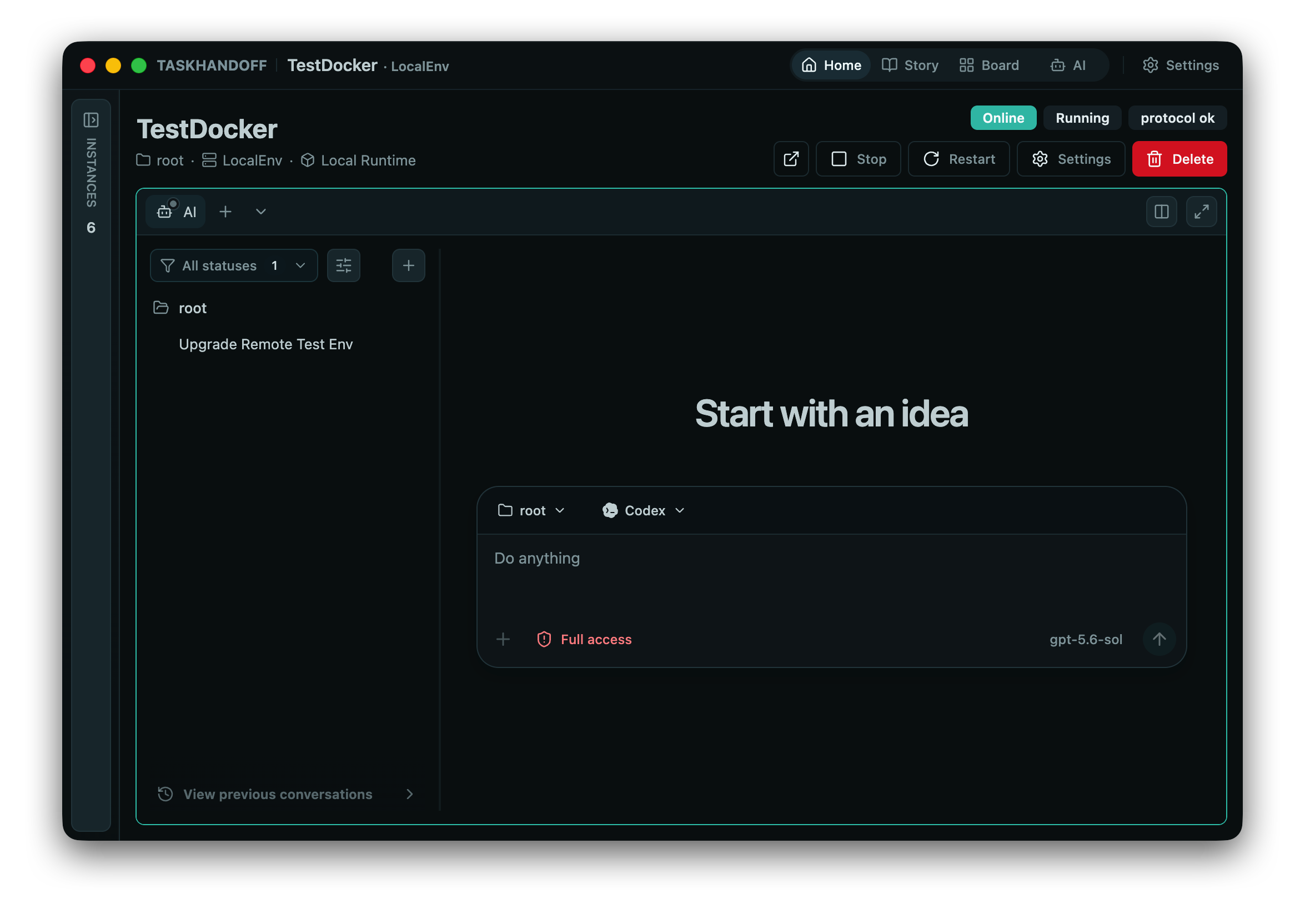
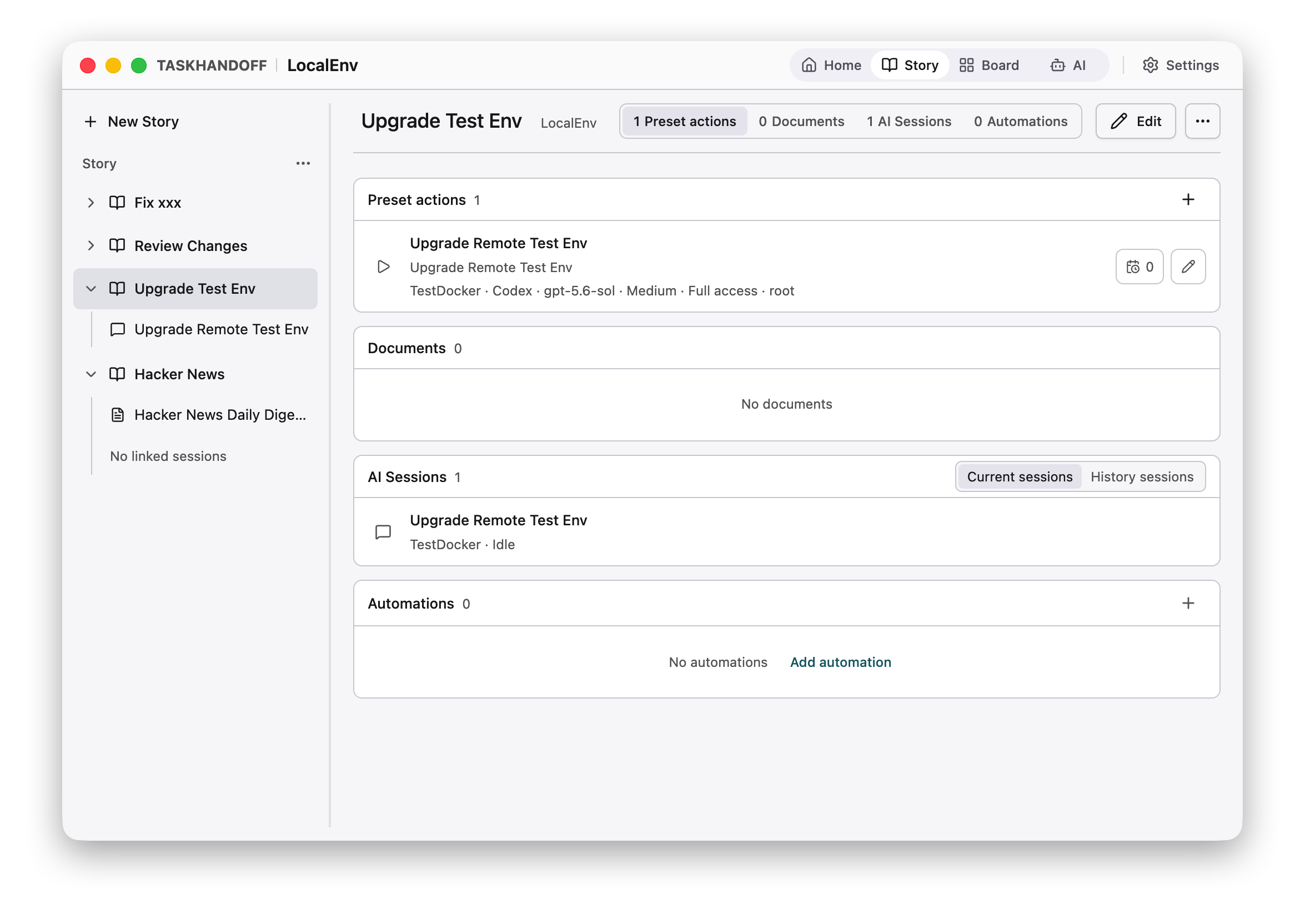
- Multi-node management — Connect local and remote nodes and inspect their resources and managed instances from one place.
- Managed workspaces — Create, start, stop, and restore isolated workspaces, with Docker as the primary runtime today.
- Image market and custom images — Choose from a read-only built-in catalog or separately managed custom images through one instance creation flow.
- Environment templates — Save a Docker instance's installed tools and container configuration as a node-local reusable environment, then combine it with any project or local-folder workspace.
- AI session center — View and control sessions across instances with real-time state delivered over WebSocket.
- Repository workflows — Inspect files, changes, branches, and worktrees, with conservative remote delivery for Git repositories.
- Managed Git credentials — Scope HTTPS tokens or pinned SSH keys to remotes, use them for one-time provisioning, or retain them for Agent, Terminal, App, and Repository Git commands.
- Chat integrations — Route messages, approvals, and actions from Telegram, DingTalk, WeChat, and Feishu/Lark to a selected instance.
- Application management — Install, remove, and run applications on target instances through a trusted built-in catalog.
- Mobile client — Connect an iOS or Android device directly to a user-managed Control Plane for AI sessions, instance operations, applications, and terminals.
- Desktop and server deployment — Run TaskHandoff as a mobile or desktop application, or as systemd services on Debian and Ubuntu.
- English and Chinese UI — Switch languages instantly or follow the browser language automatically.
Browser / Desktop / Mobile / Chat platforms
                 │
                 ▼
          Control Plane
       UI, API, and chat gateway
                 │
                 ▼
            Node Agent
   Node resources and instance lifecycle
                 │
                 ▼
       Controlled Instance
 Workspace, applications, and AI sessions
TaskHandoff is organized into three runtime layers:
- Control Plane provides the Web/API management surface and owns the node inventory, instance board, chat gateway, and cross-instance AI session views.
- Node Agent runs on each managed machine and owns node-local configuration, runtime resources, folder inventory, and controlled instance lifecycles. Instances continue running when the control plane is stopped or restarted.
- Controlled Instance hosts a workspace, applications, AI sessions, triggers, and metadata. It can run standalone; in a managed deployment, its lifecycle and access are owned by the Node Agent.
Chat and AI Session state form a cross-layer path: the Control Plane owns chat credentials, bindings, command parsing, and routing, while each target AI Session remains the source of truth for conversation state.
Docker is the primary isolated runtime and supports multiple instances on one node. A built-in Local Runtime is also available on supported non-Windows nodes for one controlled instance per host user. Runtime capabilities and adapters keep the same model extensible to Kubernetes without creating a separate UI flow.
An environment template is a node-local Docker image created from an existing instance with docker commit. Registry images and environment templates are peer environment sources in the instance creation flow. Workspace selection remains independent, so either source can be combined with a Git project or a local-folder workspace.
Templates capture only the container writable layer, such as installed system packages and tools. They exclude /workspace, /data, /home/agent, every other bind mount or volume, memory, processes, and network state. Derived instances always receive a new identity, registration token, port, and managed volumes. The node agent briefly pauses the source container during commit and rejects a template if Docker Config contains instance-private credentials.
Every Docker instance has managed volumes for /data and /home/agent; Git workspaces also have a managed /workspace volume, while local folders use an external bind mount. The instance deletion dialog uses one option, selected by default, to delete all managed data. Clearing it retains every managed volume and reports its name; retained volumes are never attached automatically to another instance.
The source node owns both the template record and its Docker image, so a template can be used only on that node while it is ready. Deleting a template removes its internal template tag. A content-addressed internal lease keeps the image recoverable while derived instances reference it, and the image is garbage-collected after the final reference is removed.
- Node.js
>= 24.15.0 < 25 - pnpm
9.15.3 - Docker, when using Docker Runtime, building container images, or running the standalone Compose profile
pnpm install
pnpm run build:all
pnpm cli help
Start the Control Plane API and development UI in separate terminals. The disabled authentication mode is intended only for loopback development:
pnpm cli control-plane --auth-mode disabled
pnpm run control-plane-ui:dev
Common development commands:
# Start the control-plane UI
pnpm run control-plane-ui:dev

# Type-check and build
pnpm run typecheck
pnpm run web:typecheck
pnpm run build:all

# Run tests
pnpm test

# Inspect the npm package contents
pnpm run pack:dry
To run a standalone Browser-profile controlled instance instead of the Control Plane development stack:
docker compose up -d --buildThe current directory is mounted at /workspace by default. Set TASK_HANDOFF_WORKSPACE_HOST to mount a different host directory. This Compose service is a standalone controlled instance, not a Control Plane and Node Agent deployment.
Server deployments install the Control Plane and the server-local Node Agent as independent systemd services. The control plane can stop or restart without terminating instances managed by the agent.
On a Debian or Ubuntu server running systemd, run the latest stable installer as root:
curl -fsSL https://github.com/edgestorage/task-handoff/releases/latest/download/install-server.sh | sudo shThe script checks the host, installs Node.js 24 and Docker when needed, installs the latest stable @task-handoff/server package from npm, and then creates and starts the Control Plane and Node Agent systemd services. The default auto source profile uses Tsinghua APT mirrors and npmmirror for Chinese locale or timezone environments, and also falls back to those mirrors when the official Node.js source is unreachable. Its temporary APT source list does not overwrite the host's source configuration. By default, the control plane listens on port 8081 with password authentication enabled. Installer options can change the port, authentication mode, release channel, and other service settings.
Use --install-source china or --install-source official to select a source profile explicitly:
curl -fsSL https://github.com/edgestorage/task-handoff/releases/latest/download/install-server.sh | sudo sh -s -- --install-source chinasudo npm install -g @task-handoff/server@latest
sudo task-handoff installManage services and updates:
sudo task-handoff start
sudo task-handoff stop
sudo task-handoff restart

task-handoff check
sudo task-handoff update
The installation creates:
task-handoff-node-agent.service
task-handoff-control-plane.service
See scripts/install-server.sh for supported installer options.
Remote machines only need the Node Agent. Generate a one-time join token in the Control Plane and prefer the exact installation command shown there. Its package version is resolved from the running Control Plane release. The equivalent form is:
curl -fsSL https://CONTROL_PLANE_HOST/install-node-agent.sh | sudo sh -s -- \
  --control-plane https://CONTROL_PLANE_HOST \
  --join-token JOIN_TOKEN \
  --npm-package @task-handoff/node-agent \
  --controlled-instance-package @task-handoff/controlled-instance \
  --version RELEASE_VERSION
On Debian and Ubuntu, the remote-node installer bootstraps the required Node.js
24 and npm on a fresh host. It uses the same automatic source selection; append
--install-source china to force Chinese mirrors. The selected npm registry is
preserved in the Node Agent service environment for subsequent managed updates.
Replace RELEASE_VERSION with the Control Plane's runtime package version so the Node Agent and controlled-instance runtime use the same release.
An installed Node Agent can also generate a one-time invitation directly on the node:
sudo task-handoff-node-agent invite --ipc-path /run/task-handoff/node-agent.sockAdd --json for automation-friendly output. Remote TCP access still requires an invitation and paired HMAC authentication.
To remove a standalone Node Agent installation:
sudo task-handoff-node-agent uninstallThe command removes the systemd service and runtime packages, then asks whether to delete the Node Agent data directory. The default is No. Use --keep-data or --delete-data for non-interactive execution. Managed Docker volumes are preserved.
@task-handoff/server provides the unified task-handoff command:
task-handoff control-plane
task-handoff node-agent
task-handoff node-agent-invite
task-handoff web
task-handoff help
Use pnpm cli help during development. Chat adapters, bindings, AI session messages, queues, and approvals are managed by the control plane.
The control-plane UI supports English (en-US) and Simplified Chinese (zh-CN). Open Settings → Appearance → Language to follow the system language or choose a language explicitly. The interface updates without reloading control-plane data.
The preference is stored only in the current browser. Terminal output, logs, AI messages, repository content, and other user- or provider-supplied data are never translated.
apps/cli/                         CLI entry point
apps/desktop-shell/               Electron desktop shell
apps/mobile/                      Expo iOS and Android client
packages/control-plane/           Control plane, Node Agent, and chat gateway
packages/control-plane-client/    Shared Control Plane API and realtime client
packages/control-plane-ui/        Control-plane Vue UI
packages/controlled-instance/     Controlled-instance HTTP/WebSocket API
packages/controlled-instance-ui/  Frozen controlled-instance Vue UI
packages/ai-session-runtime/      AI session runtime
packages/app-runtime/             Managed application runtime and catalog
packages/protocol/                Cross-component protocols and data models
packages/core/                    Shared capabilities, diagnostics, and storage
packages/web-theme/               Web theme and Markdown rendering
scripts/                          Installation, build, and runtime scripts
A semantic version tag such as v1.2.3 builds the controlled-instance runtime artifacts, publishes @task-handoff/control-plane, @task-handoff/node-agent, @task-handoff/controlled-instance, and @task-handoff/server, and attaches the installer and immutable artifacts to the GitHub Release. alpha and beta versions use their matching npm dist-tags; stable versions update latest.
The six public base images and their independent docker-vX.Y.Z release
workflow are maintained in the
TaskHandoff Images repository.
They contain system dependencies and developer tools, but not the
controlled-instance runtime. Node Agent remains the authority for mounting the
bootstrap bundle and installing the desired runtime artifact.
The Control Plane image market uses the bundled snapshot by default; once a
verification key is configured it pulls its catalog from
https://images.thandoff.com/market/v1/catalog.json and degrades through
remote, local cache, then the bundled snapshot; the cache lives at
market/catalog-cache.json inside the data directory. The issued catalog is
authoritative for the repositories it references: remote responses must pass
schema validation and mandatory ed25519 verification, and remote loading stays
disabled while no public key is configured. Configuration:
TASK_HANDOFF_MARKET_CATALOG_URLoverrides the catalog URL (official URL by default); set it tooff/0to disable remote loading.TASK_HANDOFF_MARKET_REFRESH_INTERVALsets the refresh interval in seconds (six hours by default);0keeps manual refresh only.TASK_HANDOFF_MARKET_CATALOG_PUBLIC_KEYis required to enable remote loading: the ed25519 key (PEM or base64 SPKI).TASK_HANDOFF_MARKET_CATALOG_KEY_IDoptionally pins the key identifier carried by the catalog signature.TASK_HANDOFF_MARKET_ALLOWED_REPOSITORIESis an optional comma-separated repository allowlist (matched on repository path boundaries) for deployments that want to restrict the catalog to their own registry.
Semantic version tags build macOS arm64/x64, Windows x64, and Linux x64 installers and publish them to GitHub Releases. Versions with an alpha or beta suffix are marked as prereleases. macOS artifacts are signed, notarized, stapled, and verified with Gatekeeper. Windows code signing is not enabled yet.
Closing the Desktop control-panel window keeps TaskHandoff running in the system tray. The tray shows the current Control Plane and Node Agent service status and can reopen the existing window without restarting either service. Choose Quit TaskHandoff from the tray or the platform application menu to stop the Desktop services. A graceful Node Agent shutdown stops Local Runtime controlled instances so they can be restored on the next launch; Docker Runtime controlled instances keep running and are rediscovered when the Node Agent returns.
A stable tag in the exact form mobile-vX.Y.Z runs the mobile release checks and starts independent Android and iOS release jobs. GitHub-hosted Linux and macOS runners build and sign both native applications. Android attaches an APK to the corresponding GitHub Release; after approval through the ios-production environment, iOS uploads directly to App Store Connect/TestFlight. Final App Store review remains a manual action, and Android is not submitted to Google Play by this workflow.
See apps/mobile/README.md for the client boundary and development commands, and apps/mobile/RELEASE.md for credentials, first-build setup, and release operations.
TaskHandoff is licensed under the Apache License 2.0. See NOTICE for attribution information.