[Project page] [Paper] [Dataset]
This is code for our CVPR 2026 paper PriVi: Towards a General-Purpose Video Model for Primate Behavior in the Wild.
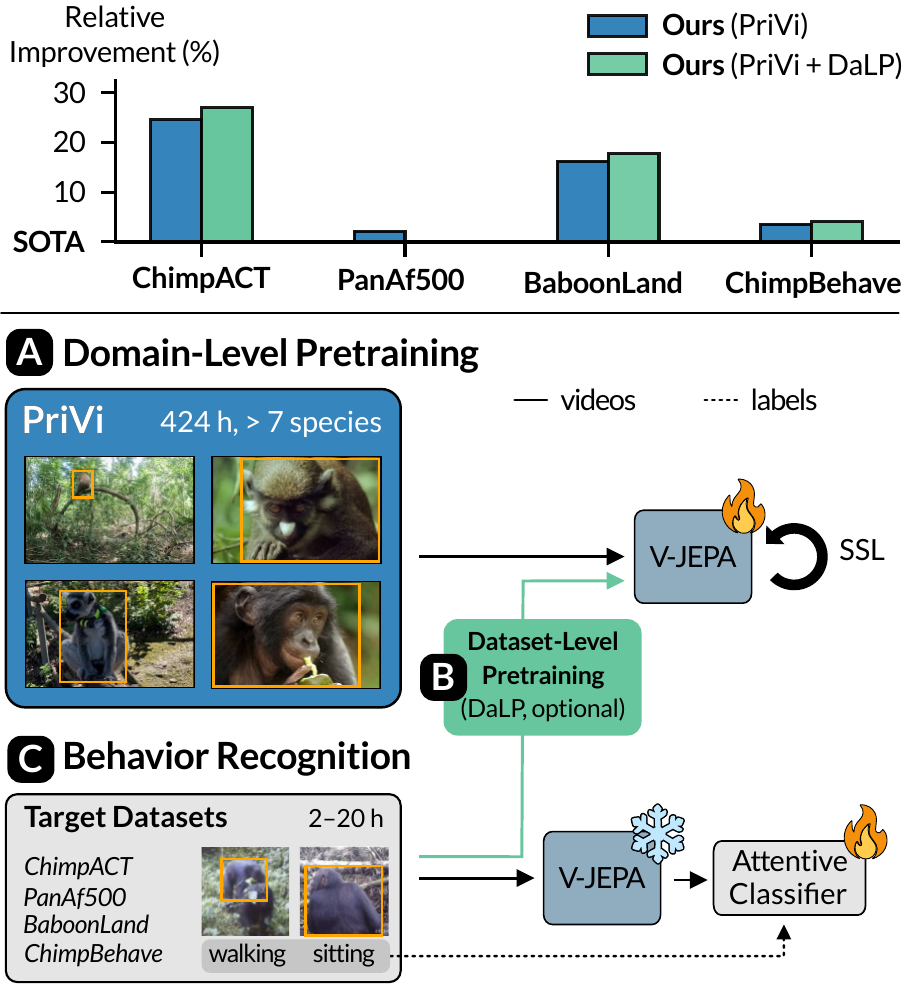
Install conda (or any conda-like dependency manager) and run conda create -f environment.yml.
We are working on relasing our model on HuggingFace, stay tuned!
In the meantime, if you want to use our model, you can do so using
from privi.backbones.vjepa import VJEPA
backbone = VJEPA(cfg=dict(
    pretrained_path="PATH_TO_CHECKPOINT",
    training_mode='frozen', # or full|finetune|layer_finetune
    #finetune_layers=[23, 22, 21], # only used when training_mode='layer_finetune',
    out_layers=[23]), device='cuda')
X = torch.randn(2, 3, 16, 224, 224, device='cuda') # (batch, channels, frames, height, width)
all_latents = backbone.forward(X) # returns {layer: latents_for_layer}
last_latents = all_latents[23] # (batch=2, n_tokens=1568, d_model=2014)
Download the model checkpoint privi_original.pth. This is the original checkpoint used in the paper (without DaLP), trained on both public data and the private chimpanzee dataset.
For most primate behavior datasets, there are currently no reference implementations for evaluation code available, which hinders community adaption. To mitigate this issue, we provide reference implementations for ChimpACT and PanAf500 in this repo. (BaboonLand and ChimpBehave coming soon)
Usage:
from privi.datasets.generic import make_videodataset
from pprint import pprint
dataset, data_loader, _ = make_videodataset(
    dataset_type='chimpact', # panaf500
    label_path="PATH_TO_LABEL_FILE", # paths in label files are relative to video_base_path
    video_base_path="PATH_TO_VIDEO_FILES",
    batch_size=16,
)
model = MODEL_TO_EVALUATE()
evaluator = dataset.evaluator()
for batch in data_loader:
    data, labels, indices, metadata = batch
    logits = model(data)
    evaluator.add_batch(labels, logits)
pprint(evaluator.metrics()) # metrics() returns a dict of all metrics relevant for a specific dataset
See EVAL_DATASETS.md for dataset preprocessing and more details.
- Download all snippets_*.zip files from TODO and unzip them in
data/snippets/ - Download yt.tab as CSV and download all YouTube videos with IDs listed to
data/ytin the formatYOUTUBE_ID.mp4 - Run
python privi/preprocessing/extract_snippets_from_csv.py data/yt.csv data/snippets/ --video-base-path=data/to extract 3s snippets from youtube videos - Download
pretrain_samples.tabas CSV todata/. If you want to use only R&O videos for pretraining, usepretrain_samples_wo_yt.csvinstead. - Download the original V-JEPA checkpoint vitl16.pth.tar to
data.
Your data/ folder should now look like this:
snippets/
├── assamese
├── baboon_a
├── baboon_w
├── barbary_a
├── barbary_t
├── eulemur
├── lemur
├── marmoset
├── rhesus
├── saimiri
├── yt1
├── yt2
├── yt3
└── yt_mammals1
yt.csv
pretrain_samples.csv
vitl16.pth.tarCheck configs/pretrain.yaml whether you want to adjust any paths and run wandb login to log into your W&B account. Then run python privi/pretrain/main.py --fname configs/pretrain.yaml to run pretraining. Our training runs used 4xA100 40GB.
-
If you did not pretrain a checkpoint yourself, download privi_original.pth and place it under
data/ -
Run
CUDA_VISIBLE_DEVICES=0 python privi/crop_action_head/train.py --config configs/frozen_head/chimpact.yaml. This script trains multiple heads in parallel to make eavaluation easier and more robust. Each head has its own wandb run, which are grouped together. For each head and for each evaluation epoch, the training script produces a json file with validation metrics. -
Use the following code snippet to view the best validation scores (aggregated over five runs) and the corresponding epochs
import privi.eval.overview as E
ldf, cfgs = E.extract(["data/checkpoints/frozen_head/"])
chimpact_df = E.agg(ldf, cfgs, {}, E.best("val__overall", ["test__overall", "test__weighted", "val__weighted"], E.mean(), max_epoch=1.0))
panaf_df = E.agg(ldf, cfgs, {}, E.best("val_balanced_acc", ["test_acc","test_balanced_acc", "val_acc"], E.mean(), max_epoch=40.0))- Then add
ckpts: data/checkpoints/frozen_head/RUN_NAME
head_epochs: [BEST_VAL_EPOCHS]
to configs/frozen_head/chimpact.yaml and run python privi/crop_action_head/train.py --config configs/frozen_head/chimpact.yaml --eval to produce test scores.
- Re-run the code snippet from 2. to also see test scores.
You can use the same procedure for panaf500 and baboonland. For chimpbehave, you need to aggregate across the five cross-validation folds.