Building Like In Minecraft
BlockDesigner builds with the controls you know from creative mode. Keys below are the defaults; all of them can be changed in Settings.
Press 1 for View (look around only), 2 for Select and 3 to turn Build mode on or off. Esc leaves Build mode.
Press C to start creative flight.
- W A S D move; W and S follow where you look.
- Space goes up, Shift goes down, Ctrl sprints.
- C or Esc stops flying.
More camera controls are on Camera, look and feel.
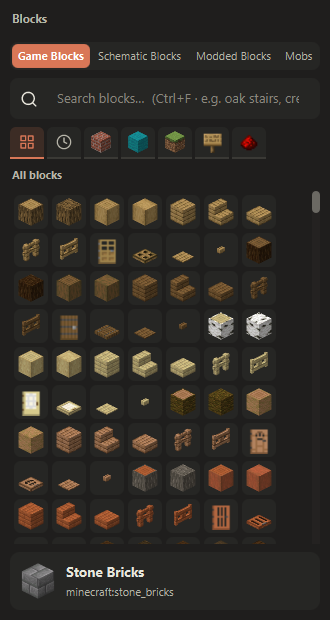
The palette is laid out like the creative menu: Building, Colored, Natural, Functional and Redstone, plus All and Recently used. Block names are Minecraft's own, from the game's and each mod's language files.
- In Build mode, press 1 to 9 to hold a hotbar slot.
- Hover a block in the palette and press 1 to 9 to put it in that slot.
- The wheel changes the hotbar slot while flying. In Build mode, Alt+wheel does it and the wheel still zooms.
- Delete empties the held slot. Shift+C clears the hotbar.
- Ctrl+F searches blocks.
- Left-click breaks. Hold to repeat.
- Right-click places, oriented like Minecraft. Hold to repeat.
- Middle-click picks the block into the hotbar.
Placement works as in the game: stairs and slabs go top or bottom, logs follow the clicked face, torches and signs go on walls, and doors and beds place both halves. Fences, walls, panes, redstone dust and rails connect to their neighbours.
- Shift+X is Replace mode: right-click swaps the aimed block and keeps its facing.
- Shift+Z is Shuffle mode: it places random blocks from the hotbar.
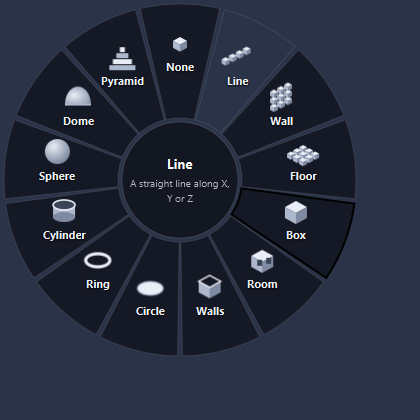
Hold Alt in Build mode to open the Easy Build wheel. Point at a shape, let go, then right-drag to draw it.
The shapes are line, wall, floor, box, room, walls, circle, ring, cylinder, sphere, dome and pyramid. You see a preview while you draw, and the shape is placed as one undo step. Shapes grow from the face you start on.
Press M for the symmetry settings. You can mirror across X, Y and/or Z, or make radial copies around a vertical axis. Stairs, doors, slabs and logs turn to match in every copy.
Shift+M puts the symmetry centre on the aimed block.
You can place pigs, villagers, iron golems, armour stands, paintings and more, drawn with Minecraft's models where available. They are saved with the project and exported with the schematic.
Ctrl+Z undoes and Ctrl+Y (or Ctrl+Shift+Z) redoes. Undo and redo cover every action.