
Quota, usage, and token visibility in OpenCode and your terminal.





npx @slkiser/opencode-quota initImportant
Requires OpenCode 2.0.16 or newer. On OpenCode 1? Use npx @slkiser/opencode-quota@4 init. Node.js 22.13+ is required for npx @slkiser/opencode-quota ... (on Node 23, 23.4+).
Upgrading from 4.x? Read what changed in 5.0.
After installation:
- Restart OpenCode.
- Run
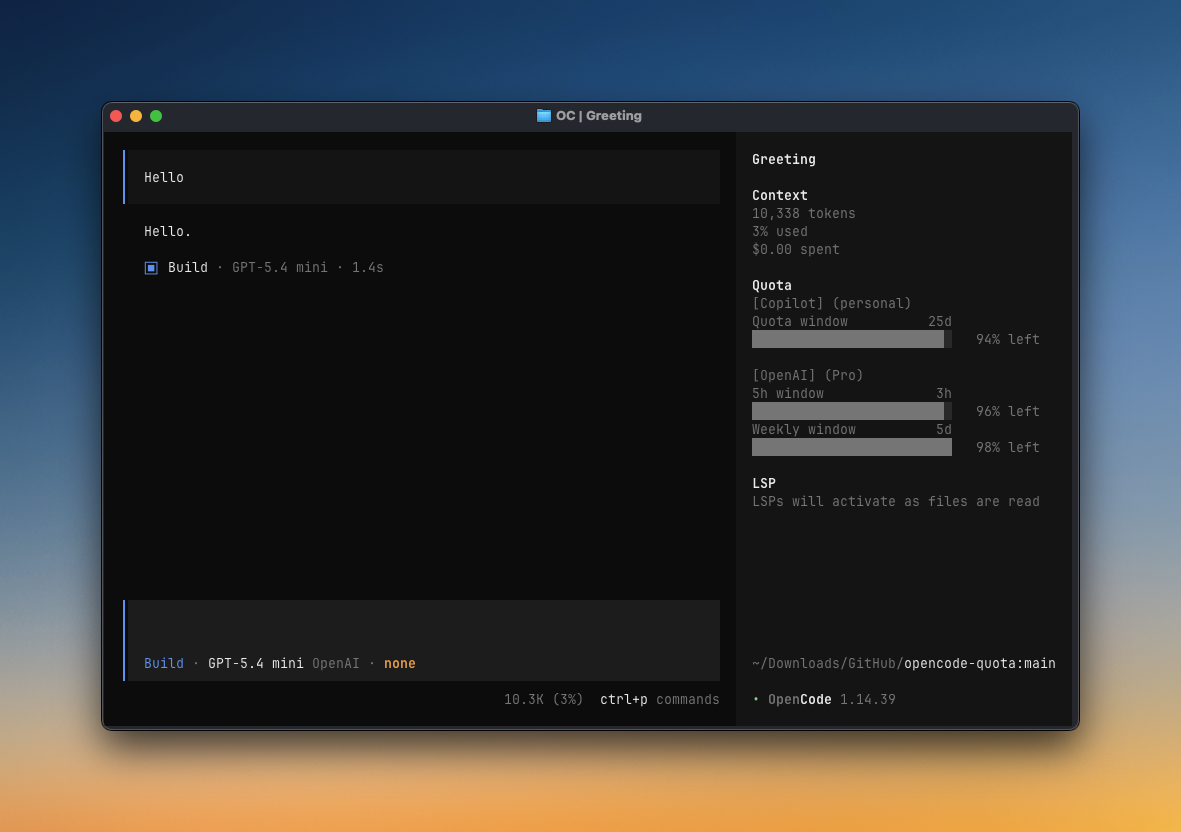
/quotain the OpenCode TUI, oropencode-quota showin a terminal. - If you enabled the sidebar, open the session sidebar and look for
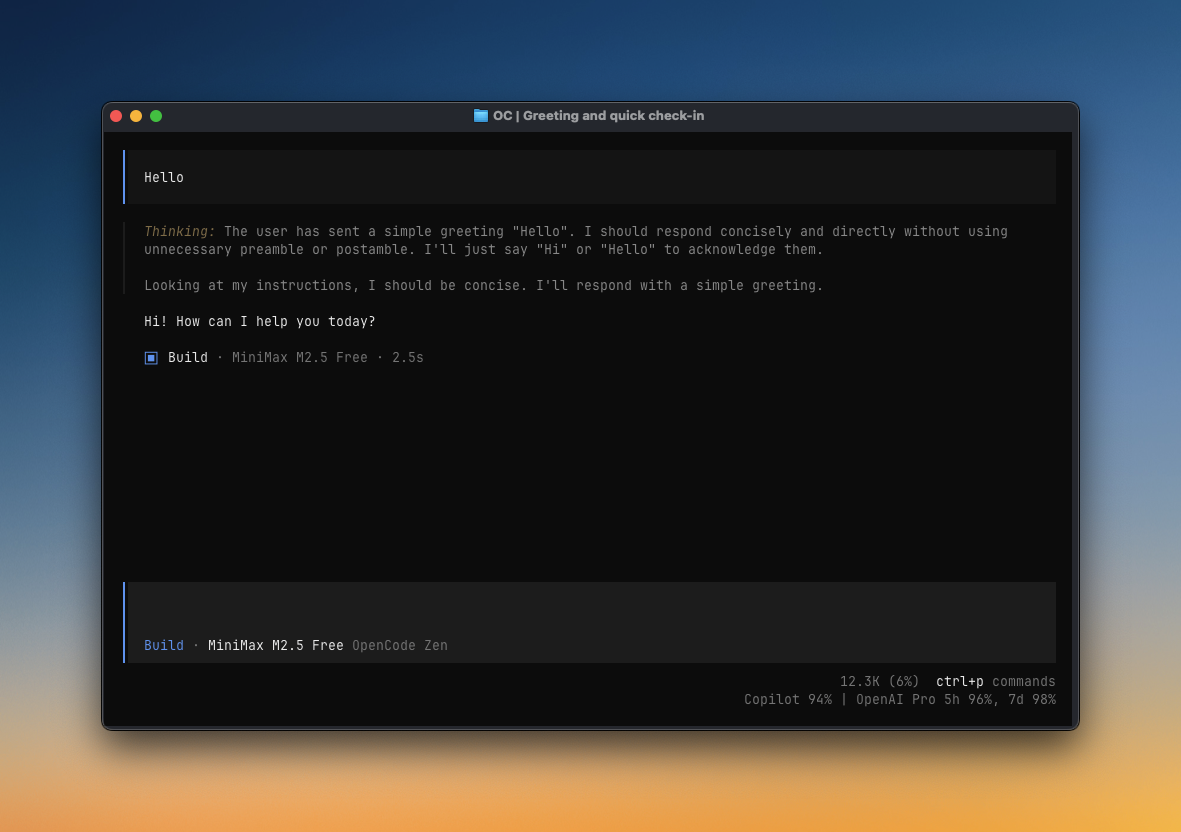
Quota. - If you enabled the compact status line, look at the bottom of Home or below the message input.
-
Close OpenCode.
-
Preview the update:
npx @slkiser/opencode-quota@latest update --dry-run
-
Inspect the safe setting/cache changes and manual credential findings, then apply:
npx @slkiser/opencode-quota@latest update
-
Restart OpenCode.
The updater always shows a preview first. --yes applies only the safe edits it previewed, and it never moves or deletes secrets. See Updating safely.
Warning
- OpenCode 1 is no longer supported.
initandupdatedetect OpenCode 1 and keep you on 4.x (@slkiser/opencode-quota@4). - Logins come from OpenCode 2 (it keeps them in
opencode.db), never fromauth.json. If a provider is missing, log in again. - Inside OpenCode, logins go through the plugin API and quota is computed in OpenCode's background service, so
PATHand environment variables come from the service. See Service environment. The terminal command readsopencode.dbread-only and uses your terminal's environment. - Web and Desktop get the slash commands (report posts in the chat) but no toasts or panels.
- One
"plugin"entry inopencode.jsonloads the server and the TUI; notui.jsonentry is needed. - TUI slash reports now open in a popup. Set
tuiCommandDisplay: "inline"to keep them in the chat. - OpenCode Zen uses your OpenCode Console sign-in (
opencode auth login opencode); the copied Console cookie file is no longer read. See OpenCode Zen setup.
Details: Moving to OpenCode 2.
|
|
| Sidebar panel A full quota view in OpenCode's session sidebar. |
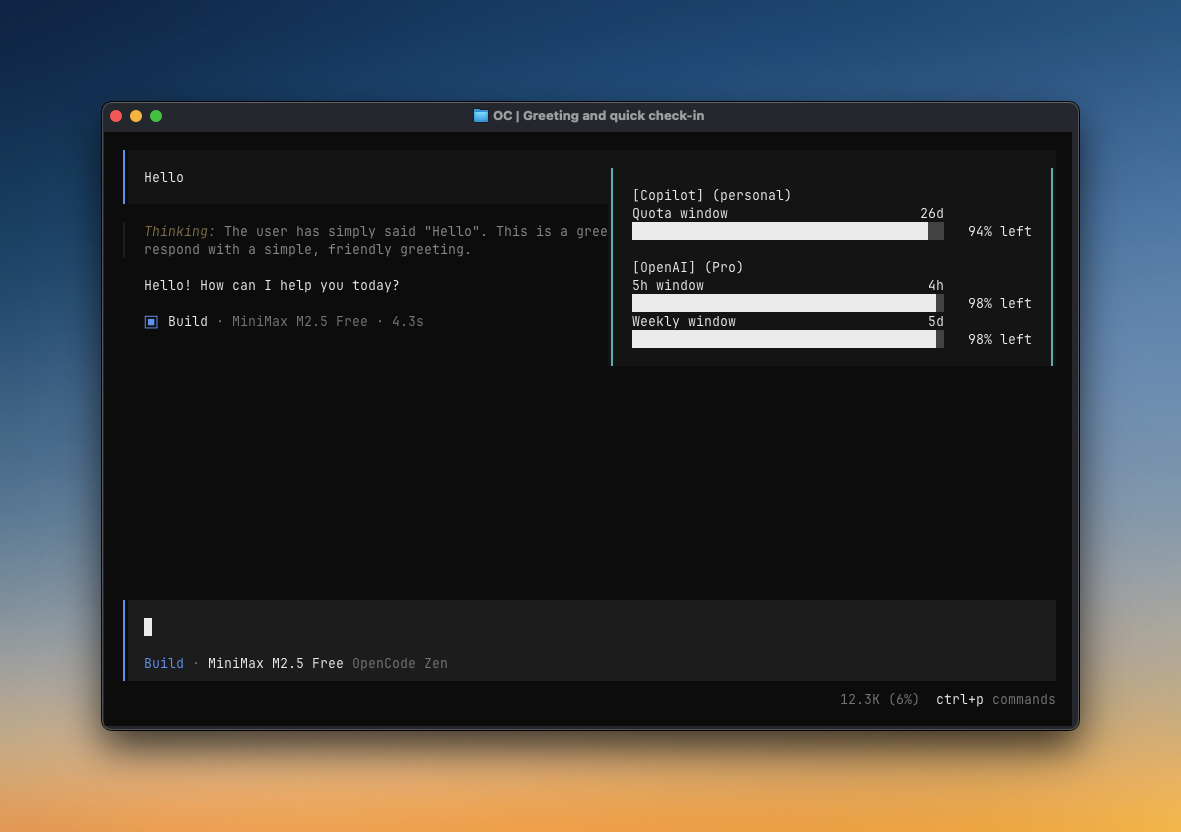
TUI toast Quota checks can appear automatically while you work. |
|
|
| Compact status line Short quota text on Home and below the message input. |
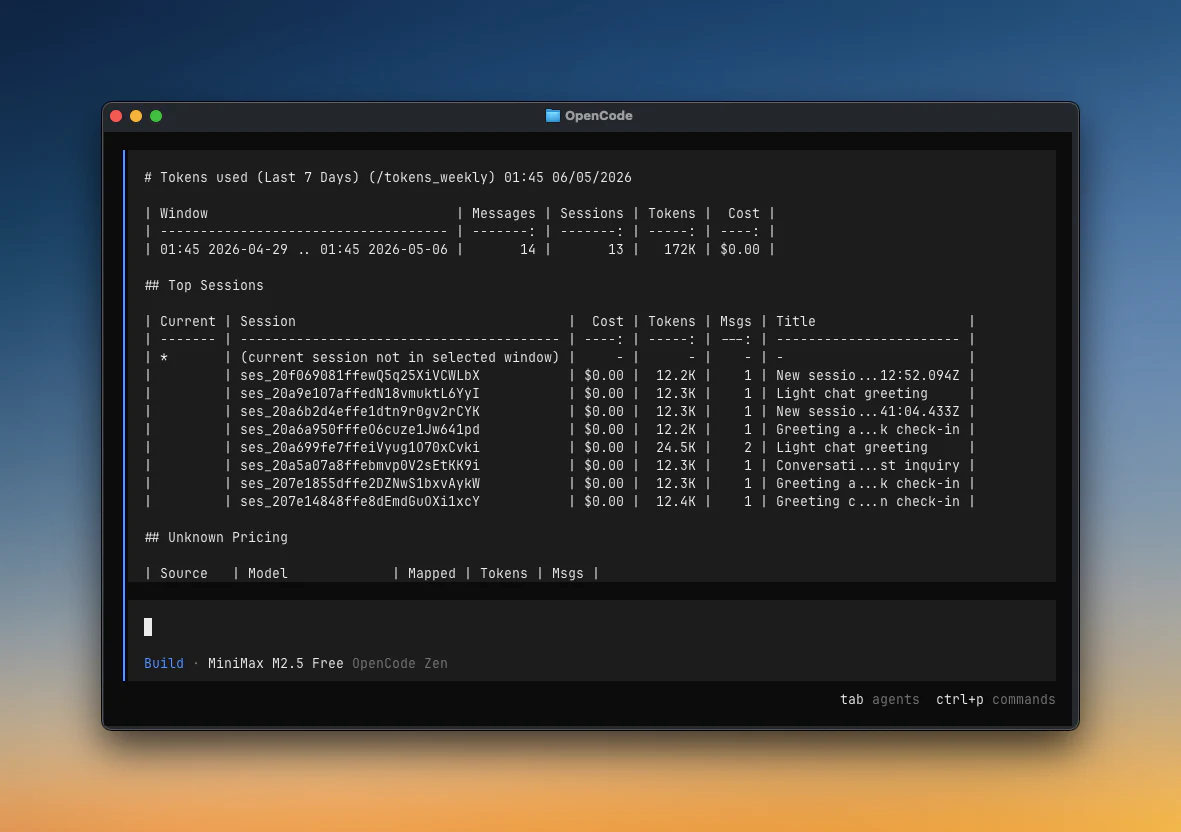
Token reports/tokens_today, /tokens_weekly, session reports, and more. |
More ways to use it:
- Terminal: run
npx @slkiser/opencode-quota show(works with OpenCode closed). In Web and Desktop, slash commands post the report in the chat, and the AI can call thequota_statustool. - Several logins: each login for a provider gets its own rows;
(active)marks the one OpenCode uses. - Scripts and CI: JSON output and optional OpenTelemetry metrics. See External integration.
- Display: a quota bar under the prompt (
tuiPromptBar.enabled), OpenCode Go's collapsed-sidebar row (tuiSidebarPanel.opencodeGoPreferredWindow), reset countdown style (resetTimeSpaced,resetTimeDecimals), bare81%labels (percentLabelStyle), and extra accounting rows (accountingDetail). - Runs-out estimate:
quotaProjection: "runway"shows Runs out ≈ 1h 50m for supported fixed windows. Off by default; JSON is unchanged. - Tokens and resets: include subagent sessions with
sessionTokenScope: "tree"; get a popup when quota comes back withresetNotifications. - Troubleshooting:
/quota_statuschecks logins, quota sources, pricing, and maintainer notices.
See Configuration for UI options and Manual install for setup details.
Type these in OpenCode. Add arguments after the command, like /tokens_between 2026-09-01 2026-09-25. See Web and Desktop notes.
| Command | Use when |
|---|---|
/quota |
Show current quota |
/quota_status |
Diagnose setup, authentication, providers, pricing, and notices |
/quota_announcements |
Read active bundled maintainer notices |
/pricing_refresh |
Refresh local runtime pricing from models.dev |
/tokens_today |
Show tokens used today |
/tokens_daily |
Show tokens used in the last 24 hours |
/tokens_weekly |
Show tokens used in the last 7 days |
/tokens_monthly |
Show tokens used in the last 30 days, including pricing |
/tokens_all |
Show tokens used across all local history |
/tokens_session |
Show tokens used in the current session |
/tokens_session_all |
Show current session plus descendant sessions |
/tokens_between YYYY-MM-DD YYYY-MM-DD |
Show tokens used between two dates |
Use the CLI for setup, updates, terminal checks, and custom providers.
| Command | What it does |
|---|---|
npx @slkiser/opencode-quota@latest init |
Set up OpenCode Quota |
npx @slkiser/opencode-quota@latest provider add |
Add or update a custom provider |
npx @slkiser/opencode-quota@latest show |
Show current quota |
npx @slkiser/opencode-quota@latest status |
Check configuration and provider problems |
npx @slkiser/opencode-quota@latest update |
Update an existing installation |
show and status work with OpenCode closed: they read logins from opencode.db read-only, never refresh a token (a sign-in can show as expired, for example Token expired, until you open OpenCode), take PATH and API-key variables from your shell, and use the settings of the folder you run them in (a project's opencode-quota/quota-toast.jsonc applies). Run npx @slkiser/opencode-quota@latest --help for command options. See External integration for JSON, scripts, and CI examples.
Personal
| Provider | Auth/setup | Data from | Reports |
|---|---|---|---|
| Anthropic (Claude) | Needs setup | Local CLI/OAuth | Quota |
| Chutes AI | Automatic | Remote API | Quota |
| Cursor | Needs setup | Local estimate | Budget and spend |
| GitHub Copilot | Automatic | Remote API | Budget and usage |
| Google AGY | Needs setup | Remote API | Quota |
| Kilo Gateway | Automatic | Remote API | Quota and balance |
| NanoGPT | Automatic | Remote API | Quota and balance |
| Ollama Cloud | Automatic | Remote API | Quota and usage |
| OpenAI | Automatic | Remote API | Quota |
| OpenCode Go | Automatic | Remote API | Quota |
| OpenCode Zen | Automatic | Remote API | Budget and balance |
| OpenRouter | Automatic | Remote API | Budget and spend |
| Synthetic | Automatic | Remote API | Quota |
| xAI SuperGrok | Automatic | Remote API | Quota |
Business / Enterprise
| Provider | Auth/setup | Data from | Reports |
|---|---|---|---|
| Anthropic (Claude) | Needs setup | Local CLI/OAuth | Quota |
| Chutes AI | Automatic | Remote API | Quota |
| Cursor | Needs setup | Local estimate | Budget and spend |
| Gemini CLI | Needs setup | Remote API | Quota |
| GitHub Copilot | Needs setup | Remote API | Budget and usage |
| Google AGY | Needs setup | Remote API | Quota |
| NanoGPT | Automatic | Remote API | Quota and balance |
| OpenAI | Automatic | Remote API | Quota |
| OpenCode Zen | Automatic | Remote API | Budget and balance |
| OpenRouter | Automatic | Remote API | Budget and spend |
| Synthetic | Automatic | Remote API | Quota |
| xAI SuperGrok | Automatic | Remote API | Quota |
Gemini CLI works only with Gemini Code Assist Standard or Enterprise (organization) accounts. Personal Google users should use Google AGY.
Personal
| Provider | Auth/setup | Data from | Reports |
|---|---|---|---|
| Alibaba Coding Plan | Automatic | Local estimate | Quota |
| Alibaba Personal Token Plan | Needs setup | Official CLI | Quota |
| DeepSeek | Automatic | Remote API | Balance and status |
| Kimi Code | Automatic | Remote API | Quota |
| Kimi Code (CN) | Automatic | Remote API | Quota |
| MiniMax Token Plan | Automatic | Remote API | Quota |
| MiniMax Token Plan (CN) | Automatic | Remote API | Quota |
| Xiaomi MiMo | Needs setup | Dashboard API | Quota and balance |
| Z.ai Coding Plan | Automatic | Remote API | Quota |
| Zhipu Coding Plan | Automatic | Remote API | Quota |
Business / Team
| Provider | Auth/setup | Data from | Reports |
|---|---|---|---|
| Kimi Code | Automatic | Remote API | Quota |
| Kimi Code (CN) | Automatic | Remote API | Quota |
| MiniMax Token Plan | Automatic | Remote API | Quota |
| MiniMax Token Plan (CN) | Automatic | Remote API | Quota |
| Zhipu Coding Plan | Automatic | Remote API | Quota |
These vendors offer team or business plans, but the current integrations report only the configured member API key rather than organization-wide usage.
Add a provider that uses a remote quota API or tracks a local usage estimate:
npx @slkiser/opencode-quota@latest provider addThe guided setup previews the change before saving. See the custom-provider guide for details.
If quota or token data looks wrong:
- Run
/quota_statusin the OpenCode TUI, oropencode-quota statusfrom a terminal for the same diagnostics. Useopencode-quota showfor a quick quota glance. - Confirm the expected provider appears in the detected provider list. If it is missing, log in to it again in OpenCode 2.
credential_sourcelists logins OpenCode could not return. - Confirm companion auth plugins are before
@slkiser/opencode-quotainopencode.json. - If token reports are empty, start OpenCode once so it creates
opencode.db, then run a session with model usage. - Check Troubleshooting for common symptoms and provider-specific fixes.
Project guides:
External references:
- OpenCode docs
- OpenCode config
- OpenCode plugins
- OpenCode TUI
- models.dev pricing data
- Node.js downloads
Thanks to everyone who has contributed to OpenCode Quota.
MIT
OpenCode Quota is not built by the OpenCode team and is not affiliated with OpenCode or any provider listed above.