The companion ComfyUI node for my CrossView-Warp IC-LoRA (LTX-Video 2.3, 22B) — v2 is the current one, v0.9 the first release.
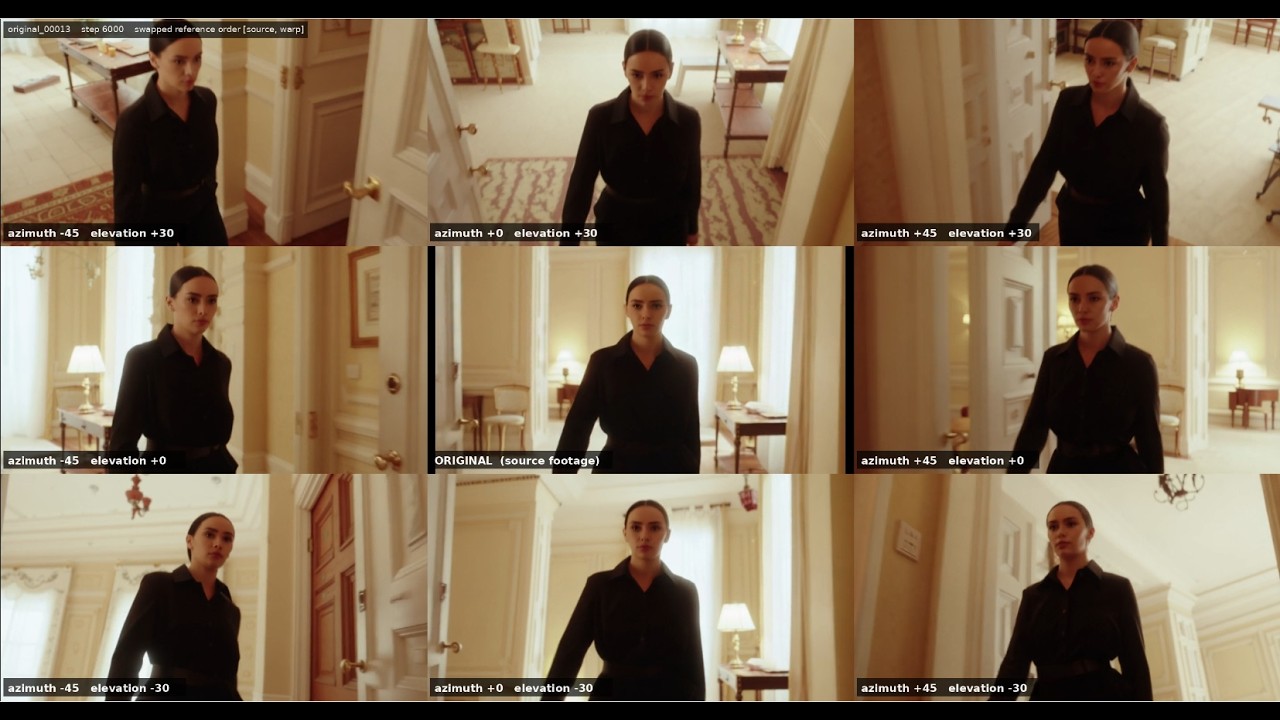
You give it a video and a camera offset, and it builds the depth-warp conditioning the LoRA expects: the input reprojected into the new viewpoint, with magenta holes where the original camera never saw anything.
The node carries two views, switched with the button in the top-right corner of the widget:
- a 3D orbit picker — a sphere around the subject where you drag the camera marker instead of typing angles. The green/yellow shading shows the ranges the LoRA was trained for.
- a live preview — the actual warp, which you orbit by dragging the picture itself and scrub or play frame by frame, without re-running the graph.
It also does camera moves: park the playhead on a frame, aim the camera, and press KEY. The node then interpolates a pose per frame instead of holding one for the whole clip.
This whole thing is a proof of concept. The LoRA card lists what works and what doesn't — read it before expecting magic: https://huggingface.co/Cseti/LTX2.3-22B_IC-LoRA-CrossView-Warp_v2
Walkthrough video - click to open on YouTube.
cd ComfyUI/custom_nodes
git clone https://github.com/cseti007/ComfyUI-CrossViewWarp
Then restart ComfyUI and refresh the browser. There are no required packages to install — the node runs on NumPy + PyTorch, which ComfyUI already provides.
The warp step splats every source pixel into the new view in a tight loop. With
numba installed, that loop is JIT-compiled and the
warp runs ~10x faster. Without it the node uses a pure-NumPy fallback and produces
the exact same result, just slower — so numba is a pure speed-up, never required.
It is deliberately not in requirements.txt / pyproject.toml, so
ComfyUI-Manager won't pull it in automatically. The reason: numba depends on
llvmlite and pins a bounded NumPy version range, so installing it into an
existing ComfyUI environment can force a NumPy up-/down-grade that breaks other
custom nodes. Only add it if you want the speed-up and know your environment can
take it:
pip install numba
- A recent ComfyUI with LTX-2 support (the
LTXAddVideoICLoRAGuidenode) - Geometry for the input clip. MoGe is the better path and needs no install —
Run MoGe Inferenceis built into ComfyUI, and it is what built the training warps, somoge_geometryroughly halves the warp error against a relative depth map. A Depth Anything V2 node pack still works on thedepthinput — kijai/ComfyUI-DepthAnythingV2 - VideoHelperSuite for video load/save
- The CrossView-Warp LoRA itself — v2 or v0.9. The node only builds the conditioning; the LoRA does the generation
- Optional:
opencv-contrib-python— thesmooth_depthoption uses its guided filter when available, and falls back to a bilateral filter when not
CrossView Warp — the only node in the pack.
| Output | What it is |
|---|---|
warp |
the warp control video — wire to an IC-LoRA reference guide (latent_downscale_factor = 1) |
orbit_view |
a rendered image of the orbit sphere with your camera setup — the single pose, or the whole keyframed path with its frame-numbered markers — wire to a PreviewImage/SaveImage to document what you asked for |
Inputs: frames plus either depth (a Depth Anything V2 map) or
moge_geometry (metric geometry from Run MoGe Inference — real metres, so
depth_ratio, invert_depth and smooth_depth stop applying). An optional
camera_info places the camera exactly and overrides the whole orbit.
Widgets the node ignores under the current wiring are hidden, so what you
see is what it reads. With camera_info connected that is most of them.
Key widgets (all have tooltips in the UI):
azimuth/elevation/distance— the camera offset. Stay in the green zone of the picker: azimuth up to ±45°, elevation +30°/−20°. Yellow runs to ±90° azimuth and +45°/−35°, which is what the training set covers — azimuth is spread evenly out to 90°, while looking up past −20° is thin (3.1%). Avoid near-zero angles — the LoRA misbehaves when the warp is almost identical to the source. Important: Unfortunately distance doesn't work as expected due to some dataset problems which will be solved in the next release.hfov— the assumed lens. 0 means "read it frommoge_geometry", and shows ashfov (auto).vertical_shift— a vertical lens shift, for rescuing a clipped head. It translates the frame rigidly; nothing moves, so parallax cannot change.depth_ratio(default 6.0) — how much depth relief the warp gets. The low default keeps the subject readable in the warp; raising it gives more parallax but shreds cluttered scenes.pivot_override+pivot_x/y/z(default on, z=1.05) The default puts the pivot on the nearest thing in the middle of the frame, which is usually your subject. The orbit radius isdistance × |pivot|, so moving the pivot back also widens the arc.keep_source_aim(default off) — orbit around the pivot but keep the camera pointed where the source was pointed, which is what the training data does. Measured against the training warps on 12 scenes it scores 28.9 against 42.3 for aiming at the pivot, with 26.8 the best a known-exact pose can do. Off by default only because it changes every saved workflow; turn it on for new work.smooth_depth— (default off) edge-aware depth smoothing, fewer speckle holes in the warp.use_keyframes/keyframes/interp_motion— a camera move instead of a single pose. See Keyframed camera move below.preview_size/frame_index— the live preview only; see below.
Run the graph once. The node keeps a downscaled copy of the clip, and from then on the preview re-warps it on demand — orbit, dolly, scrub and play without queueing anything.
It calls the same code that produces the output, so it is not an approximation: measured against a full run, at most 4 pixels of 147 456 differ, and those come from a float32 cast on the metric-geometry path.
- drag the picture — azimuth and elevation. wheel — distance.
- the strip underneath: play, KEY (drop or remove a keyframe at the playhead), iso, reset, and a scrub bar with the keyframes on it.
- iso tints the surfaces lying in the pivot's depth plane, so you can see what you are orbiting rather than only where the pivot is. The crosshair marks the pivot itself, which sits dead centre in almost every setup because the camera looks at it by construction.
preview_sizeis what the clip gets cached at: about 1.8 MB per frame and ~11 fps playback at 512, ~1 MB and ~18 fps at 384. Changing it needs a re-run.
The node is an output node, so hovering it offers Run Branch — run the warp alone and look at the preview without the generation.
Two ways to place one, writing the same path:
On the playhead (preferred). Scrub the preview to a frame, aim the camera, press KEY. The keyframe lands on exactly that frame — nothing has to be spread out afterwards. Pressing KEY again on the same frame removes it, and right-clicking a marker on the scrub bar removes that one without scrubbing onto it first.
On the sphere. Right-click it to drop a keyframe. The first one also captures your current azimuth/elevation/distance, so a single right-click gives a complete move. Left-drag a marker to move it, hover and scroll to dolly it, right-click it again to delete. Each marker is labelled with its frame number. Without a cached clip the spacing is a blind 24 frames apart.
The sphere gesture is deliberately mouse-only. A modifier key can be claimed by any other node pack through ComfyUI's keybinding system — KJNodes, for one, binds S to a node-swap gesture that disconnects and repositions whatever node is under the cursor. Right-clicking inside the sphere therefore does not open the node's context menu; right-click its title or body for that.
The first keyframe switches use_keyframes on and hides the static
azimuth/elevation/distance, which no longer feed the render. Toggling it off
leaves the markers visible but dimmed, so you can compare against the static
pose without losing the setup.
Between keyframes the path drives the camera, so dragging there auditions a pose — you see it, nothing is written, and KEY commits it. On a keyframe, dragging edits that keyframe directly.
The path lives in the keyframes widget as JSON, and you can edit it by hand:
[{"f":1,"az":-30,"el":20,"dist":1.0},{"f":49,"az":45,"el":10,"dist":1.2}]f is an absolute frame number, counted from 1. vs (vertical shift) and
px/py/pz (the pivot) are optional — leave them out and they inherit the
static widgets, which is why paths written before those fields existed render
identically. Animating the pivot swings the camera around one thing and then
another, but the orbit radius is dist × |pivot|, so it moves the parallax too;
px/py/pz are ignored unless pivot_override is on.
Before the first and after the last keyframe the camera holds, so a path may cover only part of the clip — "swing for the first two seconds, then sit still" is just a path that ends early. A keyframe past the end of the clip is an error rather than a silently truncated move. A single keyframe is not a move; the node treats it as the static pose.
dist carries the same caveat as the static distance above: the current LoRA
does not follow it reliably, so keyframing a dolly move will disappoint until the
next release. Angles are what this is good at.
interp_motion sets both the shape and the timing: linear, ease_in,
ease_out, ease_in_out, or smooth (a Catmull-Rom spline that glides through
every keyframe with no corner). Easing and the spline are deliberately not
combinable — an eased stop at each knot cancels the very continuity the spline
is there to provide.
Convert keyframes to an input and the sphere becomes read-only: the node will
render whatever the upstream sends, so letting you edit markers here would show a
path that is not the one produced. If the upstream is a literal (a primitive or
string-constant node) the sphere previews its path; if the string is computed at
execution time there is nothing to preview, and the sphere says so rather than
leaving a stale local path on screen.
- IC-LoRA strength 1.3 for characters, 1.0–1.15 for cars and other content the base model has strong opinions about
- Both IC-LoRA reference guides at
latent_downscale_factor = 1— this is the setting that breaks the result silently, and nothing catches a mismatch - For
distance > 1: describe the newly revealed content in the text prompt — the warp can't know what's outside the original frame.
The full settings story and all the limitations are on the LoRA card.
The node id has not changed, so saved workflows load. These do change:
roll_lockis gone, and it was ON by default — so a saved workflow that used the default renders differently. It rolled the camera to hold the subject's projected lean, but the orbit introduces no roll to correct (a level source gives a level target at every angle), what it was reacting to is keystone from elevation, which a roll cannot fix, and both training sets have exactly zero camera roll. The widget stays, hidden and ignored, only because widget values are stored positionally. Workflows that had it OFF are unchanged.head_biasis nowvertical_shift. It kept its widget slot, so ordinary workflows are fine — but a link into it (converted to an input) or an API-format prompt that names it will not resolve.- The mouse wheel is inverted: wheel back raises the number, matching every other numeric widget in the graph.
hfovbetween 0 and 20 now raises instead of warping from an impossible lens. 0 still means "read the focal frommoge_geometry".frame_countandinterpolationare retired — hidden and ignored. The clip length comes from the cached preview, andinterp_motioncarries both the shape and the timing of the path.distancereaches down to 0.1 (was 0.2). Widening a range cannot invalidate a saved value.
If this is useful and you want me to keep doing open work like this:

Apache-2.0