This small nodejs program is intended to demonstrate, prove how to decompress GLIA ERC-721 Tokens from the data that is stored on the ETH blockchain. It is also a proof that GLIA tokens are a truly decentralized application - if the website currently used as the main interface to the smart contract, https://glia.icu or https://blockbra.in, went away along with its data - GLIA tokens will live on forever : publishing this repository is intended to encourage that longevity by providing a public code base that shows how to decode and encode tokens.
This is a terminal based program, where you can pass the raw data as an argument and it will be decoded rendered in terminal. It can be run when offline (so you know it's actually decoding things on your system) just remember to have a byte string to pass as an argument.
You must have nodejs installed to run this program. Once that dependency is met, switch to the folder/directory that contains this program and run this in the terminal.
npm install
This will install the light dependencies for this project. "pako" is a hard dependency for decompressing data, and typescript is there to better structure the code.
It's recommended to use a VT-100 terminal with UTF-8 encoding. For the art to look correct, you should download the Perfect DOS VGA Font available here and use it as the for the terminal session you use to run this program.
npm run decode <byteString>
Here is an example of the program in action (Click image for video) :
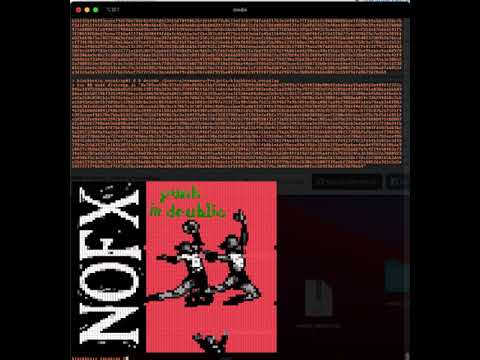
You can try this example yourself, using the command :
npm run decode 0x789ce598c971e5380c8699c1bbf54901cc61325094c884521a0e419499c71c544310e00642abe5aaa91ab8fd9e44911f7f2c845cfd97510de8ebebbe85559f8c198140a3d9e30d57789f4614df7c1adec0a46b3c2602b03ee0a15ad3907f4e7971f987e57d9209de454bfe7d1a038aaab66038dea18e581196f33154941bbcc26a9069698adbd0fc3000242f3b3936ae5faa3f338ed04c0bc5269c4c4c85172a40413663c8534f48cf333006eb450b7d46e8abca5a2c0c0181b1c7693c4da2163f2d088de4c81b4b1e4e788d9a78de355e49021cf0422ebfead1107a8ca769429030a3a9c90051aa9888ab014c336244868c3c6ac5843e5c8efb7e056c1128bdb8c0a3e5c06768e433157ad1083c20787a723f75a40c560a7522c35946f7a9b1091e98ea00d7ad4b298d560fadeb79aab3a0f082a6663d1edfcedfbef0e85e3b5ad0caeedd30e9ecb7067a3f107108e24601acabae95a8d4332f4fe398e266a0d5375638455f288f7a39de44ef31cd50f1464e07c4d7db68b8d0841f4062828f587ac84855fd1581a6f040544b490fa58050319159bfc8527868aa108328c0269263760639269573598d7168e267f8207626f32bf46993cceef9d578e7b6cb53f55de23555d704f067bc3e1b4f79a0c11ef3203798faedf1763e2ef0fa77f16d5efc8b030f0b5eeff280cb9c5dc53f8c76f5d1d451fe5d503fee0d64e3942b40e9de07bce3fca69ab8cdeb6db839ff9477010827cf876278fd08580f31e73a8fd2b52fef0ae1085ac1878e39c4bb2b7b808471e88887dfc849df2748dd63e6898ce4cf235d47634566ca8c398ceb59c5bc6cb59017b67e5c30ff7583dbd1393a57443c9caa2e3f42c2cef55deb36d6d541f57f20694f68edf6cee7fb8a47f7b63890444fd8a9cbbc6ba3af26e387c4fb4979c2fb59e5dfa45d11649e15e4c12e0f4bfcf72d1f8d77c42994b79c7e357a903fde82bd69bf5a2857320d9afda2a6ff852daa397df89a95c56ef33fc72deb44df5edf64f1ceafcbbcace11b6fce79b3a3496e9e599f6b56054640217389bf67bccdcf73463829603d2728e63daa727ced93f709dec46215f7ba25a76b7d216ad6138ef6481be50d75b20ba12391b8ac2463fdc67f91bbcc8e22b8c5cf70bdc51553178fece4965d97510cb76ea13c39c771a129b39538cb016b4cf502432c1f04ea773bb2eeacedcd59eb3b39c1730174aea9b7dd825db10ee7effe413f7421fdb4b35816e3d497783e155d31771a1b35387f5da6bdc9f650a85fac4db5c75fd6fe8dcb3a7fa76df9132f92f4b0b1eddd98acaf0a195dc153351f9ce9ba6ec4ac8d9787d6306da9c0627c368dd35979641dde3b37611ff2ee3b1e881583ed67542bdddd8959728b9384d27cf4978f4a14312b09e493541a9692e538b4526dd67a9c42f4e504b3a7334e52c282adb53e712bb65aaf54b838c0a16b2cda4159290819a047ca4dfdb8d78e5dd734429ba326d30c4ffd19d72df85a4fc5579355245a3e30b522a7880923ec898df5c3c7c561557ab134e6778bf5102f5b0f70393962f10d1d9b6a44c6c9f85d252fb465cac61c8d073368e166ecb0ae2b1165ab28af7dc1d2380165b3debc2bd5193e630c29c51b4f88529bbdb63f8b62b2b08b576e7fd2c2d193a6e1cf1b249ad207ba17d4337396cffe2b3062bd007339aa6f28dba87ab052da3d1e5a5a59273717766765cf75f7c576c3acddb0af4cd8bcf6fa08f9596a0b2ff602c9f9ff077b81d248776c3b0b9fdb6be00fcc559f9dfd0b29d78eb4
- From the Ethereum blockchain : GLIA tokens can be found on the mainnet at the contract deployed @ 0xa5655ffc8c1de3081bd7bed9b66ce26e3117cca5 on mainnet. From this contract, you can call the function
getArtworkand it will return a response that contains several properties, for decoding we want the last property2: bytes: artworkContentwhich should be a string starting with0x. Copy this string, and use it as a parameter for the program.