


archiver (binary: arv) archives files/folders into a managed vault directory and lets you restore them later.
Archiver is interactive Now !
Install dependencies and build:
npm install -g archiver-tsInitialize archiver by running:
arv # run without subcommand to initializeYou may choose the default behavior when running arv without subcommands, and it will be saved to config for future runs.
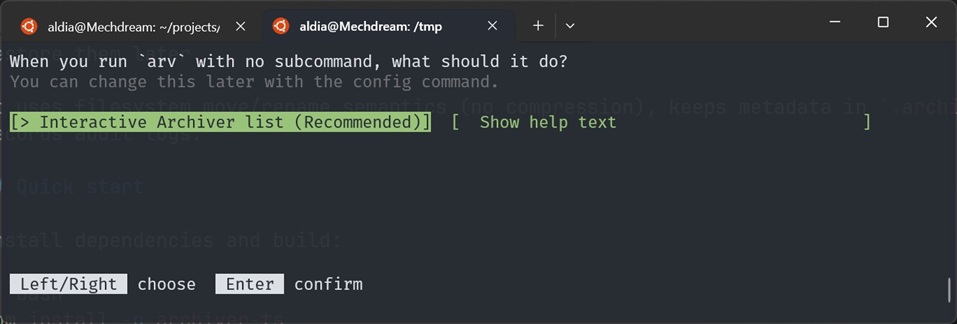
In this mode you can archive items by simply press Enter on them.
arv .Press ↑/↓ to select items, Enter to archive, and q to quit.
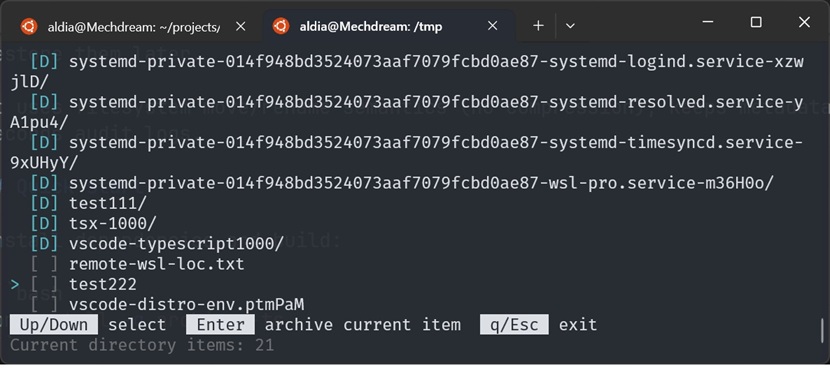
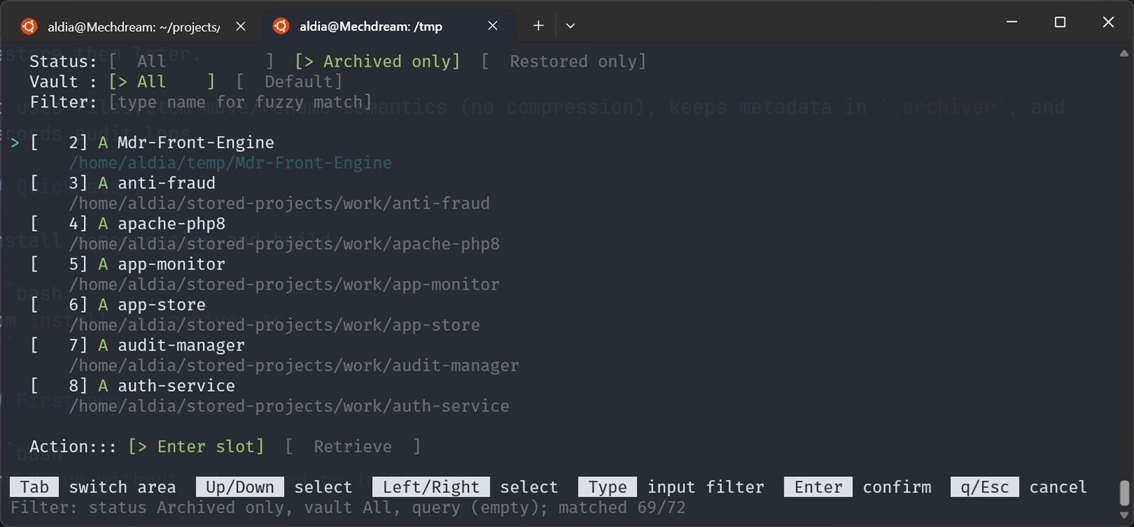
An interactive list of all archived items is available.
arv
# or
arv list
Press ↑/↓ to select items,←/→ to choose action, Enter to archive, and q to quit.
An interactive config editor is available for all settings, including language, no-command behavior, and more:
arv config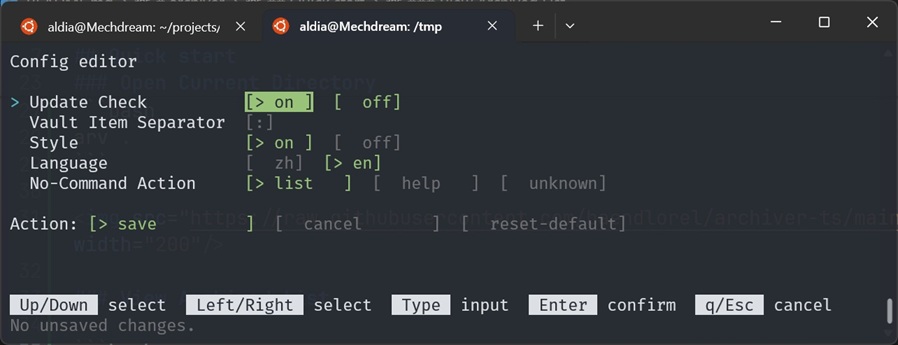
Archive / restore:
arv put <items...> [-v|--vault <vault>] [-m|--message <msg>] [-r|--remark <remark>]
arv restore <ids...>
arv move <ids...> --to <vault>
Vault management:
arv vault use <name-or-id>
arv vault create <name> [-r|--remark <remark>] [-a|--activate]
arv vault remove <name-or-id>
arv vault recover <name-or-id>
arv vault rename <old> <new>
arv vault list [-a|--all]
Query and maintenance:
arv list [-p|--plain]
arv log
arv config
arv update [--repo <owner/repo>] [--install]
arv checkRun:
arv configIn the editor:
- Up/Down: activate config item
- Left/Right: switch select options, move cursor in input, or choose save/cancel/reset-default action
- Type: edit input field text
- Enter: save current action (or quick-save on field)
- q/Esc: cancel
All fullscreen interactive UIs (arv list picker, arv config, arv dot, and no-command selector) now:
- auto re-render on terminal resize
- keep fullscreen layout after resize
- show a terminal-size warning when the viewport is too small
arv list opens an interactive picker (TTY):
- status filter: Archived / Restored / All (default All)
- vault filter: All or a specific vault (default All)
- fuzzy filter input: matches archive names and hides non-matching rows
- actions: enter slot / restore (when applicable)
When not in TTY, arv list falls back to plain list lines.
Non-interactive line format:
- format:
[<archiveId>] <A|R> <display-name> <archiveId>is zero-padded to 4 digits- default vault (
@, id0):<display-name>is item name only - non-default vault:
<display-name>is<vaultName>(<vaultId>)<sep><item> <sep>comes from config editor (vault_item_sep, default::)
Use arv list --plain for grep/script usage:
- format:
<archiveId><TAB><A|R><TAB><display-name> - always disables interactive picker
- prints no extra hints/messages when no entries match
Examples:
[0001] A todo.txt
[0002] A work(1)::report.pdf
1	A	todo.txt
2	A	work(1)::report.pdf
arv log always prints all records (no options) in a grep-friendly format.
- format:
<logId><TAB><time><TAB><level><TAB><op><TAB><message><TAB><archiveId><TAB><vaultId> opusesmain/subwhen sub operation existsarchiveIdandvaultIdare empty when not present
Example:
12\t2026-02-12 10:22:33\tINFO\tarchive/put\tArchived foo.txt\t34\t0
On interactive terminal startup, arv may auto-install a shell wrapper function so arv list interactive Enter slot can move your shell to archive slot paths.
Use project-prefixed env overrides when needed:
ARCHIVER_DISABLE_SHELL_INIT=1 arv <command>
ARCHIVER_STYLE=off arv listWhen you run arv without any subcommand, behavior is controlled by config:
unknown(default): ask once (list/help) and save to confighelp: show help textlist: runarv list
If no_command_action is unknown and input is not TTY (e.g. piped/CI), arv falls back to help text for that run.
Set it in:
arv config- default language is
zh - switch language in:
arv configconfig.jsoncandauto-incr.jsoncare initialized frompublic/config.default.jsoncandpublic/auto-incr.default.jsonc.- Build keeps these default JSONC files and copies them into
dist/as-is. - Saving config/auto-incr updates values while preserving existing JSONC comments.
list:l,lslog:lgconfig:c,cfgupdate:u,updcheck:chk