
Proof-of-concept tool that scans Clash of Clans player tags for specific rare obstacles (village decorations) and stores the results in a local SQLite database.
Experimental. Use at your own risk and make sure your use complies with the game's and API's terms of service.
-
Player tags are read from
tags.txt. -
The official Clash of Clans API (
coc.py) validates each tag and provides the player's name and Town Hall level. -
main.pypusheslib/azurlul.soto each connected rooted Android emulator (over ADB) and loads it into the game with thewrap.com.supercell.clashofclansLD_PRELOADproperty, then restarts the game. -
For each tag, the game is sent an
OpenPlayerProfileintent. The script polls the log file, extracts the"obstacles"array and counts the watched obstacle IDs:Obstacle ID Name in output 8000015stone8000021xmas20128000028xmas2013 -
Players with at least one match are upserted into
database/players.db.
Multiple emulators are supported and run in parallel. A single fetcher task feeds tags to one worker per device. Runs are resumable, and a device that misses 15 dumps in a row is relaunched automatically.
- Python 3.10+
- A rooted Android x86_64 emulator with
suavailable to the ADB shell without a signed whitelist (Genymotion, LDPlayer and MEmu are known to work; BlueStacks is not supported) - Clash of Clans installed and logged in on the emulator
- ADB server running with the emulator(s) visible in
adb devices - Clash of Clans Developer API account: https://developer.clashofclans.com/
pip install -r requirements.txtbase() in main.py logs in with coc_client.login(email, password). Replace the values there with your own developer-portal credentials.
await coc_client.login("xxx@email.com", "xxx")Put one tag per line in tags.txt. The leading # is optional.
#9ABC123
XYZ9876
A prebuilt lib/azurlul.so (x86_64) is expected at that path. Get it at: https://github.com/azurlul/hook
- Start the emulator(s) and confirm they show up in
adb devices. - Fill in
tags.txtand your API credentials. - Run:
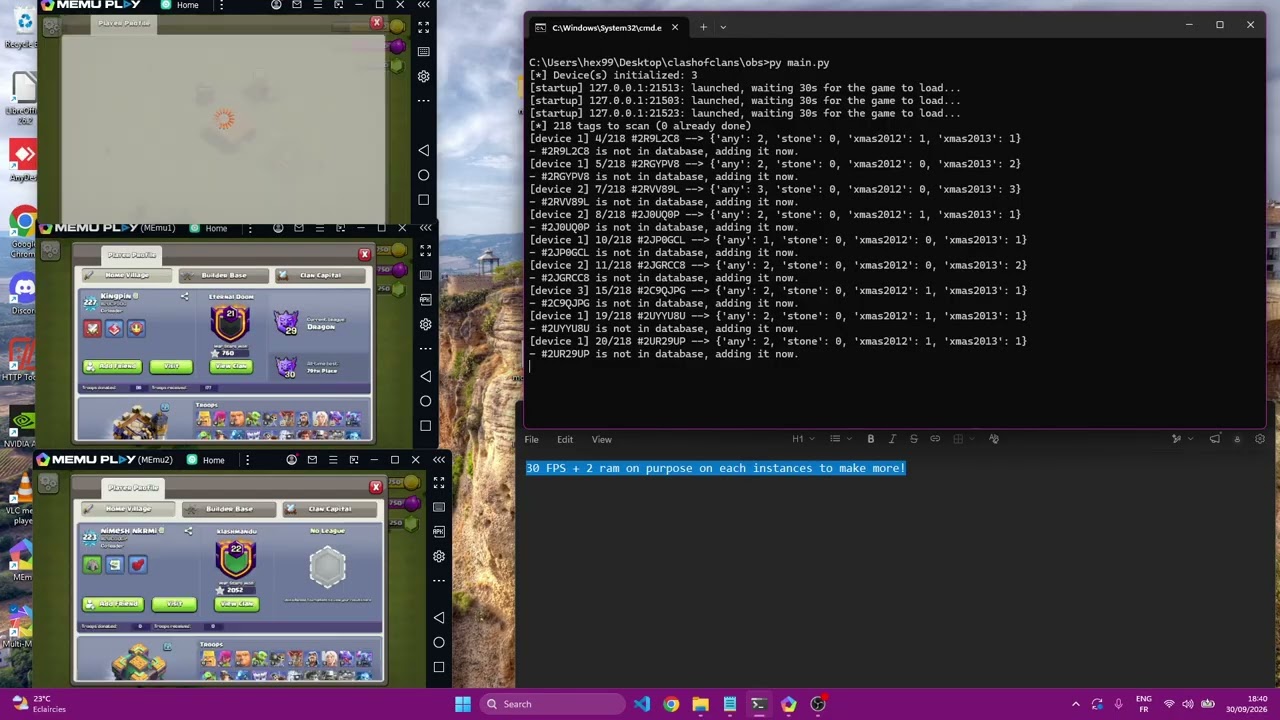
python main.pyOn start, the script hooks and launches the game on each device and waits 30 seconds for it to load. Then it scans.
| Path | Contents |
|---|---|
database/players.db |
SQLite table players (tag, name, townhall, data JSON with the counts, updated_at) |
scanned.txt |
Tags already processed or invalid. Skipped on the next run. Delete it to rescan everything. |
errors/retries.txt |
Tags that failed (API, device or timeout). Copy them into tags.txt to retry. |
errors/errors.txt |
Records that failed to save to the database. |
Open the database with DB Browser for SQLite, SQLiteStudio, or https://inloop.github.io/sqlite-viewer/.
main.py            Entry point: ADB, log streaming, API fetching, DB
tags.txt           Input tags
requirements.txt   Python dependencies
lib/azurlul.so     Prebuilt hook loaded into the game
database/          SQLite database (created at runtime)
errors/            Retry/error logs (created at runtime)
| Problem | Check |
|---|---|
ModuleNotFoundError |
Run pip install -r requirements.txt with the same Python you use to run main.py. |
0 device(s) / nothing happens |
Start the emulator, enable ADB, and run adb devices. |
Every tag ends up in retries.txt |
Root (su) must work from the ADB shell. Verify the hook loaded and that the ABI matches the emulator (x86_64). |
| Game never opens the profile | Increase the load delay in launch() or the pause in visit(). |
| API login or requests fail | Verify credentials. The API may be down for maintenance or rate-limiting. The script retries 3 times. |
| Database empty | Only players with at least one watched obstacle are saved. Check the console output. |
Provided as-is for educational and research purposes. You are responsible for complying with all applicable laws, terms of service, and third-party policies. The author accepts no liability for account actions, data loss, or other consequences of use.