
An open-source, comprehension-first GUI that wraps your agent CLI (Claude Code, Codex, Copilot CLI, Grok CLI, Muse Code, Qwen Code, …) running unmodified in an integrated terminal, and builds an environment around it. No token metering - it uses your existing subscription, and stays ToS-clean by only reading the terminal's output and typing into it (the same posture as the official editor integrations).
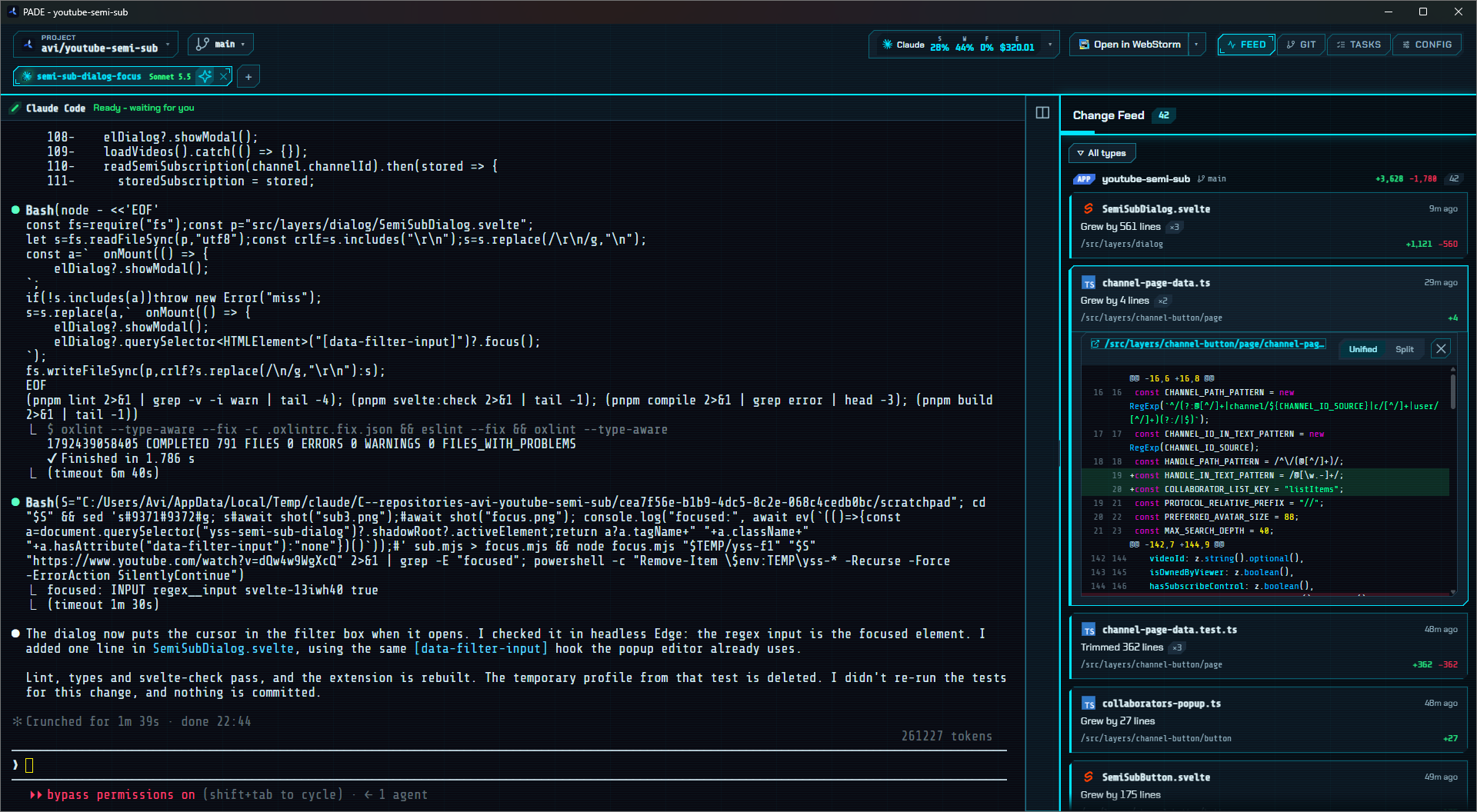
Coding 100% through an agent makes you fast but blind to the codebase. ADE's flagship surface is the Change Feed: every edit becomes a readable card - what changed, and how much - so you stay the owner while the agent writes.


- ✅ Native window (Tauri 2 + Rust) with a real terminal (xterm.js + PTY), split panes and session tabs
- ✅ Change Feed - filesystem watcher turns each save into a diff card
- ✅ Highlight → agent bridge - send a selection or a file to the agent
- ✅ Git review panel, usage meter with pacing, auto-handoff, Tasks and Config panels
- ✅ Open the project in your editor - GUI editors (VS Code, JetBrains, Zed…) or console editors (Neovim, Vim, Helix) in a terminal tab; add any editor by path
- ⏳ Agent tree, review verbs on agent commits (next)
Full status per requirement: docs/requirements.md.
| Layer | Choice |
|---|---|
| Shell/core | Tauri 2 + Rust |
| Terminal | xterm.js + WebGL, portable-pty |
| Watcher | notify |
| Frontend | Svelte 5 + Vite |
| Theme | Material 3 Expressive (light/dark, OS-follow) |
- Node ≥ 18 and pnpm (
corepack enablepicks up the version pinned inpackage.json) - Rust (stable) via rustup
- Platform WebView + build tools per the
Tauri prerequisites - Windows:
WebView2 (preinstalled on Windows 11); Linux:
webkit2gtk+libayatana-appindicator; macOS: Xcode command-line tools.
pnpm install
pnpm app          # tauri dev - compiles the Rust core and opens the native window, DevTools (CDP) on :9222
The terminal launches your platform shell by default. To launch an agent CLI directly, set its command:
# macOS/Linux
ADE_AGENT_CMD=claude pnpm app
# Windows PowerShell
$env:ADE_AGENT_CMD="claude"; pnpm app
Then edit any file in the repo and watch it appear in the Change Feed.
Every release has a signed MSIX
(PADE-<version>.msix) with PADE.cer and PADE.appinstaller. Trust
PADE.cer once, then open PADE.appinstaller (see
docs/releasing.md); Windows then keeps PADE up to date.
pnpm app:build                 # tauri build --no-bundle → src-tauri/target/release/pade.exe
pnpm release <version> <notes> # build the exe, pack the MSIX, tag, publish the GitHub release and update manifest
Tauri builds for the host platform only, so run the build on each OS you target.
Before cutting a release, run the quality gates: pnpm lint and pnpm test.
docs/releasing.md has the release steps and how installed copies update.
New to the codebase? ARCHITECTURE.md is a one-read
orientation - how the two layers (Svelte webview + Rust core) talk over the
single lib/ipc messaging door, the screen phases, and a module-by-module map, with
diagrams. Product spec lives in docs/requirements.md;
engineering rules in CLAUDE.md.
Licensed under the Apache License 2.0.