Full-stack LLM application with OpenAI, Flask, React, and Pinecone
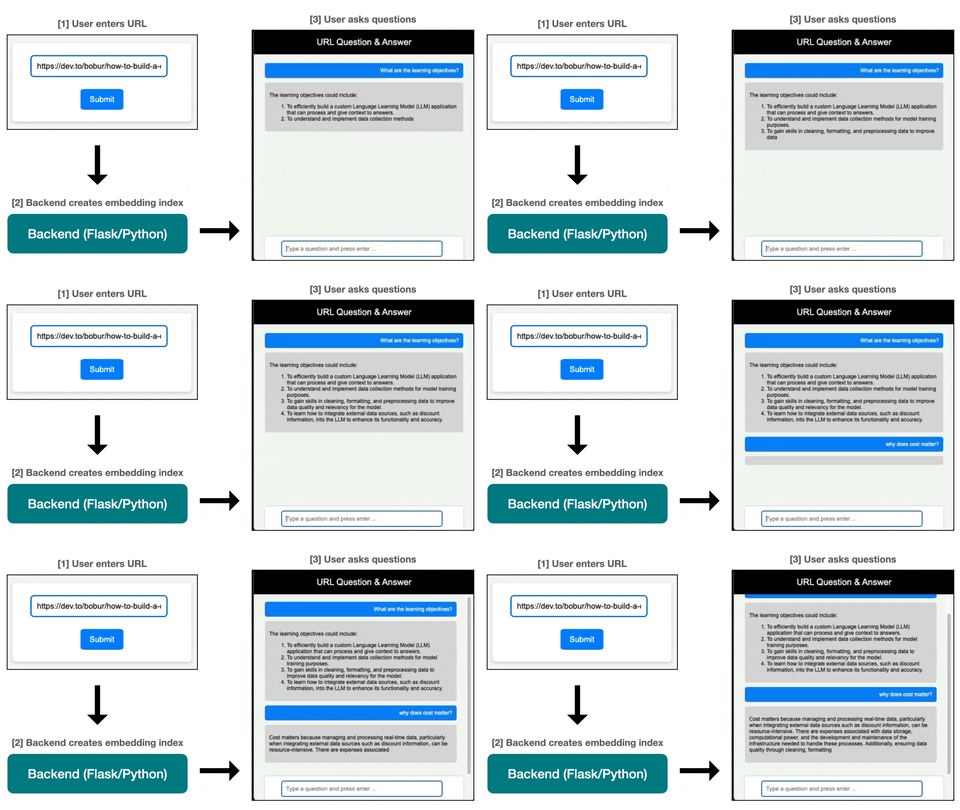
This is a sample application built for the following tutorial series, "Build a full-stack LLM application with OpenAI, Flask, React, and Pinecone". It allows a user to input a URL and ask questions about the content of that webpage. It demonstrates the use of Retrieval Augmented Generation, OpenAI, and vector databases.
- Part 1: Backend and RAG with Python, OpenAI, and Pinecone (branch)
- Part 2: Front-end chat user interface with React (branch)
Written in November 2023, and the SDKs have moved since. The code on
mainis the version the posts walk through, pinned to the OpenAI and Pinecone clients of that moment.pinecone.init()has since been removed from the Pinecone client, so a fresh install will not run the indexing path without changes. PR #1 from @eharvey71 covers the Pinecone and OpenAI migrations and is the best starting point if you are running this today. Thepart1_backendandpart2_frontendbranches are frozen snapshots that match the posts as written.

- Backend (Flask): This handles the logic to scrape the website and call OpenAI's Embeddings API to create embeddings from the website's text. It also stores these embeddings in the vector database (Pinecone) and retrieves relevant text to help the LLM answer the user's question.
- OpenAI: We'll call two different API's from OpenAI: (1) the Embeddings API to embed the text of the website as well as the user's question, and (2) the ChatCompletions API to get an answer from GPT-4 to send back to the user.
- Pinecone: This is the vector database that we'll use to (1) send the embeddings of the website's text to, and (2) retrieve the most similar text chunks for constructing the prompt to send to the LLM in step 3.
- Frontend (React): This is the interface that the user interacts with to input a URL and ask questions about the webpage.
Install Python dependencies
pip install -r requirements.txtInstall React dependencies
cd client
npm install
Create .env file
OPENAI_API_KEY=<YOUR_API_KEY>
PINECONE_API_KEY=<YOUR_API_KEY>
Start the Flask server
# In root directory
python run.py
Start the React app
cd client
npm startMIT — see LICENSE.