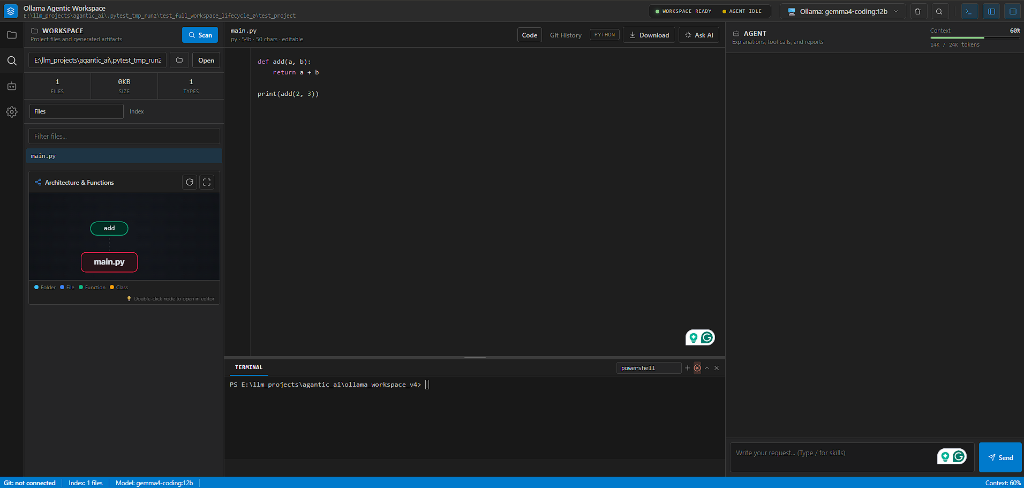
Ollama Agentic Workspace is a local-first agentic coding environment for working with multiple projects on your machine. It provides a dedicated Projects dashboard, project and session archives, a three-pane coding workspace, Git-aware editing, interactive architecture & function visualization, an integrated VS Code-style terminal, and an agent that can inspect and modify the selected project through tool calls.
The app is built as a small Python HTTP server with a custom HTML/CSS/JavaScript frontend.
If you do not want to work with the source code or install Python, download the Windows executable from the GitHub Releases page:
Use the portable executable if you want the simplest option. The portable version is a single .exe file, so you can download it, run it, and start using the app without setting up a Python environment.
The folder-based package may start faster and is usually better for future installer-style distribution, but it must be kept together with its included support files. For most users, the portable version is easier.
- Interactive Schematic Architecture Graph & Code Navigation:
- Visual dependency graph displayed directly below the file list, linking folders, files, functions, and classes.
- Folder-to-file (
contains), cross-file (imports), and function execution (calls) relationships. - Direct Jump to Code: Click or double-click any module, function, or class node to open its parent file in the code editor, automatically scrolling to and highlighting that function or class definition.
- Double-click empty canvas space to toggle fullscreen graph view.
embeddinggemmaRAG Integration:- Automatic detection of the
embeddinggemmamodel in Ollama upon startup. - Interactive modal dialog offering one-click background download (
ollama pull embeddinggemma) with a live progress bar. - Generates 768-dimensional dense vector embeddings stored locally in SQLite and Chroma for pinpoint semantic codebase retrieval.
- Seamless fallback to simple BM25 / keyword indexing if user opts out.
- Automatic detection of the
- Integrated Terminal & Command Prompt (VS Code Style with xterm.js):
- Real-time interactive terminal panel below the code editor powered by
xterm.jsand Windows PTY (winpty). - Switch dynamically between PowerShell and Command Prompt (
cmd.exe), stream subprocess output in real-time, execute build/test commands, review history with Up/Down arrow keys, clear withCtrl+L, cancel withCtrl+Cor the Kill button, resize vertically with smooth drag handle, and toggle open/closed with `Ctrl+`` or topbar button.
- Real-time interactive terminal panel below the code editor powered by
- Local Ollama & Custom API Support: Seamless integration with local Ollama models (with automatic model detection) and OpenAI-compatible endpoints.
- Bi-directional RTL / LTR Chat Support: Automatic real-time language detection. Persian/Arabic text automatically aligns Right-to-Left (RTL) with proper Persian typography, while English and code snippets stay cleanly Left-to-Right (LTR).
- Interactive Slash Commands (
/) for Skills: Type/in the chat input to invoke a rich autocomplete popover listing all available engineering and productivity skills with keyboard (Up/Down/Enter) and mouse selection. - Embedded Knowledge Graph Memory (KG-RAG): Local SQLite-based Knowledge Graph (
memory_graph.py) with entity resolution, bi-temporal fact tracking, multi-hop relationship expansion, and automatic background workspace scanning/indexing. - Project Workspace Management & Deletion: Dedicated Projects dashboard with cards, Git status, session statistics, and the ability to safely remove/delete projects from the workspace registry.
- Streamlined Two-Button Sidebar Controls: Clean topbar layout toggles for Left Workspace & Options (
Ctrl+B) and Right Chat & Agent (Ctrl+J). - Thread-Safe Backend & Direct NDJSON Streaming:
STATE_LOCKprotected state management, fast streaming over/api/chat_stream, and detailed HTTP error decoding for Ollama model runtime diagnostics. - Incremental Codebase RAG: Structural AST chunking, hierarchical summaries, hybrid BM25 + vector search, and dependency graph routing.
- LeanCTX-Inspired Token Compression & Structural Outline:
- Prevents token bloat across long multi-turn sessions using AST-powered structural code outlines (
extract_code_outline). - Active editor file compaction: large open files (>3,000 chars) are injected as compact structural outlines with line numbers rather than full 18,000-character dumps.
- History code compaction: older assistant turns with large code blocks are automatically collapsed in conversation context while preserving the latest turn.
- Surgical line windowing in
read_filewithstart_line,end_line, and compression modes (raw,clean,outline).
- Prevents token bloat across long multi-turn sessions using AST-powered structural code outlines (
- Vectorize Hindsight Deep Long-Term Memory (Biomimetic SOTA Memory):
- Integration with the Vectorize Hindsight memory engine for continuous learning across sessions.
- Workspace-scoped memory banks (
ws_<project_name>) keeping project lessons, user preferences, and architectural decisions isolated and durable. - Exposes 3 agent memory tools:
remember_fact(retain),recall_memory(4-way hybrid retrieval: vector + BM25 + graph + temporal), andreflect_memory(deep synthesis and pattern extraction). - Proactive prompt enrichment: automatically recalls relevant project facts for incoming queries.
- Resilient dual fallback: seamlessly falls back to local SQLite memory store when the Hindsight server is offline.
- Large-Scale Multi-Folder Repository Intelligence (code-review-graph):
- Deep Tree-sitter AST and SQLite call graph indexing across Python, TypeScript, JavaScript, Rust, Go, Java, C/C++, C#, Kotlin, Ruby, and PHP.
- Multi-hop blast radius analysis (
get_impact_radius): traces all downstream callers, dependents, and tests before modifying code across folders. - Hierarchical architecture clustering (
get_project_architecture): Leiden community detection partitions multi-folder codebases into high-level logical domains with up to 65x-375x token reduction. - Minimal review context (
get_code_review_context): focuses LLM context exclusively on impacted subgraphs, preventing prompt token exhaustion on large repos. - Interactive graph queries (
query_code_graph): inspect caller/callee relations, inheritance hierarchies, and import maps.
- Git-backed Agent Checkpoints: Reviewable diff previews before file edits, scoped commits, history tracking, and one-click rollback.
- Remote Git Integration: Streamed cloning, SSH/PAT authentication, branch switching, fetch, pull, push previews, and merge-conflict assistance.
- Agent Sandbox & Security: Safe tool execution boundaries, per-tool approval flows, and local Docker/subprocess sandboxing.
.
├── web_app.py                  # Local HTTP server and agent loop
├── fastapi_app.py              # Optional FastAPI / ASGI WebSocket wrapper
├── terminal_manager.py         # Subprocess manager for interactive PowerShell & CMD terminal sessions
├── agent_runtime.py            # LangChain model runtime adapter
├── launcher.py                 # EXE-friendly launcher that opens the browser
├── tools.py                    # Tool schemas and tool execution handlers
├── context_builder.py          # LeanCTX prompt compressor, AST outlines, and token budget manager
├── plan_mode/                  # Plan Mode service: domain, application, adapters, http_api
├── code_graph_service.py       # Code-review-graph integration: AST call-graph indexing & blast radius
├── hindsight_manager.py        # Vectorize Hindsight client adapter, bank scoping, and local fallback
├── git_manager.py              # Git clone, diff, checkpoint, commit, push, and revert layer
├── memory_graph.py             # Embedded Knowledge Graph (KG-RAG) memory subsystem
├── memory_manager.py           # SQLite episodic, semantic, and procedural memory
├── codebase_index.py           # Discovery, structural chunking, incremental hybrid code index
├── syntax_chunker.py           # Syntax-aware AST chunking for Python and multi-language sources
├── project_intelligence.py     # Dependency graph, hierarchical summaries, and query routing
├── vector_store.py             # Shared local Ollama embedding and Chroma adapter
├── config.py                   # Runtime configuration and environment defaults
├── prompt_manager.py           # System prompt discovery and loading
├── skills_manager.py           # Skill discovery, selection, and usage parsing
├── skill_router.py             # Fast, semantic, and optional LLM skill-selection funnel
├── skill_tracker.py            # Persistent selected/loaded/applied/failed skill events and analytics
├── web_ui/                     # Frontend HTML, CSS, and JavaScript
├── system_prompts/             # Markdown system prompts
├── skills/                     # Skill definitions
├── tests/                      # Runtime and Git integration tests
└── agent_workspace/            # Default workspace when no project is selected
For the portable release:
- Windows
- Ollama installed and running for Local Ollama mode, unless you use Custom API mode
For source development:
- Windows
- Python 3.12+
- Ollama installed and running for Local Ollama mode
- Python packages from
requirements.txt
Install dependencies:
python -m pip install -r requirements.txtpython web_app.pyThen open:
http://127.0.0.1:7864/
If python is not on PATH, run the script with the full path to your Python executable.
Local mode expects Ollama to be reachable at:
http://127.0.0.1:11434
The app reads installed Ollama models from /api/tags and sends chat requests to /api/chat.
Use Custom API in the top bar when you want an OpenAI-compatible endpoint. The UI provides fields for:
- API Base URL
- API Key
- Model name or deployment ID
The Custom API model is stored independently from the selected Ollama model. Enter the exact identifier expected by the provider, such as gpt-4o-mini, openai/gpt-4.1, or a private deployment name. CoderAI sends this value as the model field in both regular and streaming OpenAI-compatible requests. If the endpoint does not expose /models, the manually entered model remains available and is not replaced.
Tavily is disabled by default. To enable web search:
- Open the
Settingstab. - Turn on
Tavily web search. - Enter your Tavily API key.
- Save settings.
When Tavily is disabled or no key is configured, the web_search and extract_url tools are not exposed to the model.
Open Git History in the editor panel to work with a local or remote repository.
To clone a repository:
- Enter its HTTPS or SSH URL.
- Select a parent folder. The repository name is added automatically when the selected folder already contains files.
- Choose an authentication method: system Git credentials, SSH key, or username and personal access token.
- Select
Clone repositoryand follow the live command output.
Agent file changes are shown as a diff before they are written when approval mode is enabled. Approved changes are committed as scoped checkpoints. Before publishing, Push changes shows the branch and commits that will be sent to origin; the push runs only after explicit confirmation.
Personal access tokens are used only for the active clone or push process. They are not stored in the remote URL, repository configuration, or application state.
CoderAI keeps one central archive beside the application so every workspace and chat session is available from the Projects dashboard and Memory view:
coderai_data/
├── memory.db                   # SQLite conversations, facts, preferences, and session summaries
├── skill_usage.db              # Project-scoped skill lifecycle events and usage statistics
├── vectors/                    # Reserved embedded vector-index storage
└── facts.jsonl                 # Append-only semantic-memory audit log
Memory is separated into three layers:
- Episodic memory stores chronological conversation turns and tool-call metadata between sessions.
- Semantic memory stores durable project facts and retrieves up to five relevant items with SQLite FTS5/BM25.
- Procedural memory stores small user preferences that are always included when memory is enabled.
The agent never injects the entire database into the model context. It combines bounded recent turns, older session summaries, preferences, and only the project facts relevant to the current request. The chat stream reports how many facts were used.
Open Projects from the left activity rail to browse workspace cards and enter a Project Home. Each Project Home provides separate tabs for overview statistics, resumable sessions, source files, persistent memory, skills, and settings. The standalone Memory view remains available for editing semantic facts and preferences. Project data stays isolated by workspace even though all projects share one central database. Forget project removes only the active project's conversations, facts, and preferences after explicit confirmation.
In source mode, coderai_data/ is created beside the application source. In packaged builds it is created beside the executable. Set CODERAI_DATA_DIR to store the archive elsewhere.
Skills are selected with an explicit reason from slash commands, pinned project selections, or matched keywords. CoderAI records selected and loaded separately from applied, so adding a skill to model context is not counted as successful usage unless the model declares that it actually used the skill. Runtime failures are recorded as failed outcomes.
The chat stream displays skill selection and application badges in real time. The workspace Skills tab shows available skills and recent lifecycle events. The Project Home Skills tab provides project and global usage counts, last-used time, success rate, top trigger keywords, SKILL.md inspection/editing, and a project-specific disable control.
Automatic selection uses a three-stage funnel: normalized trigger matching (including Persian letter, digit, and half-space normalization), semantic ranking from cached skill-description embeddings, and optional LLM confirmation for ambiguous candidates. Ollama embeddings use nomic-embed-text by default and can be changed with OLLAMA_EMBEDDING_MODEL; a local feature-vector fallback keeps routing available when the embedding model is not installed. Smart confirmation is controlled from Settings because it adds a small model call. At most three skills are injected per turn.
Each project stores one of three modes per skill: Auto, Pinned, or Off. Pinned skills are always loaded, Off skills are excluded from automatic and explicit routing, and Auto skills pass through the routing funnel. When matching exceeds the context limit, the UI reports which skills were skipped.
Open Files > Index to build or inspect the active workspace index. Discovery respects .gitignore, excludes generated and binary directories, and stores index data inside the workspace:
.agent_memory/
├── code_index.db               # SQLite metadata, chunks, hashes, and FTS5 index
└── code_vectors/               # Embedded Chroma vector collection
Python files are split by module, class, and function boundaries using the AST. Other supported source and documentation files use bounded logical chunks. Every chunk records its source path, symbol, line range, modification time, and content hash.
Retrieval combines exact keyword/BM25 matches with semantic similarity from local Ollama embeddings (nomic-embed-text by default). Only the highest-ranked chunks are injected into a turn, with file paths and line numbers. If Ollama embeddings or Chroma are unavailable, keyword retrieval remains operational and vectors stored in SQLite provide a lightweight fallback when embeddings are available.
The index also builds a directed project graph from resolved imports and function calls. Cached summaries are stored at file, folder, and project levels. A query router separates whole-project questions from implementation questions: project-level requests receive the architecture overview and key entry-point summaries, while code-level requests use hybrid chunk retrieval followed by one-hop graph expansion. This prevents architecture answers from collapsing into an explanation of a single file.
The Index view exposes the project overview, likely entry points, graph statistics, and a textual dependency tree. Regenerate can improve the cached structural overview with the currently selected local Ollama model. The agent can call get_project_overview for architecture questions and get_related_files for import/call relationships.
Agent writes, replacements, appends, and deletes update the affected file immediately. Sync changes compares content hashes across the workspace, while Re-index workspace performs a clean rebuild. The agent can also call search_codebase for focused retrieval and scan_project for a broad project overview.
- Open or browse to a project from the Workspace panel.
- Select
Files > Index. - Select
Re-index workspacethe first time the project is opened. - Confirm that the Index view shows files, symbols, chunks, a project overview, entry points, and dependency relations.
- Ask the agent a project-level or code-level question.
Project-level examples:
What does this project do?
Explain the architecture of this project.
How do the main modules collaborate?
Where does application execution begin?
These questions are routed to the cached project summary, entry-point summaries, and dependency graph instead of a single code chunk.
Code-level examples:
Where is load_config defined and called?
Which files are related to web_app.py?
Trace the file-save flow from the UI to the backend.
These questions use hybrid chunk retrieval followed by graph expansion to include related imports and callers. The agent can explicitly use get_project_overview, get_related_files, or search_codebase when more context is needed.
Use Sync changes after external edits. Changes written by the agent update the affected file automatically. Use Re-index workspace after large refactors or dependency changes. Regenerate asks the selected Ollama model to rewrite the structural project overview; the deterministic cached overview remains available when model-based regeneration cannot run.
Virtual environments and dependency directories are pruned before traversal. Folders containing pyvenv.cfg or conda-meta, plus directories such as site-packages, .venv, venv, env, node_modules, build output, and caches are not displayed or indexed.
The Windows portable executable includes the built-in Ollama HTTP runtime, SQLite/FTS5 indexing, project dependency graphs, persistent memory, Git integration, and the complete web UI. Optional Python integrations are used when bundled in a build; otherwise the application falls back to its built-in runtime and SQLite retrieval. Ollama itself remains a separate local application and must be running when Local Ollama mode is selected.
Plan Mode lets the agent explore the codebase read-only, propose a set of concrete steps, and wait for approval before executing anything. It is the task-level counterpart to the per-tool approval policies: multi-file work is reviewed as a plan before a single mutating tool runs.
It is a modular, cleanly-architected service (plan_mode/) split into
domain (state machine + fail-closed tool gate), application (use cases),
adapters (storage, tool execution, workspace), and http_api (request
handlers). The web app is only a thin adapter over /api/plans*.
- Fail-closed tool gate — a tool is allowed in read-only states only if it is explicitly classified read-only; unknown tools are treated as mutating and blocked. Mutating tools run only after the plan is approved.
- Lifecycle —
IDLE → EXPLORING → DRAFTING → AWAITING_APPROVAL → EXECUTING → DONE, withREJECTED/CANCELLEDand an "edit plan" path back to draft. - Persistence — plans are stored under
coderai_data/plans(one JSON file each) and survive a restart.
The surface is the JSON API (GET /api/plans, POST /api/plans, and
.../{id}/{explore,draft,approve,reject,edit,execute,cancel}); a dedicated UI
and FastAPI route parity are out of scope for now. See docs/PLAN_MODE.md.
- Per-tool and per-workspace approval policies (
approval_policy.py). - Pull, fetch, branch switching, and merge-conflict assistance in Git History.
- Optional
sqlite-vecacceleration for the SQLite semantic fallback. - LeanCTX-inspired token compression, structural AST code outlining, and history code compaction.
- Vectorize Hindsight biomimetic long-term memory integration with workspace-scoped banks and dual fallback.
- Plan Mode: explore → draft → approve → execute with a fail-closed tool gate (
plan_mode/), exposed over/api/plans*(API only; UI deferred). - Add tree-sitter structural chunking for JavaScript, TypeScript, Java, and additional languages.
- Add richer skill validation, diagnostics, and execution traces.
- Add opt-in background fact extraction with review before facts become durable memory.
- Add end-to-end browser tests for clone, diff approval, checkpoint, revert, and push flows.
- Automate signed Windows release builds and GitHub Release publishing.
This project is licensed under the Apache License 2.0.
Please retain the attribution in the NOTICE file when redistributing this project or derivative works.
The web UI direction regression tests run with Node.js 22+ using only its built-in test runner:
node --test tests/web_ui_direction.test.cjsNode.js is only needed for these development tests, not to run the application. The tests evaluate the production direction and message-rendering helpers without starting the Python backend or contacting a model provider.
launcher.pyfinds a free local port starting at7864and opens the browser automatically.- LangChain is used as the preferred model runtime for Local Ollama and OpenAI-compatible Custom API mode.
- If LangChain provider packages are unavailable, the app falls back to the built-in HTTP runtime.
- Set
AGENT_USE_LANGCHAIN=falseto force the built-in HTTP runtime during debugging. - Streaming uses the built-in HTTP runtime by default for stability; set
AGENT_USE_LANGCHAIN_STREAMING=trueto test LangChain streaming. - LiteLLM is used only for token counting. If it is unavailable, the app falls back to conservative character-based estimates.
LITELLM_LOCAL_MODEL_COST_MAP=Trueis set to prevent LiteLLM from trying to refresh its model-cost map from the internet.- Tool access is constrained to the selected workspace where file operations are involved.
- Git integration is isolated in
git_manager.py. Agent file writes produce a dry-run diff, optionally wait for UI approval, then commit only the files changed by that tool call. - Git commands run without a console window on Windows. Non-Git workspaces are never initialized automatically; the UI asks first.
- PAT credentials are passed to Git only through the child-process environment for the current clone or push operation. They are not stored in the repository URL or application state.
- Tavily and Custom API keys are user-provided runtime settings.
- Shell and Python execution tools run on the local machine inside the selected workspace. Only use this app with projects and prompts you trust.
Every mutating tool — file writes/appends/deletes/replacements, shell and Python execution, the advanced shell tools (linter, tests, kubectl, terraform, npm, docker), and non-read-only SQL — is gated behind per-request approval before it runs:
- Each request carries a stable approval token (a hash of the tool + arguments), so approving one action never silently authorizes a different one. "Always allow" for a tool is scoped to that tool only, per session, and never leaks across tools.
- File tools present a diff preview (or a creation summary); command tools show the exact command; the browser and API both approve/reject by token.
- The advanced shell tools no longer run model-controlled strings through a shell: fixed binaries (kubectl/terraform/docker/npm) run as argv lists, and linter/tests run through the sandboxed runner, so shell metacharacters are not a second, ungated injection path.
- SQL is local-only:
execute_sql_queryandget_database_schemaonly reach a workspace-local SQLite file. Remote schemes and paths outside the workspace are rejected; read-only statements run unprompted, writes require approval. git pushkeeps its separate explicit-confirmation flow and is not part of the per-request token gate.