boundbox is a lightweight container for OCR bounding boxes.
Bounding box operations such as scaling, merging. Developers can use boundbox when they need the flexibility to change between different OCR services or bounding box
- Easy switch between OCR services with minimum code change
- Supports bounding box operation such as scaling, merging, rotating etc.
- Supports most of the commonly used OCR services such as pytesseract, Google Vision Ocr, Azure OCR etc.
- Support labelling tools such as LabelImg and box operations on images
- Image transformation features such as perspective transformations and box visualizations
boundbox supports Python >= 3.6. You can install it by doing
pip install boundbox
"""

     (y axis)
        -
        -
        -
----------------------------------------------------------------------  (x axis)
        -
        -                    p1
        -                  .       .
        -                .               .
        -              .                      .
        -            .                             .
        -          p4                                  p2
        -                .                            .
        -                     .                     .
        -                          .              .
        -                               .       .
        -                                    p3
        -
        -
        -
        -

"""
from Boundbox import BoundBox

import cv2
from pytesseract import image_to_data, Output

# load image to numpy array
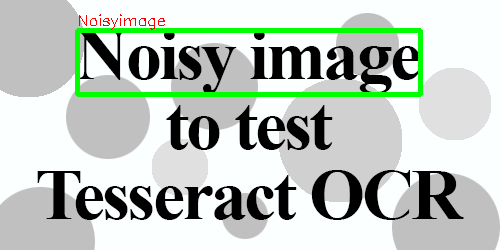
img = cv2.imread('test.png')

# image to pytesseract data
data = image_to_data(img, output_type=Output.DICT)

# list of all bounding boxes found in image
box_list = BoundBox.pytesseract_boxes(data)

box = box_list[0]

# corner points of the boxes are accessed by variable 'p1', 'p2', 'p3', 'p4'

print(box.p1, box.p2, box.p3, box.p4)

>>> (77, 30) (420, 30) (420, 94) (77, 94)

# text value is accessed by 'text_value'

print(box.text_value)

>>> Noisyimage

# draw the box on the image
drawn = box.draw_box(img)