Discord bot with ChatGPT API and SQL database for logging server events.
My Discord bot is designed to answer questions directly in chat using the ChatGPT API. This means that users can ask the bot any question they have, and the bot will respond with a relevant answer generated by the ChatGPT model. This is a great way to provide instant assistance and support to users, as they can get their questions answered quickly and easily.

During an API call, functions are specified to the models. These models are capable of intelligently generating a JSON object that includes the necessary arguments for invoking those functions. It's important to note that the Chat Completions API itself does not directly call the function. Instead, it generates JSON output that is utilized to make the function call.
Here is an example of function to get the current date & time.
def get_todays_date(timezone='US/Eastern'):
    """Get the current date and time based on the timezone"""
    tz = pytz.timezone(timezone)
    today = {"timezone": timezone,
             "today": str(datetime.datetime.now(tz))}
    return json.dumps(today)
ChatGPT intelligently recognizes when to invoke this function and uses the information to generate a response.
The bot is also connected to the DALL·E 3 API. It can take any prompt as described using natural language and generate a detail 1024x1024 image!


In addition to answering questions, the bot also writes events with usernames and timestamps to a MySQL database hosted on Amazon Web Services (AWS). This means that you can keep track of when users are interacting with your bot, and what commands they are sending. This information can be used to improve the performance and effectiveness of the bot over time, by analyzing the data to identify trends and patterns in user behavior.
Basic summaries of the data can be found in the server dashboard (https://peterdinklage.streamlit.app/) displaying information like monthly messages by user or the number of times a user has had the 1st message of the day.
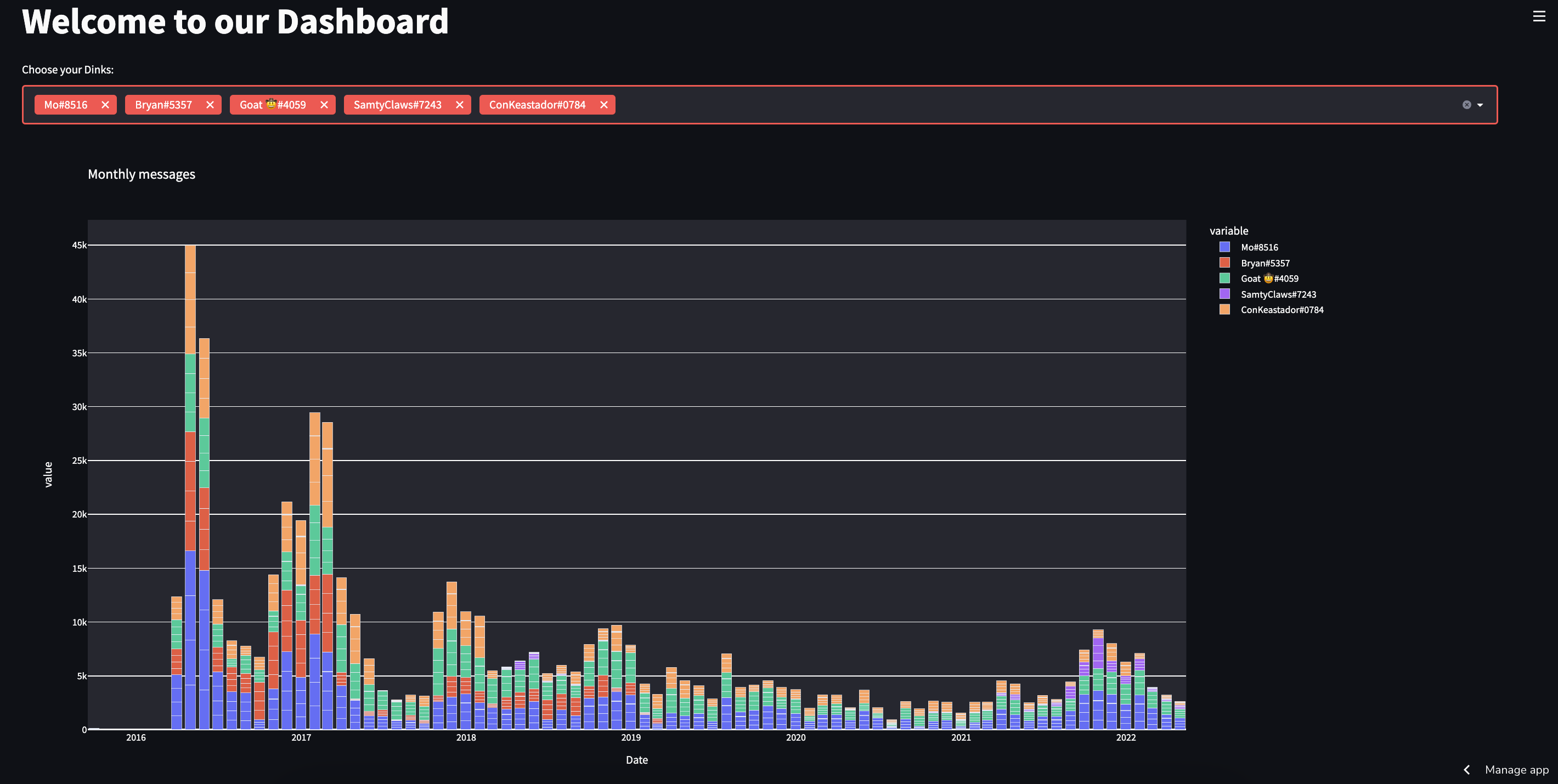
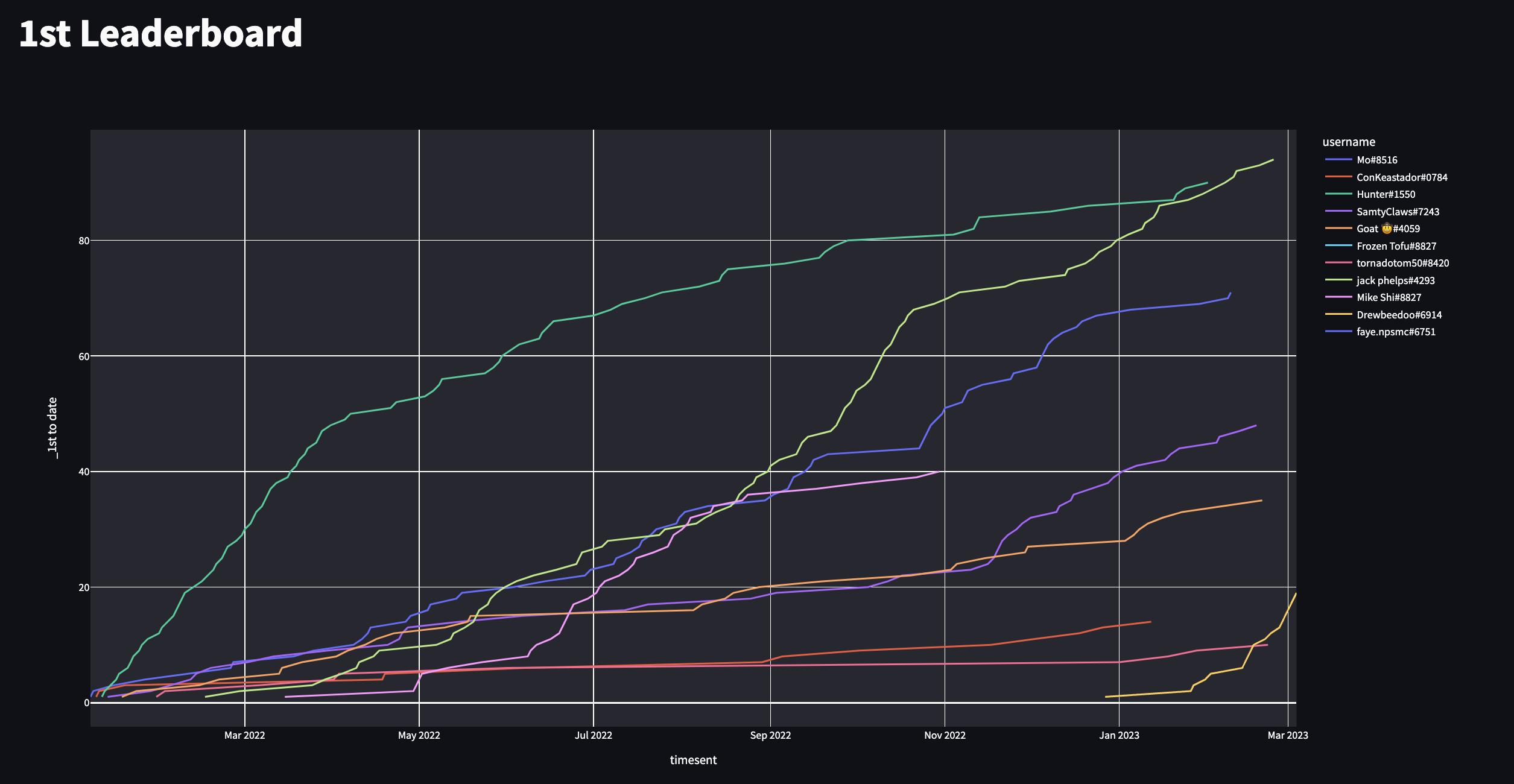
Here it's being used to log and record who sends the first message of the day. Users will send a command as close to the stroke of midnight and the event will be recorded to the database. This has become one of the most popular games on our server!

The core Discord functionality of this project is contained in the bot.py file. The logic for the ChatGPT API request and intelligent function calling are contained in the chatgpt_functions.py file.
bot.py: Main bot file that initializes the Discord bot and loads command cogs.chatgpt_functions.py: Contains functions for interacting with the ChatGPT API and handling AI responses.cogs/: Directory containing modular command extensions:ai.py: AI-related commands including ChatGPT integration and DALL·E 3 image generation.first.py: Commands for tracking and managing first messages of the day.misc.py: Miscellaneous utility commands.server.py: Server management and dashboard-related commands.utility.py: General utility commands.
utils/: Utility modules:constants.py: Constants and configuration values.db.py: Database operations for logging messages and events.
requirements.txt: Python dependencies required for the project.requirements-dev.txt: Test dependencies (pytest, pytest-asyncio).tests/: Pytest suite — mocked command tests, unit tests, and live smoke tests.scripts/test.sh: Run the full test suite locally (mirrors CI).test_grok.py: Thin wrapper around live xAI smoke tests.README.md: This documentation file.
- Clone the repository.
- Copy
.env.exampleto.envand fill in values from your hosting dashboard. - Run locally:
./scripts/dev.sh
The dev script creates a virtual environment, installs dependencies, and starts the bot.
Local runs use the same credentials as production (Discord token, MySQL, xAI). Only one bot session can be active per token, so stop the hosted bot first.
- Stop the bot on your hosting site.
- Ensure
.envis populated (see.env.example). - Run
./scripts/dev.sh - Test commands on your Discord server (prefix is
_). - Press Ctrl+C to stop, then restart the hosted bot.
Because pushes to main are picked up on the next server reboot, run tests locally before pushing.
./scripts/test.shThis installs dependencies, sets a headless matplotlib backend, and runs all tests (mocked + live).
Fast iteration (skip live API/DB calls):
./scripts/test.sh -m "not live"xAI (no Discord or DB):
source .venv/bin/activate
python test_grok.pyTo block pushes when tests fail, add a local git hook (not committed to the repo):
cat > .git/hooks/pre-push <<'EOF'
#!/usr/bin/env bash
./scripts/test.sh || exit 1
EOF
chmod +x .git/hooks/pre-pushTests run on pull requests (open, update, reopen) and on push to main. Results appear in three places:
- Checks tab — pass/fail status via JUnit (
Test Resultscheck) - Job summary — expected vs actual tables (prompts, Grok responses, command outputs, etc.)
- Artifacts — downloadable
junit.xmlandci-test-report.mdfrom the workflow run
Add these repository secrets under Settings → Secrets and variables → Actions:
XAI_API_KEYSQL_HOSTSQL_USERSQL_PASSWORDSQL_DATABASE
Locally, ./scripts/test.sh writes the same ci-test-report.md in the project root after each run.
Live MySQL smoke tests require your database to accept remote connections from GitHub Actions. If PebbleHost blocks external access, run ./scripts/test.sh -m "not live" locally and rely on mocked DB tests in CI until remote access is configured.