


"You think you saved a list. You open it tomorrow — and it's a string."
deepcsv was built to solve exactly this problem.
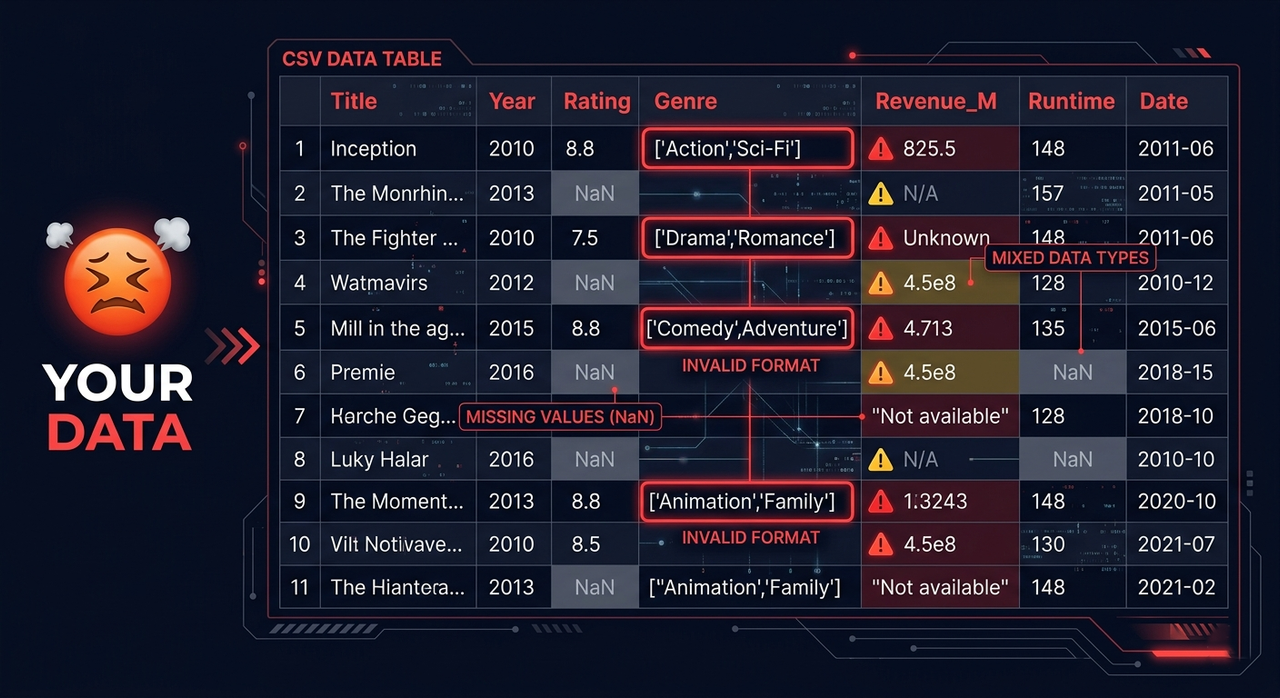
Your CSV files are lying to you.
- You save a list — you open it tomorrow and it's a string
- You have a lot of list or dict as strings nested in lists and dicts
- Your column has numbers — it secretly has 3 different data types
- You have 200 CSV files across 40 folders — and you process them one by one
- You load a file and spend 20 minutes just picking the right reader
- You have nulls scattered everywhere with no clean way to handle them
This is the silent killer of every data pipeline.
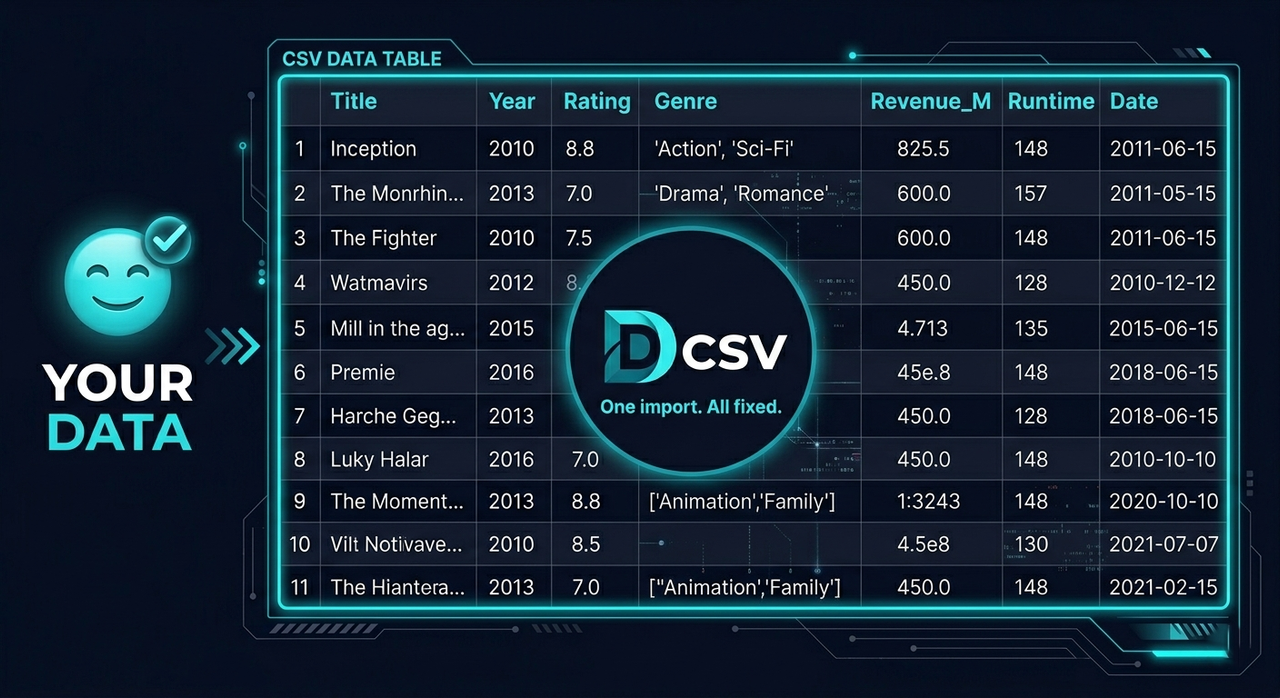
deepcsv handles all of this in one import.
- Walks through every folder and subfolder automatically
- Detects columns storing lists as strings and converts them to real NumPy arrays
- Catches mixed-type columns and fixes them automatically
- Saves everything in any format you choose — not just Parquet
- Reads any file format with one function — no more picking the right reader
- Cleans nulls with full control over columns, rows, indexes, values, and types
pip install deepcsv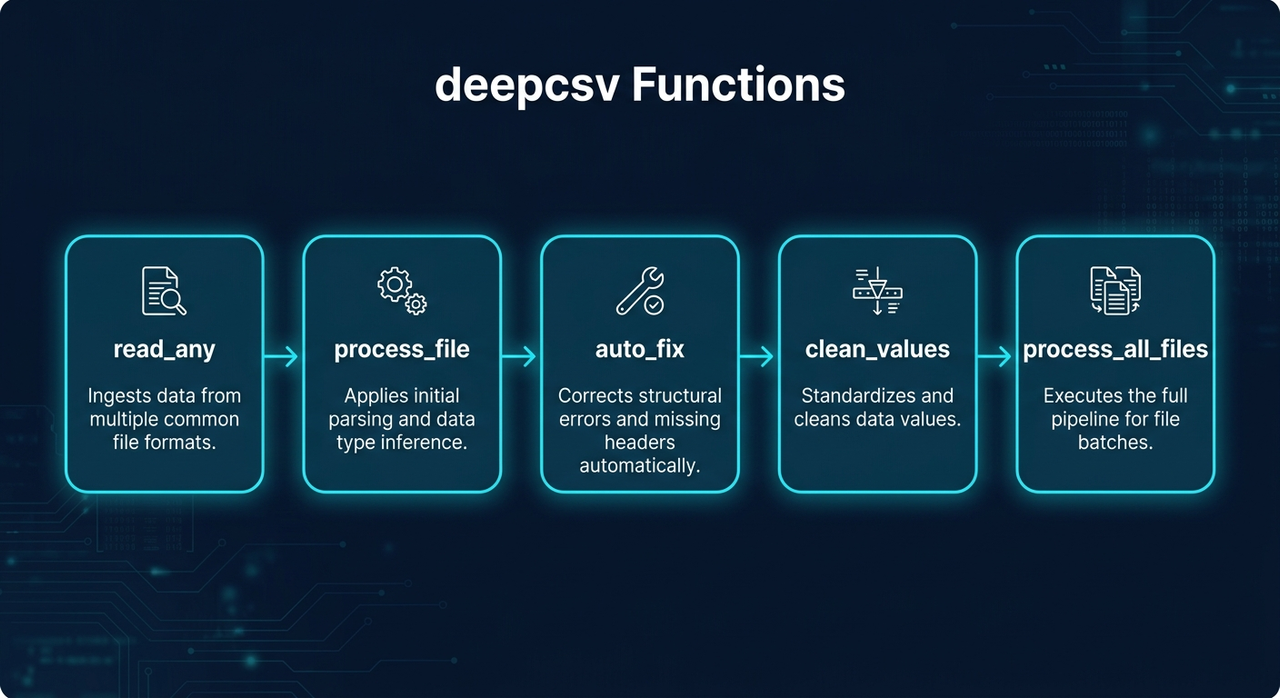
| Function | What it does |
|---|---|
process_file() |
Converts string lists → NumPy arrays, fixes mixed types |
process_all_files() |
Batch processes entire folder trees |
read_any() |
Reads any file format automatically |
clean_values() |
Cleans nulls, values, types with full control |
auto_fix() |
Detects and fixes mixed data types automatically and MORE |
auto_fs() |
Auto feature selection — keeps only the columns that matter for your target |
process_file(data_input, file_format=None, to_list=False, auto_fix = False, to_list = False, deep_check = False)
Reads a file or DataFrame, converts array-like strings to NumPy arrays, fixes mixed-type columns, and optionally saves the result.
import deepcsv

# Process only
df = deepcsv.process_file('path/to/file.csv')

# Process and save as parquet
df = deepcsv.process_file('path/to/file.csv', file_format='parquet')

# Process and convert to real Python lists
df = deepcsv.process_file('path/to/file.csv', to_list=True)

# Deep parse nested lists and dicts inside arrays
df = deepcsv.process_file('path/to/file.csv', deep_check=True)

# Support for Specific Column In Dataset
df = deepcsv.process_file('path/to/file.csv', col_name=["col1","col2"])
| deep_check | bool | False | True: recursively parses nested lists/dicts inside arrays — may be slower on large datasets |
| col_name | str \| list | "all" | Column name or list of names to process. Default "all" processes every column. Pass a single name like "genres" or a list ["genres", "tags"] to target specific columns |
Supported save formats: .csv .tsv .txt .xlsx .json .parquet .pkl .feather .html .xml
process_all_files(directory_path, output_dir="All CSV Files is Converted Here", file_format="parquet", auto_fix = False, to_list = False, DeepCheck=True)
Walks through all folders and subfolders, applies process_file on every supported file, and saves results.
import deepcsv

# Default — saves as parquet
deepcsv.process_all_files('path/to/folder')

# Custom output folder
deepcsv.process_all_files('path/to/folder', output_dir='Converted Files')

# Save as CSV
deepcsv.process_all_files('path/to/folder', file_format='csv')
Supported input formats: .csv .txt .tsv .xls .xlsx .json .parquet .pkl .feather .db .sqlite
Reads any supported file format and returns a pandas DataFrame — one function for everything.
from deepcsv import read_any

df = read_any('data/users.csv')
df = read_any('reports/sales.xlsx')
df = read_any('warehouse/orders.parquet')
df = read_any('local.db')
Supported formats: .csv .txt .tsv .xls .xlsx .json .parquet .pkl .feather .db .sqlite
Cleans a DataFrame by removing nulls, specific values, specific types, or rows by index.
from deepcsv import clean_values

# Drop fully-null columns
df = clean_values('data.csv', cols=['age', 'salary'])

# Drop rows that have nulls in specific cols
df = clean_values('data.csv', cols=['age', 'salary'], ax_0=True)

# Drop rows by index
df = clean_values(df, index=[0, 5, 12])

# Remove rows where a specific value exists
df = clean_values(df, cols=['status'], finding_value='N/A')

# Remove rows where value meets a condition
df = clean_values(df, cols=['score'], finding_value='N/A', condition=['>=', 500])

# Remove rows by Python type
df = clean_values(df, cols=['age'], finding_type=str)

# Apply on all columns except some
df = clean_values('data.csv', all_cols_except=['id', 'name'])| Parameter | Type | Default | Description |
|---|---|---|---|
data_input |
str | DataFrame |
required | File path or DataFrame |
cols |
list |
None |
Columns to apply on |
ax_0 |
bool |
False |
True: drop rows with nulls — False: drop fully-null cols |
index |
list |
None |
Row indexes to drop |
condition |
list |
None |
[operator, value] — ex: ['>=', 500] |
all_cols_except |
list |
None |
Apply on all columns except these |
finding_value |
any |
None |
Find and remove rows containing this value |
finding_type |
type |
None |
Find and remove rows matching this Python type |
Supported operators: >= <= > < == !=
Automatically detects columns with mixed data types and fixes them by converting all values to the most dominant type. Logs every change made.
from deepcsv import auto_fix

df = auto_fix('data.csv')
df = auto_fix(my_dataframe)
from deepcsv import auto_fix
df = auto_fix('data.csv')
df = auto_fix(my_dataframe)
# Fix only specific columns
df = auto_fix('data.csv', col_name='age')
df = auto_fix('data.csv', col_name=['age', 'score', 'price'])| Parameter | Type | Default | Description |
|---|---|---|---|
data_input |
str | DataFrame |
required | File path or DataFrame |
col_name |
str | list |
"all" |
Column name or list of names to fix. Default "all" applies to every column |
Automatically selects the most important features for a given target column. Two modes available — pick speed or accuracy.
from deepcsv.ml import auto_fs

# Balanced mode (default) — uses Ridge + cross-validation to drop weak features
result = auto_fs(df, target='price')

# Fast mode — uses correlation threshold only, much faster on large datasets
result = auto_fs(df, target='price', mode='fast')

# Custom correlation threshold in fast mode
result = auto_fs(df, target='price', mode='fast', corr_threshold=0.4)| Parameter | Type | Default | Description |
|---|---|---|---|
df |
DataFrame |
required | Input DataFrame |
target |
str |
required | Target column name |
model |
model |
None |
Custom sklearn model. Defaults to auto-tuned Ridge |
mode |
str |
"balanced" |
"fast": correlation filter only — "balanced": Ridge + cross-val loop — "accurate": GradientBoosting + cross-val, slowest but most precise |
corr_threshold |
float |
0.3 |
Minimum correlation to keep a feature (used in fast mode) |
Note:
auto_fsis part of thedeepcsv.mlsubpackage — install scikit-learn to use it.
process_file(data_input: Union[str, pd.DataFrame], file_format: str = None, auto_fix: bool = False, to_list: bool = False, deep_check: bool = False, col_name:  Union[str, list] = "all") -> pd.DataFrame
process_all_files(directory_path: str, output_dir="All CSV Files is Converted Here",file_format= "parquet",auto_fix = False,to_list = False, DeepCheck=True) -> None
read_any(file_path: str) -> pd.DataFrame
clean_values(data_input, cols=None, ax_0=False, index=None, condition=None, all_cols_except=None, finding_value=None, finding_type=None) -> pd.DataFrame
auto_fix(data_input: Union[str, pd.DataFrame], col_name: Union[str, list] = "all") -> pd.DataFrame
auto_fs(df: pd.DataFrame, target: str, model=None, mode: str = "balanced", corr_threshold: float = 0.3) -> pd.DataFrame- String list → real NumPy array conversion (fast, no manual parsing)
- Target specific columns by name or list — skip what you don't need
- Deep recursive parsing for nested lists and dicts stored as strings inside arrays
- Mixed-type column detection and auto-fix with logging
- Auto-fix supports column targeting — fix one column or a custom list
- Auto feature selection with two modes: correlation-based (fast) or cross-validation (balanced)
- Save in any format — CSV, Excel, JSON, Parquet, Feather, and more
- One universal file reader supporting 10+ formats
- Flexible null cleaning by column, row, index, value, or type
- Conditional filtering with 6 operators
- Recursive directory traversal
- Warning messages for full transparency
- Requires
pyarrowfor Parquet and Feather support - Only saves files in
process_all_filesif the DataFrame contains converted array columns
- Python >= 3.7
- pandas
- pyarrow