Note for NuGet.org: This README is intentionally short. For the full template-author documentation, use the GitHub Pages user manual.
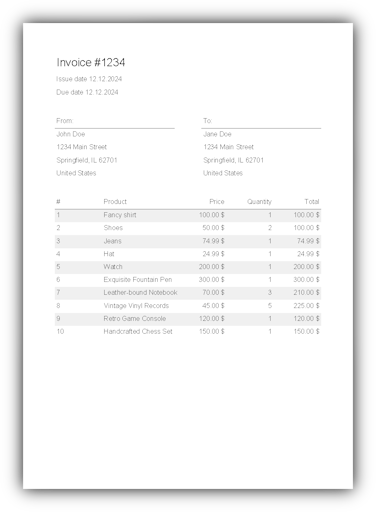
Papercraft is a template-driven document rendering engine for XML templates in .NET. The current default backend renders through SkiaSharp and supports PDF output, raster output, and built-in controls for text, rich text, borders, images, lines, tables, lists, page numbers, charts and related layout elements.
The existing X39.Solutions.PdfTemplate package remains the compatibility bridge during the
Papercraft migration. Existing users can keep services.AddPdfTemplateService() and Generator;
new code can start using services.AddPapercraft() and PapercraftRenderer.
Template authors should start with the GitHub Pages user manual. The manual explains document structure, template data, layout, controls, transformers, complete examples and troubleshooting from the perspective of people who edit XML templates. The Pages site includes a persistent manual table of contents so chapters can be reached without returning to the landing page.
Useful manual entry points:
- First document
- Template data
- Layout fundamentals
- Quick reference
- Controls
- Template language
- Complete examples
- Developer integration appendix
- Renderer backends
- .NET 10.0 or later
- A dependency injection container that can provide the services registered by
AddPapercraft - On Linux, the SkiaSharp native Linux assets package
The compatibility package is marked trim-compatible. The default rendering path uses the SkiaSharp-backed Papercraft renderer and the dependency-injection abstractions. Issues are tracked in the GitHub repository.
Install the current compatibility package:
dotnet add package X39.Solutions.PdfTemplateThe source tree now follows this partial Papercraft package split:
| Package | Use |
|---|---|
X39.Solutions.Papercraft |
Batteries-included facade for normal PDF users. |
X39.Solutions.Papercraft.Core |
Renderer-neutral contracts plus the current shared parsing, layout, control, data and validation runtime. |
X39.Solutions.Papercraft.Rendering.SkiaSharp |
SkiaSharp PDF/raster renderer and runtime services. |
X39.Solutions.Papercraft.Rendering.Svg |
Dependency-free SVG vector renderer. |
X39.Solutions.Papercraft.Rendering.PdfSharp |
PDFsharp-backed PDF renderer. |
X39.Solutions.Papercraft.Rendering.EscPos |
First-pass ESC/POS printer-command renderer. |
X39.Solutions.Papercraft.OpenTelemetry |
Optional host/OpenTelemetry integration for Papercraft renderer activity tracing. |
X39.Solutions.Papercraft.Controls.QrCode |
Optional QR code control package backed by Net.Codecrete.QrCodeGenerator. |
X39.Solutions.Papercraft.Controls.ZXing |
Optional general barcode control package backed by ZXing.Net. |
X39.Solutions.PdfTemplate |
Compatibility bridge for existing users and package metadata during the migration. |
The root README is the solution overview. Each project now has its own README for package-specific setup, public entry points and contributor notes:

On Linux, also install the SkiaSharp native Linux assets:
dotnet add package SkiaSharp.NativeAssets.LinuxTemplates are XML documents:
<template>
    <body>
        <text>Hello, world!</text>
    </body>
</template>
For template-author guidance, use the manual. For application setup, use the developer integration appendix.
Register the library services at startup:
services.AddPapercraft();Then resolve a PapercraftRenderer and render the template:
using System.Globalization;
using System.Xml;
using Microsoft.Extensions.DependencyInjection;
using X39.Solutions.Papercraft;

await using var scope = serviceProvider.CreateAsyncScope();
var renderer = scope.ServiceProvider.GetRequiredService<PapercraftRenderer>();

using var reader = XmlReader.Create(xmlTemplateStream);
await using var output = File.Create("document.pdf");

await renderer.GeneratePdfAsync(
    output,
    reader,
CultureInfo.CurrentUICulture);The existing API is still available:
services.AddPdfTemplateService();

using var generator = scope.ServiceProvider.GetRequiredService<Generator>();
await generator.GeneratePdfAsync(output, reader, CultureInfo.CurrentUICulture);
AddPdfTemplateService() also registers the Papercraft renderer stack, so applications can migrate
call sites before changing their service setup.
Common extension points are documented in the developer integration appendix:
- Set template variables with
generator.TemplateData.SetVariable("Name", value). - Add custom functions with
services.AddPapercraft((builder) => builder.AddFunction<MyFunction>()). - Add custom controls with
services.AddPapercraft((builder) => builder.AddControl<TControl>()). - Add custom transformers with
services.AddPapercraft((builder) => builder.AddTransformer<TTransformer>()). - Configure document-level options through
PapercraftRenderOptions. - Use
ValidateAsyncto check renderer capabilities and diagnostics before rendering.
Restore and build locally:
dotnet restore
dotnet build --no-restore
Run tests:
dotnet test --framework net10.0 --no-build --verbosity normalRun focused PDF comparison benchmarks:
dotnet run -c Release --project benchmark/X39.Solutions.PdfTemplate.Benchmark/X39.Solutions.PdfTemplate.Benchmark.csproj -- --anyCategories Comparison --job Short --warmupCount 3 --iterationCount 10The comparison benchmark intentionally measures a deterministic 28-row invoice against direct SkiaSharp PDF/A output, QuestPDF PDF output and Papercraft XML template PDF/A output. Current local results are tracked in the benchmark README rather than advertised as a package performance claim: Papercraft is close to the current SkiaSharp PDF/A backend path, but still several times slower than QuestPDF on this shape. The current tuning target for this benchmark is below 12 ms and below 2 MB allocated for Papercraft XML PDF/A generation on the maintainer Ryzen 9 5900X/.NET 10 harness.
Create a local package:
dotnet pack --configuration ReleaseThe pull-request workflow is defined in .github/workflows/run-dotnet-tests.yml.
The publish workflow is defined in .github/workflows/main.yml.
The GitHub Pages source lives under docs.
The Pages table of contents is maintained in docs/_data/navigation.yml.
Executable documentation samples live under test/X39.Solutions.PdfTemplate.Test/Samples
and write generated preview assets under docs/assets/samples.
Contributions are welcome. Please submit a pull request or create a discussion to discuss changes.
Add yourself to CONTRIBUTORS for your first pull request and include this agreement text:
By contributing to this project, you agree to the following terms:
- You grant me and any other person who receives a copy of this project the right to use your contribution under the
  terms of the GNU Lesser General Public License v3.0.
- You grant me and any other person who receives a copy of this project the right to relicense your contribution under
  any other license.
- You grant me and any other person who receives a copy of this project the right to change your contribution.
- You waive your right to your contribution and transfer all rights to me and every user of this project.
- You agree that your contribution is free of any third-party rights.
- You agree that your contribution is given without any compensation.
- You agree that I may remove your contribution at any time for any reason.
- You confirm that you have the right to grant the above rights and that you are not violating any third-party rights
  by granting these rights.
- You confirm that your contribution is not subject to any license agreement or other agreement or obligation, which
  conflicts with the above terms.
Additional controls are welcome when they do not add dependencies to the core library. Controls that need additional libraries should usually live in separate packages.
This library follows the principles of Semantic Versioning.
| Change | Meaning |
|---|---|
| Patch | Backwards-compatible bug fixes or small internal changes. |
| Minor | Backwards-compatible features or additions. |
| Major | Breaking changes. |
This project is licensed under the GNU Lesser General Public License v3.0. See the LICENSE file for details.