
Status: Experimental feature plugin
System-wide presence and awareness for WordPress.
WordPress has no way to know who is logged in, what screen they are on, or which posts are being edited — without writing to shared tables like wp_postmeta or wp_options. High-frequency writes to those tables invalidate caches site-wide (#64696). This plugin uses a dedicated wp_presence table with a 60-second TTL to provide that awareness with zero cache side effects.
"This idea of presence I think is really cool and seeing where people are... you log into your WordPress, I see oh Matias is moderating some comments, Lynn is on the dashboard maybe reading some news... that idea of like you log in and you can kind of see the neighborhood of like who else is also there." — Matt Mullenweg, WordPress 7.0 planning session
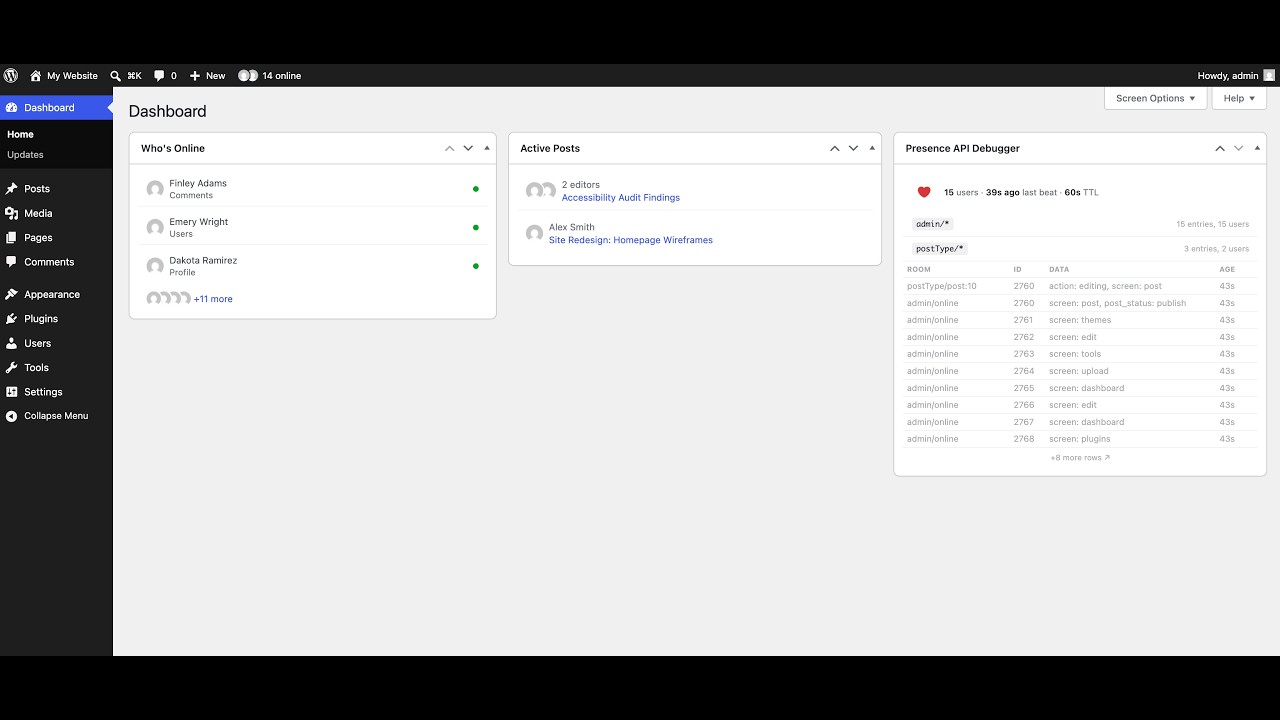
▶ Watch the demo on YouTube (no audio)

Or run locally:
npm install
npx wp-env start
Then open localhost:8888/wp-admin/ (admin / password).
- Browser sends
presence-pingvia Heartbeat - Server upserts into
wp_presence - Server reads the room and returns entries in the heartbeat response
- Client diffs a signature of user IDs and swaps HTML when content changes
- Client-side interval re-evaluates idle state every 5s between heartbeat ticks
| Pattern | Example |
|---|---|
admin/online |
All admin pages |
postType/{type}:{id} |
postType/post:42 |
Post types opt in via add_post_type_support( 'post', 'presence' ).
The following six public functions are part of the stable public API contract. All other helper functions in includes/functions.php (such as wp_get_active_rooms(), wp_get_presence_summary(), etc.) are marked @access private, are intended for internal plugin use only, and may change or be removed without notice.
// Read all presence entries in a room.
$entries = wp_get_presence( $room, $timeout = WP_PRESENCE_DEFAULT_TTL );

// Upsert a client's presence state. Atomic via INSERT … ON DUPLICATE KEY UPDATE.
wp_set_presence( $room, $client_id, $state, $user_id = 0 );

// Remove a single client from a room.
wp_remove_presence( $room, $client_id );

// Remove all presence entries for a user across all rooms.
wp_remove_user_presence( $user_id );

// Check whether a user can access a room (requires edit_posts).
wp_can_access_presence_room( $room, $user_id = 0 );

// Return the canonical room string for a post, or false if the post type
// does not support presence.
$room = wp_presence_post_room( $post );
Each entry object returned by wp_get_presence() has: room, client_id, user_id, data (array), date_gmt.
A post type opts in to per-post presence rooms by declaring presence support. post and page are registered by the plugin; any other post type must opt in itself, either during registration or afterwards:
// During registration:
register_post_type( 'my-post-type', array(
    'supports' => array( 'title', 'editor', 'presence' ),
) );

// Or afterwards, on a post type someone else registered:
add_post_type_support( 'my-post-type', 'presence' );
Without support, wp_presence_post_room() returns false for that post type and no per-post room is created.
Filters the presence TTL (time-to-live) in seconds used for all queries and cleanup. Default: 60.
add_filter( 'wp_presence_default_ttl', function( $timeout ) {
    return 30; // Override TTL to 30 seconds.
} );
Or define the constant before the plugin loads:
define( 'WP_PRESENCE_DEFAULT_TTL', 30 );Filters the key identifying the current admin screen for stale-screen detection. Core screens (Settings, post.php, term, user, comment) resolve their own keys; $key is '' on any screen without coverage. Return a non-empty string to opt a custom screen in.
add_filter( 'wp_presence_current_screen_key', function( $key, $screen ) {
    if ( 'toplevel_page_my-plugin' === $screen->id ) {
        return 'options/my-plugin-settings';
    }
    return $key; // Leave other screens untouched.
}, 10, 2 );
Keys follow the plugin's slash-separated room convention and are truncated to 191 characters (WP_PRESENCE_SCREEN_KEY_LIMIT). Use the same key when bumping the revision from JS via wp.presence.markScreenStale().
Fires after an admin screen revision has been bumped. Useful for triggering custom sync or WebSocket integrations.
add_action( 'wp_presence_screen_revision_bumped', function( $screen_key, $revision, $actor_id ) {
    // Custom sync logic
}, 10, 3 );All endpoints require edit_posts. Responses include Cache-Control: no-store.
| Method | Path | Description |
|---|---|---|
GET |
/wp-presence/v1/presence |
List entries in a room |
POST |
/wp-presence/v1/presence |
Upsert a presence entry |
DELETE |
/wp-presence/v1/presence |
Remove a presence entry |
GET |
/wp-presence/v1/presence/rooms |
List active rooms |
wp presence list      # List all active presence entries
wp presence summary   # Summary grouped by room
wp presence set       # Manually upsert an entry
wp presence cleanup   # Delete expired entries immediately
Creates presence entries alongside _edit_lock postmeta when a post lock is refreshed via Heartbeat. Both systems coexist.
All features require edit_posts.
Warns users when an admin screen they are viewing has been modified by someone else.
Classic admin screens that save via POST and redirect (like Settings or post.php) are covered automatically.
Custom JS-driven screens (like Gutenberg settings panels or custom plugin screens) can opt-in by bumping the screen revision after a successful background save:
// After a successful REST or AJAX save:
if (window.wp?.presence?.markScreenStale) {
    wp.presence.markScreenStale('options/my-custom-plugin-settings');
}
For a screen to be watched in the first place, it needs a screen key — core screens resolve their own, and custom screens supply one via the wp_presence_current_screen_key filter.
Sponsored by the Core team. Updates posted on make.wordpress.org/core with the tag #presence-api.
Questions and bug reports: GitHub Issues.
Discussion: #feature-presence-api on WordPress Slack