

A Home Assistant custom integration (HACS-ready) that puts a Wikipedia article on your dashboard (an image, a title, and a summary) and opens the full article when you tap it. Like a little "peek at Wikipedia" widget for your wall tablet or phone.
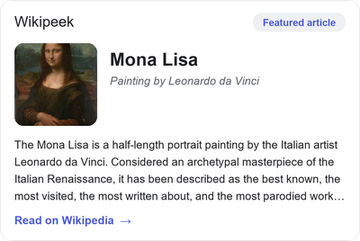
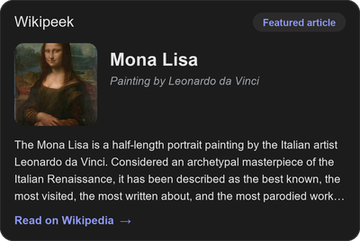
You choose what it shows:
| Mode | What you get |
|---|---|
| Today's featured article | Wikipedia's daily hand-picked article. A new one every day. |
| Random article | A fresh random article on each update; great for discovery. |
| Specific article | An article you name (e.g. a topic you care about). |
| On this day | A historical event that happened on today's date. |
Pick one, several, or all of these. If you select more than one, the widget rotates through them on your chosen interval (e.g. today's featured article, then a random one next time, then an "on this day" fact, and so on).
All content comes from the Wikipedia REST API: free, public, open, no API key, nothing to pay. Text is available under CC BY-SA.
- In Home Assistant go to HACS → ⋮ (top right) → Custom repositories.
- Add the URL of this repository, category Integration, and click Add.
- Find Wikipeek in HACS, click Download, and restart Home Assistant.
- Go to Settings → Devices & Services → Add Integration → Wikipeek.
Copy the custom_components/wikipeek folder into your Home Assistant
config/custom_components/ directory and restart.
Add it under Settings → Devices & Services → Add Integration → Wikipeek. A short form appears:
-
Name: a friendly name; it also becomes the entity id (e.g.
sensor.wikipeek). -
What to show: a checklist. Tick one or more of:
- Today's featured article: Wikipedia's daily hand-picked article.
- Random article: a different random article each time it changes.
- Specific article: an article you name (fill in Article title below).
- On this day: a historical event from today's date.
Tick just one to always show that kind. Tick several and the widget rotates through them: each time it updates it advances to the next one you selected (featured now, a random one next time, an "on this day" fact after that, then back around).
-
Article title: only needed if you ticked Specific article. Type the page title as it appears on Wikipedia, e.g.
Home AssistantorMount Everest. -
Language: which Wikipedia edition to pull from:
en,de,fr,es, … -
How often to change: seconds between updates. With one mode it's simply the refresh rate; with several it's how often it advances to the next item. Default is 3600 (1 hour).
Change any of this later: Settings → Devices & Services → Wikipeek → Configure.
One Wikipeek instance = one (optionally rotating) widget. To show, say, a
featured article tile and a separate random discovery tile on the same
dashboard, add the integration twice with different names. You'll get
sensor.wikipeek, sensor.wikipeek_2, and so on, then point each card at its
own entity (see the examples below).
You get one sensor (named after the integration), e.g. sensor.wikipeek:
- State = the article title (or the event, for "On this day").
entity_picture= the article thumbnail (so standard HA cards show it).
Attributes:
| Attribute | Description |
|---|---|
summary |
The article summary / extract |
description |
Short one-line description |
url |
Link to the full article (used for tap-to-open) |
image |
Thumbnail image URL |
mode |
The item currently shown (rotates when several are selected) |
modes |
All enabled items |
language |
Wikipedia language code |
year |
The year (only in "On this day" mode) |
Wikipeek ships a card that shows the image, title and summary, and opens the
article in a new tab when tapped. It's served automatically at
/wikipeek/wikipeek-card.js.
If the card shows "Custom element doesn't exist", add the resource manually:
Settings → Dashboards → ⋮ → Resources → Add resource, URL
/wikipeek/wikipeek-card.js, type JavaScript Module, then hard-refresh
(Ctrl/Cmd-Shift-R).
Add it from Edit dashboard → + Add Card → Wikipeek Card. It has a visual editor: pick your Wikipeek sensor from the dropdown and set the options. As YAML:
type: custom:wikipeek-card
entity: sensor.wikipeek
If you only have one Wikipeek instance you can even leave out entity; the card
finds it automatically. Point entity at a specific sensor when you run several
instances.
The small chip in the card's top-right shows which kind of article is currently displayed (Featured article / Random / On this day / Article), handy when a widget rotates through several.
Card options:
| Option | Default | Description |
|---|---|---|
entity |
(auto-detect) | The Wikipeek sensor to show. Required if you have more than one instance. |
title |
Wikipeek |
Small header label shown top-left. Set your own, e.g. Today on Wikipedia. |
show_image |
true |
Show the article thumbnail. Set false for a text-only card. |
summary_lines |
4 |
How many lines of the summary to show before it's clipped. Set 0 to show the whole summary. Note: Wikipedia's summaries are short (often one or two sentences), so on short articles raising this changes nothing because there is nothing more to show. |
open_on_tap |
true |
Open the full article in a new tab when the card is tapped. |
Examples
A card with your own header:
type: custom:wikipeek-card
entity: sensor.wikipeek
title: Today on Wikipedia
Text-only, with a longer summary:
type: custom:wikipeek-card
entity: sensor.wikipeek
show_image: false
summary_lines: 8
Two tiles side by side from two separate instances (a featured one and a random one):
type: horizontal-stack
cards:
  - type: custom:wikipeek-card
    entity: sensor.wikipeek
    title: Featured
  - type: custom:wikipeek-card
    entity: sensor.wikipeek_2
title: Random pickBecause the thumbnail is exposed as entity_picture, a standard
Entities or Glance card shows the image and title too, but the custom
card gives you the summary and tap-to-open.
- Etiquette: please keep the update interval reasonable. Wikipedia's API is free but shared; the default of 1 hour is plenty for featured / on-this-day.
- Attribution: article text is from Wikipedia and licensed CC BY-SA 4.0. The card links back to the source article.
- Wikipeek is an independent project and is not affiliated with or endorsed by the Wikimedia Foundation.
- Content from Wikipedia, the free encyclopedia.
Licensed under the MIT License.