



A Textual terminal UI for mkpfs — pack, inspect, verify, tree, unpack, build raw dumps to exFAT, and deploy to a jailbroken PS5 over FTP from a single sidebar-driven app. Every operation has its own view with file/directory pickers, live progress, and a result panel that surfaces warnings and errors without ever leaving the terminal.
mkpfs-tui is a third-party frontend. It pins
mkpfsas a dependency and never modifies it.
Contents: Screenshots · Operations · Requirements · Install · Usage · Build exFAT · Deploy to PS5 · Contributing · License
| Operation | What it does |
|---|---|
| Pack | Build a PFS image from a source folder or file (compression, signing, encryption, dry-run). |
| Inspect | Show an image's header, inode/dir/file counts, sizes, and checksums in a table. |
| Verify | Validate an image's structure and checksums — optionally against a source tree or expected CRC32 / manifest. |
| Tree | Browse the file tree stored inside an image. |
| Unpack | Extract an image to a target directory, with progress and a files/dirs/bytes summary. |
| Build exFAT | Turn a PS5 dump folder into a .exfat image for ShadowMountPlus — adaptive cluster, param.json-derived name/label. |
| Deploy | Push a built image (or any file) to a jailbroken PS5 over FTP — live progress, remote listing, overwrite confirm. |
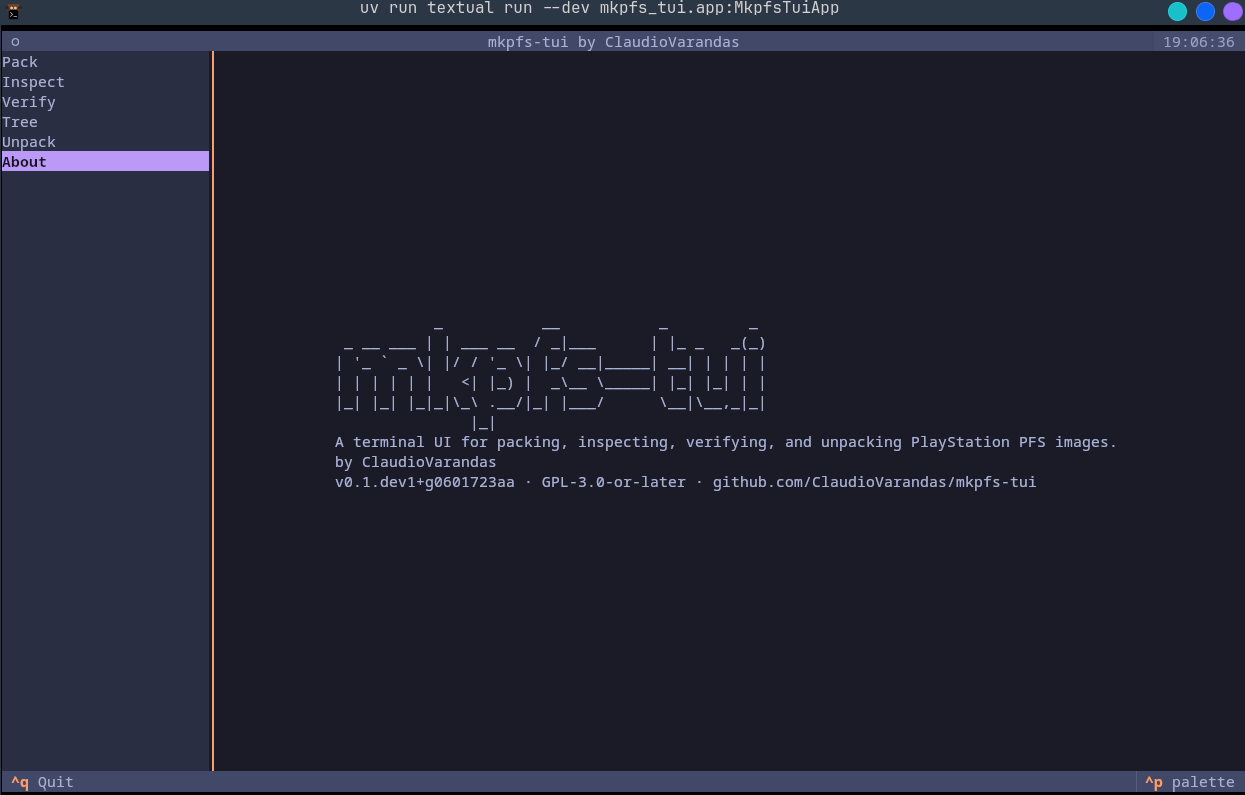
About — the welcome screen:
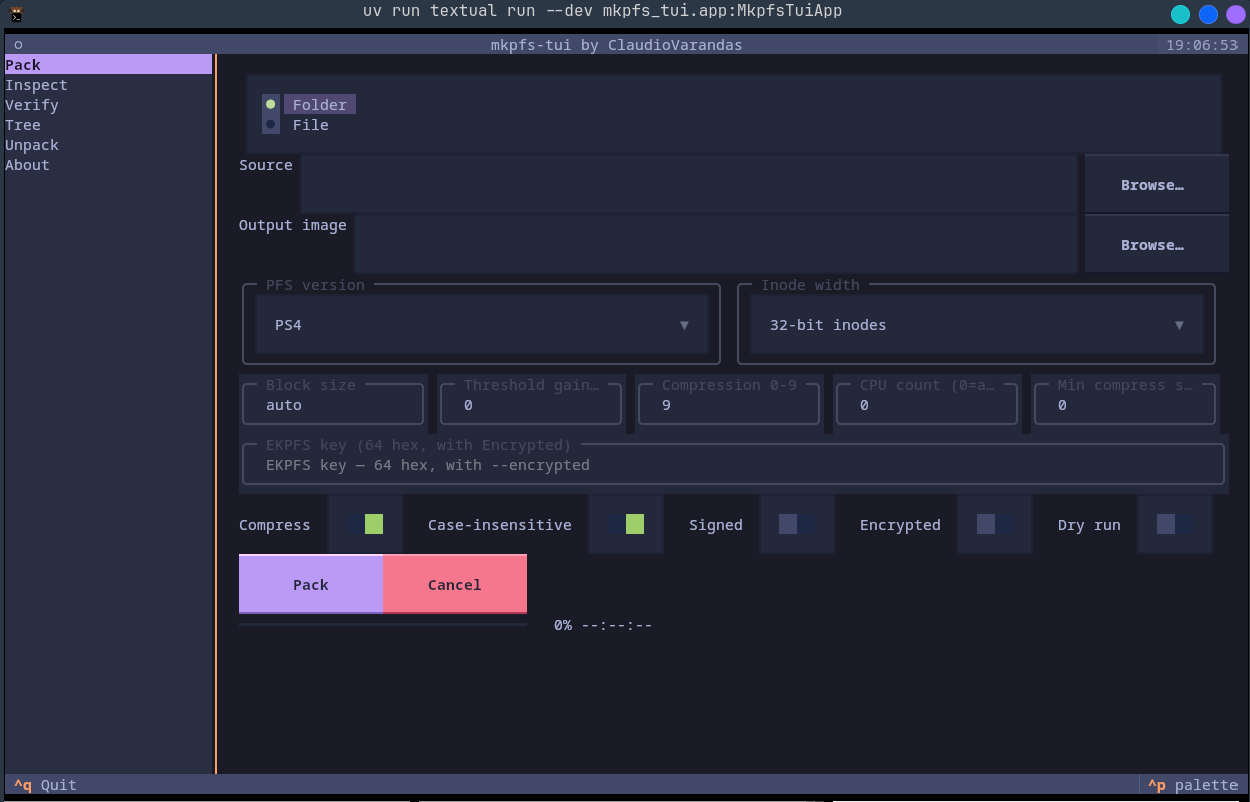
Pack — build an image from a folder or file:
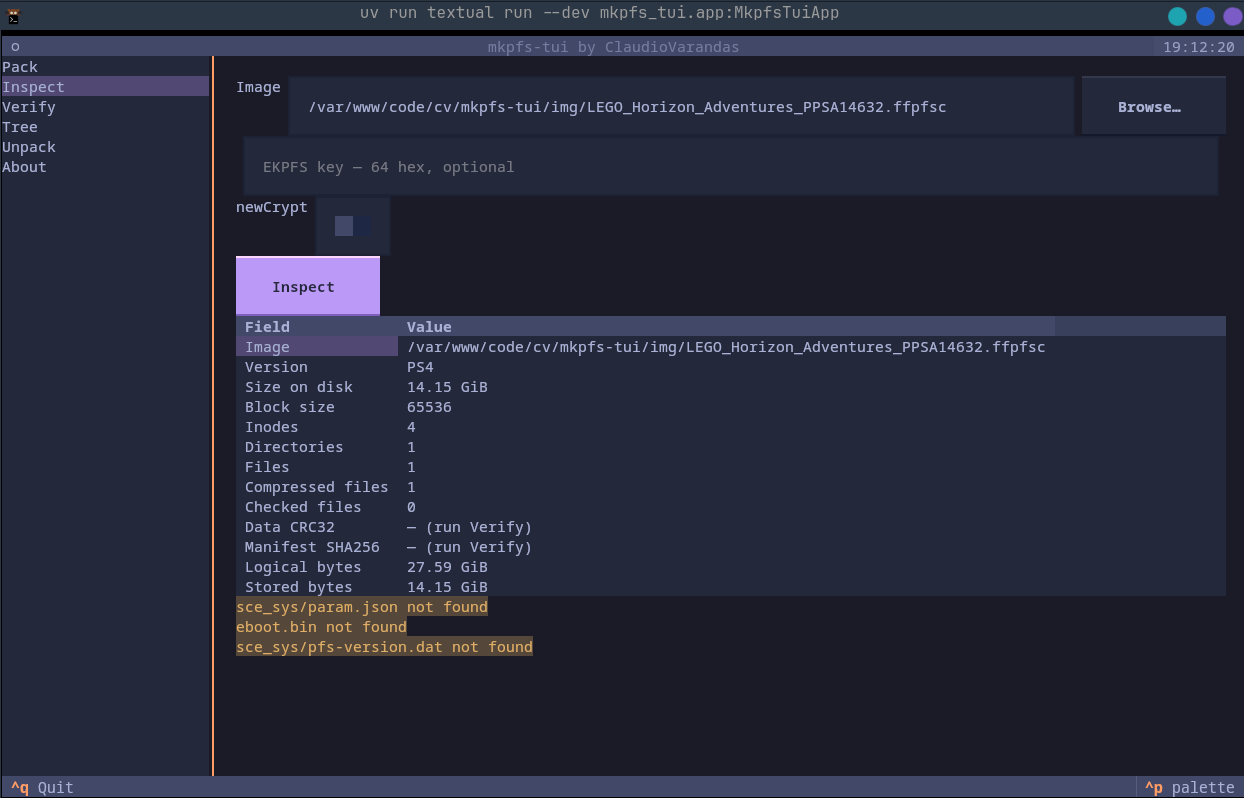
Inspect — header, counts, sizes, and checksums:
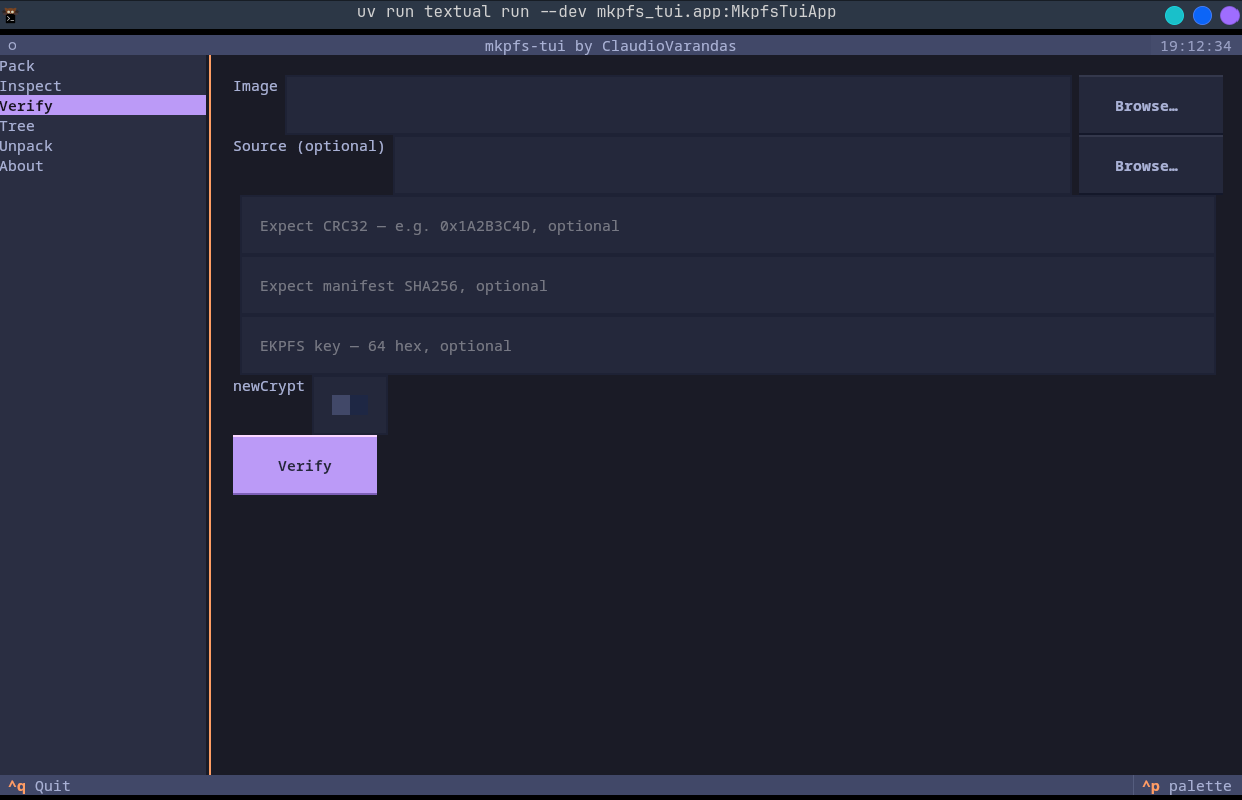
Verify — structure / checksum checks with a PASS/FAIL banner:
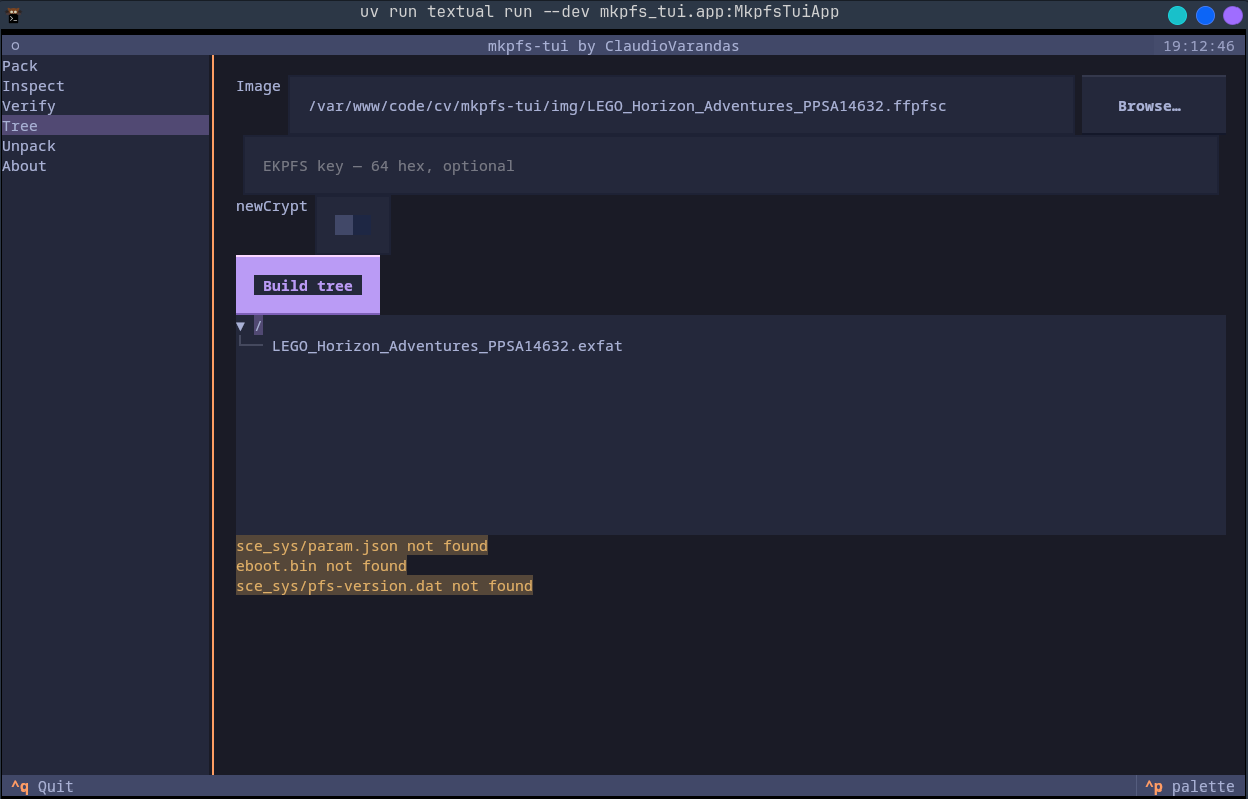
Tree — browse the file tree stored inside an image:
- Python 3.11 or newer (only needed for the
uvx/pipxinstall; the Linux binary bundles its own). - A terminal that renders modern TUIs. Most do; on Windows use Windows Terminal (the default on Windows 11), not the legacy console.
mkpfsis installed automatically as a dependency — you do not install it yourself.- Build exFAT only:
exfatprogsandrsyncmust be installed on the host system, and the build step requiressudoaccess for the loop-mount copy (sudo mount). These are not needed for any other operation.
Prefer a self-contained download? Grab a build from the Releases page.
The cross-platform way is via Python, using either uv (recommended —
uvx runs it without installing) or pipx (installs the mkpfs-tui command).
# Prerequisite — uv (one line, no root):
curl -LsSf https://astral.sh/uv/install.sh | sh

# Run it (downloads + runs in an isolated env, nothing to clean up):
uvx mkpfs-tui
Or with pipx — sudo apt install pipx (Debian/Ubuntu) / sudo pacman -S python-pipx (Arch), then:
pipx ensurepath        # once, then restart the shell
pipx install mkpfs-tui
mkpfs-tui
No Python? Download mkpfs-tui-linux-x86_64.tar.gz from the
Releases page, then:
tar -xzf mkpfs-tui-linux-x86_64.tar.gz
./mkpfs-tui/mkpfs-tui# Prerequisite — uv (via Homebrew or the install script):
brew install uv # or: curl -LsSf https://astral.sh/uv/install.sh | sh
uvx mkpfs-tuiOr with pipx: brew install pipx && pipx ensurepath, then pipx install mkpfs-tui.
(No prebuilt macOS binary yet — use the Python install above.)
Use Windows Terminal for a TUI. In PowerShell:
# Prerequisite — uv:
winget install --id=astral-sh.uv  # or: powershell -c "irm https://astral.sh/uv/install.ps1 | iex"

uvx mkpfs-tui
Or with pipx: py -m pip install --user pipx, then py -m pipx ensurepath (restart the terminal) and
pipx install mkpfs-tui. (No prebuilt Windows binary yet — use the Python install above.)
Launch the app (uvx mkpfs-tui, or mkpfs-tui if installed). You land on the Pack view.
- Left sidebar — the seven operations. Move with
↑/↓; the right pane switches as you go. - Right pane — the selected operation's form, run button, progress, and a result panel (errors in red, warnings in amber, success in green).
- Browse… buttons open a file/directory picker — navigate with the arrows, Choose to accept,
Cancel/
Escapeto dismiss. You can also just type a path into the field.
| Key | Action |
|---|---|
↑ / ↓ |
Move in the sidebar / lists / tree |
Tab / Shift+Tab |
Move between form fields |
Enter / Space |
Activate the focused button / switch |
Ctrl+P |
Command palette — includes theme switching |
Escape |
Close a modal (picker / overwrite prompt) |
Ctrl+Q |
Quit |
- Pack — choose Folder or File mode, pick the Source and the Output image path (the image is written exactly to the path you type — include the extension you want), then set options: PS4/PS5 version, inode width (folder mode only), compression level, CPU count, block size, and the switches (Compress, Case-insensitive, Signed, Encrypted, Dry run, Verify after). Press Pack to watch a live progress bar; Cancel stops the build. If the output already exists you'll be asked to confirm before it's overwritten.
- Inspect — point at an Image and press Inspect; the table fills with version, sizes, counts, and checksums.
- Verify — give an Image and, optionally, a Source directory and/or an expected CRC32 / manifest SHA-256, then press Verify for a PASS/FAIL banner plus any errors.
- Tree — pick an Image and press Build tree to browse its contents.
- Unpack — pick an Image and an Output directory and press Unpack. Turn on Overwrite to clear a non-empty output directory first (you'll be asked to confirm the deletion).
- Build exFAT — pick a Dump folder (a PS5 game dump directory) and an Output path, then press
Build. The app reads
param.jsoninside the dump to suggest the output filename and the exFAT volume label; you can override both. Use a Preset (PPSA / +Title / +Version) and the Lowercase toggle to control the suggested filename. Choose a cluster size or leave it on Auto (adaptive). Tick Verify after to runfsck.exfaton the finished image. Tick Deploy after to push the finished image to the PS5 immediately (requires FTP host set in the Deploy view or config). The pipeline is:truncate→mkfs.exfat→sudo mount(loop) →rsync→umount→ optionalfsck.exfat. ShadowMountPlus keys off the.exfatfilename, and all game files are placed at the image root. Requiresexfatprogs+rsyncon the host; the mount step needssudo. - Deploy — fill in the Host (and optionally Port, Path, User, Remote name) then press
List to browse the remote directory or Deploy to upload. Settings persist to
~/.config/mkpfs-tui/config.toml(password is never stored). FTP is plain (no TLS) — intended for LAN use with a jailbreak payload running on the console; the console mounts game images itself via ShadowMountPlus.
Every view has an EKPFS key field (64 hex characters) and a newCrypt switch for encrypted images; leave them blank/off for unencrypted ones. In Pack, the key is only applied when Encrypted is on.
The build-exfat subcommand exposes the same pipeline as the TUI view for scripting:
mkpfs-tui build-exfat <dump> [-o out.exfat] [--cluster auto|32K|64K|128K|256K|512K|1M] \
[--label LABEL] [--preset ppsa|title|version] [--lower] [--no-verify] [--deploy]<dump>— path to the PS5 dump folder (must containsce_sys/param.json).-o/--output— path for the.exfatimage to create (auto-derived fromparam.jsonif omitted).--cluster— exFAT cluster size; defaultautochooses adaptively based on the dump size.--label— override the volume label (auto-derived fromparam.jsonif omitted).--preset— filename preset:ppsa(PPSA code only),title(title only), orversion(title + version, default).--lower— lowercase the suggested filename.--no-verify— skip thefsck.exfatcheck after building.--deploy— push the finished image to the PS5 over FTP immediately after building (uses the FTP config from~/.config/mkpfs-tui/config.toml; requires--hostif no config is saved).
Runtime requirements: exfatprogs (provides mkfs.exfat + fsck.exfat) and rsync must be installed.
The copy step mounts the image via a loop device — sudo is required for that step. The output .exfat
filename is what ShadowMountPlus uses to identify the title; all game files are placed at the image root.
mkpfs-tui can push a file (typically the .exfat image you just built) to a jailbroken PS5 running an FTP
server (such as the etaHEN payload) over a plain LAN FTP connection. FTP is not encrypted — this is intended
for local network use only. The console mounts game images itself via ShadowMountPlus; mkpfs-tui only handles
the upload side.
Open the Deploy view from the sidebar, fill in:
- Host — IP address of your PS5.
- Port — FTP port (default 2121, the etaHEN default).
- Path — remote directory to upload into (default
/data/etaHEN/games/). - User — FTP username (default
anonymous). - File — local file to upload.
- Remote name — filename on the console (defaults to the local filename).
Press List to browse the remote directory. Press Deploy to upload with a live progress bar. If a file
with the same name already exists on the console you'll be asked to confirm before overwriting. Settings
(host / port / path / user) are saved to ~/.config/mkpfs-tui/config.toml — the password is never stored.
mkpfs-tui deploy <file> --host <PS5-IP> [--port 2121] [--path /data/etaHEN/games/] \
[--user anonymous] [--name remote-filename.exfat]<file>— local file to push.--host— PS5 IP address (required if no host is saved in the config).--port— FTP port (default 2121).--path— remote directory (default/data/etaHEN/games/).--user— FTP username (defaultanonymous); enter the password interactively when prompted.--name— override the remote filename (defaults to the local filename).
In the Build exFAT view, tick Deploy after to push the finished image to the PS5 immediately after
the build completes. The same FTP settings apply (loaded from config, or entered in the Deploy view first).
The build-exfat --deploy CLI flag does the same for scripted workflows.
Issues and PRs are welcome. The project uses uv for everything.
git clone https://github.com/TinyBacklog/mkpfs-tui
cd mkpfs-tui
uv sync                                              # creates .venv with deps + dev tools
uv run textual run --dev mkpfs_tui.app:MkpfsTuiApp   # run the app (or: uv run python -m mkpfs_tui)
Tip: run uv run textual console in a second pane to see logs/tracebacks from the --dev app.
./run-tests.sh        # ruff format + ruff check --fix + pytest (what to run before committing)
uv run pytest         # tests only
Tests use Textual's App.run_test() Pilot harness with pytest-asyncio in auto mode. CI runs
lint + tests (check-mode) on every push and PR.
uvonly —uv sync,uv run …; neverpipor a global Python.- Type hints everywhere, Google-style docstrings,
from __future__ import annotationsat the top of every module, preferX | NoneoverOptional. ruff is law (config inpyproject.toml). - The mkpfs boundary (most important rule): all imports of and calls to
mkpfs.*live in the single modulemkpfs_tui/mkpfs_runner.py, which exposes the app's own value types. No other module imports mkpfs. When you depend on new mkpfs surface, add an assertion totests/test_mkpfs_contract.pyso an upstream change fails loudly. - Updating the pinned mkpfs:
uv lock --upgrade-package mkpfs, run the tests (including the contract test), then commit.
See CHANGELOG.md for release history. The architecture and the per-milestone build plans
are kept outside the repo (in the author's planning notes).
GPL-3.0-or-later. mkpfs-tui imports mkpfs, which is GPLv3, so the combined work is GPL.