I have a brand new OneXPlayer 3 here. Extra buttons don't work. I was wondering what Inputplumber could do to improve the experience. If you need more information, or you'd like me to test some things, please let me know!
HDR and Brightness control in Gamescope don´t work either, but I will contact the Gamescope dev's for that.
udevadm info -a /sys/class/dmi/id
Udevadm info starts with the device specified by the devpath and then
walks up the chain of parent devices. It prints for every device
found, all possible attributes in the udev rules key format.
A rule to match, can be composed by the attributes of the device
and the attributes from one single parent device.
looking at device '/devices/virtual/dmi/id':
KERNEL=="id"
SUBSYSTEM=="dmi"
DRIVER==""
ATTR{bios_date}=="08/10/2026"
ATTR{bios_release}=="5.39"
ATTR{bios_vendor}=="American Megatrends International, LLC."
ATTR{bios_version}=="5.09"
ATTR{board_asset_tag}=="Default string"
ATTR{board_name}=="ONEXPLAYER 3"
ATTR{board_serial}=="(not readable)"
ATTR{board_vendor}=="ONE-NETBOOK"
ATTR{board_version}=="1002-B"
ATTR{chassis_asset_tag}=="Default string"
ATTR{chassis_serial}=="(not readable)"
ATTR{chassis_type}=="3"
ATTR{chassis_vendor}=="Default string"
ATTR{chassis_version}=="Default string"
ATTR{ec_firmware_release}=="0.13"
ATTR{power/control}=="auto"
ATTR{power/runtime_active_time}=="0"
ATTR{power/runtime_status}=="unsupported"
ATTR{power/runtime_suspended_time}=="0"
ATTR{product_family}=="Default string"
ATTR{product_name}=="ONEXPLAYER 3"
ATTR{product_serial}=="(not readable)"
ATTR{product_sku}=="Default string"
ATTR{product_uuid}=="(not readable)"
ATTR{product_version}=="Default string"
ATTR{sys_vendor}=="ONE-NETBOOK"
cat /proc/bus/input/devices
I: Bus=0019 Vendor=0000 Product=0005 Version=0000
N: Name="Lid Switch"
P: Phys=PNP0C0D/button/input0
S: Sysfs=/devices/pci0000:00/0000:00:1f.0/PNP0C09:00/PNP0C0D:00/input/input0
U: Uniq=
H: Handlers=event0
B: PROP=0
B: EV=21
B: SW=1
I: Bus=0019 Vendor=0000 Product=0003 Version=0000
N: Name="Sleep Button"
P: Phys=PNP0C0E/button/input0
S: Sysfs=/devices/platform/PNP0C0E:00/input/input1
U: Uniq=
H: Handlers=kbd event1
B: PROP=0
B: EV=3
B: KEY=4000 0 0
I: Bus=0019 Vendor=0000 Product=0001 Version=0000
N: Name="Power Button"
P: Phys=PNP0C0C/button/input0
S: Sysfs=/devices/platform/PNP0C0C:00/input/input2
U: Uniq=
H: Handlers=kbd event2
B: PROP=0
B: EV=3
B: KEY=8000 10000000000000 0
I: Bus=0019 Vendor=0000 Product=0001 Version=0000
N: Name="Power Button"
P: Phys=LNXPWRBN/button/input0
S: Sysfs=/devices/platform/LNXPWRBN:00/input/input3
U: Uniq=
H: Handlers=kbd event3
B: PROP=0
B: EV=3
B: KEY=8000 10000000000000 0
I: Bus=0011 Vendor=0001 Product=0001 Version=ab83
N: Name="AT Translated Set 2 keyboard"
P: Phys=isa0060/serio0/input0
S: Sysfs=/devices/platform/i8042/serio0/input/input4
U: Uniq=
H: Handlers=sysrq kbd leds event4
B: PROP=0
B: EV=120013
B: KEY=402000007 ff803078f800d001 feffffdfffcfffff fffffffffffffffe
B: MSC=10
B: LED=7
I: Bus=0003 Vendor=1a86 Product=fe00 Version=0111
N: Name="HID 1a86:fe00"
P: Phys=usb-0000:00:14.0-5/input0
S: Sysfs=/devices/pci0000:00/0000:00:14.0/usb3/3-5/3-5:1.0/0003:1A86:FE00.0001/input/input5
U: Uniq=0123456789
H: Handlers=sysrq kbd leds event5
B: PROP=0
B: EV=120013
B: KEY=1000000000007 ff800000000007ff febeffdfffefffff fffffffffffffffe
B: MSC=10
B: LED=1f
I: Bus=0003 Vendor=1a86 Product=fe00 Version=0111
N: Name="HID 1a86:fe00 Mouse"
P: Phys=usb-0000:00:14.0-5/input1
S: Sysfs=/devices/pci0000:00/0000:00:14.0/usb3/3-5/3-5:1.1/0003:1A86:FE00.0002/input/input6
U: Uniq=0123456789
H: Handlers=event6 mouse0
B: PROP=0
B: EV=17
B: KEY=ffff0000 0 0 0 0
B: REL=1943
B: MSC=10
I: Bus=0003 Vendor=1a86 Product=fe00 Version=0111
N: Name="HID 1a86:fe00 Consumer Control"
P: Phys=usb-0000:00:14.0-5/input1
S: Sysfs=/devices/pci0000:00/0000:00:14.0/usb3/3-5/3-5:1.1/0003:1A86:FE00.0002/input/input7
U: Uniq=0123456789
H: Handlers=kbd event7
B: PROP=0
B: EV=1f
B: KEY=733eff 0 0 483ffff17aff32d bfd4444600000000 1 130ff38b17c000 677bfad9415fed 9ed68000004400 10000002
B: REL=1040
B: ABS=100000000
B: MSC=10
I: Bus=0003 Vendor=1a86 Product=fe00 Version=0111
N: Name="HID 1a86:fe00 System Control"
P: Phys=usb-0000:00:14.0-5/input1
S: Sysfs=/devices/pci0000:00/0000:00:14.0/usb3/3-5/3-5:1.1/0003:1A86:FE00.0002/input/input8
U: Uniq=0123456789
H: Handlers=kbd event8
B: PROP=0
B: EV=13
B: KEY=c000 10000000000000 0
B: MSC=10
I: Bus=0019 Vendor=0000 Product=0006 Version=0000
N: Name="Video Bus"
P: Phys=LNXVIDEO/video/input0
S: Sysfs=/devices/pci0000:00/acpi.video_bus.0/input/input10
U: Uniq=
H: Handlers=kbd event9
B: PROP=0
B: EV=3
B: KEY=3e000b00000000 0 0 0
I: Bus=0010 Vendor=001f Product=0001 Version=0100
N: Name="PC Speaker"
P: Phys=isa0061/input0
S: Sysfs=/devices/platform/pcspkr/input/input11
U: Uniq=
H: Handlers=kbd event10
B: PROP=0
B: EV=40001
B: SND=6
I: Bus=0003 Vendor=045e Product=028e Version=0503
N: Name="Microsoft X-Box 360 pad"
P: Phys=usb-0000:00:14.0-7/input0
S: Sysfs=/devices/pci0000:00/0000:00:14.0/usb3/3-7/3-7:1.0/input/input14
U: Uniq=
H: Handlers=event11 js0
B: PROP=0
B: EV=20000b
B: KEY=7cdb000000000000 0 0 0 0
B: ABS=3003f
B: FF=107030000 0
I: Bus=0018 Vendor=27c6 Product=0133 Version=0100
N: Name="GXTP6933:00 27C6:0133"
P: Phys=i2c-GXTP6933:00
S: Sysfs=/devices/pci0000:00/0000:00:15.0/i2c_designware.0/i2c-0/i2c-GXTP6933:00/0018:27C6:0133.0004/input/input15
U: Uniq=
H: Handlers=event12 mouse1
B: PROP=2
B: EV=1b
B: KEY=400 0 0 0 0 0
B: ABS=260800000000003
B: MSC=20
I: Bus=0018 Vendor=27c6 Product=0133 Version=0100
N: Name="GXTP6933:00 27C6:0133 UNKNOWN"
P: Phys=i2c-GXTP6933:00
S: Sysfs=/devices/pci0000:00/0000:00:15.0/i2c_designware.0/i2c-0/i2c-GXTP6933:00/0018:27C6:0133.0004/input/input16
U: Uniq=
H: Handlers=event13
B: PROP=0
B: EV=9
B: ABS=10000000000
I: Bus=0000 Vendor=0000 Product=0000 Version=0000
N: Name="sof-hda-dsp Mic"
P: Phys=ALSA
S: Sysfs=/devices/pci0000:00/0000:00:1f.3/skl_hda_dsp_generic/sound/card0/input17
U: Uniq=
H: Handlers=event14
B: PROP=0
B: EV=21
B: SW=10
I: Bus=0000 Vendor=0000 Product=0000 Version=0000
N: Name="sof-hda-dsp Headphone"
P: Phys=ALSA
S: Sysfs=/devices/pci0000:00/0000:00:1f.3/skl_hda_dsp_generic/sound/card0/input18
U: Uniq=
H: Handlers=event15
B: PROP=0
B: EV=21
B: SW=4
I: Bus=0000 Vendor=0000 Product=0000 Version=0000
N: Name="sof-hda-dsp HDMI/DP,pcm=3"
P: Phys=ALSA
S: Sysfs=/devices/pci0000:00/0000:00:1f.3/skl_hda_dsp_generic/sound/card0/input19
U: Uniq=
H: Handlers=event16
B: PROP=0
B: EV=21
B: SW=140
I: Bus=0000 Vendor=0000 Product=0000 Version=0000
N: Name="sof-hda-dsp HDMI/DP,pcm=4"
P: Phys=ALSA
S: Sysfs=/devices/pci0000:00/0000:00:1f.3/skl_hda_dsp_generic/sound/card0/input20
U: Uniq=
H: Handlers=event17
B: PROP=0
B: EV=21
B: SW=140
I: Bus=0000 Vendor=0000 Product=0000 Version=0000
N: Name="sof-hda-dsp HDMI/DP,pcm=5"
P: Phys=ALSA
S: Sysfs=/devices/pci0000:00/0000:00:1f.3/skl_hda_dsp_generic/sound/card0/input21
U: Uniq=
H: Handlers=event18
B: PROP=0
B: EV=21
B: SW=140
sudo evtest
Available devices:
/dev/input/event0: Lid Switch
/dev/input/event1: Sleep Button
/dev/input/event10: PC Speaker
/dev/input/event11: Microsoft X-Box 360 pad
/dev/input/event12: GXTP6933:00 27C6:0133
/dev/input/event13: GXTP6933:00 27C6:0133 UNKNOWN
/dev/input/event14: sof-hda-dsp Mic
/dev/input/event15: sof-hda-dsp Headphone
/dev/input/event16: sof-hda-dsp HDMI/DP,pcm=3
/dev/input/event17: sof-hda-dsp HDMI/DP,pcm=4
/dev/input/event18: sof-hda-dsp HDMI/DP,pcm=5
/dev/input/event2: Power Button
/dev/input/event3: Power Button
/dev/input/event4: AT Translated Set 2 keyboard
/dev/input/event5: HID 1a86:fe00
/dev/input/event6: HID 1a86:fe00 Mouse
/dev/input/event7: HID 1a86:fe00 Consumer Control
/dev/input/event8: HID 1a86:fe00 System Control
/dev/input/event9: Video Bus
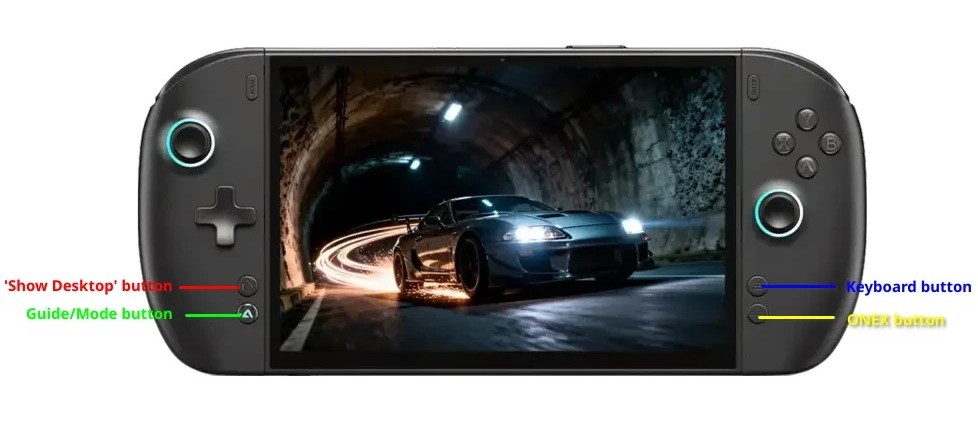
These buttons will only give output if you remap them in the OneXPlayer console on Windows:
M1/M2 BACK BUTTONS
Set up as a Secondary function button in Windows, these buttons won't give any output in evtest on Linux. But I still would like to use them. Is this possible? Can this device be mapped to Xbox Elite? Or is it impossible?
SHOW DESKTOP BUTTON
This button will give no output in any of the devices on evtest Linux, since I also have this button mapped as a secondary function button in Windows.
/dev/input/event11: Microsoft X-Box 360 pad:
ILLUMINATED TRIANGLE BUTTON
This button is the default Guide/Mode/Steam button.
Event: time 1788510010.870088, type 1 (EV_KEY), code 316 (BTN_MODE), value 1
Event: time 1788510010.870088, -------------- SYN_REPORT ------------
Event: time 1788510011.197482, type 1 (EV_KEY), code 316 (BTN_MODE), value 0
Event: time 1788510011.197482, -------------- SYN_REPORT ------------
/dev/input/event5: HID 1a86:fe00
KEYBOARD BUTTON
The Keyboard button is mapped to CTRL + WIN + O. In Windows this will pop up the On Screen Keyboard, when OneXPlayer Console is not installed, and when it IS installed, it pops up the OneXPlayer Keyboard. Maybe it can be remapped to open the Steam Keyboard.
Event: time 1788510353.111291, type 4 (EV_MSC), code 4 (MSC_SCAN), value 700e0
Event: time 1788510353.111291, type 1 (EV_KEY), code 29 (KEY_LEFTCTRL), value 1
Event: time 1788510353.111291, -------------- SYN_REPORT ------------
Event: time 1788510353.122099, type 4 (EV_MSC), code 4 (MSC_SCAN), value 700e3
Event: time 1788510353.122099, type 1 (EV_KEY), code 125 (KEY_LEFTMETA), value 1
Event: time 1788510353.122099, -------------- SYN_REPORT ------------
Event: time 1788510353.132107, type 4 (EV_MSC), code 4 (MSC_SCAN), value 70012
Event: time 1788510353.132107, type 1 (EV_KEY), code 24 (KEY_O), value 1
Event: time 1788510353.132107, -------------- SYN_REPORT ------------
Event: time 1788510353.143022, type 4 (EV_MSC), code 4 (MSC_SCAN), value 70012
Event: time 1788510353.143022, type 1 (EV_KEY), code 24 (KEY_O), value 0
Event: time 1788510353.143022, -------------- SYN_REPORT ------------
Event: time 1788510353.153127, type 4 (EV_MSC), code 4 (MSC_SCAN), value 700e0
Event: time 1788510353.153127, type 1 (EV_KEY), code 29 (KEY_LEFTCTRL), value 0
Event: time 1788510353.153127, type 4 (EV_MSC), code 4 (MSC_SCAN), value 700e3
Event: time 1788510353.153127, type 1 (EV_KEY), code 125 (KEY_LEFTMETA), value 0
Event: time 1788510353.153127, -------------- SYN_REPORT ------------
ONEX BUTTON
In Windows, this button pops up the OneXPlayer Console. Maybe it can be remapped to the Steam Quick Actions menu.
Event: time 1788512456.074133, type 17 (EV_LED), code 0 (LED_NUML), value 0
Event: time 1788512456.074133, type 4 (EV_MSC), code 4 (MSC_SCAN), value 700e0
Event: time 1788512456.074133, type 1 (EV_KEY), code 29 (KEY_LEFTCTRL), value 1
Event: time 1788512456.074133, -------------- SYN_REPORT ------------
Event: time 1788512456.084916, type 4 (EV_MSC), code 4 (MSC_SCAN), value 700e3
Event: time 1788512456.084916, type 1 (EV_KEY), code 125 (KEY_LEFTMETA), value 1
Event: time 1788512456.084916, -------------- SYN_REPORT ------------
Event: time 1788512456.095075, type 4 (EV_MSC), code 4 (MSC_SCAN), value 700e2
Event: time 1788512456.095075, type 1 (EV_KEY), code 56 (KEY_LEFTALT), value 1
Event: time 1788512456.095075, -------------- SYN_REPORT ------------
Event: time 1788512456.249208, type 4 (EV_MSC), code 4 (MSC_SCAN), value 700e2
Event: time 1788512456.249208, type 1 (EV_KEY), code 56 (KEY_LEFTALT), value 0
Event: time 1788512456.249208, -------------- SYN_REPORT ------------
Event: time 1788512456.258918, type 4 (EV_MSC), code 4 (MSC_SCAN), value 700e0
Event: time 1788512456.258918, type 1 (EV_KEY), code 29 (KEY_LEFTCTRL), value 0
Event: time 1788512456.258918, type 4 (EV_MSC), code 4 (MSC_SCAN), value 700e3
Event: time 1788512456.258918, type 1 (EV_KEY), code 125 (KEY_LEFTMETA), value 0
Event: time 1788512456.258918, -------------- SYN_REPORT ------------
I have a brand new OneXPlayer 3 here. Extra buttons don't work. I was wondering what Inputplumber could do to improve the experience. If you need more information, or you'd like me to test some things, please let me know!
HDR and Brightness control in Gamescope don´t work either, but I will contact the Gamescope dev's for that.
udevadm info -a /sys/class/dmi/id
Udevadm info starts with the device specified by the devpath and then
walks up the chain of parent devices. It prints for every device
found, all possible attributes in the udev rules key format.
A rule to match, can be composed by the attributes of the device
and the attributes from one single parent device.
looking at device '/devices/virtual/dmi/id':
KERNEL=="id"
SUBSYSTEM=="dmi"
DRIVER==""
ATTR{bios_date}=="08/10/2026"
ATTR{bios_release}=="5.39"
ATTR{bios_vendor}=="American Megatrends International, LLC."
ATTR{bios_version}=="5.09"
ATTR{board_asset_tag}=="Default string"
ATTR{board_name}=="ONEXPLAYER 3"
ATTR{board_serial}=="(not readable)"
ATTR{board_vendor}=="ONE-NETBOOK"
ATTR{board_version}=="1002-B"
ATTR{chassis_asset_tag}=="Default string"
ATTR{chassis_serial}=="(not readable)"
ATTR{chassis_type}=="3"
ATTR{chassis_vendor}=="Default string"
ATTR{chassis_version}=="Default string"
ATTR{ec_firmware_release}=="0.13"
ATTR{power/control}=="auto"
ATTR{power/runtime_active_time}=="0"
ATTR{power/runtime_status}=="unsupported"
ATTR{power/runtime_suspended_time}=="0"
ATTR{product_family}=="Default string"
ATTR{product_name}=="ONEXPLAYER 3"
ATTR{product_serial}=="(not readable)"
ATTR{product_sku}=="Default string"
ATTR{product_uuid}=="(not readable)"
ATTR{product_version}=="Default string"
ATTR{sys_vendor}=="ONE-NETBOOK"
cat /proc/bus/input/devices
I: Bus=0019 Vendor=0000 Product=0005 Version=0000
N: Name="Lid Switch"
P: Phys=PNP0C0D/button/input0
S: Sysfs=/devices/pci0000:00/0000:00:1f.0/PNP0C09:00/PNP0C0D:00/input/input0
U: Uniq=
H: Handlers=event0
B: PROP=0
B: EV=21
B: SW=1
I: Bus=0019 Vendor=0000 Product=0003 Version=0000
N: Name="Sleep Button"
P: Phys=PNP0C0E/button/input0
S: Sysfs=/devices/platform/PNP0C0E:00/input/input1
U: Uniq=
H: Handlers=kbd event1
B: PROP=0
B: EV=3
B: KEY=4000 0 0
I: Bus=0019 Vendor=0000 Product=0001 Version=0000
N: Name="Power Button"
P: Phys=PNP0C0C/button/input0
S: Sysfs=/devices/platform/PNP0C0C:00/input/input2
U: Uniq=
H: Handlers=kbd event2
B: PROP=0
B: EV=3
B: KEY=8000 10000000000000 0
I: Bus=0019 Vendor=0000 Product=0001 Version=0000
N: Name="Power Button"
P: Phys=LNXPWRBN/button/input0
S: Sysfs=/devices/platform/LNXPWRBN:00/input/input3
U: Uniq=
H: Handlers=kbd event3
B: PROP=0
B: EV=3
B: KEY=8000 10000000000000 0
I: Bus=0011 Vendor=0001 Product=0001 Version=ab83
N: Name="AT Translated Set 2 keyboard"
P: Phys=isa0060/serio0/input0
S: Sysfs=/devices/platform/i8042/serio0/input/input4
U: Uniq=
H: Handlers=sysrq kbd leds event4
B: PROP=0
B: EV=120013
B: KEY=402000007 ff803078f800d001 feffffdfffcfffff fffffffffffffffe
B: MSC=10
B: LED=7
I: Bus=0003 Vendor=1a86 Product=fe00 Version=0111
N: Name="HID 1a86:fe00"
P: Phys=usb-0000:00:14.0-5/input0
S: Sysfs=/devices/pci0000:00/0000:00:14.0/usb3/3-5/3-5:1.0/0003:1A86:FE00.0001/input/input5
U: Uniq=0123456789
H: Handlers=sysrq kbd leds event5
B: PROP=0
B: EV=120013
B: KEY=1000000000007 ff800000000007ff febeffdfffefffff fffffffffffffffe
B: MSC=10
B: LED=1f
I: Bus=0003 Vendor=1a86 Product=fe00 Version=0111
N: Name="HID 1a86:fe00 Mouse"
P: Phys=usb-0000:00:14.0-5/input1
S: Sysfs=/devices/pci0000:00/0000:00:14.0/usb3/3-5/3-5:1.1/0003:1A86:FE00.0002/input/input6
U: Uniq=0123456789
H: Handlers=event6 mouse0
B: PROP=0
B: EV=17
B: KEY=ffff0000 0 0 0 0
B: REL=1943
B: MSC=10
I: Bus=0003 Vendor=1a86 Product=fe00 Version=0111
N: Name="HID 1a86:fe00 Consumer Control"
P: Phys=usb-0000:00:14.0-5/input1
S: Sysfs=/devices/pci0000:00/0000:00:14.0/usb3/3-5/3-5:1.1/0003:1A86:FE00.0002/input/input7
U: Uniq=0123456789
H: Handlers=kbd event7
B: PROP=0
B: EV=1f
B: KEY=733eff 0 0 483ffff17aff32d bfd4444600000000 1 130ff38b17c000 677bfad9415fed 9ed68000004400 10000002
B: REL=1040
B: ABS=100000000
B: MSC=10
I: Bus=0003 Vendor=1a86 Product=fe00 Version=0111
N: Name="HID 1a86:fe00 System Control"
P: Phys=usb-0000:00:14.0-5/input1
S: Sysfs=/devices/pci0000:00/0000:00:14.0/usb3/3-5/3-5:1.1/0003:1A86:FE00.0002/input/input8
U: Uniq=0123456789
H: Handlers=kbd event8
B: PROP=0
B: EV=13
B: KEY=c000 10000000000000 0
B: MSC=10
I: Bus=0019 Vendor=0000 Product=0006 Version=0000
N: Name="Video Bus"
P: Phys=LNXVIDEO/video/input0
S: Sysfs=/devices/pci0000:00/acpi.video_bus.0/input/input10
U: Uniq=
H: Handlers=kbd event9
B: PROP=0
B: EV=3
B: KEY=3e000b00000000 0 0 0
I: Bus=0010 Vendor=001f Product=0001 Version=0100
N: Name="PC Speaker"
P: Phys=isa0061/input0
S: Sysfs=/devices/platform/pcspkr/input/input11
U: Uniq=
H: Handlers=kbd event10
B: PROP=0
B: EV=40001
B: SND=6
I: Bus=0003 Vendor=045e Product=028e Version=0503
N: Name="Microsoft X-Box 360 pad"
P: Phys=usb-0000:00:14.0-7/input0
S: Sysfs=/devices/pci0000:00/0000:00:14.0/usb3/3-7/3-7:1.0/input/input14
U: Uniq=
H: Handlers=event11 js0
B: PROP=0
B: EV=20000b
B: KEY=7cdb000000000000 0 0 0 0
B: ABS=3003f
B: FF=107030000 0
I: Bus=0018 Vendor=27c6 Product=0133 Version=0100
N: Name="GXTP6933:00 27C6:0133"
P: Phys=i2c-GXTP6933:00
S: Sysfs=/devices/pci0000:00/0000:00:15.0/i2c_designware.0/i2c-0/i2c-GXTP6933:00/0018:27C6:0133.0004/input/input15
U: Uniq=
H: Handlers=event12 mouse1
B: PROP=2
B: EV=1b
B: KEY=400 0 0 0 0 0
B: ABS=260800000000003
B: MSC=20
I: Bus=0018 Vendor=27c6 Product=0133 Version=0100
N: Name="GXTP6933:00 27C6:0133 UNKNOWN"
P: Phys=i2c-GXTP6933:00
S: Sysfs=/devices/pci0000:00/0000:00:15.0/i2c_designware.0/i2c-0/i2c-GXTP6933:00/0018:27C6:0133.0004/input/input16
U: Uniq=
H: Handlers=event13
B: PROP=0
B: EV=9
B: ABS=10000000000
I: Bus=0000 Vendor=0000 Product=0000 Version=0000
N: Name="sof-hda-dsp Mic"
P: Phys=ALSA
S: Sysfs=/devices/pci0000:00/0000:00:1f.3/skl_hda_dsp_generic/sound/card0/input17
U: Uniq=
H: Handlers=event14
B: PROP=0
B: EV=21
B: SW=10
I: Bus=0000 Vendor=0000 Product=0000 Version=0000
N: Name="sof-hda-dsp Headphone"
P: Phys=ALSA
S: Sysfs=/devices/pci0000:00/0000:00:1f.3/skl_hda_dsp_generic/sound/card0/input18
U: Uniq=
H: Handlers=event15
B: PROP=0
B: EV=21
B: SW=4
I: Bus=0000 Vendor=0000 Product=0000 Version=0000
N: Name="sof-hda-dsp HDMI/DP,pcm=3"
P: Phys=ALSA
S: Sysfs=/devices/pci0000:00/0000:00:1f.3/skl_hda_dsp_generic/sound/card0/input19
U: Uniq=
H: Handlers=event16
B: PROP=0
B: EV=21
B: SW=140
I: Bus=0000 Vendor=0000 Product=0000 Version=0000
N: Name="sof-hda-dsp HDMI/DP,pcm=4"
P: Phys=ALSA
S: Sysfs=/devices/pci0000:00/0000:00:1f.3/skl_hda_dsp_generic/sound/card0/input20
U: Uniq=
H: Handlers=event17
B: PROP=0
B: EV=21
B: SW=140
I: Bus=0000 Vendor=0000 Product=0000 Version=0000
N: Name="sof-hda-dsp HDMI/DP,pcm=5"
P: Phys=ALSA
S: Sysfs=/devices/pci0000:00/0000:00:1f.3/skl_hda_dsp_generic/sound/card0/input21
U: Uniq=
H: Handlers=event18
B: PROP=0
B: EV=21
B: SW=140
sudo evtest
Available devices:
/dev/input/event0: Lid Switch
/dev/input/event1: Sleep Button
/dev/input/event10: PC Speaker
/dev/input/event11: Microsoft X-Box 360 pad
/dev/input/event12: GXTP6933:00 27C6:0133
/dev/input/event13: GXTP6933:00 27C6:0133 UNKNOWN
/dev/input/event14: sof-hda-dsp Mic
/dev/input/event15: sof-hda-dsp Headphone
/dev/input/event16: sof-hda-dsp HDMI/DP,pcm=3
/dev/input/event17: sof-hda-dsp HDMI/DP,pcm=4
/dev/input/event18: sof-hda-dsp HDMI/DP,pcm=5
/dev/input/event2: Power Button
/dev/input/event3: Power Button
/dev/input/event4: AT Translated Set 2 keyboard
/dev/input/event5: HID 1a86:fe00
/dev/input/event6: HID 1a86:fe00 Mouse
/dev/input/event7: HID 1a86:fe00 Consumer Control
/dev/input/event8: HID 1a86:fe00 System Control
/dev/input/event9: Video Bus
These buttons will only give output if you remap them in the OneXPlayer console on Windows:
M1/M2 BACK BUTTONS
Set up as a Secondary function button in Windows, these buttons won't give any output in evtest on Linux. But I still would like to use them. Is this possible? Can this device be mapped to Xbox Elite? Or is it impossible?
SHOW DESKTOP BUTTON
This button will give no output in any of the devices on evtest Linux, since I also have this button mapped as a secondary function button in Windows.
/dev/input/event11: Microsoft X-Box 360 pad:
ILLUMINATED TRIANGLE BUTTON
This button is the default Guide/Mode/Steam button.
Event: time 1788510010.870088, type 1 (EV_KEY), code 316 (BTN_MODE), value 1
Event: time 1788510010.870088, -------------- SYN_REPORT ------------
Event: time 1788510011.197482, type 1 (EV_KEY), code 316 (BTN_MODE), value 0
Event: time 1788510011.197482, -------------- SYN_REPORT ------------
/dev/input/event5: HID 1a86:fe00
KEYBOARD BUTTON
The Keyboard button is mapped to CTRL + WIN + O. In Windows this will pop up the On Screen Keyboard, when OneXPlayer Console is not installed, and when it IS installed, it pops up the OneXPlayer Keyboard. Maybe it can be remapped to open the Steam Keyboard.
Event: time 1788510353.111291, type 4 (EV_MSC), code 4 (MSC_SCAN), value 700e0
Event: time 1788510353.111291, type 1 (EV_KEY), code 29 (KEY_LEFTCTRL), value 1
Event: time 1788510353.111291, -------------- SYN_REPORT ------------
Event: time 1788510353.122099, type 4 (EV_MSC), code 4 (MSC_SCAN), value 700e3
Event: time 1788510353.122099, type 1 (EV_KEY), code 125 (KEY_LEFTMETA), value 1
Event: time 1788510353.122099, -------------- SYN_REPORT ------------
Event: time 1788510353.132107, type 4 (EV_MSC), code 4 (MSC_SCAN), value 70012
Event: time 1788510353.132107, type 1 (EV_KEY), code 24 (KEY_O), value 1
Event: time 1788510353.132107, -------------- SYN_REPORT ------------
Event: time 1788510353.143022, type 4 (EV_MSC), code 4 (MSC_SCAN), value 70012
Event: time 1788510353.143022, type 1 (EV_KEY), code 24 (KEY_O), value 0
Event: time 1788510353.143022, -------------- SYN_REPORT ------------
Event: time 1788510353.153127, type 4 (EV_MSC), code 4 (MSC_SCAN), value 700e0
Event: time 1788510353.153127, type 1 (EV_KEY), code 29 (KEY_LEFTCTRL), value 0
Event: time 1788510353.153127, type 4 (EV_MSC), code 4 (MSC_SCAN), value 700e3
Event: time 1788510353.153127, type 1 (EV_KEY), code 125 (KEY_LEFTMETA), value 0
Event: time 1788510353.153127, -------------- SYN_REPORT ------------
ONEX BUTTON
In Windows, this button pops up the OneXPlayer Console. Maybe it can be remapped to the Steam Quick Actions menu.
Event: time 1788512456.074133, type 17 (EV_LED), code 0 (LED_NUML), value 0
Event: time 1788512456.074133, type 4 (EV_MSC), code 4 (MSC_SCAN), value 700e0
Event: time 1788512456.074133, type 1 (EV_KEY), code 29 (KEY_LEFTCTRL), value 1
Event: time 1788512456.074133, -------------- SYN_REPORT ------------
Event: time 1788512456.084916, type 4 (EV_MSC), code 4 (MSC_SCAN), value 700e3
Event: time 1788512456.084916, type 1 (EV_KEY), code 125 (KEY_LEFTMETA), value 1
Event: time 1788512456.084916, -------------- SYN_REPORT ------------
Event: time 1788512456.095075, type 4 (EV_MSC), code 4 (MSC_SCAN), value 700e2
Event: time 1788512456.095075, type 1 (EV_KEY), code 56 (KEY_LEFTALT), value 1
Event: time 1788512456.095075, -------------- SYN_REPORT ------------
Event: time 1788512456.249208, type 4 (EV_MSC), code 4 (MSC_SCAN), value 700e2
Event: time 1788512456.249208, type 1 (EV_KEY), code 56 (KEY_LEFTALT), value 0
Event: time 1788512456.249208, -------------- SYN_REPORT ------------
Event: time 1788512456.258918, type 4 (EV_MSC), code 4 (MSC_SCAN), value 700e0
Event: time 1788512456.258918, type 1 (EV_KEY), code 29 (KEY_LEFTCTRL), value 0
Event: time 1788512456.258918, type 4 (EV_MSC), code 4 (MSC_SCAN), value 700e3
Event: time 1788512456.258918, type 1 (EV_KEY), code 125 (KEY_LEFTMETA), value 0
Event: time 1788512456.258918, -------------- SYN_REPORT ------------