


Lifetime statistics for your character in World of Warcraft: Forever. Install it once and it keeps counting for as long as you play: steps taken, times jumped, unique NPCs met, dungeon and raid bosses killed, fastest times, longest corpse runs, biggest falls survived, every dodge and parry, and hundreds more. Some of it is useful. A lot of it is gloriously useless.
- Author: Malikor
- Client: WoW: Forever (interface 16001, build 1.60.1)
- License: GPL-3.0-or-later (see
LICENSE) - Tracks: 992 statistics, top lists, fastest times, uniques and firsts, plus a dungeon book for all 35 Forever dungeons and 3 raids (bosses found, full clears, fastest clear, runs under or over level), an Adventurer score, play-session history with CSV export, peak character stats and battleground scoreboards
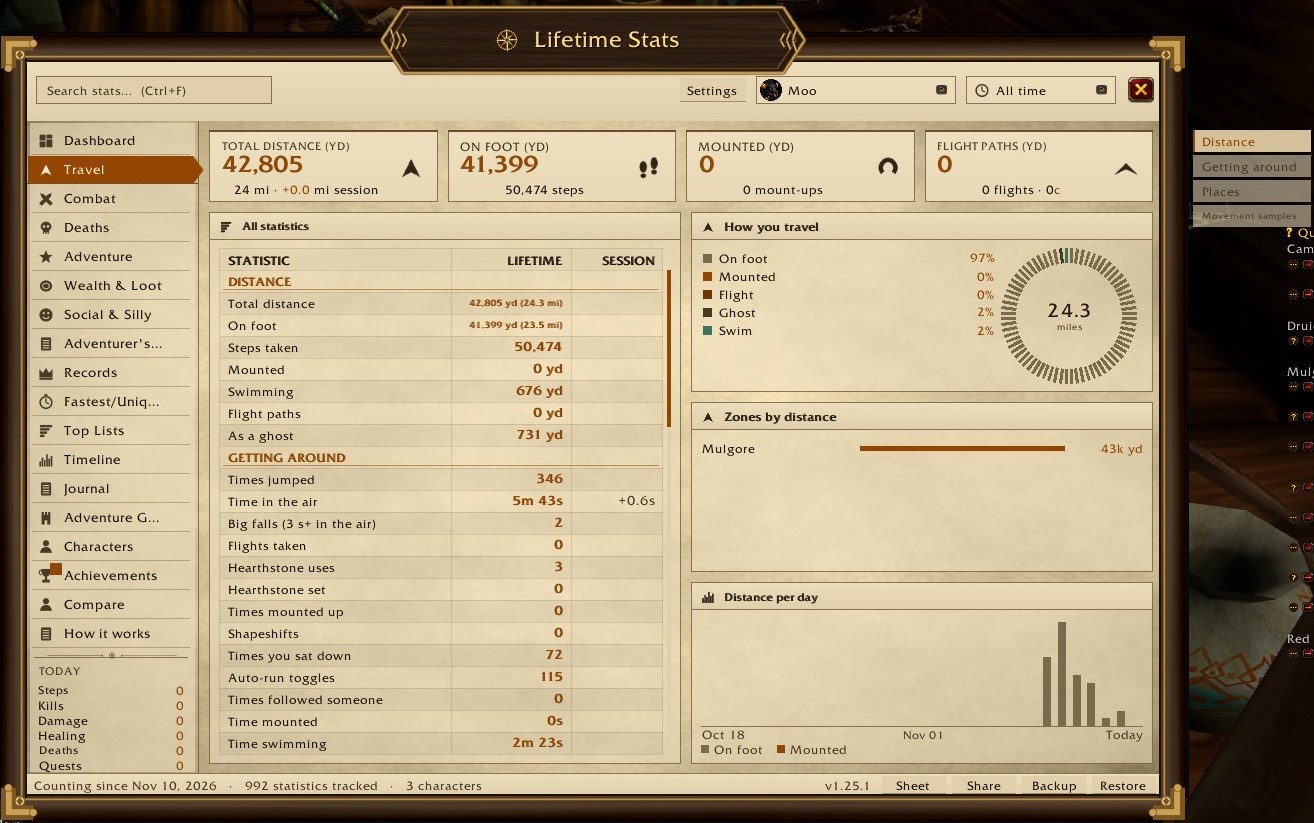 Travel: sections in the table and as tabs on the right |
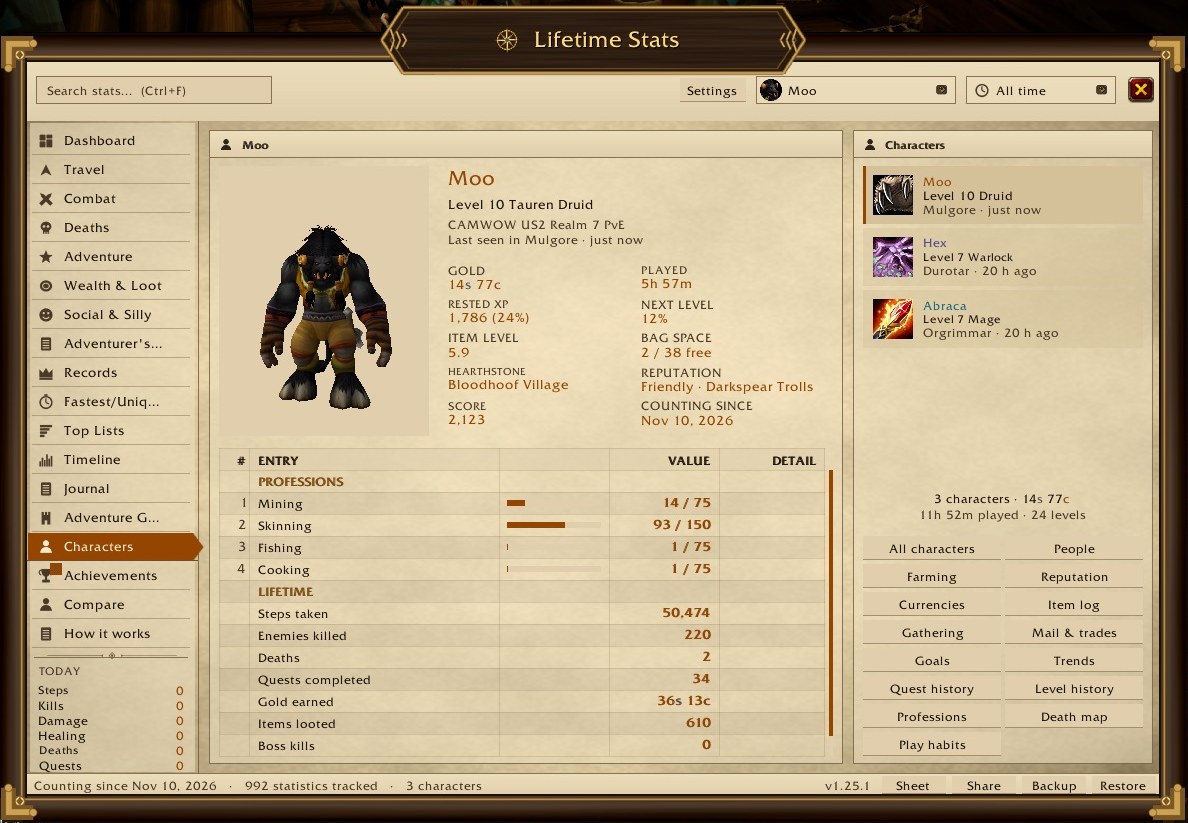 Characters |
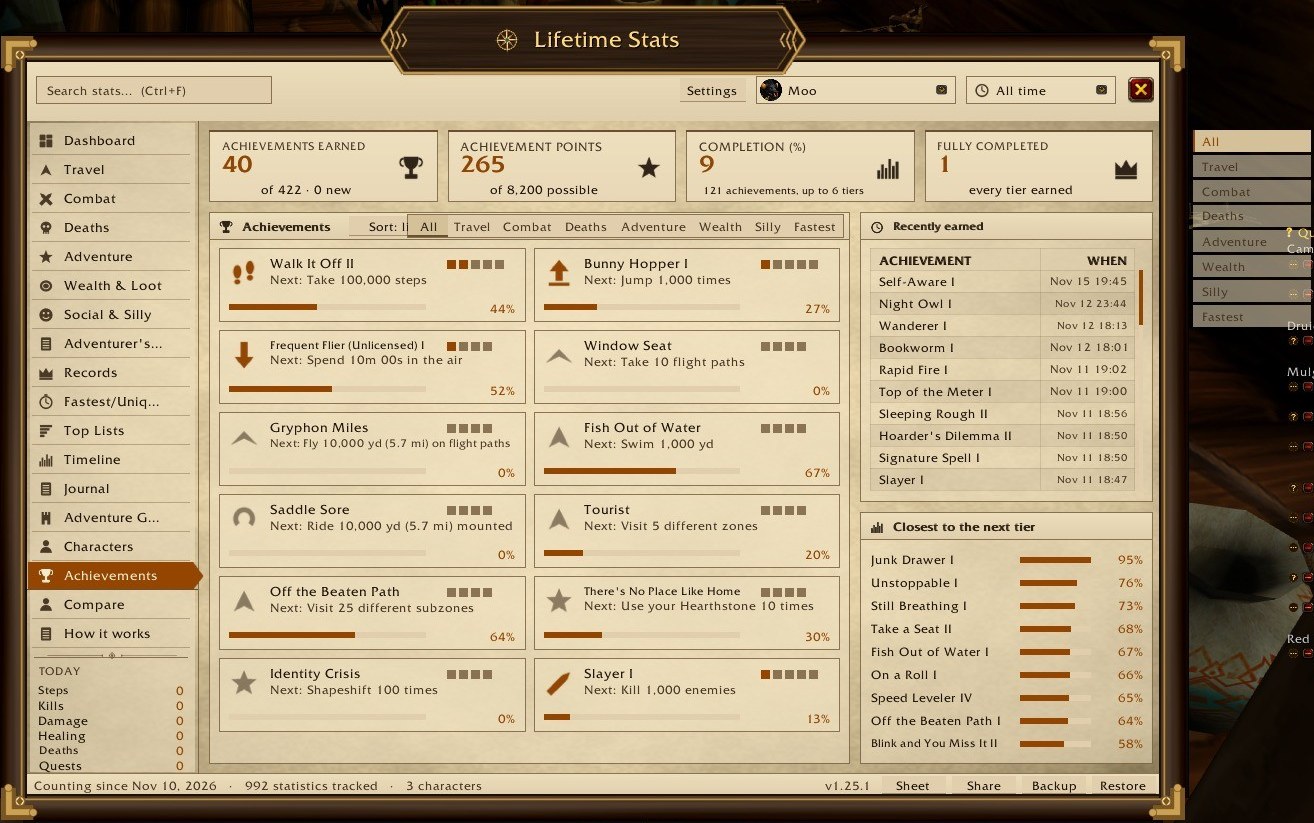 Achievements, with their categories as tabs |
In-game screenshots from 1.25.1, Lifetime Stats skin, Tauren Druid at level 10.
Other skins (1.26.0, in game):
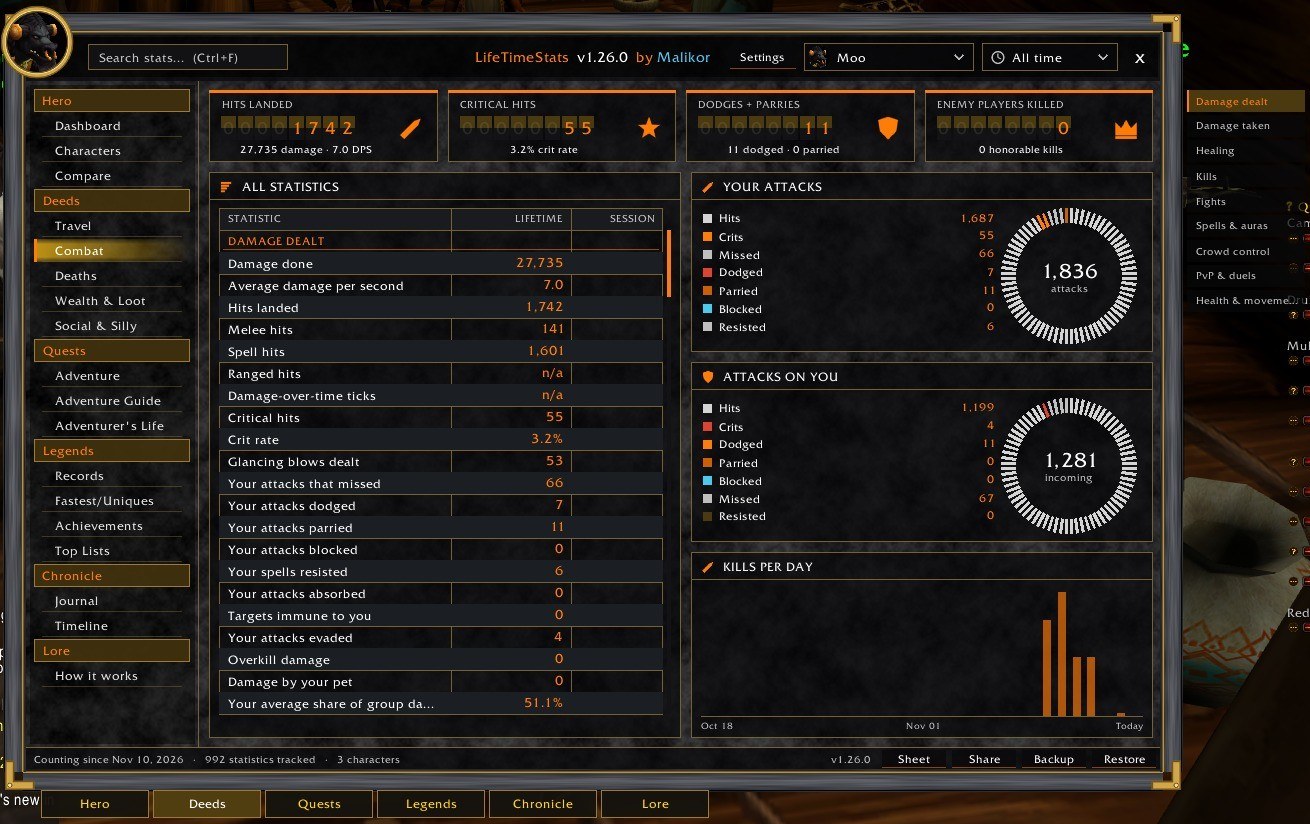 Stone & Gold (Altoholic style): Combat |
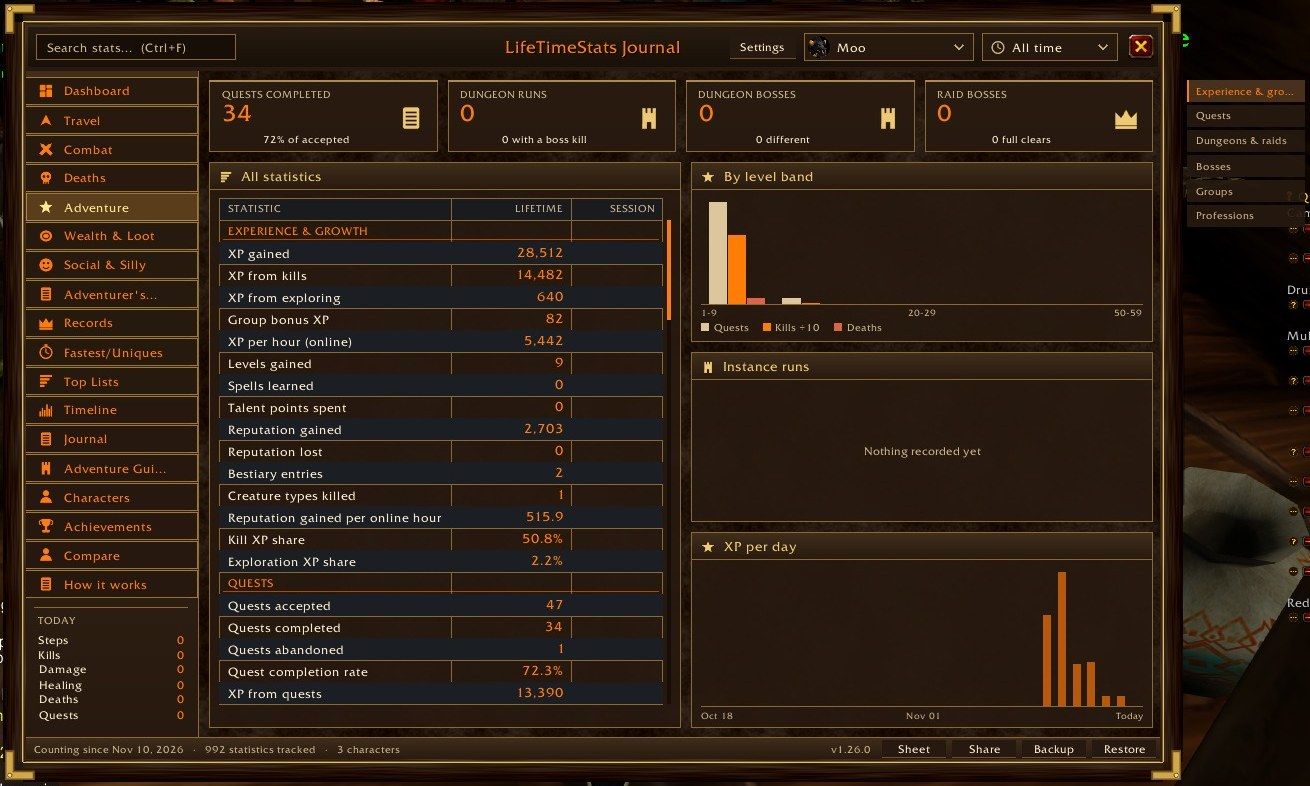 Adventure Journal (Dungeon Journal style): Adventure |
More screenshots (every page, from the earlier dark skin)
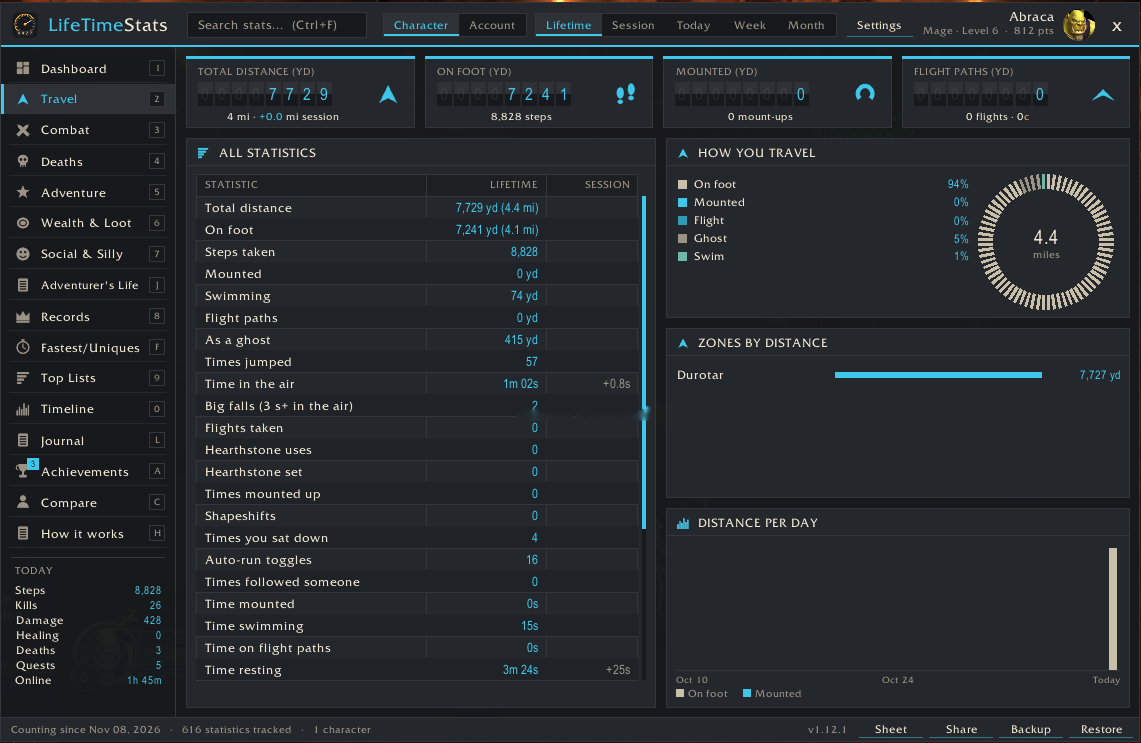 Travel |
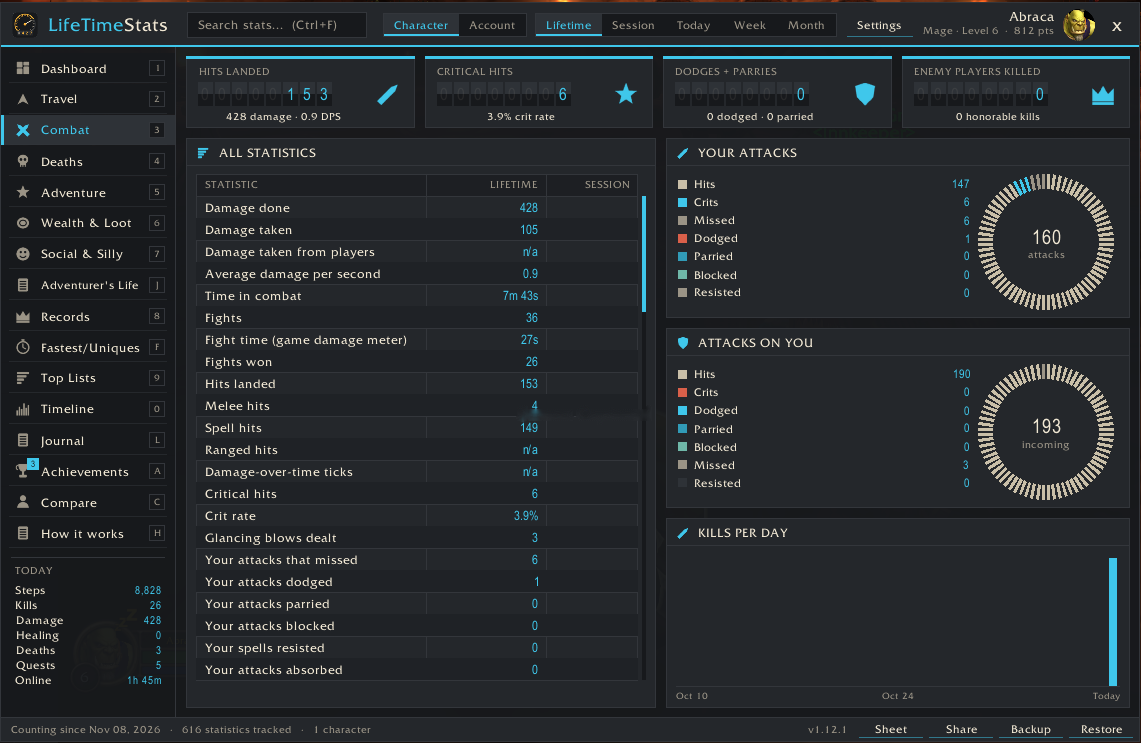 Combat |
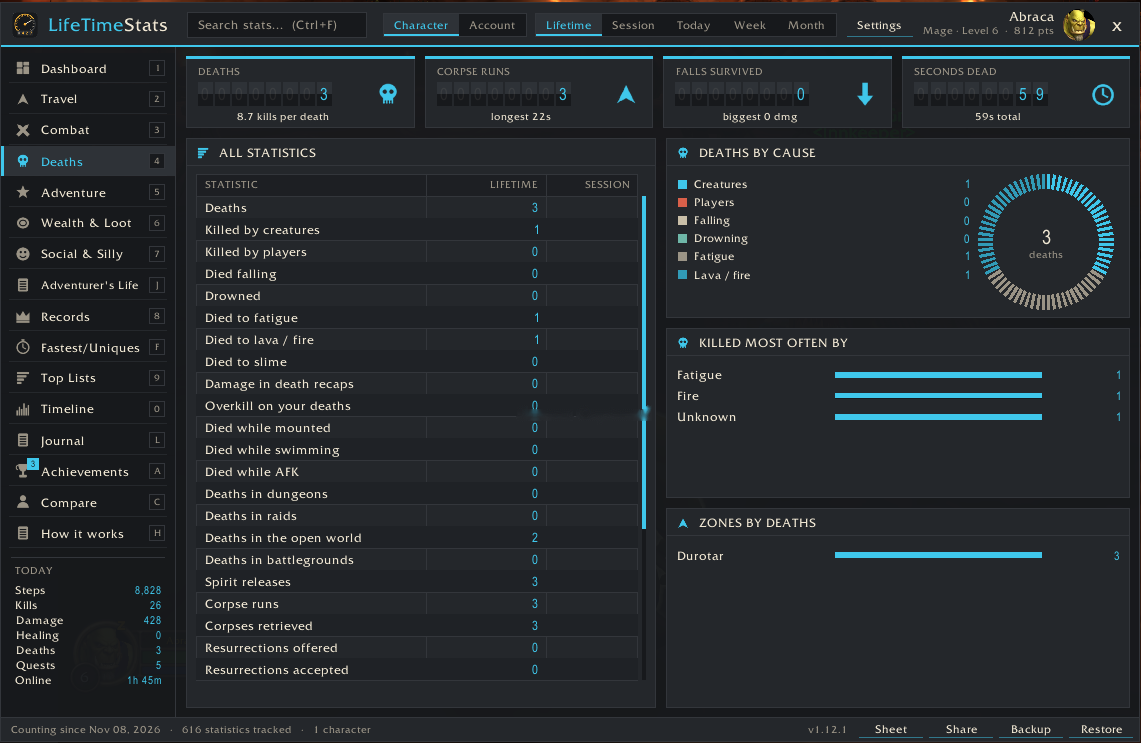 Deaths |
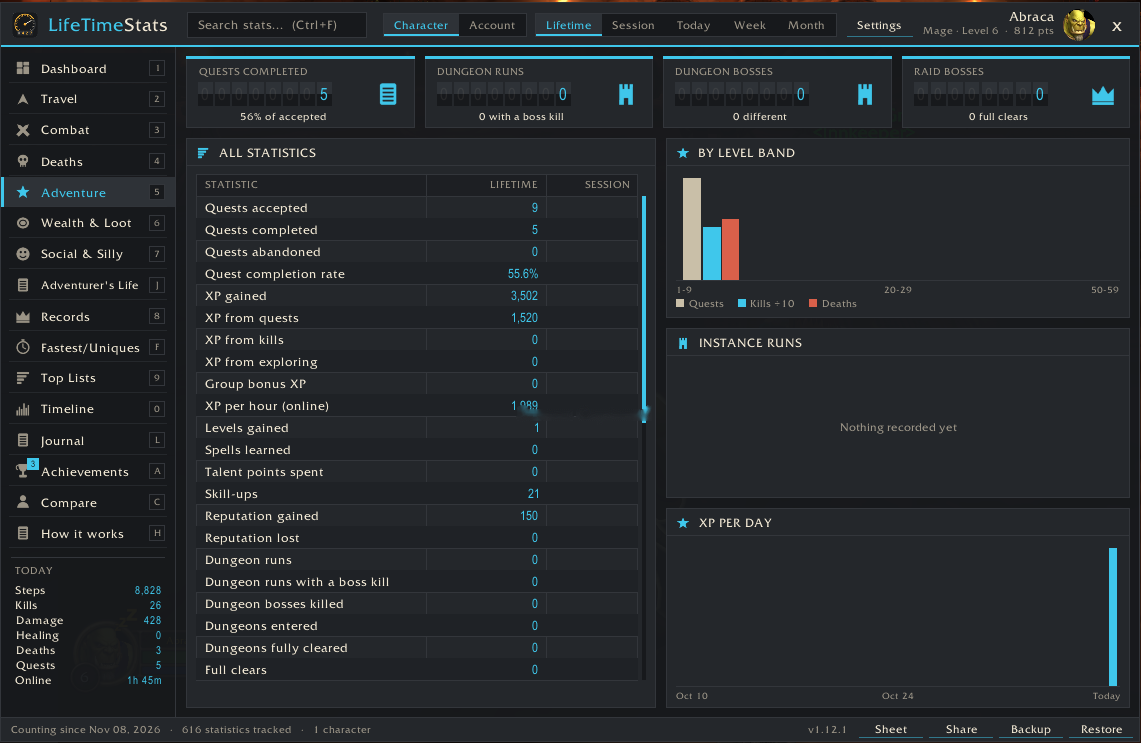 Adventure |
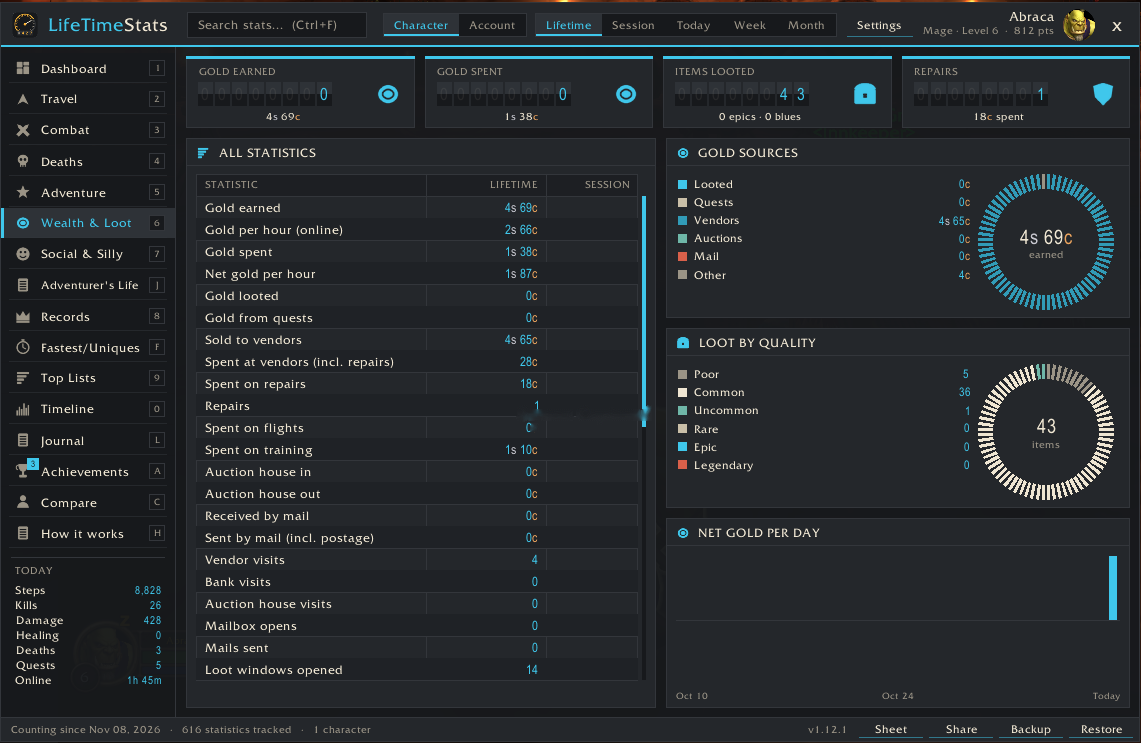 Wealth & Loot |
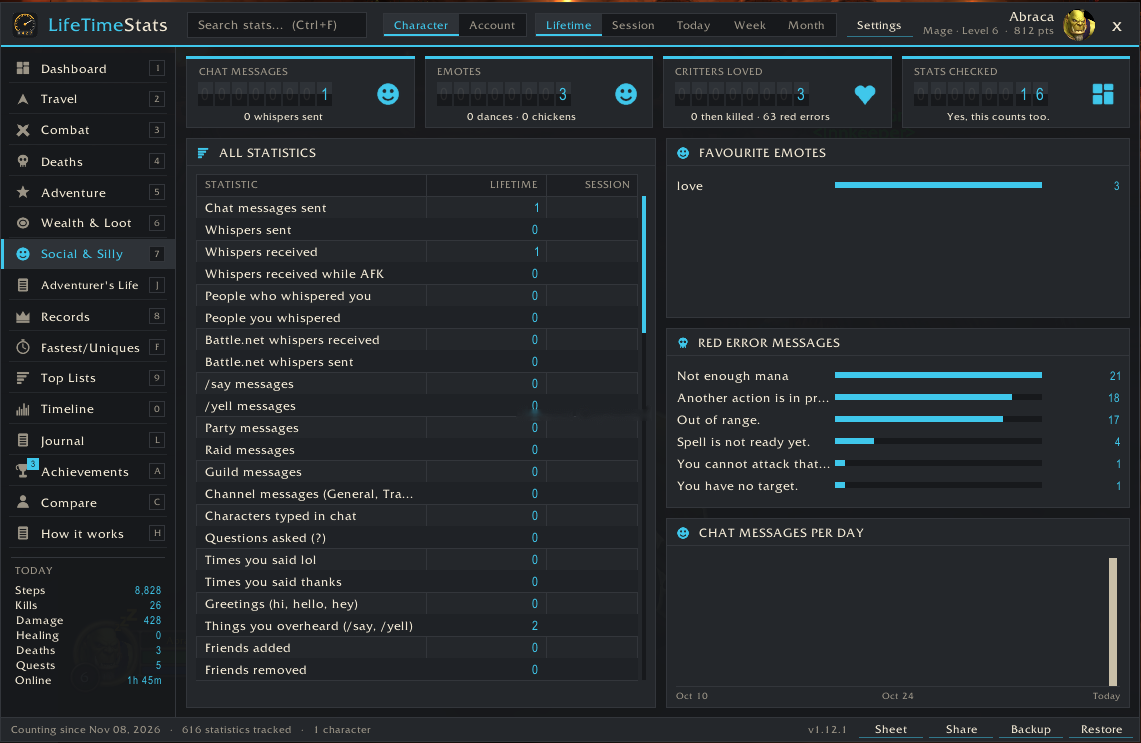 Social & Silly |
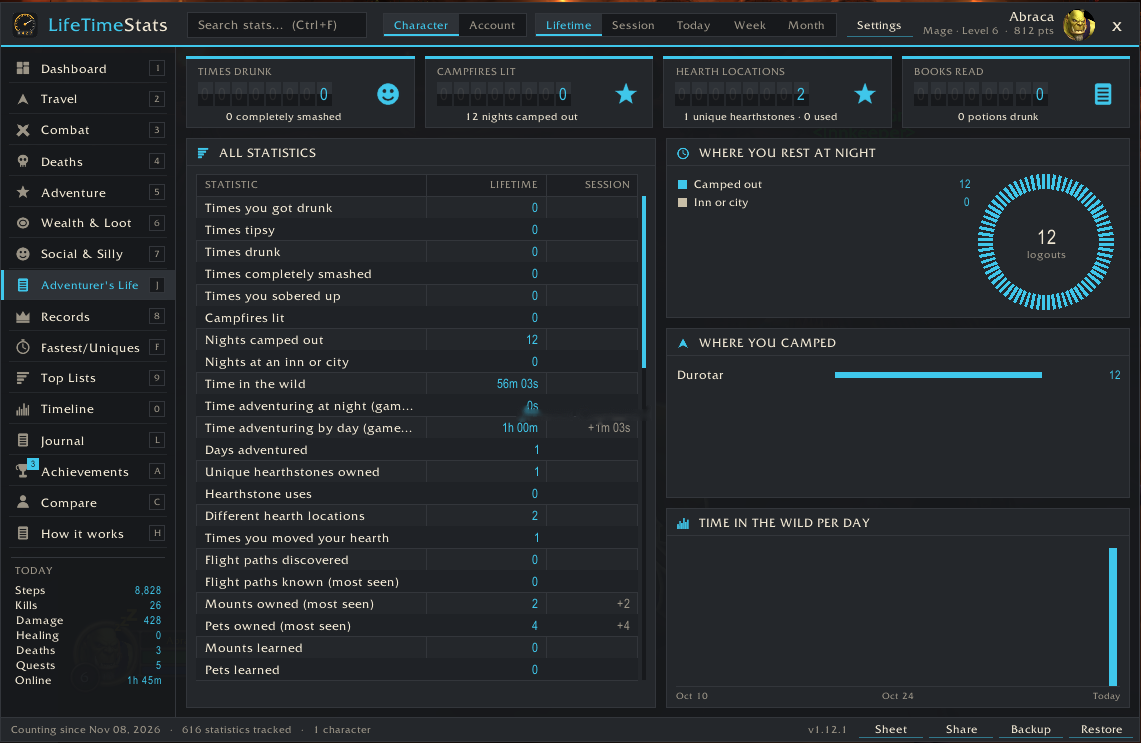 Adventurer's Life |
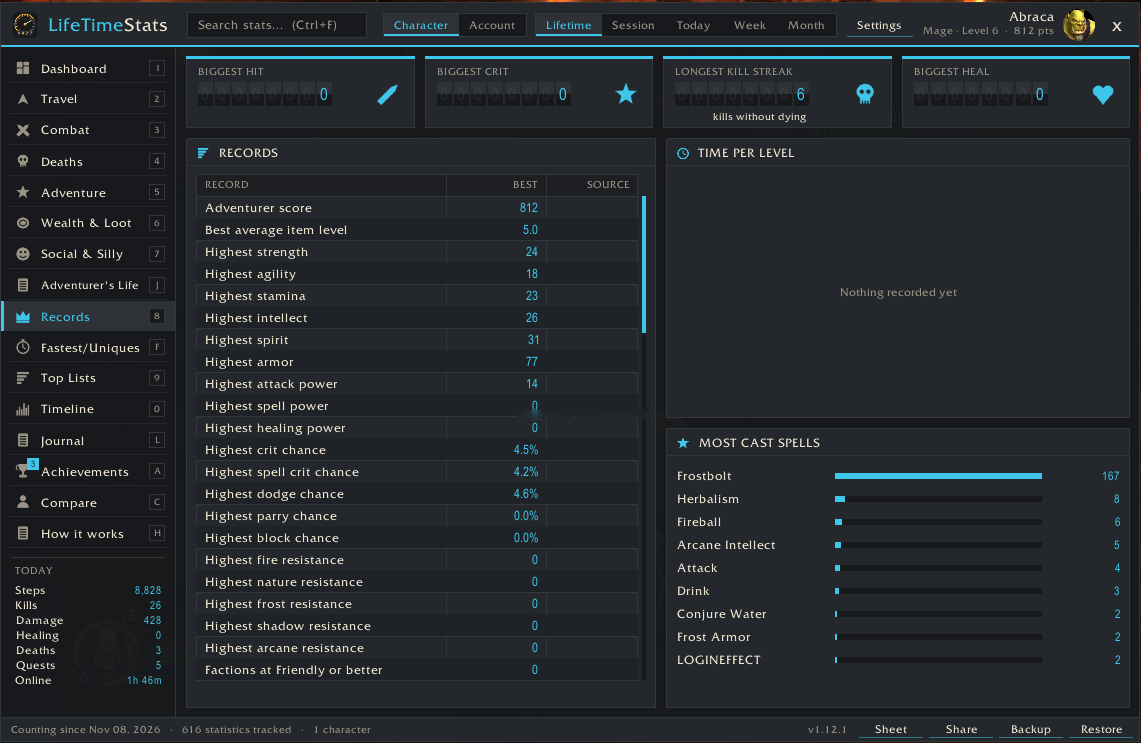 Records |
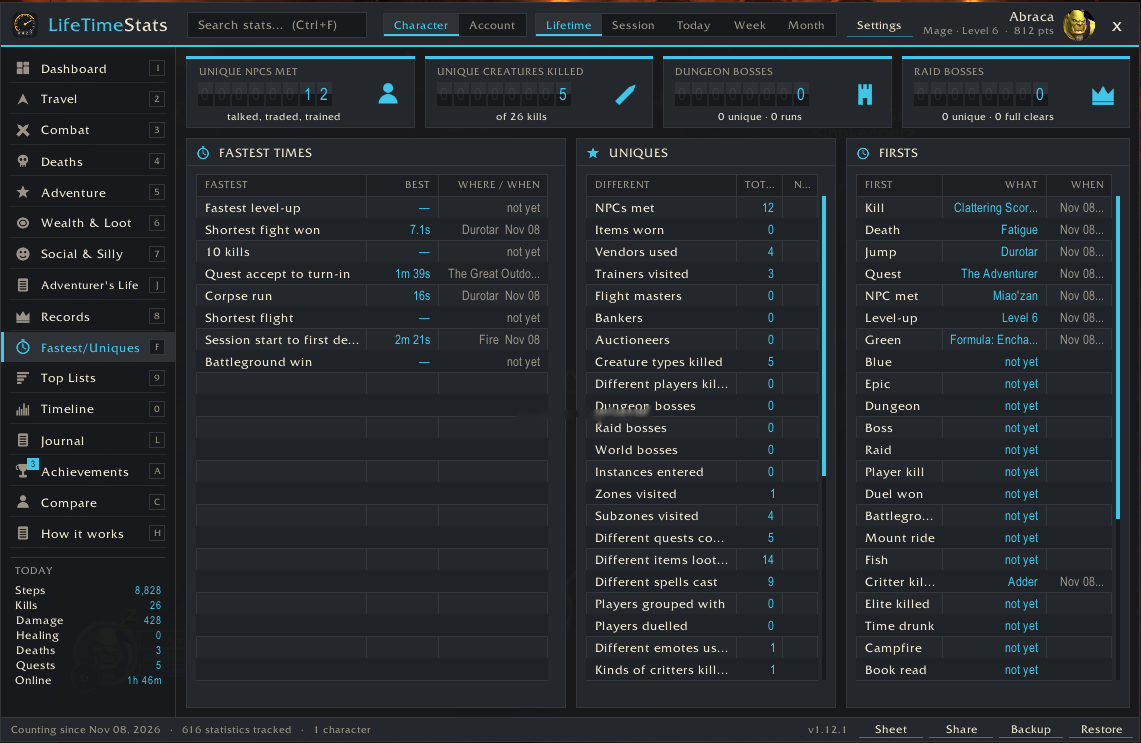 Fastest & Uniques |
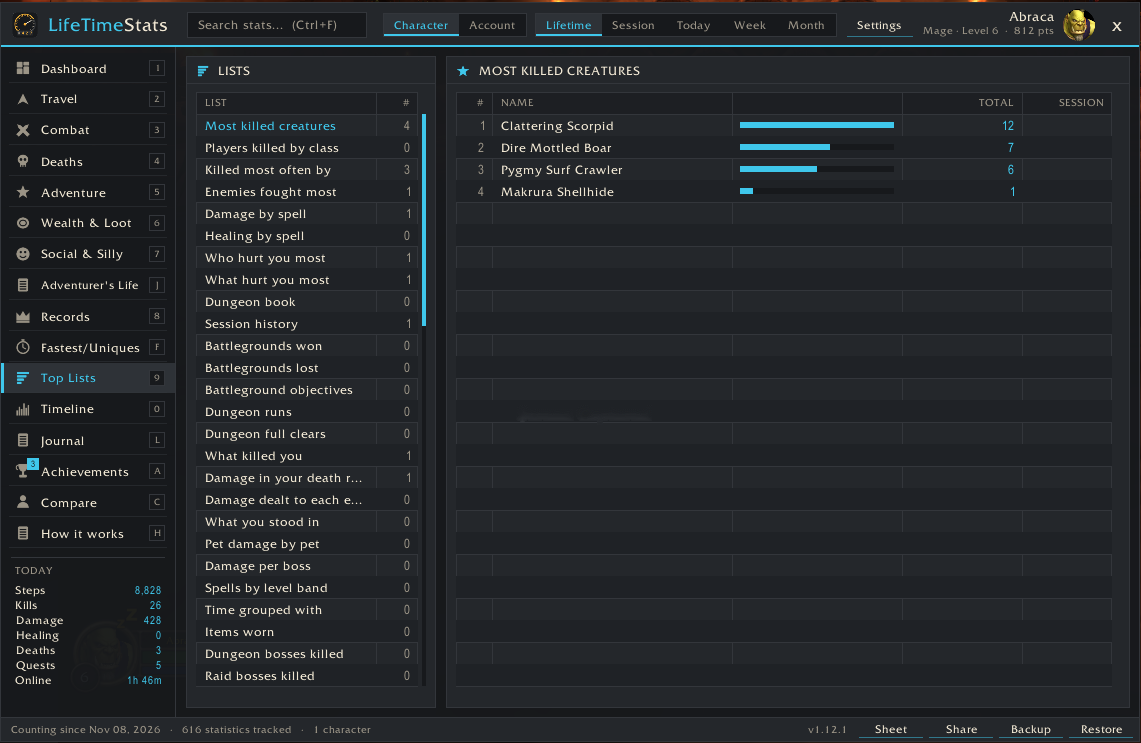 Top Lists |
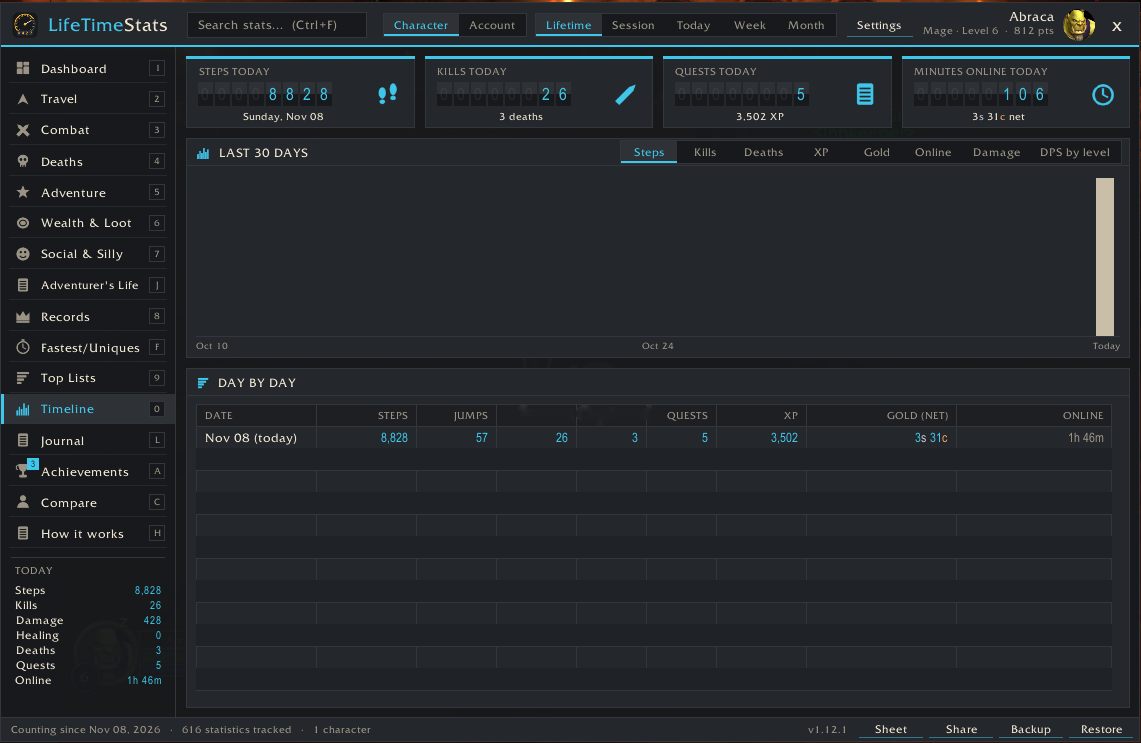 Timeline |
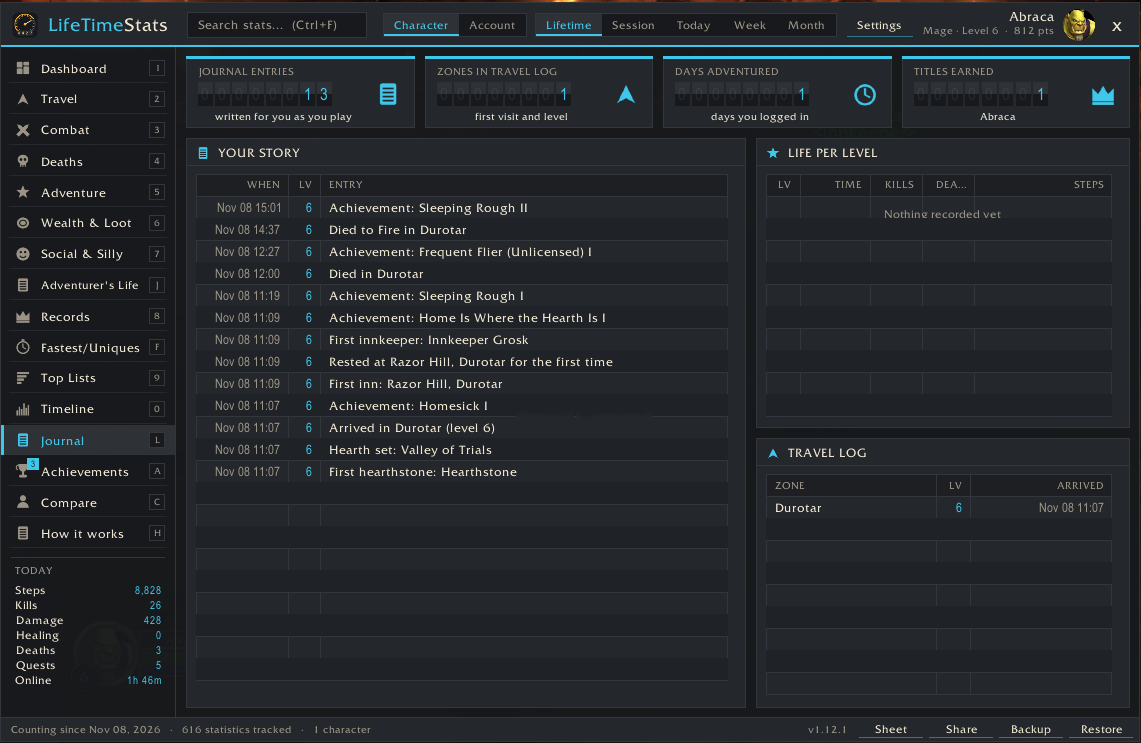 Journal |
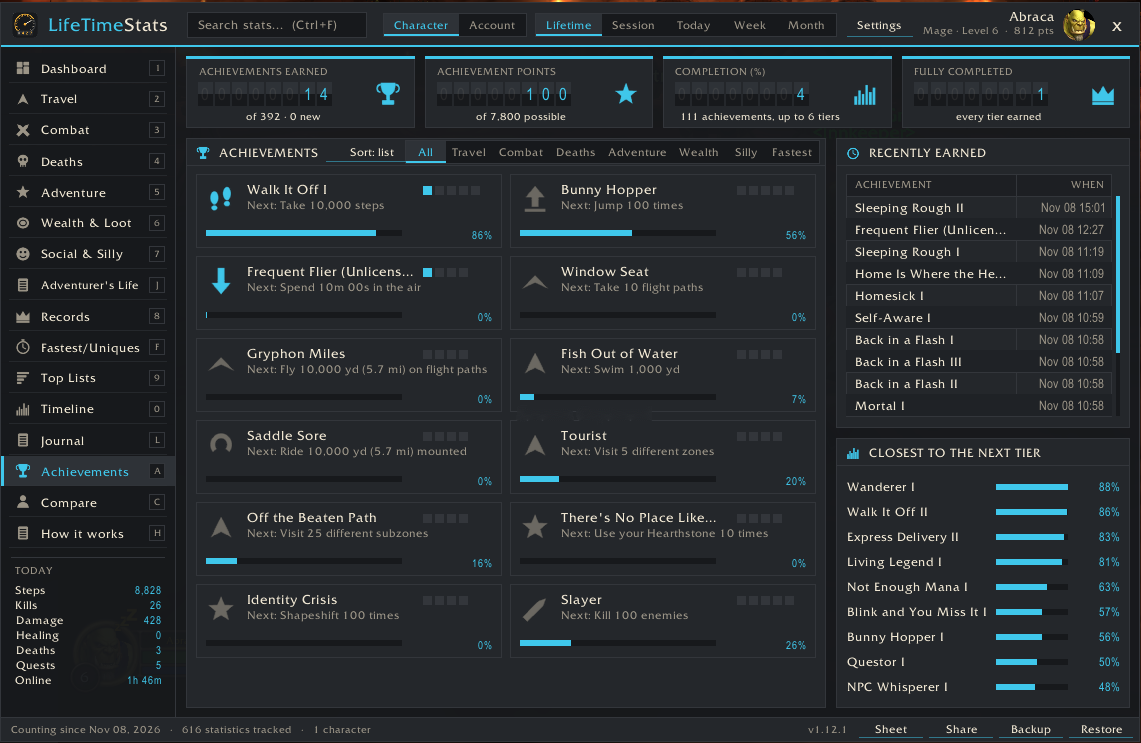 Achievements |
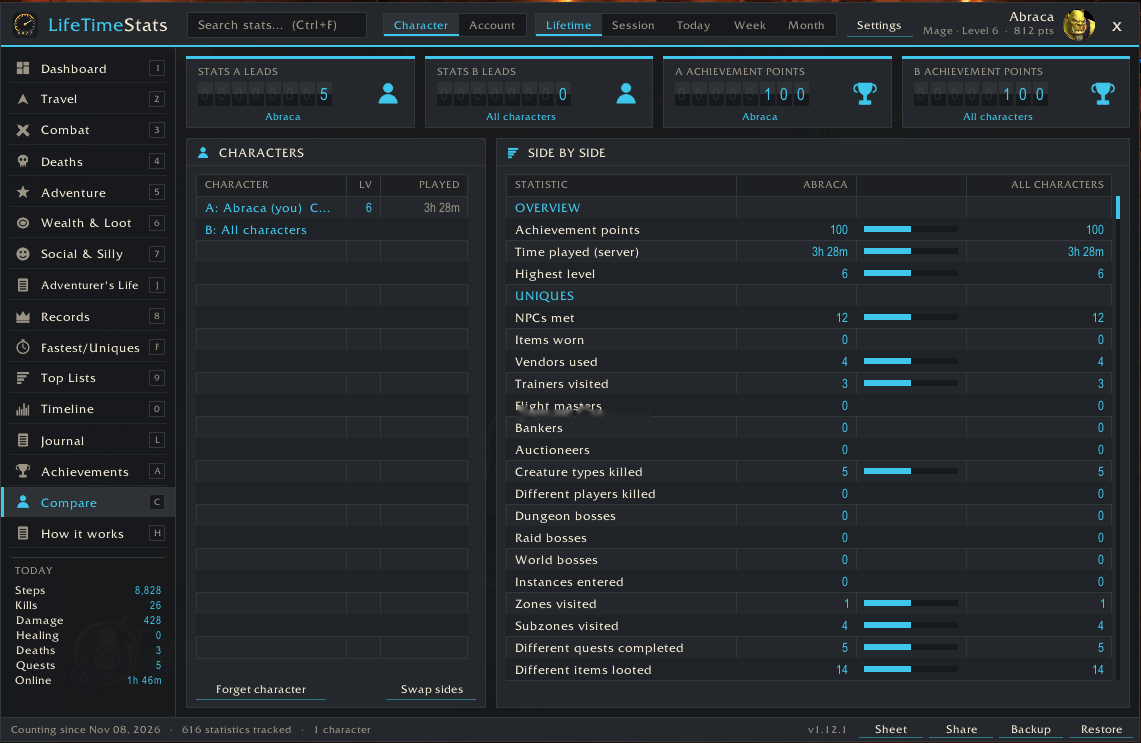 Compare |
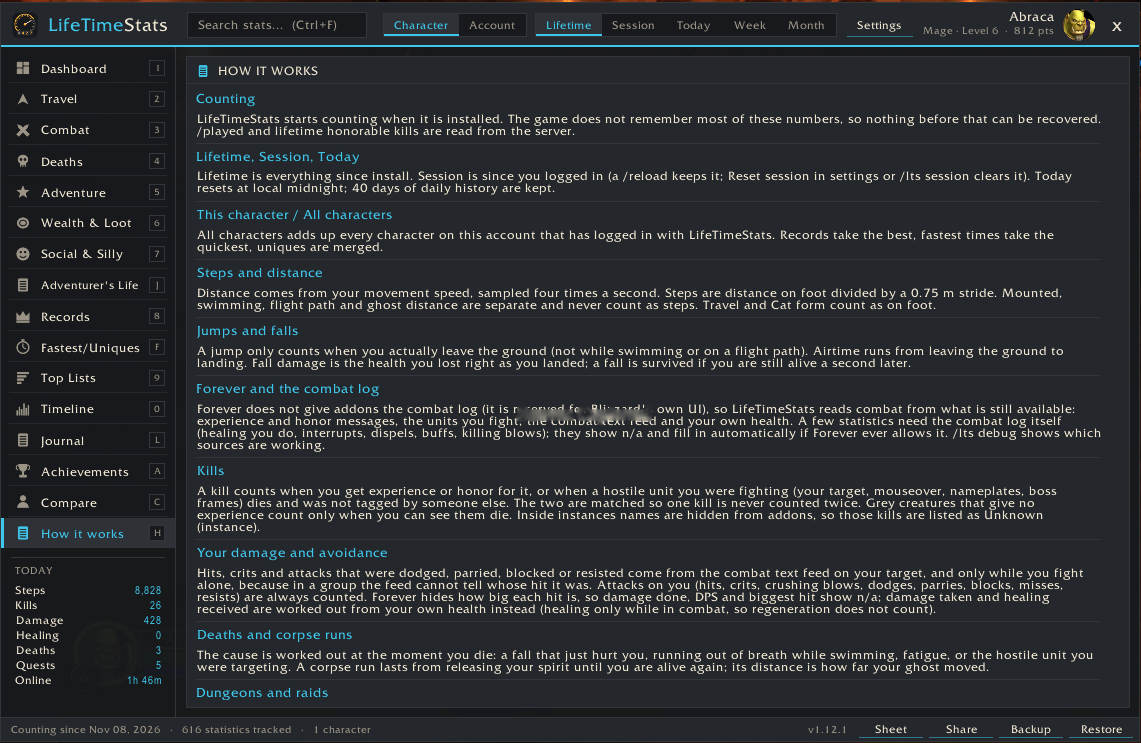 How it works |
In-game captures from version 1.12.1 show the previous Odometer layout (Mage, level 6, class-colour accent).
Get the 1.26.1 prerelease archive, LifeTimeStats-1.26.1-forever.zip, from the Releases page and unzip it into World of Warcraft\_forever_\Interface\AddOns\.
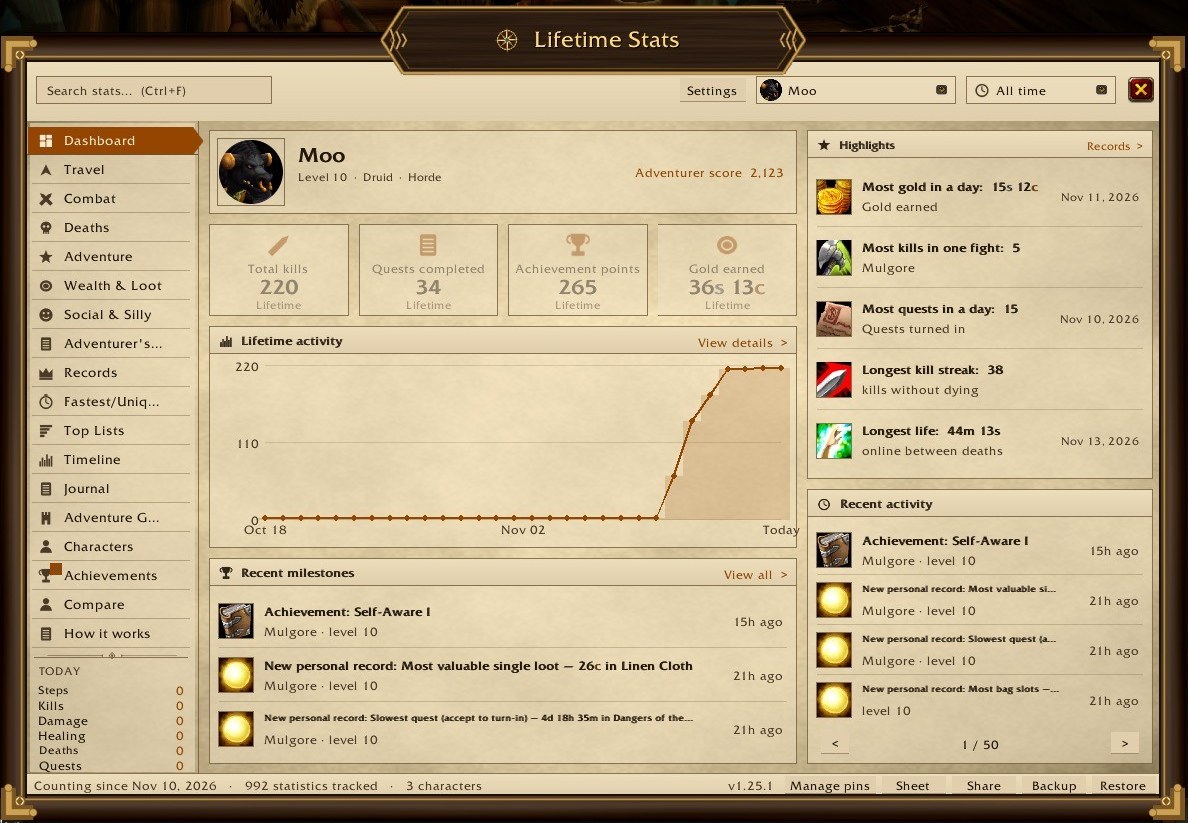
Lifetime Stats (the default from 1.25) frames the window as a tome:
- The frame: a dark wooden frame with gold corners and a title plaque around clean parchment.
- Navigation: a menu of pages down the left, a search box, and dropdowns for the character (this one or all of them) and the time range.
- The overview: your character, four headline counters (kills, quests, achievement points, gold), a lifetime activity line, recent milestones from your Journal, highlights (your biggest hit, best boss DPS, best gold and quest days, longest kill streak) and recent activity, a page at a time.
Stats Explorer is the same frame with a dark wooden menu and a Session / Daily / Weekly / Monthly / Lifetime bar. Its overview shows:
- your lifetime score with its motto;
- recent activity as a timeline;
- a card each for Combat, Exploration, Progression and Collections, which open their pages;
- your pinned statistics along the bottom.
Stone & Gold is in the style of Altoholic: dark stone and steel with gold trim, a round portrait, chapters with gold headers in the menu and chapter tabs along the bottom. Adventure Journal is in the style of Dungeon Journal: dark brown leather in a darker frame with a thin gold line, a gold title and gold-edged buttons. Both are LifeTimeStats' own artwork and are not affiliated with those addons.
Adventurer's Notebook (the default from 1.21 to 1.24) turns the window into an adventurer's tome: a single hand-made sheet of aged parchment with torn edges and an inked frame. Six chapter tabs run down the side: Hero (Overview, Characters, Compare), Deeds (Travels, Battles, Deaths, Purse & Pack, Company), Quests (Adventures, Dungeon Tome, Life on the Road), Legends (Records, Feats & Firsts, Honours, Rolls of Note), Chronicle (Journal, Days) and Lore (How it works). The margin of each page lists that chapter's pages as tags, with Today below them. Each tab reopens the page you last read in it. Values are inked in your class colour. Every page has its own ink sketch in the margin (a compass on the Overview, a skull for Deaths, a backpack for Purse & Pack, crossed swords for Battles, and more). Earned achievements are stamped with a wax seal showing their tier, and a pinned Dashboard statistic is sealed once its goal is reached. The other skins (Stats Explorer, Stone & Gold, Adventure Journal, Adventurer's Notebook, Forever Journal, Odometer, Blizzard, ElvUI, Tukui, EllesmereUI) are in Settings; changing skin needs a /reload.
A Warcraft-style adventurer's journal (/lts) with gold trim, warm page panels, chapter accents and ledger counters. The accent colour can follow your class colour.
Themes (Settings → Theme, applies after /reload): Auto follows ElvUI, Tukui or EllesmereUI when available and uses Forever Journal otherwise. You can also select Forever Journal, Odometer, Blizzard, ElvUI, Tukui or EllesmereUI directly. Supported UI replacements supply live colours and fonts.
- Header: search box (Ctrl+F, also finds entries in the Top Lists, e.g. a spell or creature), Character / Account, Lifetime / Session / Today / Week / Month, settings, your portrait. In Account + Lifetime, hover a value to see each character's part.
- Sidebar pages: Dashboard, Travel, Combat, Deaths, Adventure, Wealth & Loot, Social & Silly, Records, Fastest & Uniques, Top Lists, Timeline, Adventurer's Life, Journal, Achievements, Compare, How it works. Keys 1–9, 0, F, A, C and H jump between pages while the mouse is over the window (never in combat, never while typing).
- Statistic pages pair headline counters with detailed tables and charts.
- Hover any row, counter or chart bar for exactly how it is measured and where a record came from.
- Ctrl + mouse wheel on the header changes the window scale. The default scale fits your screen height.
Steps, jumps, kills and deaths counters · kills vs deaths in your five deadliest zones · net gold per day for 30 days · deaths by cause · quests/kills/deaths per level band · where your gold came from · jumps by hour of day · steps per day · crit rate, quest completion and dungeon runs with a boss kill · Your legend: signature spell, nemesis, most hunted creature, best fight and homeland.
Use Manage pins at the bottom of the Dashboard to search by statistic or category and pin up to four counters. Pins come first, and the original counters fill the remaining spaces. The same pins are available on each character, and their values follow the selected Character or Account scope and date range.
| Page | Examples |
|---|---|
| Travel | Total distance; on foot, mounted, swimming, flight paths and as a ghost; steps; jumps; time in the air; flights; Hearthstone uses; mount-ups; shapeshifts; sits; auto-run toggles; time mounted, swimming, resting, indoors and outdoors; most visited capital city, continent and zone; zone changes; loading screens |
| Combat | Damage and healing done/taken; DPS; fights won; melee, spell, ranged and DoT hits; crits and crit rate; glancing blows; your attacks missed, dodged, parried, blocked, resisted, absorbed, evaded; attacks you dodged, parried, blocked, missed, resisted, reflected; crits and crushing blows taken; dodge rate; heals, crit heals, overhealing; killing blows; PvP kills; honorable kills; casts failed and interrupted; interrupts; dispels; buffs given and received; debuffs; duels; battlegrounds won and lost |
| Deaths | Deaths by cause (creatures, players, falling, drowning, fatigue, lava), while mounted/swimming/AFK, in dungeons and raids; spirit releases; corpse runs; resurrections offered/accepted/cast; time dead; falls survived; falling, drowning, lava and fatigue damage |
| Adventure | Quests accepted/completed/abandoned and completion rate; XP and XP per hour; levels; spells learned; talent points; skill-ups; reputation gained/lost; dungeon runs, runs with a boss kill, dungeon bosses; raid runs, raid bosses, full clears; world bosses; time in dungeons, raids, battlegrounds; gathering; fish; crafting |
| Wealth & Loot | Gold earned/spent and net per hour; looted, quests, vendors, repairs, flights, training, auction house, mail; vendor/bank/auction/mailbox visits; loot windows; items looted by quality; items destroyed; times your bags were full; gear changes; trades |
| Social & Silly | Chat, whispers (and whispers while AFK), emotes (dances, hugs, waves, laughs, cheers, bows, chickens, rude), /roll count, average and perfect rolls, inspects, assists, targets selected, NPC conversations, food, drink, bandages, AFK time, bags/character/spellbook/talents/quest log/friends/map opened, red error messages, screenshots, logins, reloads, and how often you opened this window |
| Records | Biggest hit, crit, heal, crit heal, hit and crit taken; most crits in a row; biggest fall survived (damage and % of health) and biggest fatal fall; longest airtime, survived and fatal; longest corpse run by time and by distance; longest wait for a resurrection; longest life between deaths; longest fight and most kills in one fight; kill streak; slowest quest and level; longest flight; most gold carried; fastest speed; longest session |
| Fastest & Uniques | Fastest: level-up, fight won, 10 kills, quest accept → turn-in, corpse run, flight, session start → first death, battleground win, and a fastest clear for every dungeon and raid. Uniques: NPCs met, vendors, trainers, flight masters, bankers, auctioneers, creature types killed, different players killed, dungeon/raid/world bosses, instances, zones, subzones, quests, items, spells, groupmates, duel opponents, emotes. Firsts: first kill, death, jump, quest, NPC, level-up, green, blue, epic, dungeon, boss, raid, player kill, duel won, battleground win, mount ride, fish |
| Top Lists | Dungeon book (every instance: bosses found / total, runs, clears, fastest), session history, battlegrounds won and lost, then top 100 of: creatures killed, players killed by class, killers, dungeon bosses, raid bosses, instance runs, zones by time/distance/kills/deaths, capital cities by time, continents by time/distance, instances by time, spells cast, time in each form, emotes, NPCs visited, reputation, skill-ups, time per level, red error messages, epic loot |
| Timeline | Today's counters, a 30-day chart (steps, kills, deaths, XP, gold, online time) and a day-by-day table |
Search finds any statistic by name across all pages.
This release adds 222 statistics to the existing 616, plus Personal Best History, for 839 total dashboard entries:
- Movement context: sampled time, distance and longest/farthest intervals moving or stationary, on foot, mounted, swimming, in combat, solo or grouped, AFK or active, resting, indoors/outdoors, in the open world, dungeon, raid, battleground or arena, while falling, casting, channeling, and below 25% or at full health. Contexts overlap; do not add them together.
- Corpse recovery: actual ghost movement distance en route to your body, observed time moving and waiting, separate confirmed corpse retrievals and other resurrection methods, per-zone breakdowns, and fully observed run averages/records. Moving distance is not straight-line distance, and a retrieval button press alone does not count as success.
- Window visits: time with the vendor, bank, mailbox, auction house, trade, trainer, flight map, NPC conversation, quest dialog or book open; visit counts, completed-visit averages and longest visits.
- Combat and pace: sampled movement and fight records, known-outcome fight survival, and per-hour activity for kills, quests, gathering, crafting, loot, chats and more.
- Rates and proportions: recorded XP and gold breakdowns, healing/damage shares, and averages such as repair cost or XP per completed quest.
- A living chronicle: meaningful personal-best milestones can appear in your local Journal; the last-session recap can include its top new records. Both stay in-game and the journal option is configurable. The Top Lists page keeps a dated, bounded history of record changes.
All additions use the client's available observations; hidden or missing data is skipped rather than guessed. These counters begin with 1.13.0 and are not backfilled from older saves. See the measurement details for definitions, unknown-data handling and test limits.
111 achievements of LifeTimeStats' own, with up to 6 tiers each: 396 badges and 7,890 points. Each one shows its tier pips, progress to the next tier and, on hover, every tier with the date you earned it.
| Category | Examples |
|---|---|
| Travel | Walk It Off (steps), Bunny Hopper (jumps), Frequent Flier (Unlicensed) (time in the air), Gryphon Miles, Fish Out of Water, Saddle Sore, Tourist, Off the Beaten Path, There's No Place Like Home, Identity Crisis |
| Combat | Slayer, Gladiator, Duelist, Critical Mass, On a Roll (crits in a row), Untouchable (dodges + parries), Wall, Heavy Hitter, Field Medic, Rude Interruption, Unstoppable, Warmonger |
| Deaths | Mortal, Gravity Always Wins, Forgot to Breathe, Stuck the Landing, Barely (fall survived at % health), Marathon Ghost (corpse run distance), Spirit Walker, Still Breathing |
| Adventure | Questor, Commitment Issues, Dungeoneer, Collector of Heads, Raider, Clean Sweep, Instance Regular, Growing Up, Patient Angler, Gatherer, Artisan, Well Regarded |
| Wealth | Earner, Big Spender, Dragon's Hoard, Fix It Again, Loot Goblin, Purple Rain, Junk Drawer, Hoarder's Dilemma |
| Silly | Critter Whisperer (/love critters), You Monster (critters killed), Dance Floor, Bawk Bawk, Free Hugs, Chatterbox, Gambler, Natural 100, Social Butterfly, NPC Whisperer, Not Enough Mana, Take a Seat, Brb, Where Am I?, Self-Aware |
| Fastest | Speed Leveler, Express Delivery, Rapid Fire, Back in a Flash, Blink and You Miss It (lower is better) |
Progress you already had when 1.3 was installed is awarded quietly and marked "before v1.3". Alerts are off by default: the sidebar shows "N new". Settings → Achievement alerts switches to a chat line, an on-screen toast (click it to open the page) or both.
Times drunk (tipsy, drunk, completely smashed) and sobered up · campfires lit and where · nights camped out vs at an inn · time in the wild and longest stretch without a town · inns and innkeepers · unique hearthstones and different hearth locations · flight paths found · books read · potions and elixirs · Well Fed, time eating and drinking · mounts and pets by name · times naked · breath held, fatigue · day vs night game time · days adventured.
The Journal writes itself as you explore. Dated entries collect firsts, level-ups, new zones, first inn visits, boss kills, deaths, achievements and personal bests. Choose an entry type and optionally enter part of a zone name in Zone. The search ignores case. Leave Zone blank for all zones, including older entries without a known location. Browse matches with Newer and Older. Click an entry to read it or add, edit or remove a personal note of up to 500 characters. Notes stay in that character's local Journal and are included when you copy a full character backup. Chat shares, character sheets and stats-only backups exclude notes. Life per level compares what happened at each level, and Travel log lists each zone with its first-visit date and level.
A Dungeon Journal-style compendium of everything your characters have seen. In Account scope it reads every character, and runs, bestiary entries and chronicle chapters are tagged with the character's name.
- Suggestions: dungeons in your level range you have never entered, bosses never killed, missing full clears and bosses that beat you.
- Progress book: every dungeon and raid as a chapter, with bosses seen (pulled), bosses killed and runs. Click a dungeon for its bosses.
- Boss pages: kills, pulls, wipes, kill rate, deaths in the fight, time fighting, fastest kill, first pull and first kill (with your level, item level and group), what killed you there and the loot you got.
- Run history: the last 200 dungeon and raid runs, with length, bosses, deaths, wipes, group size, who was with you, items looted and full clears.
- Death codex: deaths by boss fight, dungeon, zone (with the usual killer), killing ability and level.
- Bestiary: every creature you kill, with creature type, classification (elite and rare entries are highlighted), first zone, level range and first and last kill dates. It holds up to 3,000 creatures.
- Zone atlas: time, distance, quests, kills, deaths, items looted, new creatures, level-ups, visits and first and last visit for each zone.
- Chronicle chapters: your Journal grouped into ten-level chapters. Click one to copy it as text.
- Group memories: who you ran instances with, killed bosses with and who was there for your first kills.
- Boss loot: your own loot within 3 minutes of each boss kill. It is what you got, not a full loot table.
Boss rosters for the nine Forever dungeons and the Forever encounter IDs come from DBM-Dungeons' Forever encounter scaffolds (names and IDs only). In Krol'Dok Stronghold, Alcaz Island Prison, Blackmaw Hold and Shaper's Terrace it is not yet known which bosses are optional, so they are marked * and full clears are not counted there.
Everything here is also counted as statistics and top lists (boss wipes, kills by group size, boss loot by quality, kills by creature type and classification, deaths by hour and by level, and more). Tracking starts with 1.15.0, so nothing earlier is backfilled.
Every character on this account in one place, kept on this computer only, laid out like the character select screen: a card for each character on the right (class crest, name in class colour, level, class and where you logged out), and the chosen character on the left, with your own 3D model (alts show their class crest, because the game does not give addons other characters' appearance), the key facts, and a table of professions, saved instances and lifetime highlights. People and Farming buttons under the cards switch the left side to those lists.
- All characters: level, class, gold, /played, item level and when you last played, with account totals.
- One page per character: race and class, title, guild and rank, gold, /played, rested XP, where you logged out, hearthstone, item level, bag space, best reputation, Adventurer score, professions with skill levels, and saved instances with time to reset. The page is refreshed every minute while you play that character.
- People: everyone who was in your group, with time grouped, how often they joined, first and last time, class and level. Account scope merges your characters.
- Farming sessions: your play sessions ranked by net gold per active hour, with XP, kills and the vendor value of your loot per hour.
New statistics: vendor value of your loot (by quality), the most valuable single loot, best gold, loot value, XP and kills per hour, and players grouped with.
Buttons under the character cards open:
- Reputation: every faction you have met, its standing and progress, and the date each standing from Friendly to Exalted was first reached. Reaching Friendly or better also writes a Journal line.
- Currencies: every currency per character, with the account total.
- Item log: every green-or-better item you got, newest first. Each entry has the time, zone, your level, its item level and where it came from: a boss (by name), a quest reward, a vendor, crafting, mail, a trade, the auction house, gathering, fishing or plain loot. It holds up to 1,000 items per character.
- Gathering: herbs, ore, skins and fish by zone, items gathered, and your best gathering sessions per hour.
- Mail & trades: who you mailed and traded with, and how much gold went each way.
- Goals: a target for any statistic, with a progress bar.
/lts goal steps 1000000adds one,/lts goal listlists them,/lts goal remove 2removes one. Reaching a goal writes a Journal line and a chat line. - Trends: this week against last week, and this month against last month, for steps, kills, deaths, quests, XP, gold, loot, time, damage, jumps, boss kills, gathering and fishing.
After a session of 10 minutes or more, a summary window opens at your next login (turn it off with the session-recap setting). /lts summary shows the current session at any time.
More buttons on the Characters page:
- Quest history: every quest you turn in, with when, where, your level, the XP and gold it gave, and how long it took from accepting it.
- Level history: a snapshot at each level-up, with the time it took, gold, item level, base stats, zone, and your totals at that point.
- Professions: each skill's rank and how long 1-75, 75-150, 150-225 and 225-300 took. Each milestone also writes a Journal line.
- Death map: every death with its cause, place and map position. Deaths also show as skulls on the world map; hover one for details, and
/lts deathpinsturns them off. - Play habits: time online by weekday and by hour.
Item tooltips say where you got an item, e.g. "Boss from Taragaman the Hungerer · Nov 15, 2026, level 14". The tooltip setting turns this off.
/lts sizeshows how big each character's saved data is and what takes the most space. You get a warning at login above 4 MB.- A snapshot of your statistics is kept each day you play: the newest three, stored in that character's own saved file.
/lts snapshotlists them,/lts snapshot show 2gives the backup text, and/lts snapshot restore 2merges it back, keeping the higher of each value. /lts export items,quests,runsanddeathsexport one log as CSV.- A pinned Dashboard statistic that has a goal shows its progress ("Goal 45% of 1,000,000").
/lts export opens every statistic, fastest time, unique count, first and top list for every character, plus the account total, as CSV. Values are raw numbers: times in seconds, money in copper, distances in yards, firsts as Unix time. The Timeline page has a Days / Months switch; Months shows the last 12 months from the monthly totals.
On clients with the addon compartment (the addon list button by the minimap), LifeTimeStats is listed there: click to open, right-click for settings.
Achievements unlock titles ("the Barfly", "the Wanderer", "of Many Hearths", …). Pick one with /lts title or in settings; it shows by your name. /lts sheet (or Sheet in the footer) gives a copyable character sheet.
The Compare page (key C) puts two of your characters side by side, or one character against all of them together. Every statistic, unique count, fastest time and your achievement points get a row with a lead bar; a + marks who leads (for fastest times, lower wins). Counters show how many stats each side leads. Forget character removes the data of an alt you deleted (asks first; never the character you are playing).
Share in the footer, or /lts share, previews a one-line summary of the page you are on, for example:
[LifeTimeStats] Malikor: Died 143 times (17 from falling, 7 drowned), 52 corpse runs, longest 4m 10s; killed most by Defias Pillager
Edit it if you like, pick Say / Party / Raid / Guild / Instance, press Send. Nothing is posted until you do. /lts share g deaths posts straight to guild because you typed it. Topics: summary, travel, combat, deaths, adventure, wealth, social, records, fastest, achievements, timeline.
- Download
LifeTimeStats-1.26.1-forever.zip. - Unzip into
World of Warcraft\_forever_\Interface\AddOns\so the folder isAddOns\LifeTimeStats. - Enable LifeTimeStats on the AddOns screen.
Upgrading from any earlier version keeps all your existing stats.
Open Backup or run /lts export and copy the text for safekeeping.
- Stats only is the default. It copies character statistics and personal-best history. Restore or
/lts importaccepts LTS1 and LTS2 backups and merges those records with your current data. - Full character includes saved statistics, Journal entries and personal notes, level and travel history, and saved session history. Keep this text private if it contains personal notes. A full restore previews the snapshot and asks you to confirm replacing the saved record for the same character.
Full character backups cover one character's saved record. Account settings, other characters, Dashboard pins, the active session, and in-progress tracking are outside that snapshot.
| Command | What it does |
|---|---|
/lts |
Open or close the window |
/lts summary |
Print steps, jumps, kills, PvP kills, deaths and quests in chat |
/lts settings |
Open settings (also Options > AddOns > LifeTimeStats) |
/lts minimap |
Show or hide the minimap button |
/lts session |
Reset the session counters |
/lts share [s|p|r|g|i] [topic] |
Share a stat line (no channel = preview first) |
/lts compare |
Open the Compare page |
/lts export |
Open the character backup dialog |
/lts import |
Paste and restore a character backup |
/lts errors |
Recent Lua errors (Forever hides them), in a copyable window |
/lts dm |
What Forever's damage meter and death recap give addons, in a copyable window (for the developer) |
/lts sheet |
Copyable character sheet |
/lts title |
Cycle earned titles |
/lts recap |
One-line summary of this session |
/lts score |
Your Adventurer score and how it is made |
/lts csv |
Your play sessions as CSV, in a copyable window |
/lts debug |
Which game data sources work this session, in a copyable window |
/lifetimestats works too. Minimap button: left-click opens the window, right-click opens settings, drag to move.
Options → AddOns → LifeTimeStats (or right-click the minimap button), in the addon's own theme:
- Appearance: theme (with colour swatches; Reload button appears when it changes), class colour accent, window scale, lock window, minimap button.
- Chat and display: session column, last-session recap, level-up line, kill counts on tooltips, milestones in chat, achievement alerts (Off / Chat / Toast / Both).
- Screenshots: on level-up, first boss kill, achievement (all off by default).
- Tracking and title: count pet damage, title picker.
- Your data: statistics, size and days of history; Backup, Restore, Character sheet, Reset session, Reset window, Erase character (asks first).
-
Forever and the combat log. Forever does not give addons the combat log. LifeTimeStats reads combat from experience and honor messages, the units you fight, the combat text feed and your own health instead. After each fight it also reads Forever's built-in damage meter: damage and healing you do (total and per spell), damage taken and who dealt it, avoidable damage ("stood in the fire"), damage to each enemy, pet damage, your share of group damage, boss damage, interrupts, dispels and overkill. Every fight not yet counted is read, oldest first. Death causes come from the game's death recap (fire, lava, falling, drowning, or the attacker and spell), else the meter's killing blow during a fight. Overhealing, buffs, debuffs and killing blows you deal still need the combat log and show n/a. Inside instances creature names are hidden, so those kills appear as "Unknown (instance)".
/lts debugshows which sources are working. -
Counting starts when you install it. The game does not keep most of these numbers. /played and lifetime honorable kills come from the server.
-
Steps = distance on foot ÷ 0.75 m stride. Travel and Cat form count as on foot.
-
Kills count when something you or your pet damaged dies, so group kills count for each helper. Killing blows are separate.
-
Dungeon runs: a /reload, disconnect or zoning out and back within 30 minutes stays the same run; an instance reset starts a new one. In the Dungeon Book, fastest clear measures entry to the final required boss in a complete roster. The book labels incomplete rosters and tracks discoveries while withholding new clear, completion and fastest-clear awards. The highest Dungeon Crawler, Brave New World and Bestiary Complete tiers depend on verified rosters. Previously recorded clears and earned achievements stay in your history.
-
Falls: "survived" means you were still alive 1.5 s after the fall damage. Airtime is measured from leaving the ground to landing.
-
Corpse runs go from releasing your spirit to getting your body back (or using the spirit healer).
-
Session is since you logged in; a /reload keeps it. Today resets at local midnight. 40 days of daily history are kept for the charts.
-
Your data is stored twice (account and per-character SavedVariables); if one fails to load the other restores it. A stats-only restore merges records and keeps the newest 200 personal bests. See Back up and restore for the full character option.
-
The How it works page in the window explains every measurement.
-
The Journal records new personal bests as local adventure moments by default; turn this off under Settings → Chat and display. No new record is sent to another player.
-
Unique lists stop growing at 20,000 entries each; top lists keep 400 entries; daily history keeps 40 days, and older days are kept as monthly totals.
-
Nothing is ever sent anywhere unless you press Send in the Share dialog or type
/lts sharewith a channel. No chat spam unless you turn on milestones. -
Loot, duel, roll, reputation and skill messages are read with the client's own text, so other languages should work (only English has been tested).
LifeTimeStats/
  LifeTimeStats.toc
  Core.lua  Themes.lua  Stats.lua  Widgets.lua  Trackers.lua  Extras.lua  Fallback.lua  Life.lua  Story.lua
  Meter.lua  Chronicle.lua  Dungeons.lua  Guide.lua  Roster.lua  Collections.lua  Goals.lua  Upkeep.lua  History.lua  Character.lua  Social.lua  Achievements.lua  Share.lua  Backup.lua
  Notebook.lua  UI.lua  GuideUI.lua  RosterUI.lua  CollectionsUI.lua  HistoryUI.lua  Options.lua  Expanded.lua
  Media/icon.tga  Media/dot.tga  Media/icons/*.tga  Media/notebook/*.tga  Media/notebook/sketches/*.tga  icon.png  logo.png
  README.md  CHANGELOG.md  DESCRIPTION.md  AUDIT.md  CREDITS.md  LICENSE
Found a bug or have an idea? Open an issue: https://github.com/SeanShaffer88/LifeTimeStats/issues
Include the output of /lts debug and /lts errors (both open in a copyable window).
tests/run.pyruns every Lua file under Lua 5.1 with a stubbed WoW API (needs Python andpip install lupa):python tests/run.py.tests/expanded.pytests the new observation counters, hidden/missing APIs, edge cases and formatting under the same Lua 5.1 stub harness:python tests/expanded.py.tests/package_release.pyvalidates the versioned ZIP layout, manifest, required assets and SHA-256 sidecar.- New record history is saved locally, bounded to the 200 most recent breakthroughs per character/session, and included in text backups. Per-sample interval records need a meaningful gain before they create history or Journal entries.
- These stubbed tests are not a live in-game compatibility test.
docs/screenshots/holds the README images;tests/,docs/andscripts/are left out of release zips.