






AI-Powered Security Platform | Reconnaissance | Log Analysis | Incident Response
CAIO is your AI-powered cybersecurity sidekick. Whether you're a SOC analyst drowning in alerts, a pentester mapping out attack surfaces, or a sysadmin trying to keep things locked down, CAIO helps you work smarter. It automates the boring stuff — recon, log hunting, vulnerability checks, incident response — so you can focus on what actually matters: stopping threats.
License: MIT
Platform: Windows 11 / Linux / macOS
| Module | Description |
|---|---|
| Reconnaissance | DNS enumeration, subdomain discovery, port scanning, WHOIS lookup — all analyzed by AI |
| Log Analysis | Paste any log (Windows Event, Apache, Syslog, Firewall) → AI identifies IOCs, TTPs, attack patterns |
| Vulnerability Assessment | URL probing or file upload (Dockerfile, Python, JS, configs) → AI-powered security review |
| IR Chat | Multi-turn incident response assistant with DFIR expertise, MITRE ATT&CK mapping, command references |
| Module | Description |
|---|---|
| OSINT Profiler | Build threat dossiers from GitHub, Certificate Transparency logs, and public sources |
| Email Forensics | Parse email headers, detect spoofing, analyze SPF/DKIM/DMARC, identify phishing |
| Password Auditor | Analyze password entropy, detect patterns, check against breach dictionaries |
| CVE Intelligence Feed | Live NVD lookup with AI contextualization and patch priority scoring |
| Module | Description |
|---|---|
| SIEM Rule Generator | Convert attack descriptions into Sigma, Splunk SPL, KQL (Sentinel), and Suricata rules |
| Supply Chain Risk | Assess third-party vendors for CVEs, breach history, and trust indicators |
| Threat Actor Profiler | Correlate IOCs/TTPs with known APT groups and MITRE ATT&CK techniques |
| Module | Description |
|---|---|
| Payload DNA Analyzer | Deobfuscate and analyze suspicious code (Base64, PowerShell, shellcode, VBA macros) |
| Network Storyteller | Convert network logs into plain-English attack narratives with timelines |
| Honeypot Simulator | Generate realistic attack logs for training and SIEM testing |
| Red Team Playbook | Generate structured adversary emulation plans based on target profiles |
| Module | Description |
|---|---|
| Batch Scanner | Run reconnaissance or vulnerability scans against multiple targets concurrently |
| Compliance Report | Map findings to NIST 800-53, ISO 27001, or PCI DSS with gap analysis |
| Scan History | Every scan persisted to SQLite — searchable, filterable, exportable |
| Cost Dashboard | Track token usage and USD costs per provider/module with Chart.js visualizations |
| Provider | Type | Cost Tracking | Notes |
|---|---|---|---|
| Ollama | Local (free) | Token count only | Runs entirely offline |
| OpenAI GPT-4o | Cloud (paid) | Input/output token costs | Requires API key |
| Anthropic Claude | Cloud (paid) | Input/output token costs | Requires API key |
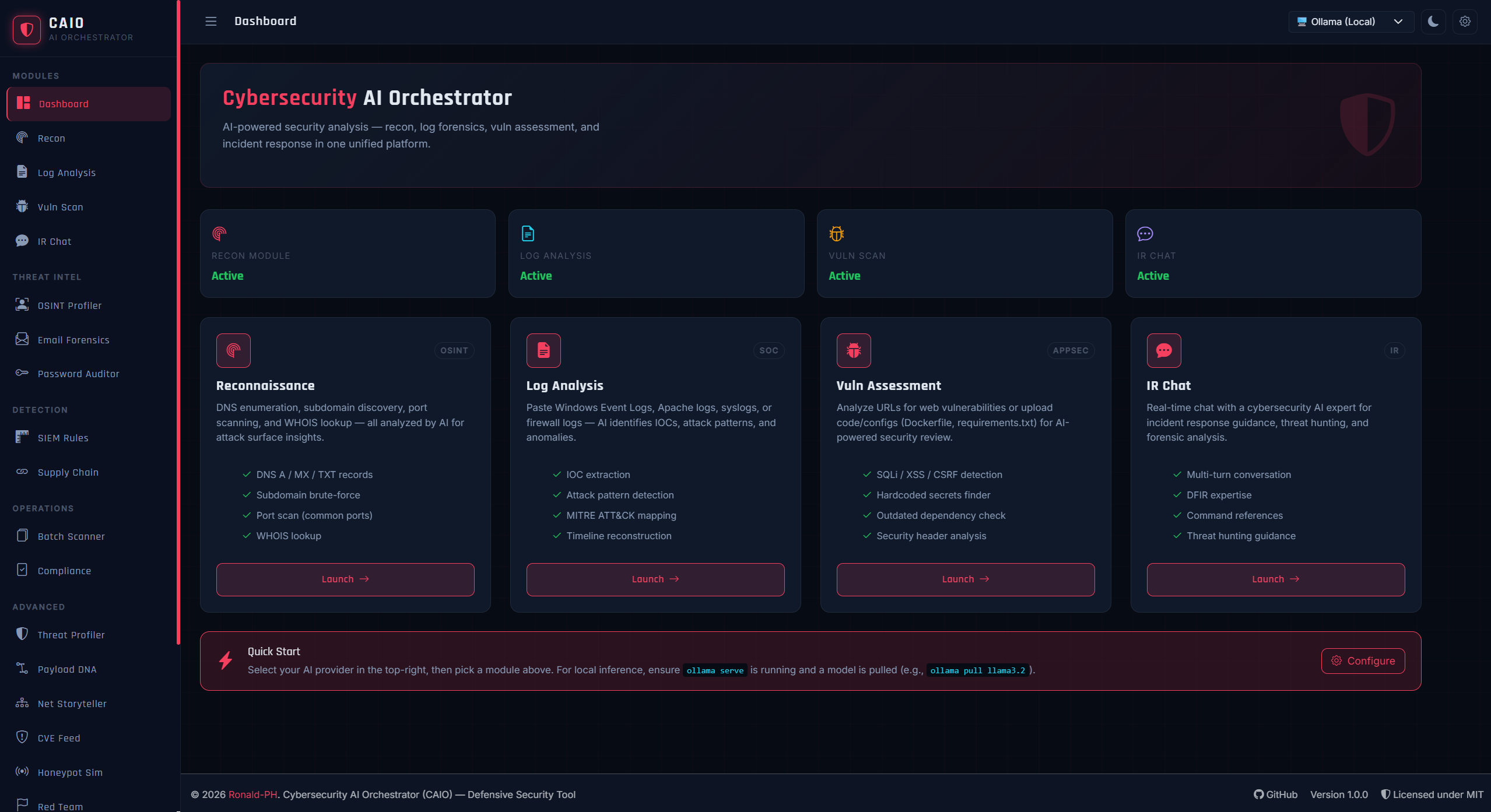
Main Dashboard
- Python 3.10 or higher
- Git (optional)
- Ollama (for local AI — recommended)
1. Clone or download the repository
git clone https://github.com/Ronald-PH/caio.git
cd caio
2. Create a virtual environment
python -m venv venv
venv\Scripts\activate
3. Install dependencies
pip install -r requirements.txt4. Configure environment variables
copy .env.example .env
notepad .env
Edit the .env file:
- Set
SECRET_KEYto a random string - Add
OPENAI_API_KEYand/orANTHROPIC_API_KEYif using cloud providers - For local inference, leave API keys blank
5. Set up Ollama (recommended for local AI)
- Download from ollama.com and install
- Open a new terminal and run:
ollama serve
- In another terminal, pull a model:
Other good options:
ollama pull llama3.2
mistral,phi3,llama3.1:8b,codellama
6. Run CAIO
python app.pyOpen your browser to: http://127.0.0.1:5000
caio/
├── app.py                      # Flask application factory + routes
├── database.py                 # SQLite setup, queries, cost statistics
├── requirements.txt            # Python dependencies
├── .env.example                # Environment variable template
├── README.md                   # This file
│
├── modules/                    # Backend blueprints
│   ├── __init__.py
│   ├── ai_client.py            # Unified AI caller (Ollama/OpenAI/Claude)
│   ├── jobs.py                 # Background job manager (threading + SQLite)
│   ├── recon.py                # Reconnaissance module
│   ├── log_analysis.py         # Log analysis module
│   ├── vuln_scan.py            # Vulnerability assessment
│   ├── chat.py                 # Incident response chat
│   ├── osint_profiler.py       # OSINT threat dossiers
│   ├── email_forensics.py      # Email header analysis
│   ├── password_auditor.py     # Password policy auditing
│   ├── cve_feed.py             # CVE intelligence
│   ├── siem_rule_generator.py  # Sigma/SPL/KQL/Suricata rules
│   ├── supply_chain_risk.py    # Third-party risk assessment
│   ├── threat_profiler.py      # Threat actor attribution
│   ├── payload_dna.py          # Malicious code analysis
│   ├── network_storyteller.py  # Network attack narration
│   ├── honeypot_simulator.py   # Fake attack log generation
│   ├── redteam_playbook.py     # Red team engagement plans
│   ├── batch_scanner.py        # Multi-target batch scanning
│   ├── compliance_report.py    # Framework gap analysis
│   ├── settings.py             # Configuration management
│   └── dashboard.py            # Landing page
│
├── templates/                  # Jinja2 HTML templates
│   ├── base.html               # Base layout with sidebar + theme toggle
│   ├── index.html              # Dashboard
│   ├── recon.html              # Reconnaissance page
│   ├── log_analysis.html       # Log analysis page
│   ├── vuln_scan.html          # Vulnerability assessment
│   ├── chat.html               # IR chat interface
│   ├── history.html            # Scan history with filtering
│   ├── cost_dashboard.html     # Cost analytics with Chart.js
│   ├── settings.html           # Configuration page
│   ├── batch_scanner.html      # Batch scanning interface
│   ├── compliance_report.html  # Compliance report generator
│   ├── cve_feed.html           # CVE lookup
│   ├── email_forensics.html    # Email analysis
│   ├── honeypot_simulator.html # Log simulator
│   ├── network_storyteller.html
│   ├── osint_profiler.html
│   ├── password_auditor.html
│   ├── payload_dna.html
│   ├── redteam_playbook.html
│   ├── siem_rule_generator.html
│   ├── supply_chain_risk.html
│   ├── threat_profiler.html
│   └── pdf_export.html         # PDF report template
│
└── static/
    └── style.css               # Cyber-noir theme (dark/light modes)
| Endpoint | Method | Description |
|---|---|---|
/health |
GET | JSON health status for all AI providers |
/progress/<job_id> |
GET | Poll background job status (used by recon) |
/history |
GET | Scan history with filtering (module, provider, target, days) |
/history/<id> |
GET | Full scan detail as JSON |
/history/<id>/delete |
POST | Delete a scan record |
/cost-dashboard |
GET | Cost analytics page |
/cost-dashboard/api |
GET | Cost analytics as JSON |
/export/pdf/<id> |
GET | Download scan as PDF |
/recon/*— Reconnaissance/log-analysis/*— Log analysis/vuln-scan/*— Vulnerability assessment/chat/*— IR chat/osint-profiler/*— OSINT threat dossiers/email-forensics/*— Email header forensics/password-auditor/*— Password auditing/cve-feed/*— CVE intelligence/siem-rules/*— SIEM rule generation/supply-chain/*— Supply chain risk/threat-profiler/*— Threat actor attribution/payload-dna/*— Malicious code analysis/network-storyteller/*— Network attack narration/honeypot-simulator/*— Honeypot log simulation/redteam-playbook/*— Red team playbooks/batch/*— Batch scanning/compliance/*— Compliance reporting/settings/*— Configuration management
CAIO tracks token usage and costs for all API calls:
- OpenAI: Configurable rates (default: $0.005/1K input, $0.015/1K output)
- Claude: Configurable rates (default: $0.003/1K input, $0.015/1K output)
- Ollama: Free (token counting only)
The dashboard displays:
- Total cost over 30 days
- Cost breakdown by provider
- Cost breakdown by module
- Daily cost trend chart
- Recent cost details table
CAIO attempts PDF export in this order:
- weasyprint — Pure Python, best quality (requires GTK3 runtime on Windows)
- pdfkit — Wrapper for
wkhtmltopdf - HTML fallback — Print-friendly HTML (Ctrl+P → Save as PDF)
CAIO is a defensive security tool intended for:
- Security professionals conducting authorized assessments
- SOC analysts investigating incidents
- System owners reviewing their own infrastructure
- Educational and research purposes
- Only scan, test, or analyze systems you own or have explicit written permission to test
- Unauthorized scanning is illegal in most jurisdictions
- The author assumes no liability for misuse of this tool
- Always follow responsible disclosure practices
Contributions are welcome! Please:
- Fork the repository
- Create a feature branch
- Submit a pull request
For bugs or feature requests, please open an issue on GitHub.
For any inquiries or support, please reach out to
GitHub: https://github.com/Ronald-PH
Project: https://github.com/Ronald-PH/caio
- Ollama — Local LLM inference
- OpenAI — GPT-4o API
- Anthropic — Claude API
- Flask — Web framework
- Bootstrap — UI components
- Chart.js — Data visualization
- Highlight.js — Code syntax highlighting
MIT License — see LICENSE file for details.
Report Bug · Request Feature · Star on GitHub
Built with ❤️ for the cybersecurity community