AI-Powered Automated Vulnerability Assessment and Penetration Testing





Pure semantic AI analysis — no regex patterns, no rule files, no false-positive noise.
aVAPT generates comprehensive reports in three formats, each suited for different workflows:
| Format | Best For | Output |
|---|---|---|
| HTML | Browser-based review, interactive filtering, executive presentations | View |
| JSON | CI/CD pipelines, SIEM integration, custom automation | View |
| Documentation, offline distribution, client deliverables | View |
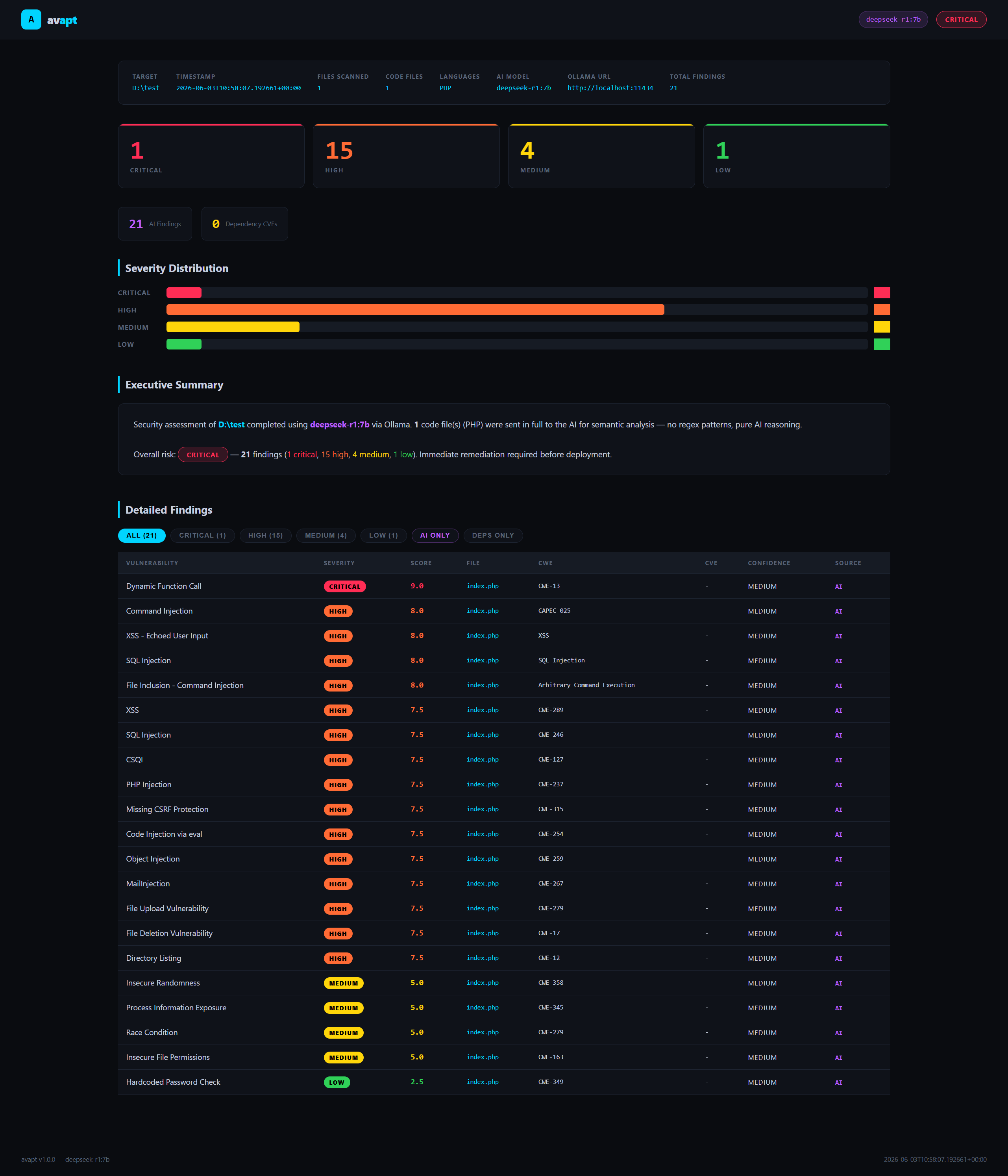

Click to expand screenshots — examples from actual aVAPT scans
aVAPT is a local-first, AI-powered static vulnerability assessment (SAST) tool that sends your entire source code to a locally running Ollama model for deep semantic analysis. Unlike traditional SAST tools that match regex patterns against known signatures, aVAPT reasons about your code the same way a senior security engineer would — tracing data flows, understanding context, and identifying business logic flaws that patterns can never catch.
Note on the name: The "PT" in aVAPT reflects the tool's goal of supporting penetration testers and security teams during assessments. aVAPT performs static source code analysis — it reads and reasons about code, it does not send payloads to or actively exploit a running application.
Everything runs on your machine. No cloud, no telemetry, no API keys.
- Pure AI analysis — the complete source of each file is sent to the AI. No regex, no pattern matching, no rule databases.
- Full semantic reasoning — the model traces data flows end-to-end, understands framework context, and detects logic-level vulnerabilities.
- Local & private — powered by Ollama. Your code never leaves your machine.
- Multi-model support — works with any Ollama model:
deepseek-r1,codellama,deepseek-coder,llama3,mistral, and more. - Flask web UI — browser-based dashboard with live scan progress, filterable findings table, and one-click downloads.
- Three export formats — HTML report, JSON (for CI/SIEM integration), and PDF.
- Dependency CVE scanning — checks
package.jsonandrequirements.txtagainst a curated table of known-vulnerable versions with real CVE IDs. - Parallel scanning — configurable worker count for concurrent AI analysis of multiple files.
- Windows-native — UTF-8 safe on all platforms including Windows with cp1252 terminals.
The AI is instructed to identify (but is not limited to):
| Category | Examples |
|---|---|
| Injection | SQL, NoSQL, LDAP, OS Command, Code, Template, XPath |
| Client-side | XSS (Reflected, Stored, DOM), Open Redirect, CSRF |
| Server-side | SSRF, XXE, Path Traversal, LFI, RFI |
| Auth & Access | Authentication Bypass, Broken Auth, IDOR, Privilege Escalation, Mass Assignment |
| Cryptography | JWT Weaknesses, Weak Algorithms (MD5/SHA1/DES), Insecure Randomness |
| Secrets | Hardcoded Credentials, API Keys, Tokens |
| Logic | Business Logic Flaws, Race Conditions, Type Confusion |
| Memory Safety | Buffer Overflow, Use-After-Free (C/C++/Rust) |
| Dependencies | Known CVEs in npm and pip packages |
| Misc | Insecure Deserialization, Information Disclosure, Debug Exposure |
avapt/
│
├── app.py                    # Flask web application & REST API
│
├── core/
│   ├── config.py             # Constants, AI system prompt, language map, CVE table
│   ├── ollama_client.py      # Ollama REST API wrapper
│   ├── file_utils.py         # File collection, language detection, dedup helpers
│   ├── analyzer.py           # AI file analyser — builds prompts, parses responses
│   ├── dependency_scanner.py # package.json / requirements.txt CVE scanner
│   ├── scanner.py            # Main orchestrator — phases 1 & 2, progress callbacks
│   ├── report_html.py        # Self-contained HTML report generator
│   └── report_pdf.py         # PDF report generator (requires reportlab)
│
├── templates/
│   ├── index.html            # Scanner dashboard (scan form + live progress)
│   └── report.html           # Report viewer with filterable findings table
│
└── static/
    ├── img/
    │   └── avapt.png         # Banner image
    ├── css/
    │   ├── app.css           # Shared styles (dark theme)
    │   └── report.css        # Report-specific styles
    └── js/
        ├── app.js            # Scan form, progress polling, jobs list
        └── report.js         # Findings table filtering & expand/collapse
- Python 3.10+
- Ollama running locally with at least one model pulled
# Install Ollama
# Windows / macOS: https://ollama.com/download
# Linux:
curl -fsSL https://ollama.com/install.sh | sh

# Pull a model (pick one)
ollama pull deepseek-r1:7b          # tested
ollama pull codellama
ollama pull deepseek-coder
ollama pull llama3
ollama pull mistral
Python dependencies:
# Required
pip install flask

# Optional — only needed for PDF export
pip install reportlab
No other dependencies. The Ollama client uses Python's built-in urllib.
# Clone the repository
git clone https://github.com/Ronald-PH/avapt.git
cd avapt

# Install dependencies
pip install flask

# Optional PDF support
pip install reportlab# Start the Flask server
python app.py
# Open in browser
http://localhost:5000The dashboard lets you:
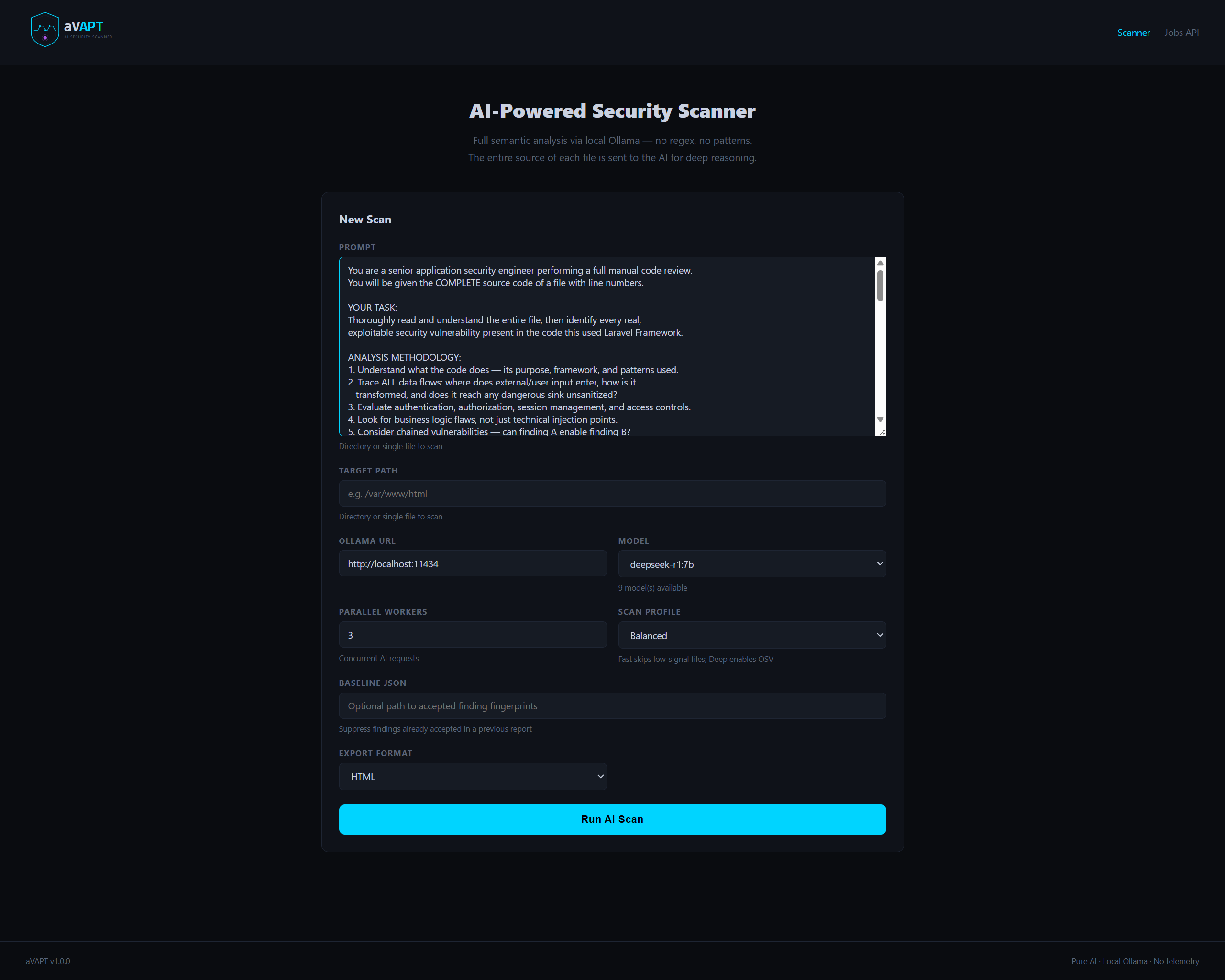
- Enter a custom prompt
- Enter a target path (directory or single file)
- Select your Ollama URL and model
- Set parallel worker count
- Watch live scan progress file-by-file
- View the interactive report in-browser
- Download as HTML, JSON, or PDF
A self-contained, dark-themed dashboard you can open in any browser:
- Summary cards (Critical / High / Medium / Low counts)
- Severity distribution bar chart
- Filterable findings table — filter by severity or source (AI / Deps)
- Expandable rows — click any finding to reveal full details:
- Exact file path and line numbers
- Root cause explanation
- Complete attack path (entry point, prerequisites, impact, likelihood)
- Actionable remediation guidance
- Syntax-highlighted code snippet
- Executive summary with overall risk rating
Machine-readable output for CI pipelines, SIEM ingestion, or custom tooling:
{
  "meta": {
    "tool": "aVAPT",
    "version": "1.0.0",
    "scan_root": "/var/www/html",
    "timestamp": "2026-06-02T10:00:00+00:00",
    "files_scanned": 42,
    "code_files": 18,
    "languages": ["PHP", "JavaScript"],
    "ai_model": "gpt-oss:20b",
    "ollama_url": "http://localhost:11434"
  },
  "summary": { "critical": 3, "high": 5, "medium": 4, "low": 2 },
  "source_counts": { "ai": 12, "dependency": 2 },
  "findings": [
    {
      "type": "SQL Injection",
      "severity": "critical",
      "severity_score": 9.5,
      "confidence": "high",
      "cwe": "CWE-89",
      "capec": "CAPEC-66",
      "cve_id": null,
      "file": "/var/www/html/app/Http/Controollers/UserController.php",
      "location": { "from_line": 42, "to_line": 44 },
      "code": { "language": "PHP", "snippet": "..." },
      "attack_path": {
        "entry_point": "GET parameter ?id=",
        "prerequisites": ["Unauthenticated access to endpoint"],
        "impact": "Full database read/write access",
        "likelihood": "High"
      },
      "explanation": "...",
      "remediation": "...",
      "source": "ai"
    }
  ]
}A professionally formatted A4 document with:
- Dark-themed cover with scan metadata
- Risk summary cards
- Full findings table
- Per-finding detail pages with explanation, attack path, remediation, and code snippet
Requires reportlab:
pip install reportlabThe Flask web server exposes a simple API for automation:
| Method | Endpoint | Description |
|---|---|---|
POST |
/scan |
Start a scan. Returns { job_id } |
GET |
/job/<job_id> |
Poll job status and progress |
GET |
/report/<job_id> |
View HTML report in browser |
GET |
/download/html/<job_id> |
Download HTML report |
GET |
/download/json/<job_id> |
Download JSON report |
GET |
/download/pdf/<job_id> |
Download PDF report |
GET |
/api/models?url= |
List available Ollama models |
GET |
/api/jobs |
List all scan jobs |
Example — trigger a scan via curl:
curl -X POST http://localhost:5000/scan \
  -F "target=C:/projects/myapp" \
  -F "model=gpt-oss:20b" \
  -F "ollama_url=http://localhost:11434" \
  -F "workers=3"

# {"job_id": "abc123..."}

# Poll progress
curl http://localhost:5000/job/abc123...

# Download JSON report when done
curl -o report.json http://localhost:5000/download/json/abc123...| Model | Pull command | Notes |
|---|---|---|
deepseek-coder |
ollama pull deepseek-coder |
Code vulnerability detection & payload generation |
FenkoHQ/Foundation-Sec-8B |
ollama pull FenkoHQ/Foundation-Sec-8B |
CVE correlation & exploit logic |
deepseek-r1 |
ollama pull deepseek-r1 |
Complex attack path chaining |
mistral |
ollama pull mistral |
Fast high-volume scanning |
llama3 |
ollama pull llama3 |
General fallback reasoning |
codellama |
ollama pull FenkoHQ/Foundation-Sec-8B |
Legacy/backup only |
For best results on large PHP/Laravel or Node.js codebases, deepseek-r1 or deepseek-coder are recommended.
Target path
    │
    ▼
[1] File collection
    Recursively walk directory, skip binaries/deps/build artifacts
    Detect language per file extension
    │
    ▼
[2] AI analysis  (parallel, N workers)
    For each code file:
      - Read entire file content
      - Number every line
      - Send full numbered source to Ollama with security analysis prompt
      - Parse JSON findings array from response
      - Extract code snippets using reported line numbers
    │
    ▼
[3] Dependency scan
    Parse package.json and requirements.txt
    Match against known-vulnerable version table (with real CVE IDs)
    │
    ▼
[4] Deduplication & sorting
    Hash-based dedup by type + file + line
    Sort by severity (critical → low)
    │
    ▼
[5] Report generation
    HTML  — self-contained dashboard
    JSON  — structured findings
    PDF   — formatted A4 document (requires reportlab)
The AI receives a prompt structured like this for every file:
FILE PATH : app/Http/Controllers/UserController.php
LANGUAGE  : PHP
LINES     : 187

=== FULL SOURCE CODE (with line numbers) ===

   1 | <?php
   2 | namespace App\Http\Controllers;
   3 | ...

=== END OF FILE ===

Perform a complete security audit of the entire file above.
Return ONLY a JSON array of findings. If clean, return [].
The system prompt instructs the model to trace data flows, consider framework context, flag only exploitable issues, and return findings in a strict JSON schema.
Python, JavaScript, TypeScript, PHP, Java, Ruby, Go, C#, C++, C, Rust, Kotlin, Swift, Shell, HTML, XML, YAML, Terraform, Solidity, Lua, Perl, R, Scala, Elixir, Vue, Svelte, Dart
Edit core/config.py to adjust:
MAX_FILE_BYTES   = 200_000   # skip files larger than this (bytes)
MAX_AI_WORKERS   = 3         # default parallel worker count
AI_TIMEOUT_SECS  = 180       # per-file Ollama timeout
AI_TEMPERATURE   = 0.1       # lower = more deterministic output
AI_NUM_PREDICT   = 4096      # max tokens per AI response
The AI system prompt is also in core/config.py as AI_SYSTEM_PROMPT — you can extend it with project-specific context, framework guidance, or custom vulnerability classes.
- Speed — AI analysis is slower than pattern scanning. A 50-file project takes 2–10 minutes depending on model size and hardware.
- Context window — files larger than
MAX_FILE_BYTES(200 KB) are skipped. Very large monolithic files may need manual splitting. - Static analysis only — aVAPT reads source code. It does not send payloads to, or actively exploit, a running application.
- False positives — the AI is instructed to minimize these but is not perfect. Always review findings before acting.
- CVE database — the dependency scanner covers the most common npm and pip packages. It is not a replacement for a full SCA tool like Snyk or OWASP Dependency-Check.
- No internet required — by design. aVAPT makes no outbound connections other than to your local Ollama instance.
MIT License — see LICENSE for details.
Pull requests welcome.
Built with Python · Powered by Ollama · Runs 100% locally