
GPU heating and thermal load testing for Windows.
Download Furnace 0.2 for Windows x64 · Release notes
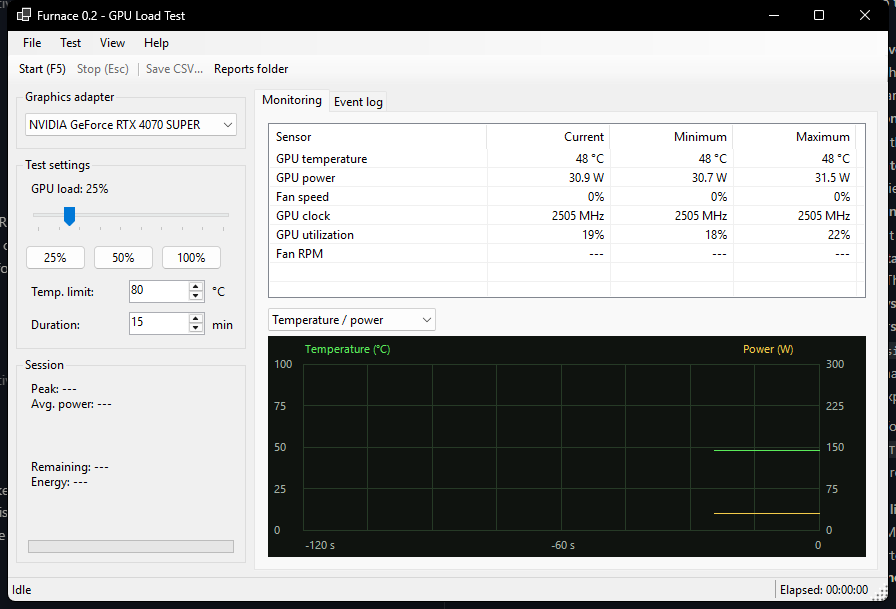
Furnace 0.2 is a Windows 10/11 x64 desktop app: a C Direct3D 11 workload engine and a C# / .NET 10 Windows Forms interface. It enumerates hardware GPUs from all vendors and runs one selected GPU at a time. Heating requires both Direct3D feature level 11.0 and a valid temperature reading from that same adapter.
| GPU | Temperature provider | Current hardware validation |
|---|---|---|
| NVIDIA | NVML matched by PCI identity; Windows WDDM fallback | RTX 4070 SUPER |
| AMD | Windows WDDM | No AMD hardware tested |
| Intel discrete or integrated | Intel IGCL when available; Windows WDDM fallback | No Intel hardware tested |
| Other hardware adapters | Windows WDDM, if the driver implements it | Not tested |
DirectX capability alone does not guarantee a temperature sensor. Windows performance telemetry depends on the display driver and requires the WDDM 2.4-era query interface. Intel IGCL ships with supported Intel graphics drivers; Intel documents Alder Lake-P and newer platforms. Older integrated graphics may have no usable GPU temperature API. Those adapters remain listed, show Temperature sensor unavailable, and cannot start a load. There is no unmonitored mode.
The adapter selector uses Windows adapter IDs (LUIDs), not model names or vendor enumeration order. Ordinary systems with several separate GPUs are supported in code; select one before starting. Selection is locked during a run. View > Refresh adapters re-enumerates hardware while idle. Linked multi-physical adapters, such as some SLI/CrossFire configurations, are rejected when a single temperature cannot cover the workload. Software adapters are excluded.
This is conditional driver support, not a claim that every GPU model has been tested. NVIDIA remains the only vendor physically validated for this release.
Open dist/Furnace/Furnace.exe, or extract the release ZIP and open Furnace.exe. Keep FurnaceCore.dll beside the executable. The package includes its .NET runtime; no separate .NET installation is needed. Install the GPU manufacturer's display driver. Furnace does not install drivers or request administrator access. The package includes the Intel IGCL header license; Intel's driver DLL is supplied by the Intel driver and is not bundled.
Intel Graphics Control Library headers: Copyright (C) 2025 Intel Corporation. See Intel-IGCL-LICENSE.txt in the portable package.
- Select the graphics adapter and check the live readings. Heating is off at startup.
- Choose load intensity, GPU temperature cutoff, and session length.
- Click Start (F5), or press F5. Start at 25% and watch your temperatures.
- Click Stop, press Esc, or close the app to stop. Screen lock and suspend also request a stop. A stopped session never restarts automatically.
The default cutoff is 80°C; the range is 60–85°C. Session duration is 1–120 minutes, default 15. The load slider sets the duty cycle from 10–100%; utilization and power draw vary. Load changes are recorded in the CSV.
- GPU temperature, reported GPU power, fan percentage, fan RPM, graphics clock, and GPU utilization where supported. Unavailable readings appear as
---. - Monitoring and Event log tabs, with two-minute temperature/power and fan/clock graphs.
- Current, minimum, and maximum sensor readings. Min/max values cover the time since opening the monitor or choosing View > Reset min/max.
- Session elapsed time, sampled peak core temperature, arithmetic mean of power samples, estimated GPU energy, and stop reason.
- Automatic CSV samples approximately once per second and a JSON summary at the end. Reports are stored under
%LOCALAPPDATA%/Furnace/Sessions. Reports folder opens this folder; Save CSV... copies the most recent session to your chosen path.
Power includes all activity on the selected GPU. Estimated GPU energy integrates reported GPU power; it does not measure PC wall power or subtract idle draw. If power becomes unavailable during a session, its energy total becomes unavailable. Windows' power-percentage field is never shown as watts. Fan RPM is kept separate from fan percentage. Missing values are blank in CSV and null in JSON summaries. Reports include the selected adapter LUID and temperature provider.
GPU temperature is not room temperature. No room sensor or thermostat is included. Manufacturer telemetry may be averaged; this app cannot measure every transient or hotspot. Fractional temperature readings are rounded upward for the displayed value and cutoff check.
The native C worker checks the temperature cutoff, session deadline, and a UI heartbeat before submitting work. It stops at the cutoff, on an invalid temperature sample, when the last complete temperature sample is older than 1.5 seconds, or when the UI heartbeat is older than 2 seconds. Only one GPU dispatch is outstanding at a time; a query timeout or device failure latches an engine fault that requires restarting the app. An already submitted dispatch must finish; software cannot instantly preempt it.
No clock, voltage, driver power limit, fan setting, or firmware protection is changed. Keep ventilation clear and choose a cutoff appropriate to the card. These controls reduce risk; they do not guarantee hardware safety or cover VRAM/VRM temperatures. A driver call or OS hang can delay software response; the GPU's own protections still matter.
This is a thermal load test, not a GPU correctness test, certification, or proof of stability in every application. Workload output is written to a GPU buffer to keep computation observable but is not compared against expected values. Do not compare scores with other stress tools; there is no benchmark score.
Requires the .NET 10 SDK and Visual Studio 2026 with Desktop development with C++, CMake, and a Windows SDK.
.\build.ps1 -PackageThe build compiles C with /W4 /WX, runs native policy checks, and publishes a self-contained Windows x64 app. For a short hardware smoke test, invoke Furnace.exe --smoke-test and wait for its process to exit. It performs a 3-second timed run at 25%, a lost-heartbeat test, and manual-stop checks, then exits. Results are written to validation/smoke-test.json beside the executable; its test reports also go into the usual reports folder. This option intentionally loads the GPU. Do not run it while another Furnace instance is open.
Furnace.exe --probe-adapters enumerates adapters, checks the C/C# layouts, opens each adapter without submitting GPU workloads, checks identity and telemetry, and exercises close/reopen and invalid selection. Its validation/compatibility-probe.json distinguishes API checks from usable temperature readings. Furnace.exe --check-reports validates missing telemetry and report formatting using synthetic data; it writes validation/report-checks.json and clearly labeled fixture reports. Neither option starts a thermal load. Run these commands with the GUI closed.
The source build also produces build/native/Release/FurnaceWddmProbe.exe. This read-only diagnostic prints WDDM adapter IDs, query status codes, and raw telemetry units as JSON. It creates no Direct3D device or workload.
For package verification after a UI export, run tests/Verify-Deliverable.ps1 -SourceCsv <saved-session.csv> -ExportCsv <exported-copy.csv>. This maintainer check requires an existing build/package and a real CSV export. It compares package bytes with the published files and checks the export against the saved session. Machine-local validation output is excluded from Git.
Furnace.exe --characterize runs three successive 10-second sessions at 25%, 50%, and 100%, with a 75°C cutoff, then exits. It writes validation/characterization.json beside the executable and CSV/JSON reports to the reports folder. These short runs demonstrate load response, not steady-state cooling or long-duration stability.
native/furnace.c: DXGI selection, NVML/WDDM telemetry, Direct3D workload, native worker, C ABI.native/intel_sensor.c: optional Intel IGCL temperature provider.native/telemetry_policy.h: adapter matching and telemetry conversion rules.native/policy.h: temperature, telemetry freshness, heartbeat, deadline, and settings checks.app/: C# interface, charts, session CSV/JSON, and hardware smoke test.tests/policy_tests.c,tests/adapter_tests.c: native guard, identity and telemetry boundary tests.
References: NVIDIA NVML, Windows telemetry units, Intel IGCL requirements, Direct3D completion queries.
Version 0.2 passed 112 native assertions and 23 short hardware smoke-test checks on an RTX 4070 SUPER under Windows 11 Pro N, build 26200. The 25% timed test stopped at 3,000 ms; heartbeat-loss, manual-stop, close/reopen, and report checks passed. A separate exact-LUID WDDM probe returned a valid temperature. UI checks confirmed the adapter selector locks during a run, becomes available after stopping, and refreshes into idle with cleared session counters.
Before the compatibility update, the same 2,048-iteration workload passed short timed runs at 25%, 50%, and 100% on this RTX 4070 SUPER with driver 616.64. An experimental 16,384-iteration workload encountered a GPU driver fault during development and was removed. Fault handling stopped submissions; driver communication subsequently recovered. See the validation notes.
No Windows 10 runtime test, long-duration soak test, real overtemperature trip, physical AMD/Intel or multi-GPU test, or GPU computation correctness test has been performed. Temperature and sensor-failure boundaries are covered by native policy tests. Thermal behavior depends on the card, fan settings, other workloads, and ambient conditions. Version 0.2 is a local preview, not a hardware stability certification.