


A sleek, fully customizable Home Assistant timer card with live per-second countdown, warning/critical color zones, paused state support, a gradient progress bar with glow effect, and a built-in visual editor.
Built as a companion to Universal Remote Card to implement a deadman switch for TV auto-shutoff — but works with any HA timer entity.
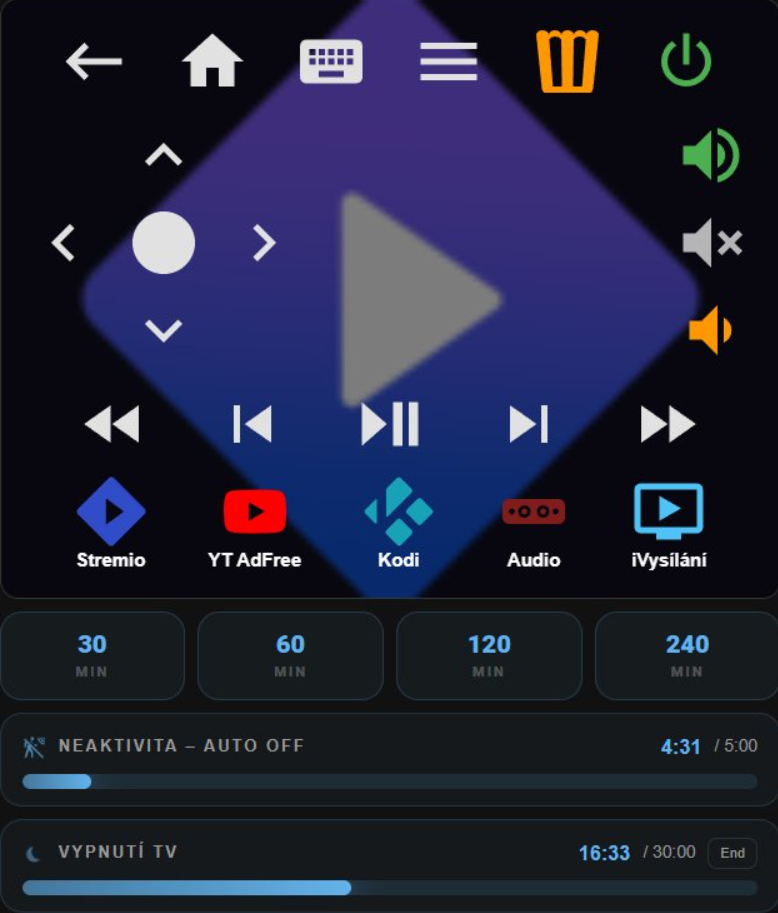
Universal Remote Card is great for controlling media devices, but it has no native way to display a running timer inline. This card fills that gap — specifically for the deadman switch pattern:
You set a sleep timer. If you fall asleep and stop interacting with the remote, the TV turns off automatically. The timer is visible directly in the remote panel, and you can cancel it with a single tap if you're still watching.
- Live countdown computed from
finishes_at, with server↔client clock-skew compensation - Warning and critical color zones with configurable thresholds — percentage and/or absolute seconds
- Optional bar pulse animation when entering warning/critical zone
- Paused state with dimmed bar and badge (keeps its zone color)
- Tap and hold actions (cancel, pause/resume, more-info, or custom)
- Preset buttons —
30 / 60 / 120 / 240buttons that start the timer with a fixed duration, so one card both starts and stops it - Extend buttons —
+10m/−10mchips that calltimer.changeon a running or paused timer - Timestamp sensors — count down to any
sensorwithdevice_class: timestamp(washer, dryer, voice-assistant timers) - Finished flash — a brief localized "Done" badge when a timer completes (distinguishes finish from cancel)
- Optional end-time display (
→ 23:45) - Progress bar: gradient, direction (ltr/rtl), position (top/bottom), height
- Pulsing icon animation while active (honors
prefers-reduced-motion) show_when_idle: falsehides the card automatically — no conditional card wrapper needed- Stacked mode: display multiple timers in a single card via
entities:— every option can be overridden per entity - Badge labels auto-localized (en, cs, sk, de, fr, es, it, nl, pl), overridable per card
- Keyboard accessible (Tab + Enter/Space), sections-layout aware (
getGridOptions) - Unknown or removed config options are reported in the browser console instead of being silently ignored
- Built-in visual GUI editor with entity suggestions
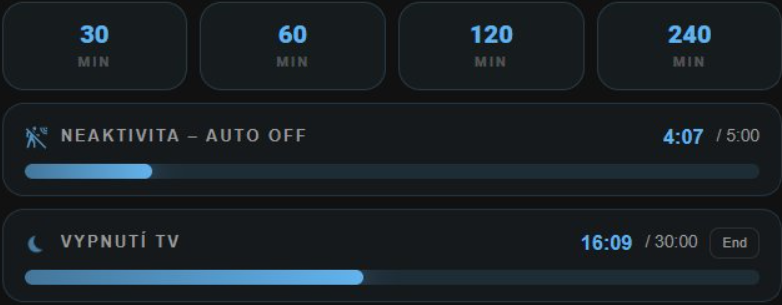
| State | Visual |
|---|---|
| active | Live countdown, full color, pulsing icon, action badge |
| paused | Remaining time (dimmed), ⏸ Paused badge, dimmed bar — keeps warning/critical color |
| idle | Hidden (if show_when_idle: false) or shows full duration |
| finished | ✓ Done badge flashed for 5 s after a natural finish (not after cancel) |
| unknown / unavailable / missing | ! error badge |
The bar and icon color change automatically as the timer runs down.
Thresholds come in two flavours and are OR-combined — whichever fires first wins:
warning_threshold/critical_threshold— percent of time remaining (default20/5)warning_threshold_sec/critical_threshold_sec— absolute seconds remaining
Setting only the _sec variant disables the percentage default for that zone. This matters when one timer is started with different durations: critical_threshold defaults to 5 %, which on a 4-hour timer is 12 minutes and would always beat critical_threshold_sec: 60. Specify the percentage explicitly if you want both to apply.
# Same 60 s red zone whether the timer was started at 30 min or 4 h
critical_color: "#fc8181"
critical_threshold_sec: 60

This card works with Home Assistant's built-in timer domain.
Via YAML (in configuration.yaml):
timer:
  tv_sleep_timer:
    name: TV Sleep Timer
    duration: "00:30:00"
    restore: true
  tv_auto_inactivity:
    name: TV Auto Inactivity
    duration: "00:05:00"
    restore: true
Note:
restore: truepreserves timer state across HA restarts.
Via UI: Settings → Devices & Services → Helpers → + Create helper → Timer
alias: TV Sleep Timer – Turn Off
triggers:
  - trigger: event
    event_type: timer.finished
    event_data:
      entity_id: timer.tv_sleep_timer
actions:
  - action: media_player.turn_off
    target:
      entity_id: media_player.your_tv
For the inactivity variant, call timer.start on every remote button press to reset the countdown.
- Open HACS → Frontend
- Click the three-dot menu ⋮ → Custom repositories
- Add the URL of this repository, category Lovelace
- Find Compact Timer Card and click Install
- Hard-reload the browser (Ctrl+Shift+R)
- Download
compact-timer-card.jsfrom the latest release - Copy it to
/config/www/compact-timer-card.js - Add as a Lovelace resource:
- url: /local/compact-timer-card.js
type: moduletype: custom:compact-timer-card
entity: timer.tv_sleep_timer
name: Sleep Timer
icon: mdi:power-sleep
color: "#63b3ed"
tap: cancel
hold: none
cancel_label: Cancel
show_duration: true
show_when_idle: false
gradient_bar: true
pulse_icon: true
pulse_bar: false
bar_height: 3
bar_direction: ltr
bar_position: bottom
warning_color: "#f6ad55"
warning_threshold: 30
critical_color: "#fc8181"
critical_threshold: 10
critical_threshold_sec: 60
presets: [30, 60, 120, 240]
preset_style: buttons
extend_buttons: [10, 30]
show_ends_at: true| Option | Type | Default | Description |
|---|---|---|---|
entity |
string | required | Timer entity ID, or a sensor with device_class: timestamp |
entities |
list | — | Multiple timers in one card (see Stacked mode below) |
name |
string | friendly_name | Label displayed on the card |
icon |
string | mdi:timer-outline |
Any MDI icon |
color |
string | #63b3ed |
Base accent color (hex) — controls bar, icon, and time text |
tap |
string | cancel |
Tap action: cancel, toggle_pause, more_info, none |
hold |
string | none |
Hold action (~500 ms): none, cancel, toggle_pause, more_info |
presets |
list | — | Durations in minutes that start the timer, e.g. [30, 60, 120, 240] — calls timer.start. Entries may be objects: { minutes: 90, label: "1½h" } |
preset_style |
string | buttons |
buttons = full-width grid with a unit caption; chips = small inline chips next to the countdown |
preset_position |
string | top |
top or bottom — where the button grid sits relative to the timer row (buttons style only) |
preset_unit |
string | min |
Caption under each preset number; set to "" to hide it (buttons style only) |
extend_buttons |
list | — | Minutes for ±Nm chips shown while active or paused, e.g. [-10, 10, 30] — calls timer.change |
cancel_label |
string | localized | Text shown on the cancel badge |
pause_label |
string | localized | Badge text when tap action is toggle_pause and timer is active |
resume_label |
string | localized | Badge text when tap action is toggle_pause and timer is paused |
paused_label |
string | localized | Badge text when timer is paused and tap action is not toggle_pause |
finished_label |
string | localized | Text on the finished badge (e.g. Done) |
show_duration |
boolean | false |
Show total duration next to remaining time (e.g. 1:23 / 30:00) |
show_ends_at |
boolean | false |
Show wall-clock end time (→ 23:45) while active |
show_finished |
boolean | true |
Flash a ✓ Done badge for 5 s when a timer finishes naturally |
show_when_idle |
boolean | false |
Keep card visible when timer is idle. Ignored for rows that have presets — those stay visible so the timer can always be started |
gradient_bar |
boolean | true |
Gradient on the progress bar instead of flat color |
pulse_icon |
boolean | true |
Pulse icon animation while active |
pulse_bar |
boolean | false |
Pulse bar animation when in warning or critical zone |
bar_height |
number | 3 |
Progress bar height in pixels |
bar_direction |
string | ltr |
ltr = fills left→right (elapsed); rtl = empties right→left (remaining) |
bar_position |
string | bottom |
bottom or top |
warning_color |
string | — | Color when warning threshold is reached (e.g. #f6ad55) |
warning_threshold |
number | 20 |
% of time remaining that triggers warning color. The default is skipped when warning_threshold_sec is set |
warning_threshold_sec |
number | — | Absolute seconds remaining that trigger warning color (OR-combined with %) |
critical_color |
string | — | Color when critical threshold is reached (e.g. #fc8181) |
critical_threshold |
number | 5 |
% of time remaining that triggers critical color. The default is skipped when critical_threshold_sec is set |
critical_threshold_sec |
number | — | Absolute seconds remaining that trigger critical color (OR-combined with %) |
duration |
string | — | Total duration for timestamp sensors ("01:00:00") — enables the progress bar |
use_ha_card |
boolean | false |
Render inside ha-card so the theme's card background/border applies |
tap_action |
object | — | Advanced tap action object (overrides tap) |
| Action | Description |
|---|---|
call-service / perform-action |
Call any HA service |
navigate |
Navigate to a dashboard path |
more-info |
Open the more-info dialog |
none |
Disable tap |
The card includes a built-in GUI editor. In the HA dashboard editor click + Add card, search for Compact Timer Card, and configure all options without writing YAML.
The card also counts down to any sensor whose state is a future timestamp (device_class: timestamp) — washing machines, dryers, dishwashers, or Alexa/Google voice-assistant timers. Cancel/pause actions don't apply to sensors (tap falls back to more-info). Add duration to enable the progress bar, and prefer *_threshold_sec since the total duration is otherwise unknown:
type: custom:compact-timer-card
entity: sensor.washer_finish_time
name: Washer
icon: mdi:washing-machine
duration: "02:30:00"
critical_color: "#fc8181"
critical_threshold_sec: 300
show_ends_at: truepresets turns the card into a full control surface instead of a display with a cancel button: each entry is a duration in minutes that calls timer.start.
type: custom:compact-timer-card
entity: timer.tv_sleep_timer
name: Sleep Timer
icon: mdi:power-sleep
presets: [30, 60, 120, 240]
tap: cancel
┌──────────────────────────────────┐
│ 30 60 120 240 │ preset_style: buttons (default)
│ MIN MIN MIN MIN │
├──────────────────────────────────┤
│ 🌙 SLEEP TIMER 23:41 [End] │
│ ▓▓▓▓▓▓▓░░░░░░░░░░░░░░░░░░░░░░░░░ │
└──────────────────────────────────┘
┌──────────────────────────────────┐
│ 🌙 SLEEP TIMER 30m 1h 2h 4h │ preset_style: chips
└──────────────────────────────────┘
Notes:
- Presets are visible in every state. Tapping one while the timer runs restarts it with the new duration.
- Because they are the only way to start the timer, a row with presets ignores
show_when_idle: false— it would otherwise be unreachable exactly when you need it. - Presets sit outside the row's tap target, so they never trigger the row's
tap/holdaction. chipsstyle reads long durations as hours (120→2h);buttonsstyle prints the raw minute count with thepreset_unitcaption. Override either with{ minutes: 90, label: "1½h" }.
Combine with extend_buttons to get start, adjust, and cancel in one row:
presets: [30, 60, 120, 240]
extend_buttons: [-10, 10]
tap: cancelDisplay multiple timers in a single card. Each timer can override any display option — colors, thresholds, bar settings, labels, actions, extend_buttons, even show_when_idle:
type: custom:compact-timer-card
color: "#63b3ed"
warning_color: "#f6ad55"
warning_threshold: 30
critical_color: "#fc8181"
critical_threshold: 10
show_when_idle: false
show_duration: true
tap: cancel
entities:
  - entity: timer.tv_auto_inactivity
    name: NEAKTIVITA – AUTO OFF
    icon: mdi:motion-sensor-off
  - entity: timer.tv_sleep_timer
    name: VYPNUTÍ TV
    icon: mdi:power-sleep
cancel_label: EndThis is the intended use case. The sleep timer sits under the remote with its preset buttons and is always reachable; the inactivity timer appears only while it is running.
type: grid
columns: 1
square: false
cards:

  # Universal Remote Card
  - type: custom:universal-remote-card
    # ... your remote config here

  # Sleep timer: presets start it, tapping the row cancels it.
  # Absolute-second thresholds keep the warning/critical zones identical
  # whichever preset was tapped — 5 % of a 4 h timer would be 12 minutes of red.
  - type: custom:compact-timer-card
    entity: timer.tv_sleep_timer
    name: SLEEP TIMER
    icon: mdi:power-sleep
    presets: [30, 60, 120, 240]
    tap: cancel
    cancel_label: End
    warning_color: "#f6ad55"
    warning_threshold_sec: 300
    critical_color: "#fc8181"
    critical_threshold_sec: 60
    pulse_bar: true

  # Inactivity timer: started by an automation on every remote button press,
  # so it needs no presets and hides itself while idle.
  - type: custom:compact-timer-card
    entity: timer.tv_auto_inactivity
    name: INACTIVITY – AUTO OFF
    icon: mdi:motion-sensor-off
    show_when_idle: false
    tap: none
    hold: toggle_pause
    warning_color: "#f6ad55"
    warning_threshold: 50
    critical_color: "#fc8181"
    critical_threshold: 25
pulse_bar: true[ 30 ] [ 60 ] [ 120 ] [ 240 ] ← optional presets
[ icon ] LABEL NAME 1:23 / 30:00 [ Cancel ]
━━━━━━━━━━━━━━━━━━━━━━━━━━━━━━━━━━━━━━━━━━━━━━━━━━━━━━━━━
- Top (optional): preset buttons that start the timer
- Left: pulsing MDI icon (when active) + uppercase label
- Right: live per-second countdown + optional total duration + state badge
- Bottom: gradient progress bar with color glow
- Colors switch automatically from base → warning → critical as time runs out
- All colors derived from a single hex value — the card always looks cohesive
- Adapts to both dark and light HA themes via CSS variables
Pull requests and issues are welcome. If you add support for a new feature or fix a bug, please open a PR against the main branch.
MIT © Michal Ič